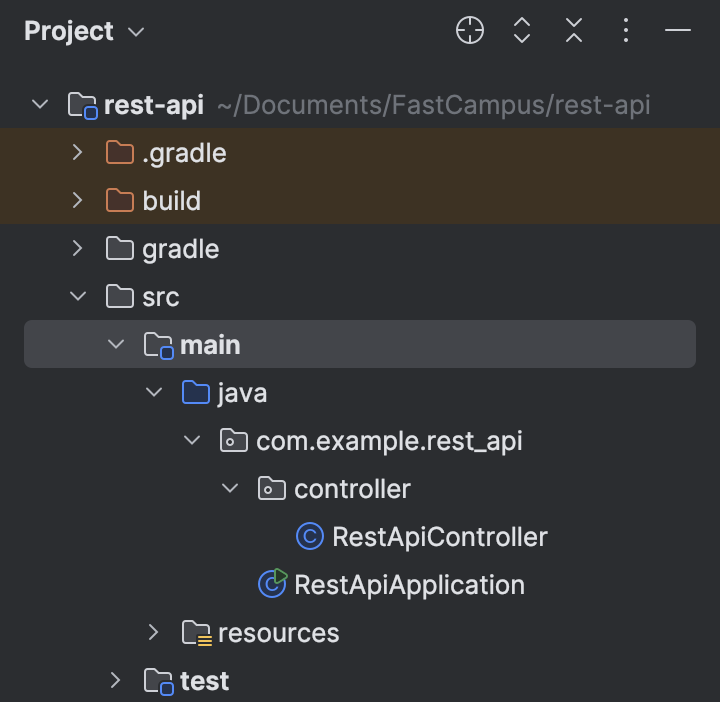
package com.example.rest_api.controller;


import org.springframework.web.bind.annotation.GetMapping;
import org.springframework.web.bind.annotation.RequestMapping;
import org.springframework.web.bind.annotation.RestController;

@RestController
@RequestMapping("/api")
public class RestApiController {

    @GetMapping(path = "/hello")
    public String hello(){
        return "Hello String Boot";
    }
}- @RestController:
- @RestController is a specialized version of the @Controller annotation in Spring that simplifies the creation of RESTful web services. It marks a class as a controller where every method returns a response body rather than rendering a view.- It automatically serializes the returned object into JSON (or XML if configured) and sends it to the HTTP response body. This removes the need to annotate each method individually with @ResponseBody.
- @RequestMapping
- Used to map web requests to specific handler classes or methods. It allows us to define the URI and the HTTP method that should trigger the execution of a particular method.- We can use @RequestMapping on both classes and method levels.
- The above RestApiController handles all requests that are coming through /api endpoint, and the method hello() handles requests with /api/hello path.
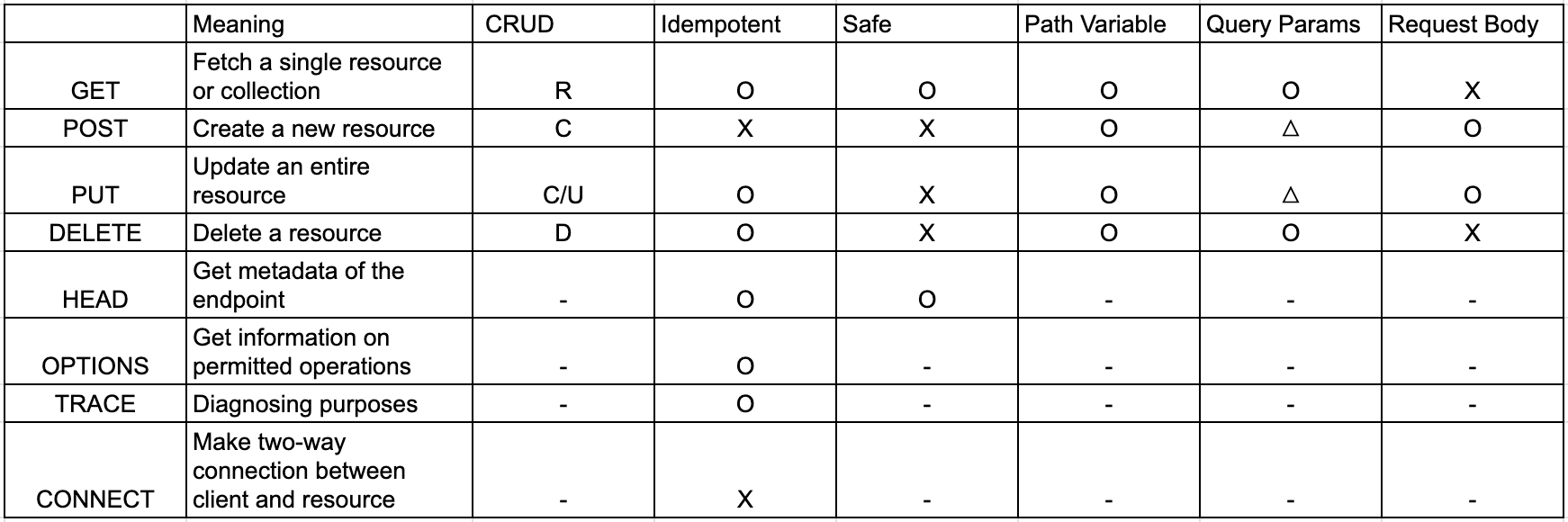
Path Variable:
- A part of URL that is used to capture specific data in the request URI and pass it to a controller method as a variable. This is particularly useful when we want to handle requests for specific resources, identified by unique identifiers (like IDs or names), as part of the URL path.
https://www.foo.bar/user-id/100 => user with user ID 100
https://www.foo.bar/user-id/100/card-id/200 => card with card ID 200 of user 100@GetMapping(path = "/echo/{message}")
public String echo(
@PathVariable String message //same name as path variable
){
System.out.println("echo message: " + message);
return message;
}- When we access localhost:8080/api/echo/hellothere, we get

- "hellothere" was passed as {message} path variable which was then returned from the server, printed on web.
Query Parameter
- Query parameters are appended to a URL after a ? character. If there are multiple query parameters, they're separated by an & symbol. Each query parameter consists of a key and a value, written in the form key=value.
- The @RequestParam annotation binds the query parameter to a method argument.
https://localhost:8080/book?category=IT&issuedYear=2023&issued-month=01&issued_day=31 @GetMapping(path = "/book")
public void queryParams(
@RequestParam String category,
@RequestParam String issuedYear,
@RequestParam(name = "issued-month") String issuedMonth,
@RequestParam(name = "issued_day") String issuedDay
){
System.out.println("category: " + category);
System.out.println("issuedYear: " + issuedYear);
System.out.println("issuedMonth: " + issuedMonth);
System.out.println("issued_day: " + issuedDay);
}- For cases where the query parameter names violate the naming convention or naming constraints of Java, we can assign the query parameter to Java-appropriate variable names (issued-month binded to issuedMonth, issued_day binded to issuedDay)
- The above code logs
category: IT
issuedYear: 2023
issuedMonth: 01
issued_day: 31- Another way to retrieve query parameters is through a model
import lombok.AllArgsConstructor;
import lombok.Data;
import lombok.NoArgsConstructor;
import org.springframework.web.bind.annotation.RequestParam;

@Data
@AllArgsConstructor
@NoArgsConstructor
public class BookQueryParam {

    private String category;
    private String issuedYear;
    private String issuedMonth;
    private String issuedDay;
}- Lombok is a library that helps reduce boilerplate code in Java applications by generating commonly used methods and constructors at compile-time through simple annotations.
- @Data annotation combines @Getter, @Setter, @ToString, @EqualsAndHashCode and @RequiredArgsConstructor all in one.- @AllArgsConstructor creates a consturctor with parameters for all fields.
- @NoArgsConstructor creates a no-argument constructor.
- In the RestApiController.java,
@GetMapping(path = "/book2")
    public void queryParamDto(
            BookQueryParam bookQueryParam
    ) {
        System.out.println(bookQueryParam);
    }
returns
BookQueryParam(category=IT, issuedYear=2023, issuedMonth=null, issuedDay=null)- issuedMonth and issuedDay are not parsed correctly due to mismatch in names. But when using model to parse query parameters, we can't modify the variable names like when we parsed the parameter manually one by one.
- For automatic binding and consistency with Java code, using camelCase in URIs can be a wise choice but if we need to maintain kebab-case or snake_case for readability and adherence to REST conventions, we need to be explicit with mappings using @RequestParam
- Once we modify the URL,
http://localhost:8080/api/book2?category=IT&issuedYear=2023&issuedMonth=01&issuedDay=31

//we correctly get
BookQueryParam(category=IT, issuedYear=2023, issuedMonth=01, issuedDay=31)