경사면
경사가 가파른 지면을 플레이어가 연속해서 점프하여 위로 향하지 못하도록 경사가 가파르면 미끄러지도록 해보자.
핵심 코드
핵심 코드만 보도록 하자.
// 미끄러지는지 여부 체크
private bool isSliding;
// 미끄러지는 속도
private Vector3 slopeSlideVelocity;

private void SetSlopeSlideVelocity()
{
    // transform.position + Vector3.up: 캐릭터와 가까운 지면을 놓치지 않기 위해 원점을 높임
    if (Physics.Raycast(transform.position + Vector3.up, Vector3.down, out RaycastHit hitInfo, 5))
    {
        // 경사 각도 결정
        float angle = Vector3.Angle(hitInfo.normal, Vector3.up);
        // Charater Contoller의 경사 각도와 비교
        if (angle >= characterController.slopeLimit)
        {
            slopeSlideVelocity = Vector3.ProjectOnPlane(new Vector3(0, ySpeed, 0), hitInfo.normal);
            return;
        }
    }

    // 슬라이딩할 때 부드러운 감속을 주기 위해
    if (isSliding)
    {
        // 배속을 주기 위해 *3
        slopeSlideVelocity -= slopeSlideVelocity * Time.deltaTime * 3;

        // 크기가 1보다 작아지면 충분히 감속했다고 판단
        if (slopeSlideVelocity.magnitude > 1)
        {
            return;
        }
    }

    slopeSlideVelocity = Vector3.zero;
}
Vector3.Angle
public static float Angle(Vector3 from, Vector3 to);
두 벡터 A,B가 있을 때 Vector3.Angle(A, B)는 A와 B 사이의 각도를 반환한다.
각도의 부호가 없으며, 항상 0도 이상 180도 미만의 값을 가진다.
Vector3.ProjectOnPlane
public static Vector3 ProjectOnPlane(Vector3 vector, Vector3 planeNormal);
주어진 평면에 대해 벡터를 투영 시키는 역할을 한다. 벡터를 주어진 평면에 수직인 벡터롤 변환한다.
ex) 구불한 바닥 평면에 방향 벡터를 투영하여 수직인 벡터를 얻음으로써, 평면 바닥을 따라 움직이는 벡터를 얻을 수 있다.
투영
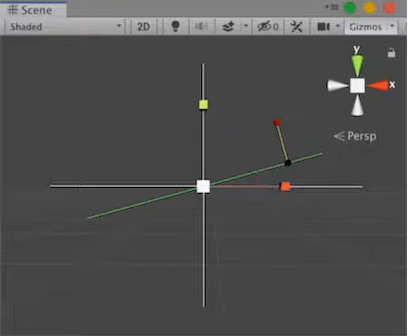
빨간 사각형으로 표시된 벡터는 녹색 평면에 투영되어 검은색 사각형으로 표시된 벡터가 된다.
법선 벡터 (Normal)
법선 벡터는 특정 지점 또는 표면에서 수직으로 나아가는 벡터를 말한다. 표면의 각 점에서 법선 벡터는 해당 점에서 표면을 수직으로 가리키며, 이는 표면이 어떤 방향을 향하는지를 나타낸다.
코드 리뷰
// 경사 각도 결정
float angle = Vector3.Angle(hitInfo.normal, Vector3.up);Raycast를 통하여 충돌된 오브젝트의 정보를 얻고, 충돌 지점에서의 법선 벡터와 Vector3.up 이용하여 경사면의 각도를 구한다.
slopeSlideVelocity = Vector3.ProjectOnPlane(new Vector3(0, ySpeed, 0), hitInfo.normal);평면을 충돌된 오브젝트의 법선벡터로 할당하고, 벡터를 중력으로 감소되고 있는 ySpeed로 할당해 투영된 평면에 수직인 벡터를 얻음으로써, 경사면의 기울기대로 중력을 적용시킨다.
스크립트
경사면에서 미끄러지는 핵심 코드와 더불어 예외 처리를 적용한 PlayerMovement의 전체 코드를 보자.
using System.Collections;
using System.Collections.Generic;
using UnityEngine;

public class PlayerMovement : MonoBehaviour
{
    public float rotationSpeed = 720;

    public float jumpHeight = 2;
    public float gravityMultiplier = 1.5f;

    public float jumpHorizontalSpeed = 3;

    public float jumpButtonGracePeriod = 0.2f;

    public Transform cameraTransform;

    private CharacterController characterController;
    private Animator animator;

    private float ySpeed;
    private float originalStepOffset;

    private float? lastGroundedTime;
    private float? jumpButtonPressedTime;

    private bool isJumping;
    private bool isGrounded;

    // 미끄러지는지 여부 체크
    private bool isSliding;
    // 미끄러지는 속도
    private Vector3 slopeSlideVelocity;


    private void Start()
    {
        characterController = GetComponent<CharacterController>();
        animator = GetComponent<Animator>();
        originalStepOffset = characterController.stepOffset;
    }

    void Update()
    {
        float horizontalInput = Input.GetAxis("Horizontal");
        float verticalInput = Input.GetAxis("Vertical");

        Vector3 movementDirection = new Vector3(horizontalInput, 0, verticalInput);

        float inputMagnitude = Mathf.Clamp01(movementDirection.magnitude);

        if (Input.GetKey(KeyCode.LeftShift) || Input.GetKey(KeyCode.RightShift))
        {
            inputMagnitude *= 0.5f;
        }

        animator.SetFloat("Input Magnitude", inputMagnitude, 0.05f, Time.deltaTime);

        movementDirection = Quaternion.AngleAxis(cameraTransform.rotation.eulerAngles.y, Vector3.up) * movementDirection;
        movementDirection.Normalize();

        float gravity = Physics.gravity.y * gravityMultiplier;

        // 점프 시작, 위쪽 방향이동 체크, 점프 버튼을 더 이상 누르지 않는지
        // 세가지 조건이 충족되면 중력값을 두배로 늘린다.
        if(isJumping && ySpeed > 0 && Input.GetButton("Jump") == false)
        {
            gravity *= 2;
        }

        ySpeed += gravity * Time.deltaTime;

        // 경사속도 설정
        SetSlopeSlideVelocity();
        // 경사면인지 검사
        if(slopeSlideVelocity == Vector3.zero)
        {
            isSliding = false;
        }

        if (characterController.isGrounded)
        {
            lastGroundedTime = Time.time;
        }
        if(Input.GetButtonDown("Jump"))
        {
            jumpButtonPressedTime = Time.time;
        }

        if (Time.time - lastGroundedTime <= jumpButtonGracePeriod)
        {
            if (slopeSlideVelocity != Vector3.zero)
            {
                isSliding = true;
            }

            characterController.stepOffset = originalStepOffset;

            // 슬라이딩이 아닌 경우만 실행
            if (isSliding == false)
            {
                ySpeed = -0.8f;
            }

            animator.SetBool("isGrounded", true);
            isGrounded = true;
            animator.SetBool("isJumping", false);
            isJumping = false;
            animator.SetBool("isFalling", false);

            // 슬라이딩이 아닌 경우에만 점프
            if (Time.time - jumpButtonPressedTime <= jumpButtonGracePeriod && isSliding == false)
            {
                ySpeed = Mathf.Sqrt(jumpHeight * -2 * gravity);

                animator.SetBool("isJumping", true);
                isJumping = true;

                lastGroundedTime = null;
                jumpButtonPressedTime = null;
            }
        }
        else
        {
            characterController.stepOffset = 0;

            animator.SetBool("isGrounded", false);
            isGrounded = false;

            if ((isJumping && ySpeed < 0) || (ySpeed < -2.5f))
            {
                animator.SetBool("isFalling", true);
            }
        }

        if (movementDirection != Vector3.zero)
        {
            animator.SetBool("isMoving", true);
            Quaternion toRotation = Quaternion.LookRotation(movementDirection, Vector3.up);
            transform.rotation = Quaternion.RotateTowards(transform.rotation, toRotation, rotationSpeed * Time.deltaTime);
        }
        else
        {
            animator.SetBool("isMoving", false);
        }

        // 슬라이딩이 아닐때만 떨어짐
        if(isGrounded == false && isSliding == false)
        {
            Vector3 velocity = movementDirection * inputMagnitude * jumpHorizontalSpeed;
            velocity.y = ySpeed;

            characterController.Move(velocity * Time.deltaTime);
        }

        // 슬라이딩 이동 처리
        if(isSliding)
        {
            Vector3 velocity = slopeSlideVelocity;
            velocity.y = ySpeed;

            characterController.Move(velocity * Time.deltaTime);
        }
    }

    private void SetSlopeSlideVelocity()
    {
        // transform.position + Vector3.up: 캐릭터와 가까운 지면을 놓치지 않기 위해 원점을 높임
        if (Physics.Raycast(transform.position + Vector3.up, Vector3.down, out RaycastHit hitInfo, 5))
        {
            // 경사 각도 결정
            float angle = Vector3.Angle(hitInfo.normal, Vector3.up);
            // Charater Contoller의 경사 각도와 비교
            if (angle >= characterController.slopeLimit)
            {
                slopeSlideVelocity = Vector3.ProjectOnPlane(new Vector3(0, ySpeed, 0), hitInfo.normal);
                return;
            }
        }

        // 슬라이딩할 때 부드러운 감속을 주기 위해
        if(isSliding)
        {
            // 배속을 주기 위해 *3
            slopeSlideVelocity -= slopeSlideVelocity * Time.deltaTime * 3;

            // 크기가 1보다 작아지면 충분히 감속했다고 판단
            if (slopeSlideVelocity.magnitude > 1)
            {
                return;
            }
        }

        slopeSlideVelocity = Vector3.zero;
    }

    private void OnAnimatorMove()
    {
        // 슬라이딩이 아닐때만 적용
        if(isGrounded && isSliding == false)
        {
            Vector3 velocity = animator.deltaPosition;
            velocity.y = ySpeed * Time.deltaTime;

            characterController.Move(velocity);
        }
    }

    private void OnApplicationFocus(bool focus)
    {
        if (focus)
        {
            Cursor.lockState = CursorLockMode.Locked;
        }
        else
        {
            Cursor.lockState = CursorLockMode.None;
        }
    }
}