플랫폼
웨인포인트에 따라 움직이는 플랫폼을 만들고, 플레이어가 플랫폼에 탑승하도록 만들어보자.
씬 구성
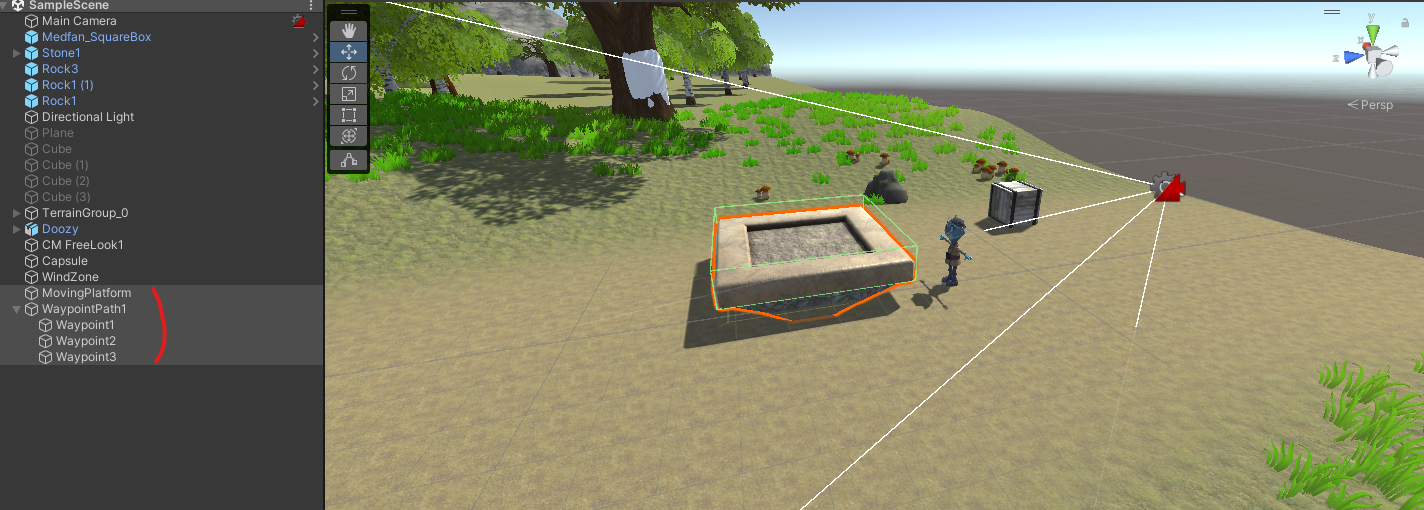
MovingPlatform이라는 프리팹을 씬에 구성하고, 빈오브젝트를 만들어 웨이포인트를 관리할 WaypointPath1 오브젝트와 하위 오브젝트로 실제 경유할 Waypoin 오브젝트 3개를 배치했다.
스크립트
Path를 관리할 오브젝트를 작성해보자. WaypointPath1 오브젝트에 부착.
using System.Collections;
using System.Collections.Generic;
using UnityEngine;

public class WaypointPath : MonoBehaviour
{
    public Transform GetWaypoint(int waypointIndex)
    {
        return transform.GetChild(waypointIndex);
    }

    public int GetNextWaypointIndex(int currentWaypointIndex)
    {
        int nextWaypointIndex = currentWaypointIndex + 1;
        if(nextWaypointIndex == transform.childCount)
        {
            nextWaypointIndex = 0;
        }

        return nextWaypointIndex;
    }
}
플랫폼을 직접 움직이는 스크립트를 작성해보자. MovingPlatform 오브젝트에 부착.
using System.Collections;
using System.Collections.Generic;
using UnityEngine;

public class MovingPlatform : MonoBehaviour
{
    public WaypointPath waypointPath;
    public float speed = 1;

    private int targetWaypointIndex;

    private Transform previousWaypoint;
    private Transform targetWaypoint;

    // 목표 경유지까지 걸리는 시간
    private float timeToWaypoint;
    // 경과된 시간
    private float elapsedTime;

    private void Start()
    {
        TargetNextWaypoint();
    }

    private void FixedUpdate()
    {
        elapsedTime += Time.deltaTime;

        // 경과된 시간을 목표 경유지까지 걸리는 시간으로 나누어 완료될 비율을 계산
        float elapsedPercentage = elapsedTime / timeToWaypoint;
        // 시작과 끝에 속도가 느려지게
        elapsedPercentage = Mathf.SmoothStep(0, 1, elapsedPercentage);

        transform.position = Vector3.Lerp(previousWaypoint.position, targetWaypoint.position, elapsedPercentage);
        // 회전값도 적용
        transform.rotation = Quaternion.Lerp(previousWaypoint.rotation, targetWaypoint.rotation, elapsedPercentage);

        // 목표 경유지까지 이동했는지 검사
        if (elapsedPercentage >= 1)
        {
            TargetNextWaypoint();
        }
    }

    private void TargetNextWaypoint()
    {
        previousWaypoint = waypointPath.GetWaypoint(targetWaypointIndex);
        targetWaypointIndex = waypointPath.GetNextWaypointIndex(targetWaypointIndex);
        targetWaypoint = waypointPath.GetWaypoint(targetWaypointIndex);

        elapsedTime = 0f;

        float distanceToWaypoint = Vector3.Distance(previousWaypoint.position, targetWaypoint.position);

        // 거리를 속도로 나누어 해당거리에 도달하는 데 걸리는 시간 계산
        timeToWaypoint = distanceToWaypoint / speed;
    }

    private void OnTriggerEnter(Collider other)
    {
        other.transform.SetParent(transform);
    }

    private void OnTriggerExit(Collider other)
    {
        other.transform.SetParent(null);
    }
}
Mathf.SmoothStep
public static float SmoothStep(float from, float to, float t);
보간 속도는 처음부터 점차 빨라지고 끝으로 갈수록 느려진다.
from: 시작점
to: 종료점
t: 비율
문제 해결
#1 플랫폼과 같이 움직이기
플랫폼과 같이 움직이고 회전하도록 하기위해 MovingPlatform 스크립트에 OnTrigger 함수를 추가해 Enter일 때는 플랫폼의 자식으로, Exit일 때는 자식을 해제하므로써 플랫폼과 같은 움직임을 보이도록 수정하였다.
#2 버벅거리는 움직임
Update메서드에 제어되는 플랫폼 오브젝트에 실제로 올라타면 움직임이 버벅이는 것처럼 보인다. 이는 플레이어 오브젝트에 부착된 Character Controller와 관련이 있다. 이를 해결하기 위해 플랫폼 오브젝트가 FixedUpdate에서 제어되도록 수정하였다.