Need for Privileged Programs
Password Dilemma
- Permissions of /etc/shadow File

- How would normal users change their password?
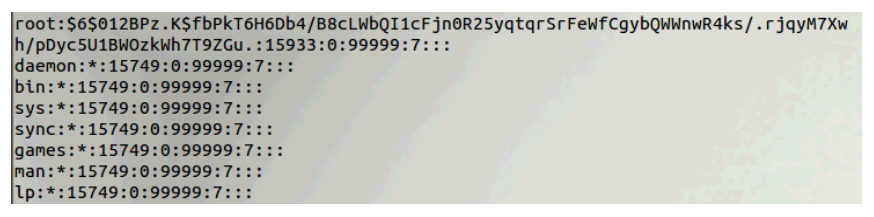
대부분의 리눅스 시스템에서 '/etc/shadow'는 rw(owner), r(group), none(others) 권한으로 관리된다. shadow 파일을 수정하기 위해서는 write 권한이 필요하다.
Two-Tier Approach
Coarse-Grained: rwx vs Fine-Grained Authorization: rwx + 3 bits
- Implementing fine-grained access control in operating systems make OS over complicated
- 세분화할수록 OS는 check overhead가 증가한다.
- OS relies on extension to enforce fine-grained access control
- Root can modify the shadow file directly
- Normal user cannot modify the shadow file directly
- Privileged programs are such extensions
- set-UID programs
- daemons
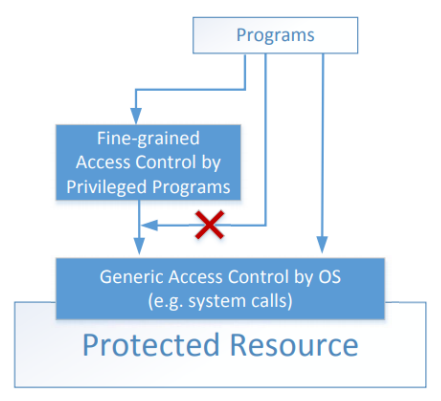
Types of Privileged Programs
Daemons (=Services in MS Windows)
- Computer program that runs in the background
- Needs to run as root or other privileged users
- If a user needs to change her password, she can send a request to this daemon
Unix/Linux의 daemon은 백그라운드 시스템 프로그램이다. 직접 실행하거나 제어하지 않아도 시스템이 부팅될 때 백그라운드에서 자동으로 구동되며, 특정 기능을 계속 제공하는 프로그램이다.
일반 유저가 비밀번호를 직접적으로 바꾸려면 반드시 daemon에게 request를 날려야 한다.
Set-UID Programs
- Widely used in UNIX systems
- Program marked with a special bit
Superman Story
Power Suit 1.0
- Superpeople: Directly give them the power
- She/he can do everything with the suit
- Issue: bad superpeople
여기서 모든 권한을 아무나 얻을 수 있다는 점이 문제이다.
Power Suit 2.0
- Computer chip for Specific task
- The actions in each chip are pre-programmed
- She/he can only do whatever is included in the chip
- No way to deviate from pre-programmed task
칩에 포함된 행동만 할 수 있고 일반적으로는 deviation이 불가능하다. 만약 취약점이 있으면 이를 악용해 허용된 범위를 넘어서 행동할 수 있다.
Set-UID mechanism: A Power Suit mechanism implemented in Linux OS
Set-UID Concept
Allow user to run a program with the program owner's privilege
- Allow users to run programs with temporary elevated privileges
- Example: the passwd program
$ ls -l /usr/bin/passwd
-rwsr-xr-x 1 root root 41284 Sep 12 2012 /usr/bin/passwd- s: Set-UID bit
- Set-UID는 실행하면 무조건 root 권한이 되는 것이 아니라, 해당 프로그램의 소유자 권한으로 변경되는 것이다. root 권한을 가지게 되더라도 다른 task를 수행할 수 없다.
- /usr/bin/passwd의 경우 owner의 권한이 root이기 때문에 root권한으로 동작하게 된다.
Every process has two User IDs
- Real UID (RUID): identifies real owner of process
- Effective UID (EUID): identifies privileged of a process
- Access control is based on EUID
- When a normal program is executed, RUID = EUID, they both equal to the ID of the user who runs the program
- When a Set-UID is executed, RUID != EUID. RUID still equal to the user's ID, but EUID equals to the program owner's ID
- If the program is owned by root, the program runs with the root privilege
일반적인 경우에는 RUID와 EUID가 동일하지만, Set-UID를 실행 시 EUID가 해당 프로그램의 owner로 바뀌어 다르게 된다.
Turn a Program into Set-UID
-
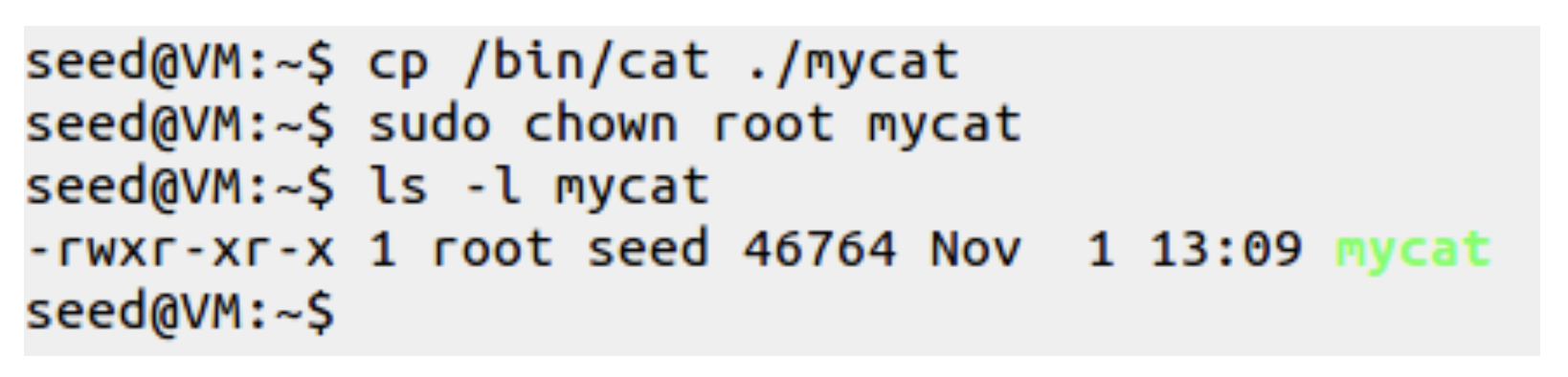
Change the owner of a file to root
sudo chown root mycat- 파일 mycat의 소유자를 root로 바꾸는 명령어
- 서버나 시스템 관리와 관련된 특별한 작업을 위해서는 root 권한이 필요하므로 변경
-
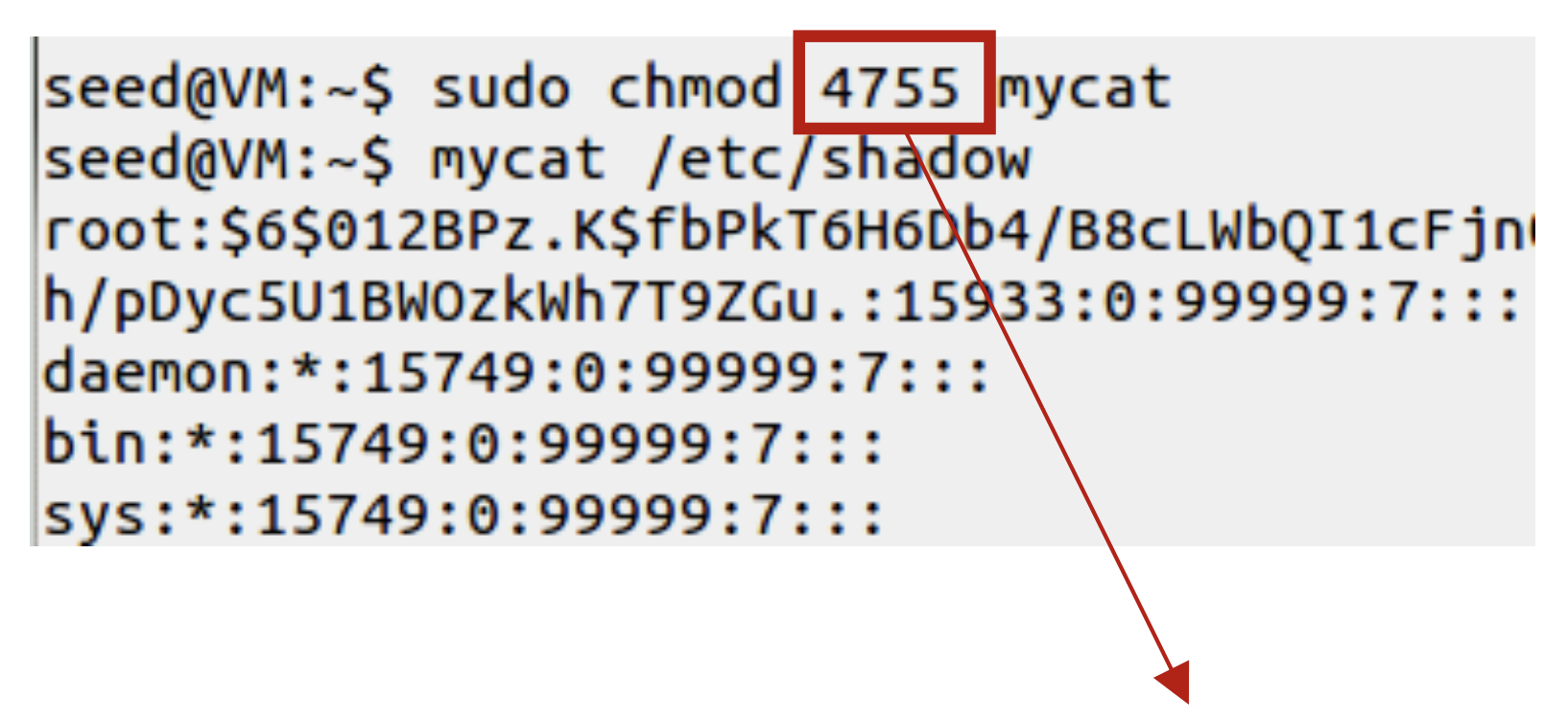
Before Enabling Set-UID bit
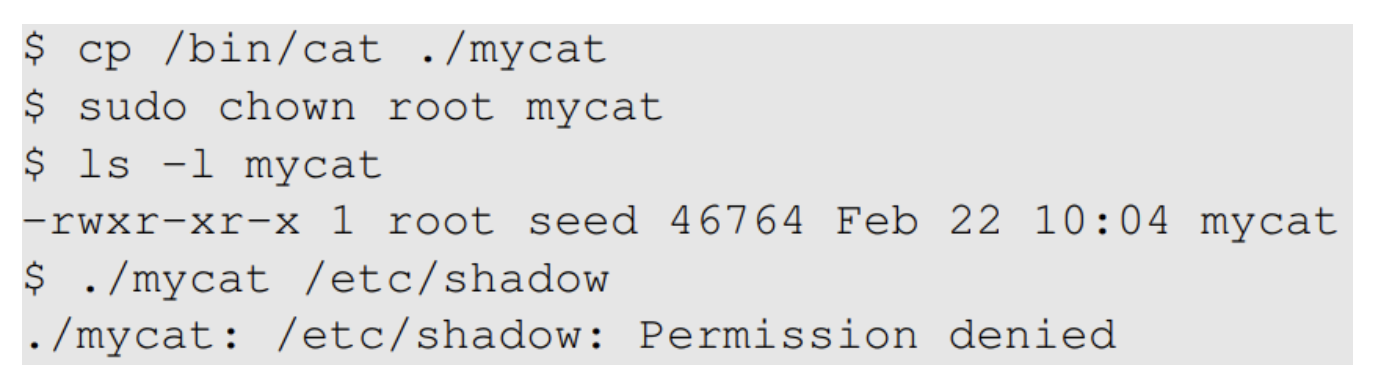
- mycat 프로그램을 실행해 /etc/shadow 파일을 읽으면 Permission denied
- mycat을 실행한 현재 유저는 일반 유저이기 때문에, 인자로 etc/shadow 전달 불가
- 일반적으로 /etc/shadow는 root 소유이며 r--------

-
After Enabling the Set-UID bit
sudo chmod 4755 mycat- 일반적으로 권한을 숫자로 표현할 때, 4(100, 3 bit)는 Set-UID, 7은 rwx 의미
- 즉 4755는 Set-UID + rwxr-xr-x 권한이다.
- rwsr-xr-x: 실행 권한 x가 setuid s로 표시된다.
- mycat이 root 소유자로 Set-UID이므로, 실행자가 일반 사용자여도 root 권한을 임시로 빌릴 수 있게 된다.
How about Set-UID first, and then 'chown root'?
- 순서를 반대로 Enabling the Set-UID bit를 하고 chown root를 하면 어떻게 될까?
- Set-UID 비트는 먼저 켜고 나중에 chown root를 하면, 보안상의 이유로 Set-UID bit가 초기화되는 경우가 많아 소유권을 변경한 후 set-UID 프로그램이 활성화되지 않는다.
How it Works
- A Set-UID program is just like any other program, except that it has a special marking, which a single bit called Set-UID bit


- chown은 파일의 소유권만 변경하고, permission(rwx)에는 아무런 영향을 주지 않는다.
- Set-UID가 적용되면 RUID와 EUID가 달라져서 euid가 root가 된다.
Example of used IDs
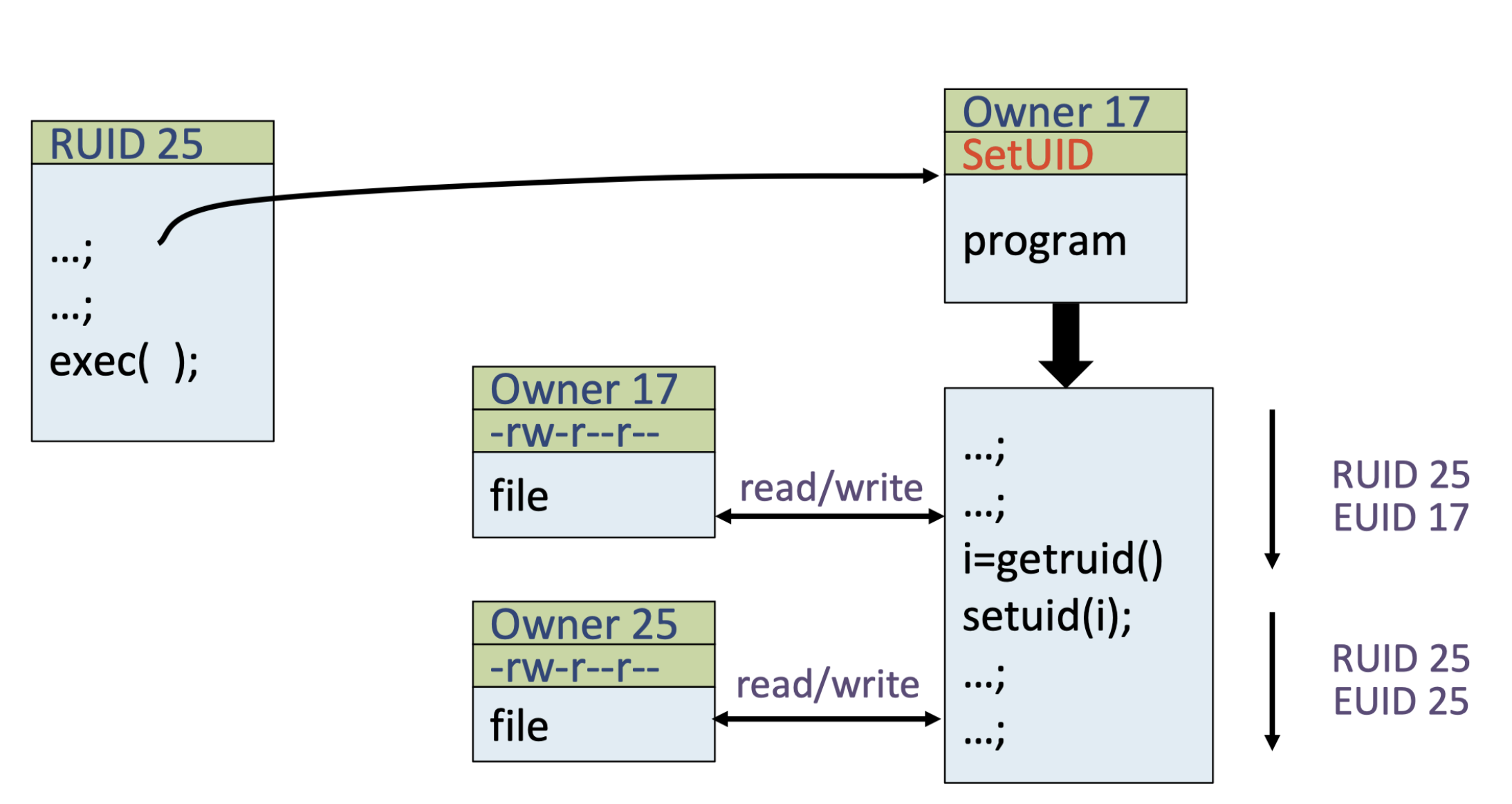
- 시작 프로세스의 RUID: 25
- 실행하는 프로그램의 Owner가 17인 Set-UID 프로그램
프로그램이 실행되면, 처음엔 RUID 25, EUID 17(owner)로 바뀐다.
이때 프로그램 안에서 getruid()로 본인의 RUID(실행자 25)를 가져오고, setuid(i)를 하면 다시 EUID를 RUID(25)로 되돌릴 수 있다.
Example of Set UID
-
Not a privileged program
- Set-UID가 없는 일반 파일
- /etc/shadow는 root만 읽을 수 있고, 아직 Set-UID가 없기 때문에 Permission denied
-
Become a privileged program
- Set-UID bit로 실행자의 권한이 아닌 파일 소유자의 root 권한으로 동작
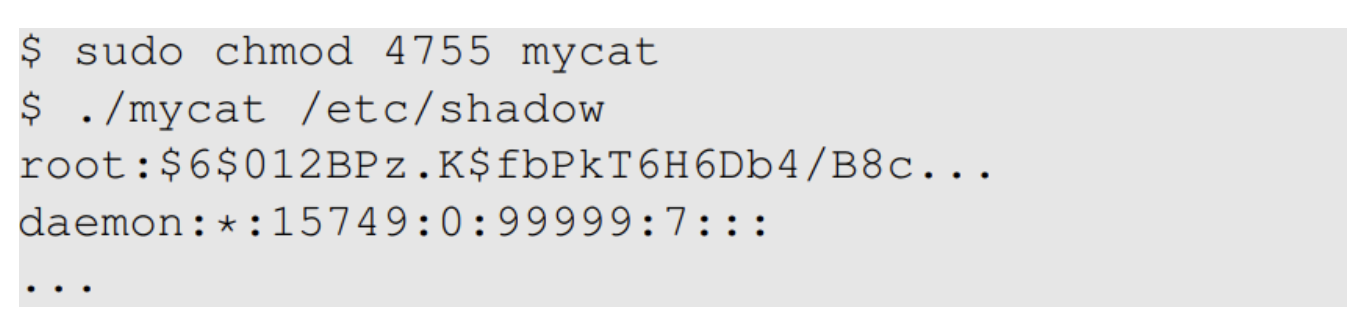
- Set-UID bit로 실행자의 권한이 아닌 파일 소유자의 root 권한으로 동작
-
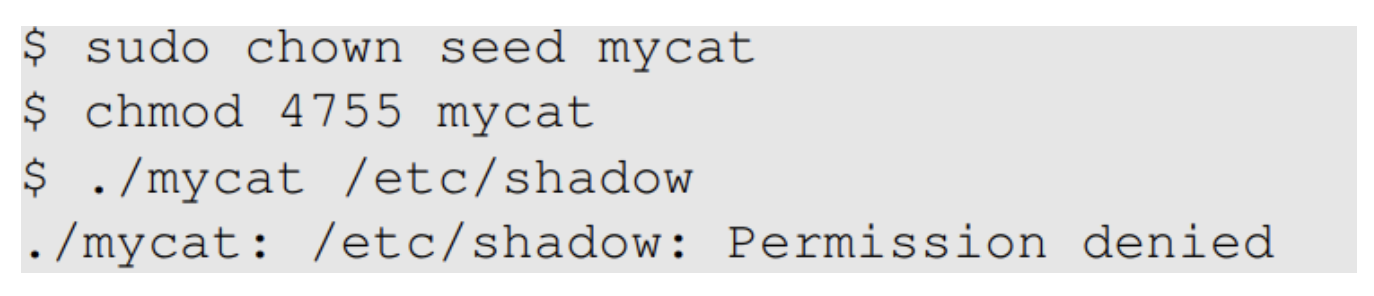
It is still a privileged program, but not the root privilege
- Set-UID bit가 있어도, 소유자가 일반 사용자이기 때문에 실행자도 일반 사용자 권한만 갖기 때문에 shadow 파일에 접근이 불가하다.
- /etc/shadow 파일은 root 권한만 접근 가능
How is Set-UID Secure?
Allows normal users to esclate privileges
- This is different from directly giving the privilege (sudo command)
- Normal users can do whatever they want after getting the privilege
- Restricted behavior - simlar to superman designed computer chips
- Normal users can only do whatever is included in the program
sudo는 권한을 그대로 주어서 무슨 일이든 할 수 있지만, Set-UID는 프로그램이 허용한 행동 내에서만 권한을 사용할 수 있다.
Unsafe to turn all programs into Set-UID
- Example: /bin/sh
- Example: vi
/bin/sh, bash, zsh, dash나 vi 같은 도구에 Set-UID를 적용하면 누구든지 root 권한으로 쉘을 실행하거나 파일을 수정할 수 있어 보안상 심각한 문제가 생긴다. 모든 프로그램에 적용하면 보안 취약점이 될 수 있으므로 신중하게 사용해야 한다.
Attack on Superman
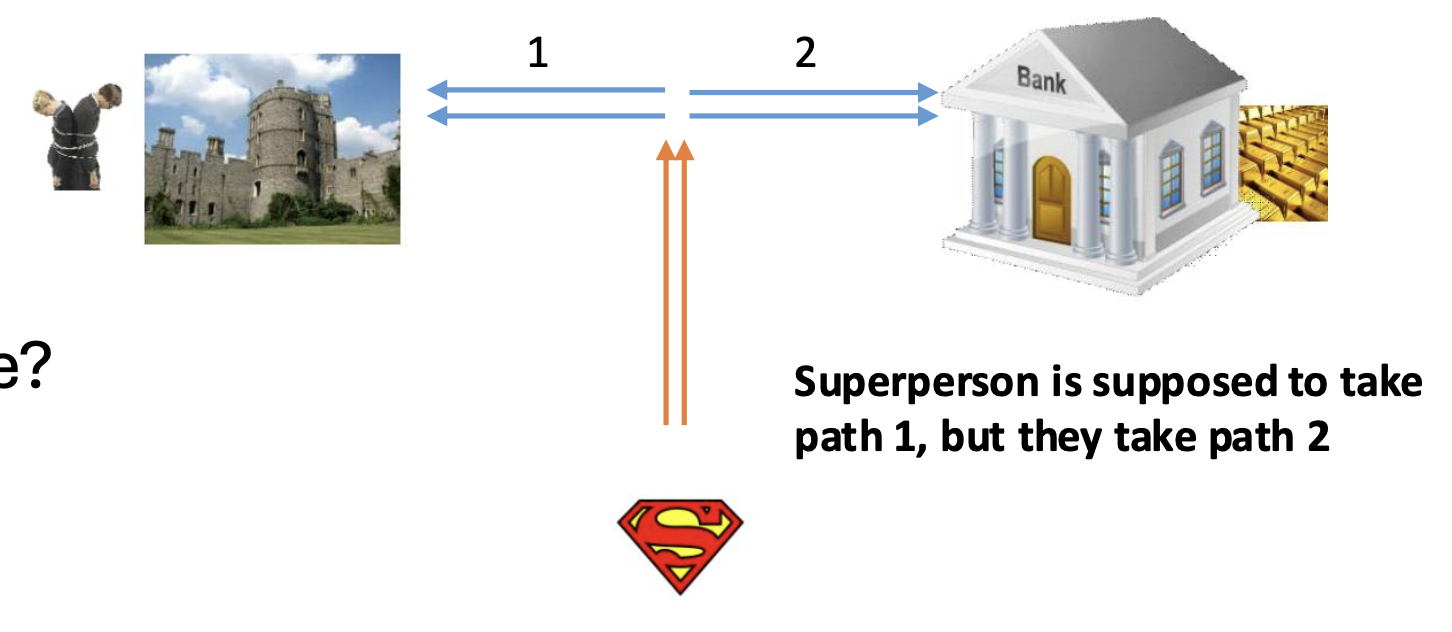
- Cannot assume that user can only do whatever is coded
- Coding flaws by developers
- Superperson Mallroy
- Fly North then turn left
- How to exploit this code?
- Superperson Malorie (3.0)
- Fly North and turn West
- How to exploit this code?
취약점이 있으면 이 제한을 우회해서 다른 목적지에 도달하는 공격이 가능하다.
exploit: 해킹 용어로서 취약점을 이용해 공격자가 이득을 얻는 모든 행위
Attack Surfaces of Set-UID Programs
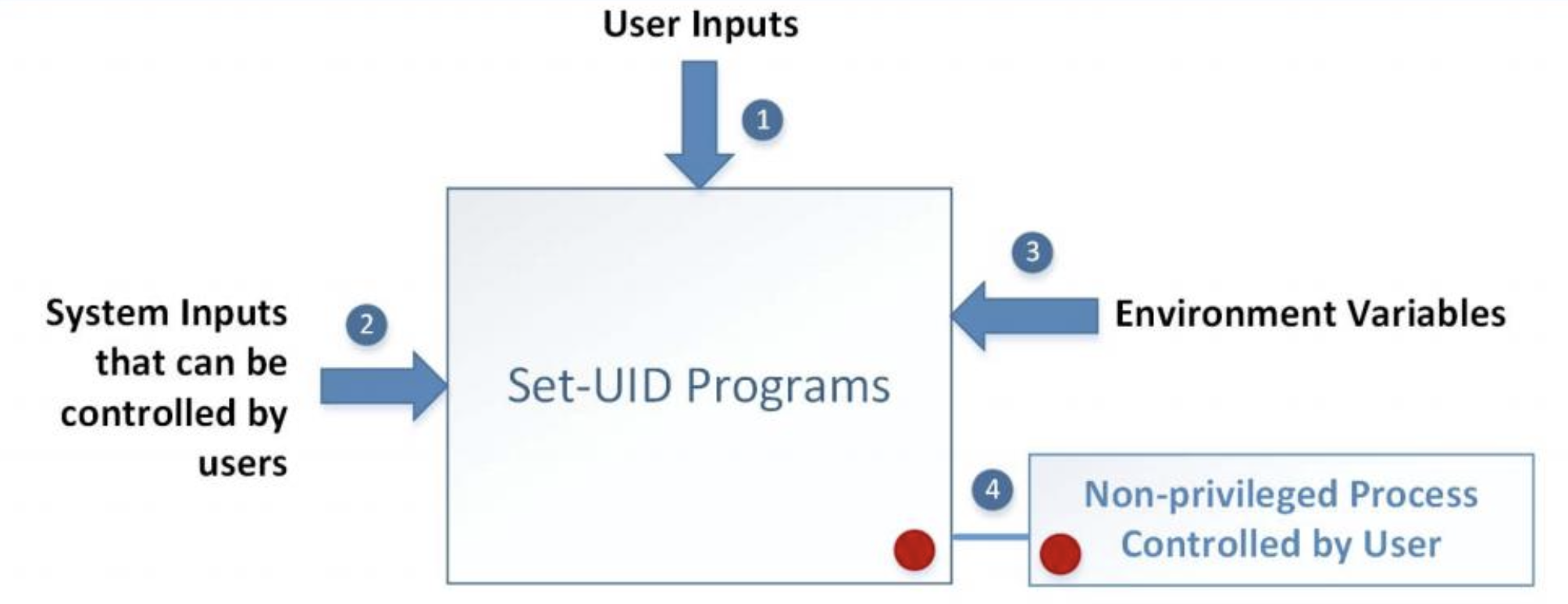
- User Inputs
- Set-UID 프로그램이 사용자로부터 직접 입력받는 데이터
- 입력값이 제대로 검증되지 않으면 취약점 발생 가능
- System Inputs that can be controlled by users
- 사용자가 조작할 수 있는 시스템 자원(socket, file)
- 권한 상승을 악용해서 접근 가능
- Envionment Variables
- 환경변수도 공격자가 변조할 수 있는 취약점 경로
- 악성 라이브러리, 경로 조작 등으로 권한 탈취 가능
- Non-privileged Process Controlled by User
- Set-UID 프로그램이 사용자 권한으로 실행한 하위 프로세스
Attacks via Environment Variables
- Behavior can be influenced by inputs that are not visible inside a program
- Environment Variables: These can be set by a user before running a program
$ printenv or $ env # 환경변수 전체 출력
echo $HOME # 개별 변수 출력
PATH
사용자가 명령어를 입력할 때, 해당 명령어 실행 파일을 찾는 디렉토리 목록을 저장하는 환경 변수
여러 디렉토리 경로들이 :으로 구분되어 저장, 쉘은 순서대로 일치하는 실행파일을 찾는다.
악의적으로 경로를 조작하면 기대하지 않은 실행 파일이 먼저 실행되도록 할 수 있다.
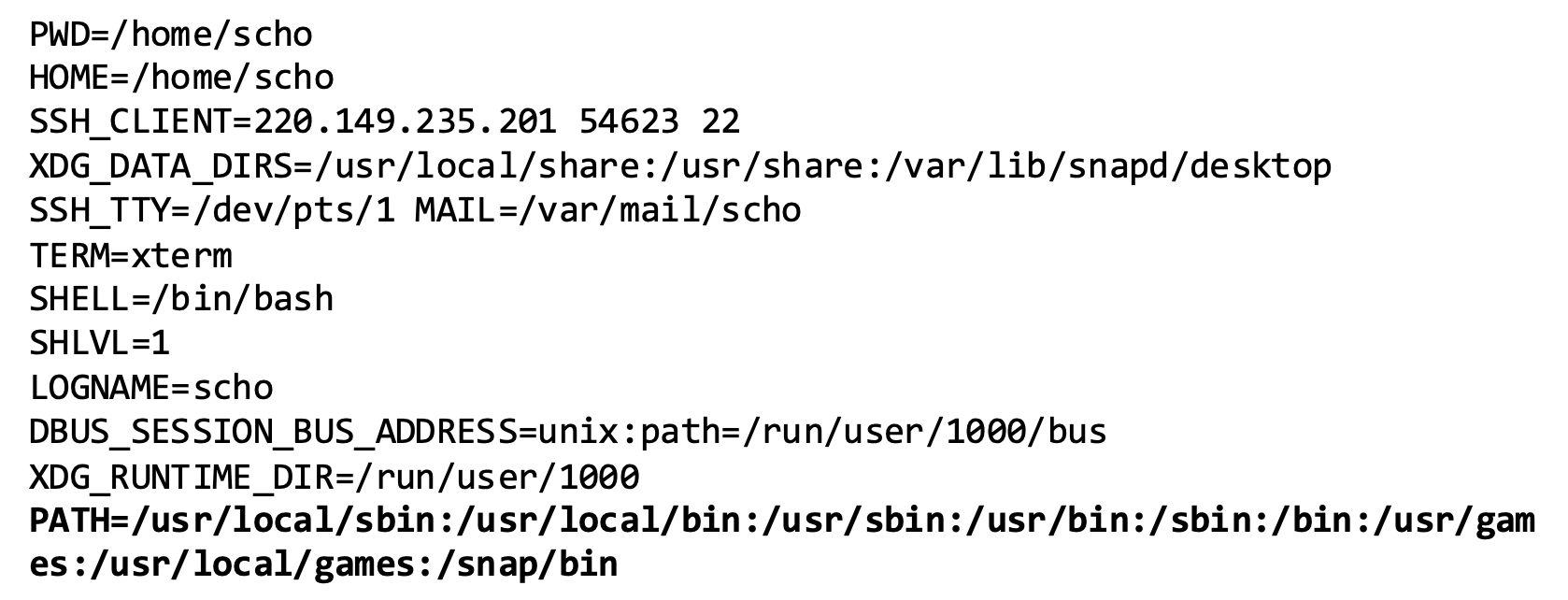
PATH Environment Variable
- Used by shell programs to locate a command if the user dose not provide the full path for the command
- System(): call
/bin/shfirst- 내부적으로 /bin/sh를 먼저 실행하고, 그 셀에 PATH 환경변수를 참고해서 실제 명령어 ls의 경로를 찾는다.
system("ls")/bin/shuses the PATH environment variable locate "ls"
전체 경로 없이 명령어로를 호출하면, PATH에 설정된 dir 순서대로 ls라는 이름을 가진 실행파일을 찾는다.
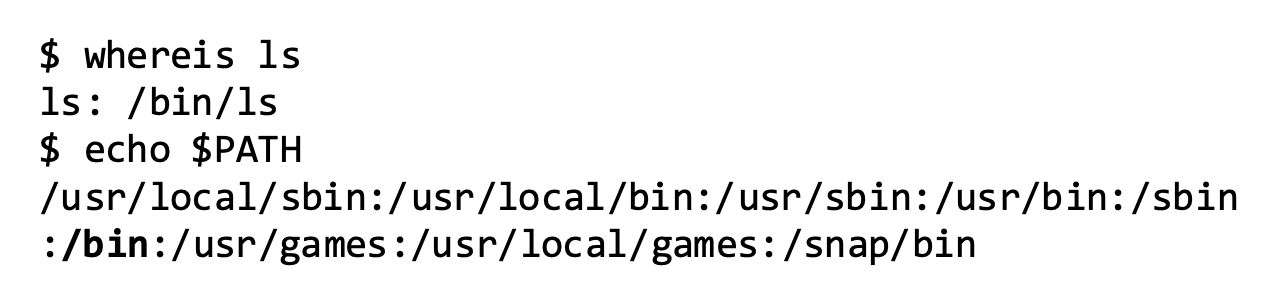
- Attacker can manipulate the PATH variable and control how the "ls" command is found
system이 실행한 /bin/sh이 "ls"를 찾는데, 공격자는 PATH의 앞부분에 자신이 만든 디렉토리를 추가하여 악성 파일이 실행되게 할 수 있다.
Attacks via External Program: Case Study
- Shell programs behavior is affected by many environment varibles, the most common of which is the PATH variable
- When a shell program runs a command and the absolute path is not provided, it uses the PATH variabel to locate the command
- 절대 경로를 명시하면 운영체제는 해당 위치의 프로그램을 바로 실행하여 PATH 환경변수를 참조하지 않는다.
- 반대로, 상대경로이거나 단순 command일 경우, OS가 PATH 환경 변수를 참고해 실행 파일 위치를 찾는다.
-
Consider the following code

-
We will force the above program to execute the following program
- /bin/dash를 수행하는 이름만 cal인 file
- 절대경로를 넣으면 PATH 환경변수 영향을 받지 않는다.
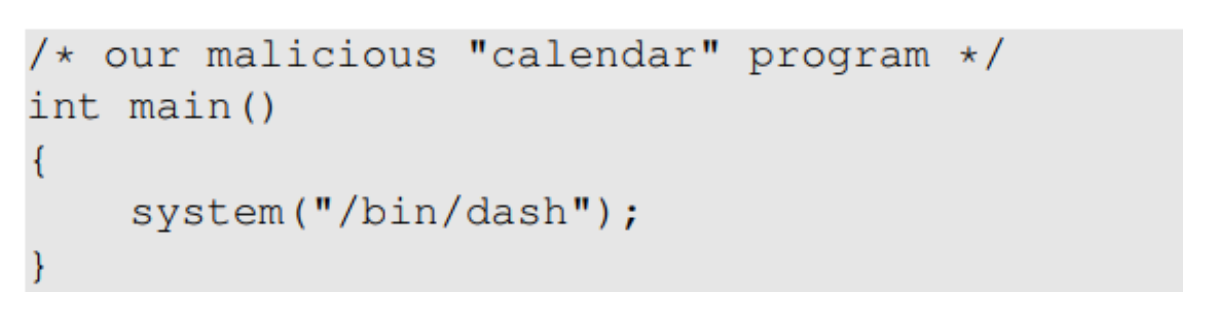
-
export 등으로 PATH를 바꾸면, 공격자가 원하는 프로그램을 우선 실행시킬 수 있다.
- export PATH = .:$PATH
- 기존 환경 변수 앞에 .(현재 dir)을 추가하겠다.
- 환경변수 값 설정: variable = value
- export PATH = .:$PATH
-
PATH가 수정되면서, ./cal.c (malicious cal)이 실행되는데, Set-UID root이기 때문에 root 권한으로 shell을 얻는다.
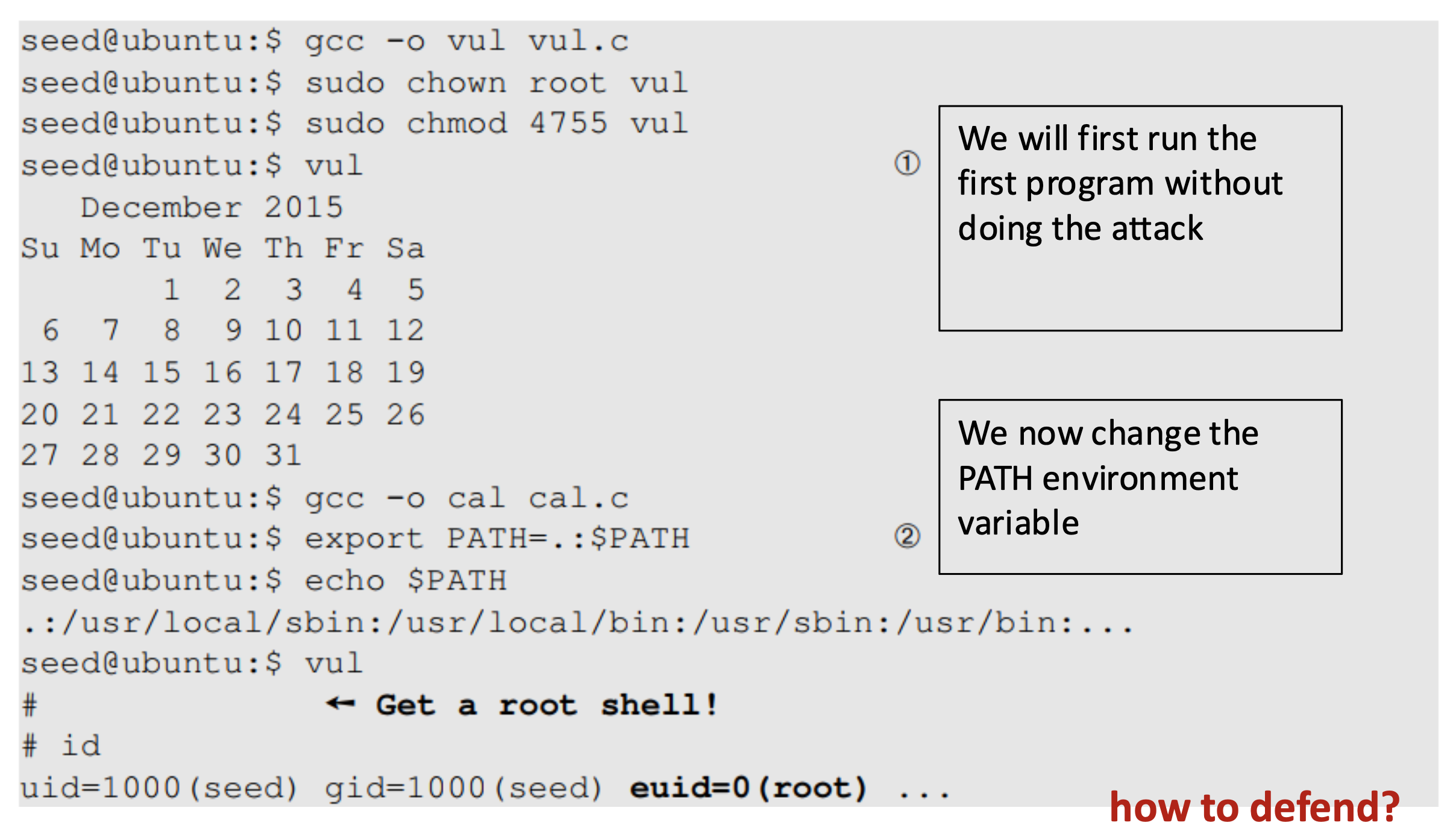
How to defend? absolute path
- 실행 파일의 정확한 위치를 지정하면 공격자가 PATH를 변조해 맨 앞에 악성 파일을 놓아도 지정된 파일이 실행된다.
- 하지만, 실제로 리눅스 버전마다 프로그램 위치의 차이가 존재하여 호환성 문제가 발생한다.
Attacks via Dynamic Linker
- Linking finds the external library code referenced in the program
- Linking can be done during runtime or complie time
- Dynamic Linking
- Uses environment variables, which becomes part ot the attack surface
- Static Linking
- We will use the following example to differentiate static and dynamic linking
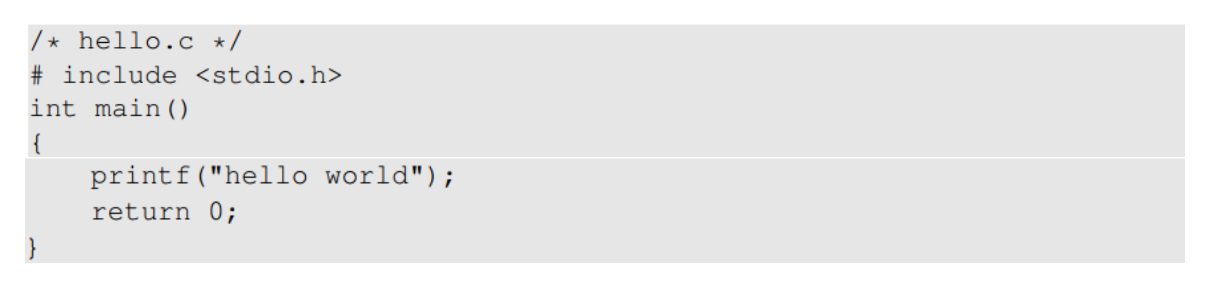
- Dynamic linking은 runtime 때, 외부 라이브러리를 동적으로 찾아서 연결하는 과정에서 Dynamic linker가 LD_PRELOAD, LD_LIBRARY_PATH 등의 특정 환경변수를 참고하기 때문에 보안 취약점이 될 수 있다.
Static Linking
- The linker combines the program's code and the library code containing the printf() func
- The size of a static complied program is 100 times larger than a dynamic program

$ gcc -o hello_dynamic hello.c  # Dynamic(default)
$ gcc -static -o hello_static hello.c # Static- c. (dynamic linking)
- 함수 선언만 가져오고 함수의 body는 없다.
- Dynamic Linking
- 실행 파일에는 사용자 코드의 기계어와 라이브러리 함수의 참조 정보만 존재
- 실제 라이브러리 코드는 런타임에(실행 시) 동적으로 로드되어 연결됨
- Static Linking
- 컴파일 시점에 사용된 모든 라이브러리 함수의 구현 코드가 실행 파일에 포함되어 용량이 크게 증가
Static은 환경변수 의존성이 없어 안전하지만, 라이브러리 결함 시 각각의 실행 파일을 찾아서 재컴파일해야 한다. 반면에 Dynamic은 공유 라이브러리인 원본만 수정하면 모두 즉시 적용된다.
Dynamic Linking
- "ldd" command to see what shared libraries a program depends on
- List Dynamic Dependencies
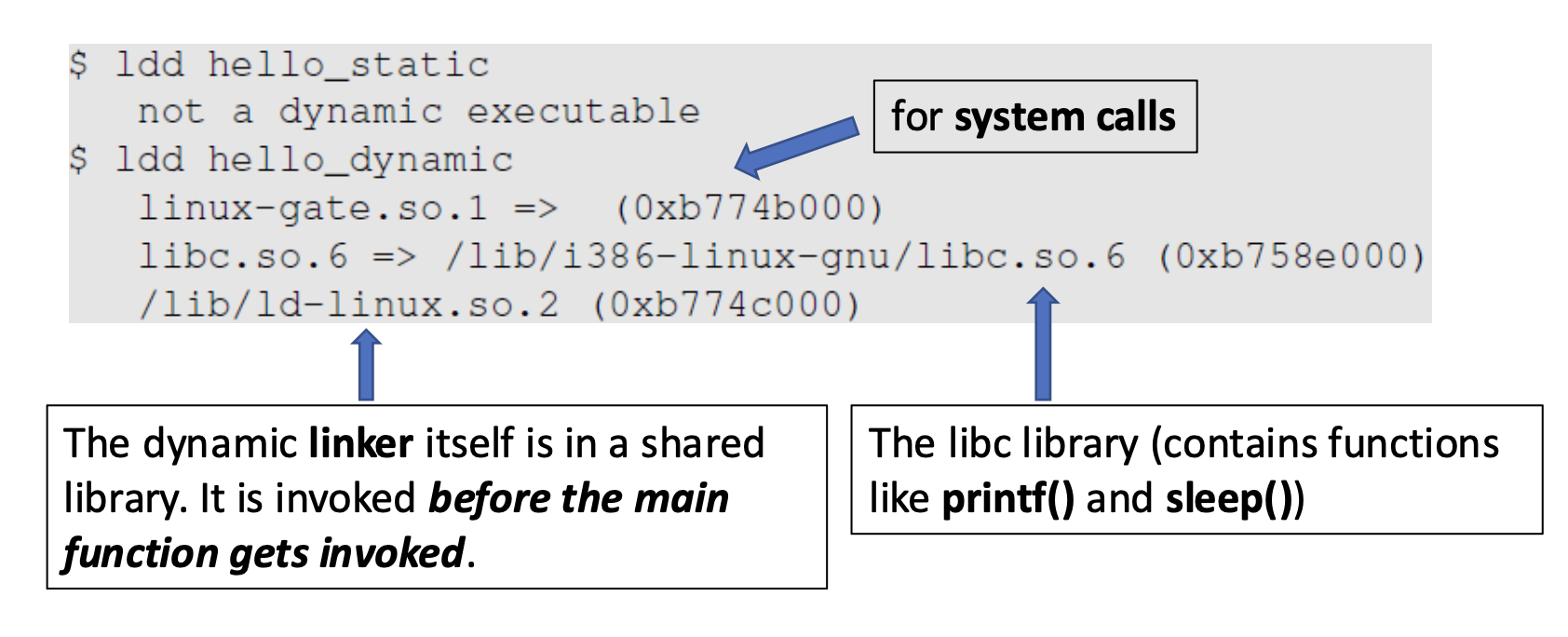
Static은 외부 라이브러리 의존이 없고, Dynamic은 여러 공유 라이브러리에 의존한다.
Dynamic Linking의 시점
- Load-time Dynamic Linking
- 프로그램 실행 시작 전에 필요한 모든 동적 라이브러리를 미리 메모리에 올리는 방식
- before the main function gets invoked
- Run-time Dynamic Linking (실행 중)
- 프로그램이 실행되는 도중에 필요할 때마다 라이브러리를 동적으로 로드하고 연결
Case Study: Normal Programs
-
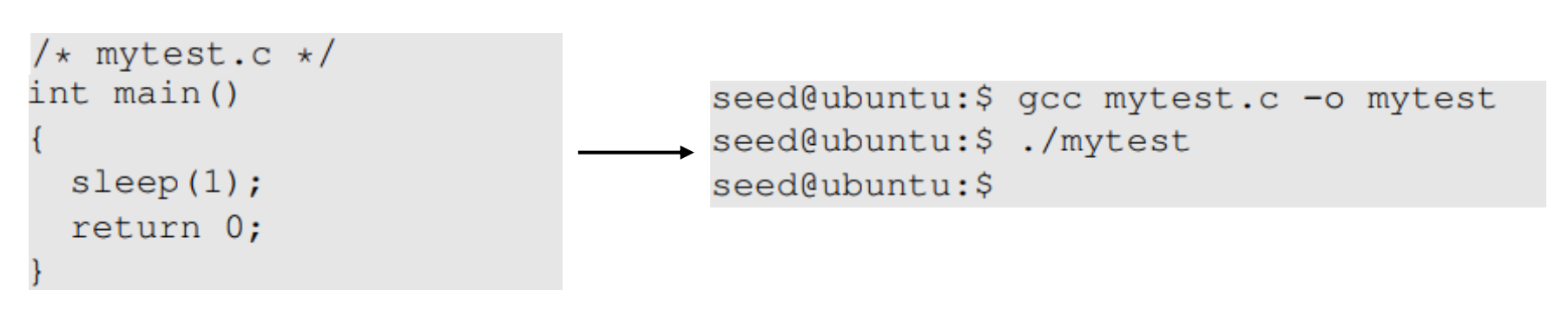
Program calls sleep function which is dynamically linked
- Dynamic Linking으로 컴파일되어(default) 시스템의 libc에서 sleep() 함수를 가져와 사용
-
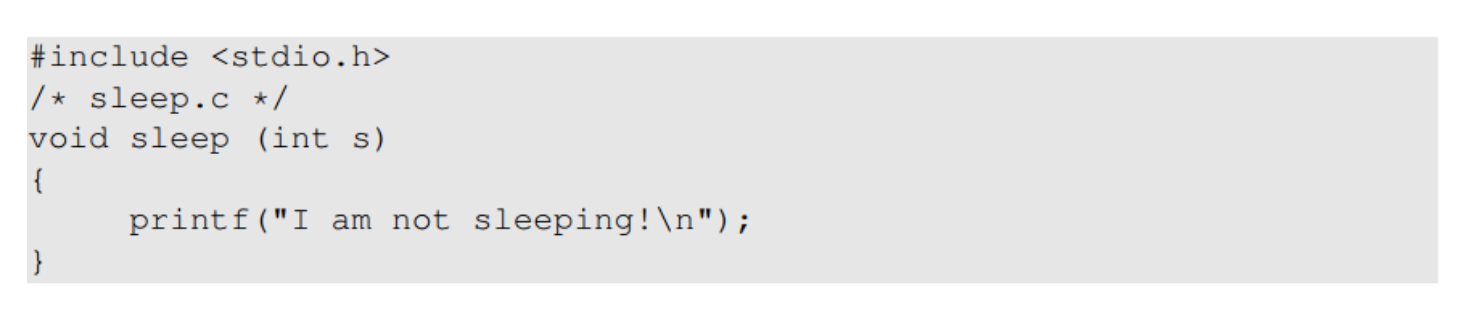
Now we implement our own sleep() function
- 함수 원형은 동일하지만 실제 내용은 다른 가짜 sleep 함수를 이용한다.
-
We need compile the above code, create a shared library and add the shared library to the LD_PRELOAD environment varible
- 가짜 함수를 컴파일하고, 공유 라이브러리(.so) 생성
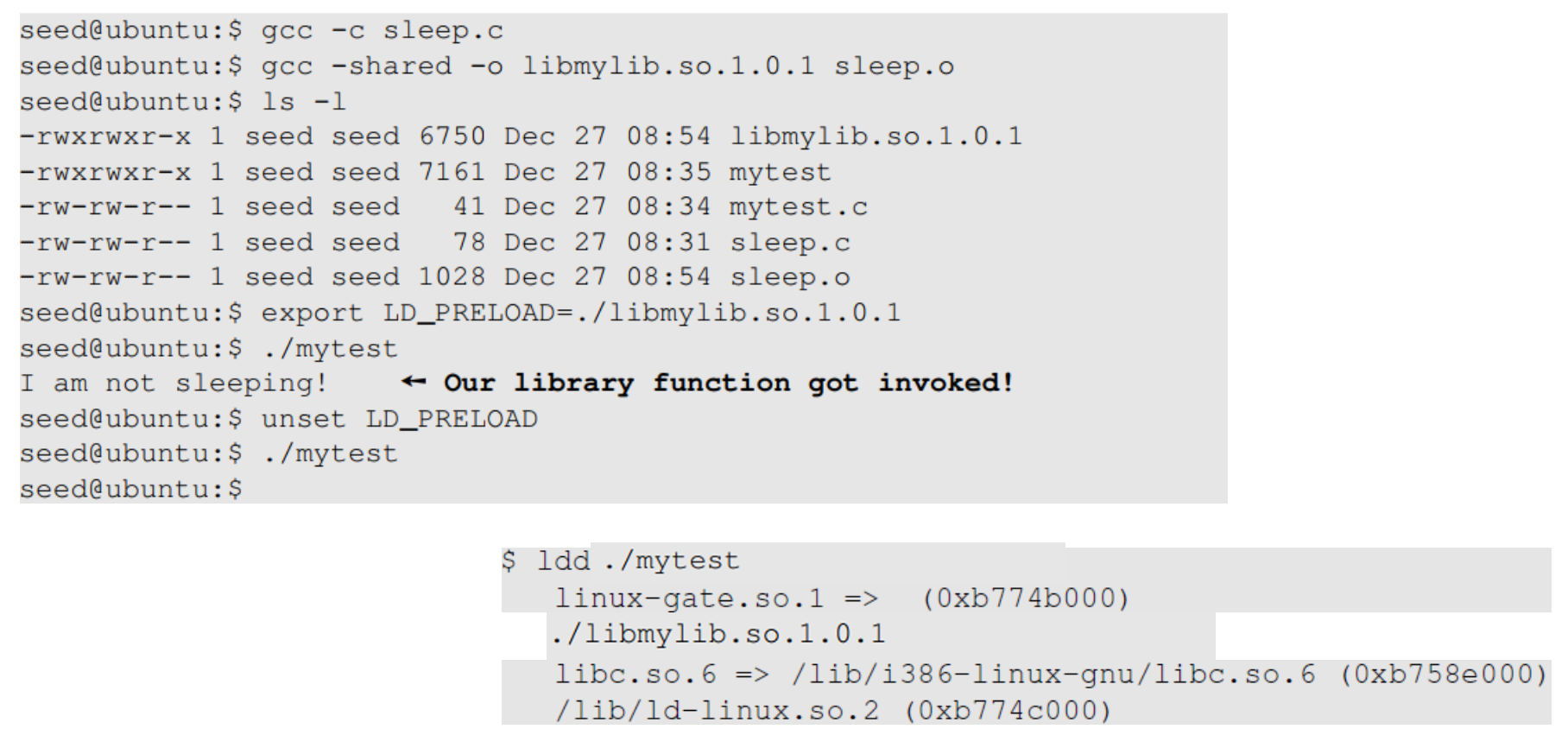
# 환경변수 설정 및 실행
$ export LD_PRELOAD=./libmylib.so.1.0.1  # 악성 라이브러리를 우선 로드하도록 설정
$ ./mytest
I am not sleeping!  ← 악성 함수가 실행됨
# 공격 해제
$ unset LD_PRELOAD    # 환경변수 제거
$ ./mytest
(1초 대기 후 종료)    # 정상 sleep 함수 실행
ldd로 확인해 보면 악성 라이브러리가 두 번째 우선순위로 로드되어 있다.
Let's verify the countermeasure
- Make a copy of the
envprogram and make it a Set-UID program- Set-UID 설정 확인: 소유자 권한 부분에 s 표시

- Export LD_LIBRARY_PATH and LD_PRELOAD and run both the programs
- export로 환경변수 설정
- 원본 env 프로그램 실행 시, 환경변수가 정상적으로 보임
- Set-UID myenv 프로그램 실행 시, LD_PRELOAD와 LD_LIBRARY_PATH가 사라짐
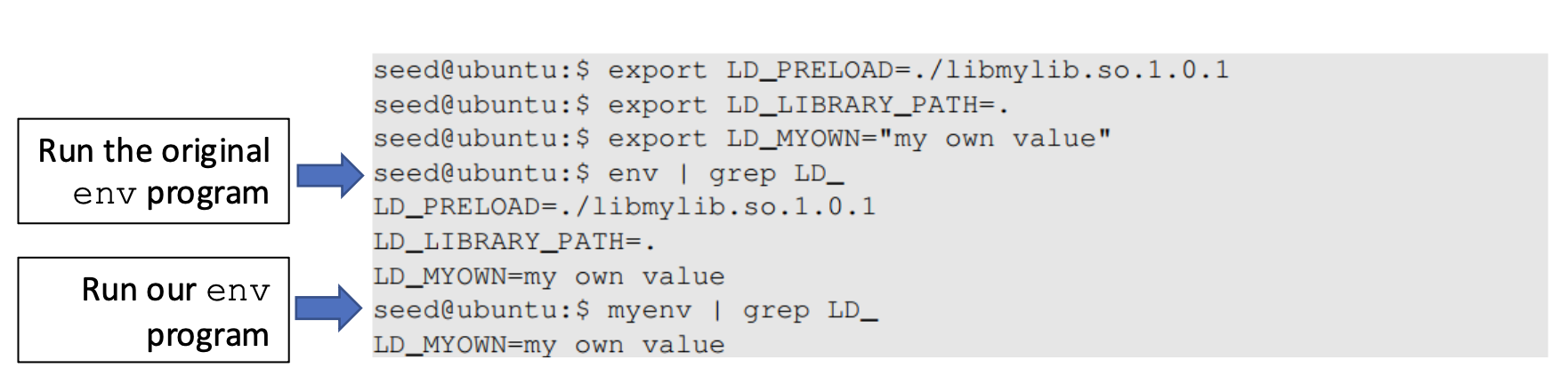
현대의 리눅스 시스템에서는 Set-UID 프로그램이 실행될 때 보안상 위험한 환경변수들을 자동으로 제거한다.
LD_LIBRARY_PATH and LD_PRELOAD는 Normal user bound이기 때문에 사용자가 임의로 설정할 수 있어 보안 위험을 초래하므로 Set-UID 프로그램에서 Normal bound는 자동으로 제거된다.
어떤 것들이 제거되는지, 그 기준이 무엇인가?
- Dynamic Linker에 의해 외부 라이브러리나 코드가 삽입될 위험이 있는 변수들
- LD_PRELOAD
- 실행 바이너리에 특정 공유 라이브러리를 강제로 로드하기 위한 함수
- LD_LIBRARY_PATH
- 공유 라이브러리 검색 경로 재지정
- LD_AOUT_LIBRARY_PATH, etc.
Attacks via User Inputs
User Inputs: Explicit inputs
- Buffer Overflow
- Overflowing a buffer to run malicious code
- 원래 영역을 넘쳐서 다른 공간까지 침범하면 이를 악용하여 악성코드를 실행할 수 있다.
- Format String Vulnerablity
- Changing program behavior using inputs as format strings
- printf("%s"), printf("%d")처럼 formatting string을 사용하는 함수에서 메모리값이 유출되거나 기록될 수 있다.
CHSH - Change Shell
- Set-UID program with ability to change default shell programs
- Shell programs are stored in /etc/passwd file
- Issues
- Failing to sanitize user inputs
- Attackers could create a new root account
- Attack
- A input may contain two lines of text
- If attackers put 0s in the and fields (UID & GID fields), they can create a root account
$ chsh -s /usr/bin/dash  // 정상
$ chsh -s "/usr/bin/zsh\n myroot:x:0:0:My backdoor:/home:/bin/bash" // 악용 - 공격자는 /etc/passwd 파일 포맷에 맞춘 데이터를 입력하였다.
- Change shell 공격은 세세한 사용자 입력 검증 실패로 인해 Set-UID 프로그램을 악용하여 새로운 관리자 계정을 생성하는 전형적인 권한 상승 사례
- CHSH만 해야 하는데, \n 뒤에 새로운 계정 정보를 넣어서 새로운 사용자를 root 권한으로 등록시킬 수 있다.
- UID와 GID가 0: 시스템에서 root와 동등한 관리자 권한을 가짐