OpenGL 쉐이더 프로그래밍 - Perspective View

타입·2025년 12월 2일

컴퓨터 그래픽스

목록 보기
22/24

Perspective Projection

  • Parallel projection
    무한한 COP(Center of Projection) = DOP(Direction of Projection)
    소실점이 무한함
  • Perspective Projection
    유한한 COP
    소실점이 한곳에 모임

Homogeneous Coordinate Caclulation으로 변환

원점에 위치한 카메라에 대해 (x,y,z) 점을 거리 d에 있는 평면에 프로젝션

(x,y,z,zd)>xp=x(z/d)yp=y(z/d)zp=z(z/d)wp=1>(x(z/d),y(z/d),d,1)(x,\,y,\,z,\,\frac{z}{d})\\ ->\\ \mathbf{x}_{p} = \frac{x}{(z/d)}\\ \mathbf{y}_{p} = \frac{y}{(z/d)}\\ \mathbf{z}_{p} = \frac{z}{(z/d)}\\ \mathbf{w}_{p} = 1\\ ->\\ (\frac{x}{(z/d)},\,\frac{y}{(z/d)},\,d,\,1)

OpenGL 하드웨어 구현

  • Perspective Division의 자동 실행
    Vertex Shader의 제일 마지막 단계
    Parallel Projection일 땐 (x, y, z, 1) 그대로 사용
    Perspective Projection일 땐 (x, y, z, w) -> (x/w, y/w, z/w, 1)로 automatic division 좌표 변환

  • 단순한 Perspective Projection의 문제점
    Z=d 평면으로만 프로젝션됨
    실제로는 더 복잡한 행렬식을 가짐
    Z=-1.0 ~ +1.0으로 depth 값 출력

View Frustum Approach

Perspective Projection in OpenGL

Frustum(절두체): 잘린 피라미드 모양
View Frustum: near 평면부터 far 평면까지의 뷰 볼륨
FOV(Field of View): 시야 각도

대칭 뷰 프러스텀

z축에 대칭인 View Frustum으로 가정

xmin=xmax,ymin=ymaxfrustum(xmax,xmax,ymax,ymax,znear,zfar);\mathbf{x}_{min} = -\mathbf{x}_{max},\,\mathbf{y}_{min} = -\mathbf{y}_{max}\\ frustum(-\mathbf{x}_{max},\,\mathbf{x}_{max},\,-\mathbf{y}_{max},\,\mathbf{y}_{max},\,\mathbf{z}_{near},\,\mathbf{z}_{far});
  • 대칭이 아닌 Frustum 볼륨을 대칭인 Frustum 볼륨으로 만듦
  • 정규화된 View Frustum을 구함 (직사각형을 정사각형으로 정규화)
  • Canonical View Volume (-1.0 ~ +1.0을 가지는 뷰 볼륨)

View Frustum 방식의 계산

Symmetric View Frustum Normalization

Z=znearZ = \mathbf{z}_{near} 평면에서 정사각형이 되는 대칭 피라미드로 매핑
이 과정에서 원래 오른손좌표계의 View Frustum을 왼손좌표계로 변환

  • Normalize 전 near 평면의 좌표

    (xmax,ymax,znear),(xmax,ymax,znear)\\ (-\mathbf{x}_{max},\,-\mathbf{y}_{max},\,-\mathbf{z}_{near}), (\mathbf{x}_{max},\,\mathbf{y}_{max},\,-\mathbf{z}_{near})
  • Normalize 후 near 평면의 좌표

    (znear,znear,znear),(znear,znear,znear)(-\mathbf{z}_{near},\,-\mathbf{z}_{near},\,\mathbf{z}_{near}),\,(\mathbf{z}_{near},\,\mathbf{z}_{near},\,\mathbf{z}_{near})
  • 정규화를 위한 크기 변환 행렬
    좌표계 방향을 바꾸는 연산 포함

    S=(2znearxmaxxmin00002znearymaxymin0000100001)=(znearxmax0000znearymax0000100001)S = \begin{pmatrix} \frac{2z_{\text{near}}}{x_{\text{max}} - x_{\text{min}}} & 0 & 0 & 0 \\ 0 & \frac{2z_{\text{near}}}{y_{\text{max}} - y_{\text{min}}} & 0 & 0 \\ 0 & 0 & -1 & 0 \\ 0 & 0 & 0 & 1 \end{pmatrix} = \begin{pmatrix} \frac{z_{\text{near}}}{x_{\text{max}}} & 0 & 0 & 0 \\ 0 & \frac{z_{\text{near}}}{y_{\text{max}}} & 0 & 0 \\ 0 & 0 & -1 & 0 \\ 0 & 0 & 0 & 1 \end{pmatrix}

Canonical View Volume로 변환

정규화된 View Frustum 볼륨에서 near 평면의 좌하단 좌표가 Canonical View 볼륨의 (-1, -1, -1) 좌표로 변환되어야 함
정규화된 View Frustum 볼륨에서 far 평면의 우상단 좌표가 Canonical View 볼륨의 (-1, -1, -1) 좌표로 변환되어야 함

(znear,znear,znear)>(1,1,1)(zfar,zfar,zfar)>(+1,+1,+1)(-\mathbf{z}_{near},\,-\mathbf{z}_{near},\,\mathbf{z}_{near}) -> (-1, -1, -1)\\ \,(\mathbf{z}_{far},\,\mathbf{z}_{far},\,\mathbf{z}_{far}) -> (+1, +1, +1)
  • 변환 행렬 N을 구하는 과정

    N=[1000010000αβ0010]N = \begin{bmatrix} 1 & 0 & 0 & 0 \\ 0 & 1 & 0 & 0 \\ 0 & 0 & \alpha & \beta \\ 0 & 0 & 1 & 0 \end{bmatrix}
    [1000010000αβ0010][znearznearznear1]=[znearznearαznear+βznear]=[11α+βznear1]=[1111][1000010000αβ0010][zfarzfarzfar1]=[zfarzfarαzfar+βzfar]=[11α+βzfar1]=[1111]\begin{aligned} \begin{bmatrix} 1 & 0 & 0 & 0 \\ 0 & 1 & 0 & 0 \\ 0 & 0 & \alpha & \beta \\ 0 & 0 & 1 & 0 \end{bmatrix} \begin{bmatrix} -z_{\text{near}} \\ -z_{\text{near}} \\ z_{\text{near}} \\ 1 \end{bmatrix} &= \begin{bmatrix} -z_{\text{near}} \\ -z_{\text{near}} \\ \alpha z_{\text{near}} + \beta \\ z_{\text{near}} \end{bmatrix} = \begin{bmatrix} -1 \\ -1 \\ \alpha + \frac{\beta}{z_{\text{near}}} \\ 1 \end{bmatrix} = \begin{bmatrix} -1 \\ -1 \\ -1 \\ 1 \end{bmatrix} \\[2ex] \begin{bmatrix} 1 & 0 & 0 & 0 \\ 0 & 1 & 0 & 0 \\ 0 & 0 & \alpha & \beta \\ 0 & 0 & 1 & 0 \end{bmatrix} \begin{bmatrix} z_{\text{far}} \\ z_{\text{far}} \\ z_{\text{far}} \\ 1 \end{bmatrix} &= \begin{bmatrix} z_{\text{far}} \\ z_{\text{far}} \\ \alpha z_{\text{far}} + \beta \\ z_{\text{far}} \end{bmatrix} = \begin{bmatrix} 1 \\ 1 \\ \alpha + \frac{\beta}{z_{\text{far}}} \\ 1 \end{bmatrix} = \begin{bmatrix} 1 \\ 1 \\ 1 \\ 1 \end{bmatrix} \end{aligned}
  • 변환 행렬의 α, β

    α=zfar+znearzfarznearβ=2zfarznearzfarznear\alpha = \frac{z_{\text{far}} + z_{\text{near}}}{z_{\text{far}} - z_{\text{near}}} \quad \beta = -\frac{2z_{\text{far}} z_{\text{near}}}{z_{\text{far}} - z_{\text{near}}}

최종 Perspective Projection 행렬

(대칭 뷰 프러스텀의 경우)

모든 점들에 대하여 수식을 적용하면 원근감을 가진 화면을 보여줄 수 있음

Mperspective=NS=[1000010000αβ0010][znearxmax0000znearymax0000100001]=[znearxmax0000znearymax0000αβ0010]=[znearxmax0000znearymax0000zfar+znearzfarznear2zfarznearzfarznear0010]\mathbf{M}_{\text{perspective}} = \mathbf{N} \cdot \mathbf{S} = \begin{bmatrix} 1 & 0 & 0 & 0 \\ 0 & 1 & 0 & 0 \\ 0 & 0 & \alpha & \beta \\ 0 & 0 & 1 & 0 \end{bmatrix} \begin{bmatrix} \frac{z_{\text{near}}}{x_{\text{max}}} & 0 & 0 & 0 \\ 0 & \frac{z_{\text{near}}}{y_{\text{max}}} & 0 & 0 \\ 0 & 0 & -1 & 0 \\ 0 & 0 & 0 & 1 \end{bmatrix} \\[2ex] = \begin{bmatrix} \frac{z_{\text{near}}}{x_{\text{max}}} & 0 & 0 & 0 \\ 0 & \frac{z_{\text{near}}}{y_{\text{max}}} & 0 & 0 \\ 0 & 0 & -\alpha & \beta \\ 0 & 0 & -1 & 0 \end{bmatrix} = \begin{bmatrix} \frac{z_{\text{near}}}{x_{\text{max}}} & 0 & 0 & 0 \\ 0 & \frac{z_{\text{near}}}{y_{\text{max}}} & 0 & 0 \\ 0 & 0 & -\frac{z_{\text{far}} + z_{\text{near}}}{z_{\text{far}} - z_{\text{near}}} & -\frac{2z_{\text{far}} z_{\text{near}}}{z_{\text{far}} - z_{\text{near}}} \\ 0 & 0 & -1 & 0 \end{bmatrix}

View Frustum 프로그램

(0,0,2)에서 -z 방향으로 바라보는 카메라

  • 좌표계 계산
    화면비를 4:3으로 할 때 직사각형 범위
    x: -0.5 ~ +0.5
    y: -0.375 ~ +0.375
    z: -1 ~ -3 (znear=+1.0,zfar=+3.0z_{near}=+1.0, \, z_{far}=+3.0)

  • updateFunc()
    View Frustum 계산

void updateFunc(void) {
	...
    
	// viewing transform
	const GLfloat radius = 2.0F;
	matView = glm::lookAtRH(
		glm::vec3(radius * sinf(theta), 20 * 0.05F, radius * cosf(theta)),
		glm::vec3(0.02F, 0.0F, 0.0F),
		glm::vec3(0.0F, 1.0F, 0.0F)
	);
     
	// projection matrix
	const GLfloat zoom = 0.5F; // xy 범위를 좁히기 위한 변수
	matProj = glm::frustumRH(
		-1.0F * zoom, +1.0F * zoom,
		-0.75F * zoom, +0.75F * zoom,
		+1.0F, +3.0F
	);
}

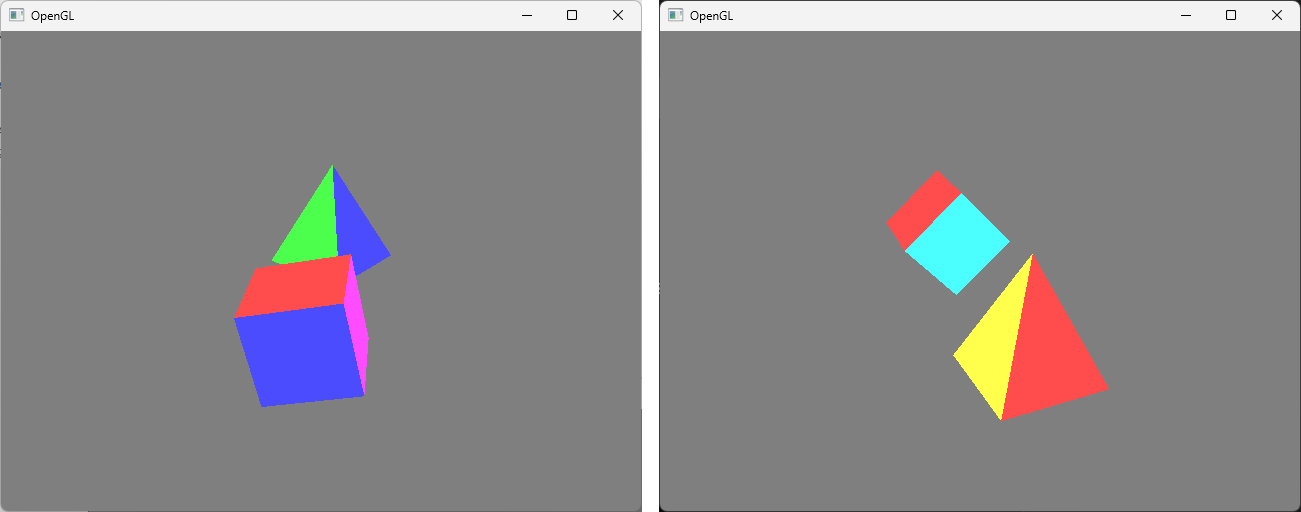
화면에 더 가까운 물체가 원근감을 가져 더 크게 보이는 것을 확인
profile
주니어 언리얼 프로그래머

0개의 댓글