AI를 활용해 git commit message를 생성하는 것은 정말 생산적이고 효율적이다. 그래서 이번 글에서 내가 사용하고 있는 방법을 공유해보고자 한다.
나는 ChatGPT를 사용하고 있지만 Gemini, Copilot, Claude 등의 AI 챗봇에 모두 사용할 수 있다.
API를 사용하는 방법은 편하지만 무료는 아니므로 AI 챗봇을 사용한다.
✍️ Prompting 기법
어떻게 Prompt를 줘야 좋은 답변을 얻을 수 있을까?
🌱 Basic
기본적으로 '명확'하고 '구체적'인 지시를 작성해야 한다.
1. 문장에서 적절한 띄어쓰기, 쉼표, 마침표 등으로 의도한 의미를 전달하기
We ate chocolate, doughnuts and raspberries.
We ate chocolate doughnuts and raspberries.
2. 어떤 형식으로 표현되길 원하는지 알려주기
Please organize the following text into a table format.3. 만족해야 하는 조건 명시하기
Write a brief summary in less than 100 words.✨ Advanced
1. 원하는 작업의 예시 제공하기 (Few-shot Prompting)
Classify these conversations. Use the examples provided to label the text as 'positive' or 'negative'.

Text: "My service was awesome."
Label: positive

Text: "My order never arrived."
Label: negative

Text: "Thanks for great service!"
Label: positive

Text: Horrible customer service!
Label: ?
2. 단계를 나눠서 요청하기 (Chain-of-Thought)
First, summarize the text, then identify three key points from the summary.3. 제약 조건 부여하기 (Constraints-based Prompting)
Explain the concept without using technical jargon, so that a beginner can understand.4. 역할 부여하기 (Role-based Prompting)
You are a math teacher. Please explain what a circle is to elementary school students.📝 Prompt 작성하기
Git commit message 형식은 https://udacity.github.io/git-styleguide/를 참고했다.
나는 보통 영어로 commit message를 작성하기 때문에 prompt 또한 영어로 작성했다.
참고로 LLM을 훈련하는 데 사용된 dataset은 영어가 지배적이기 때문에 다른 언어보다 영어에서 더 좋은 성능을 보여준다.
prompting 기법을 십분 활용해 열심히 작성해보았다! 😎
앞서 이야기한 prompting 기법 중 어느 부분에 어떤 기법을 사용했는지 찾아보면 좋을 것 같아 자세한 설명은 생략한다.
You are a software engineer reviewing changes before committing them. I'm going to provide you with the output of the `git diff --staged` command. Your task is to generate a concise and meaningful commit message based on the changes.

Please follow these guidelines:

1. Git commit message structure:
	- The commit message should follow this structure:
		```
		type: subject

		body(optional)

		footer(optional)
		```
	- The type should be one of the following:
		- feat: A new feature
		- fix: A bug fix
		- docs: Changes to documentation
		- style: Formatting, missing semi colons, etc; no code change
		- refactor: Refactoring production code
		- test: Adding tests, refactoring test; no production code change
		- chore: Updating build tasks, package manager configs, etc; no production code change

	- The subject:
		- Must be no longer than 50 characters.
		- Should start with a capital letter.
		- Should not end with a period.
		- Use an imperative tone to describe what a commit does, rather than what it did. For example, use change; not changed or changes.

	- The body(optional):
		- Include this section only if the changes require additional explanation.
		- Explain what and why the changes were made in more detail, while the code itself explains how.
		- Ensure that each line in the body does not exceed 72 characters.

	- The footer(optional):
		- Only include a footer if the user provides specific information, such as issue tracker IDs.

2. Process:
    - First, summarize the key changes from given output of the `git diff --staged` command.
    - Ensure the message clearly reflects the purpose of the changes.
    - Write the commit message adhering to Git commit message structure.
    - Here's an example commit message to follow:
			```
			style: Enhance button component design

			Improved button design to better address user feedback on
			visibility and consistency across different devices. The new
			design aims to create a more cohesive and accessible user
			interface.

			- Updated color scheme to improve contrast and ensure compliance
			  with accessibility standards.
			- Increased font size and adjusted font weight for better
			  readability on smaller screens.
			- Standardized button sizes and padding for consistency across
			  all pages.
			- Enhanced hover and active states to provide clearer visual
			  feedback to users.

			Resolves: #123
			See also: #456, #789
			```
🚀 적용하기
이제 실제로 prompt를 적용해서 사용해보자.
-
AI 챗봇에게 prompt 보내기
-
git diff --staged명령어 output 보내기환경 명령어 Windows (Git Bash) git diff --staged | clip Windows (PowerShell) git diff --staged | Set-Clipboard MacOS git diff --staged | pbcopy Linux git diff --staged | xclip -selection clipboard -
AI 챗봇이 작성해준 git commit message 사용하기
-
필요할 때마다 2~3 과정 반복
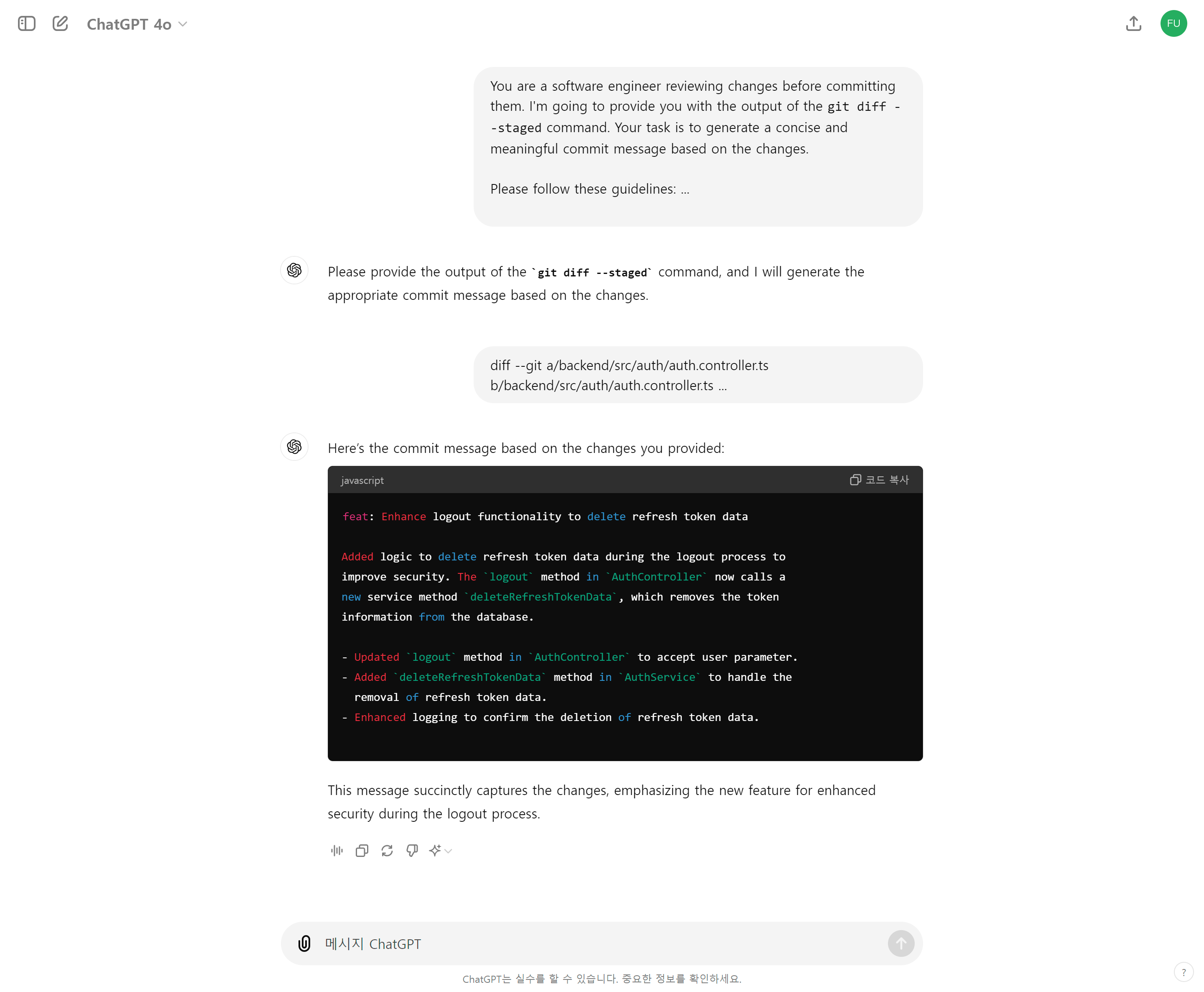
실제로 잘 동작한다! 😁
(Prompt와 내가 보낸 git diff --staged output은 너무 길어서 뒷부분은 이미지에서 생략했다.)

오 저도 이거 node로 코드 짜서 npm 명령어로 실행되도록 만들어봤었어요 ㅋㅋㅋㅋ