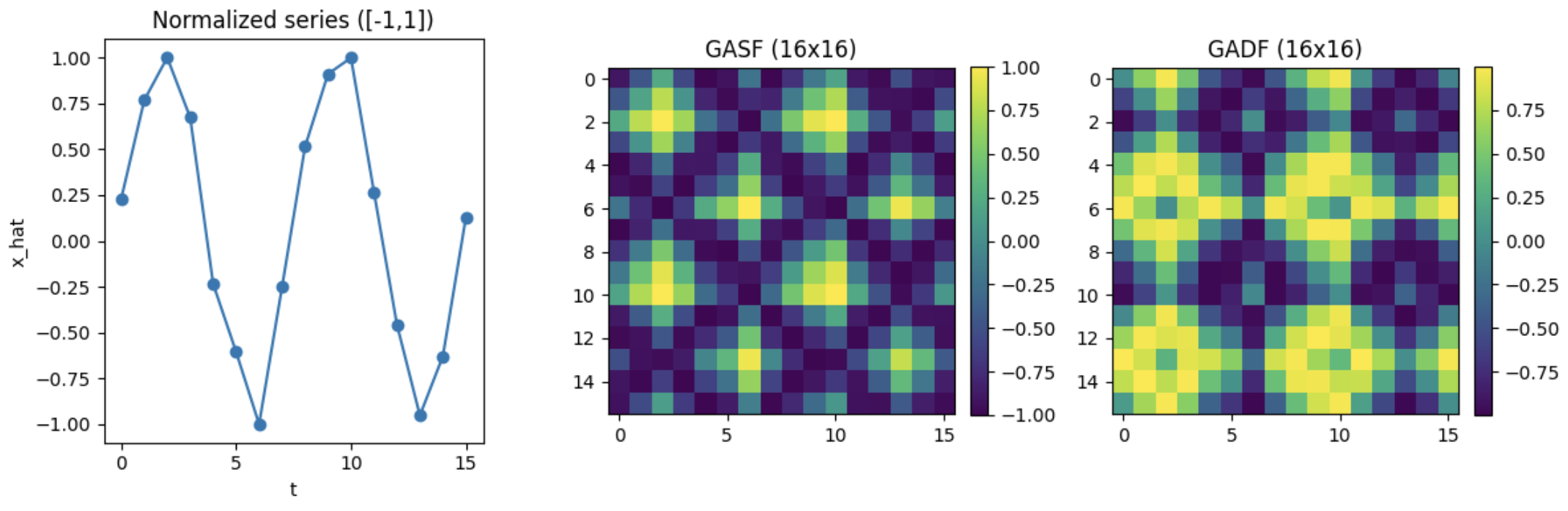
GAF (Gramian Angular Field)
시계열 값을 각도로 변환한 뒤, 모든 시간 간의 관계를 계산하여 이미지로 만드는 방법
-> 1차원 형태인 시계열을 픽셀로 된 2차원 형태의 관계 지도로 바꾸는 과정
- 시계열 값들을 각도로 변환
- 시간 i 와 j 사이의 관계 계산
- 그 결과를 다시 N x N 행렬 형태로 만들어 이미지로 표현
결과적으로 하나의 시계열 길이가 N 이면 N x N 크기의 이미지가 생성된다.
이 이미지의 각 픽셀은 두 시점 사이의 관계를 의미한다.
GAF 과정
-
값 정규화
시계열 값의 범위가 제각각이면 각도로 변환하기 어렵다.
따라서 먼저 모든 값을 -1 에서 1 사이로 맞추는 정규화 과정이 필요하다. -
값 -> 각도 변환
정규화된 값은 각도로 변환된다.
값이 클수록 작은 각도로, 값이 작을수록 큰 각도로 매핑된다.
이 단계의 목적은 단순 숫자를 원 위의 방향 정보로 바꾸는 것이다.
이렇게 하면 이후 단계에서 삼각함수를 이용한 관계 계산이 가능해진다. -
시간 간 관계 계산 후 이미지 생성
모든 시간쌍(i,j)에 대해 각도를 이용한 계산을 수행한다.
예를 들어, 시간 3과 시간 7의 관계, 시간 2와 시간 9의 관계 등 모든 조합을 계산한다.
위 과정을 거쳐 GAF 이미지가 도출된다.
| 값 | 의미 |
|---|---|
| 가로축 | 시간 i |
| 세로축 | 시간 j |
| 픽셀 값 | 두 시점의 관계 |
GAF 방식 2가지
- GASF (Gramian Angular Summation Field)
각도의 값을 더하는 방식으로 관계를 계산함
결과 이미지가 대칭적인 형태를 가지는 경우가 많고, 전체적인 패턴을 보기 좋음
각도 와 를 더한 값을 기반으로 행렬을 채운다.
- GADF (Gramian Angular Difference Field)
각도의 값을 빼는 방식으로 관계를 계산함
시간 흐름의 변화 방향이 더 잘 드러나는 특징이 있음
각도 와 각도 의 차이를 기반으로 행렬을 채운다.
예제
import numpy as np
import matplotlib.pyplot as plt

def minmax_scale_to_minus1_1(x, eps=1e-12):
    x = np.asarray(x, dtype=np.float64)
    xmin, xmax = np.min(x), np.max(x)
    if np.isclose(xmax, xmin):

        return np.zeros_like(x)
    x01 = (x - xmin) / (xmax - xmin + eps)      # [0, 1]
    x11 = 2.0 * x01 - 1.0                       # [-1, 1]

    return np.clip(x11, -1.0, 1.0)

def resample_1d(x, target_len):
    x = np.asarray(x, dtype=np.float64)
    n = len(x)
    if n == target_len:
        return x
    xp = np.linspace(0, 1, n)
    xq = np.linspace(0, 1, target_len)
    return np.interp(xq, xp, x)

def gaf_gasf_gadf(x, target_len=None):
    if target_len is not None:
        x = resample_1d(x, target_len)

    x_hat = minmax_scale_to_minus1_1(x)
    phi = np.arccos(x_hat)  # [0, pi]
    sin_phi = np.sqrt(np.maximum(0.0, 1.0 - x_hat**2))

    gasf = np.outer(x_hat, x_hat) - np.outer(sin_phi, sin_phi)

    gadf = np.outer(sin_phi, x_hat) - np.outer(x_hat, sin_phi)

    return gasf, gadf, x_hat

def demo_gaf():
    t = np.linspace(0, 4*np.pi, 256)
    x = np.sin(t) + 0.1*np.random.RandomState(0).normal(size=t.shape)

    gasf, gadf, x_hat = gaf_gasf_gadf(x, target_len=16)

    fig = plt.figure(figsize=(12, 4))

    ax1 = fig.add_subplot(1, 3, 1)
    ax1.plot(x_hat, marker='o')
    ax1.set_title("Normalized series ([-1,1])")
    ax1.set_xlabel("t")
    ax1.set_ylabel("x_hat")

    ax2 = fig.add_subplot(1, 3, 2)
    im2 = ax2.imshow(gasf, aspect='equal')
    ax2.set_title("GASF (16x16)")
    plt.colorbar(im2, ax=ax2, fraction=0.046, pad=0.04)

    ax3 = fig.add_subplot(1, 3, 3)
    im3 = ax3.imshow(gadf, aspect='equal')
    ax3.set_title("GADF (16x16)")
    plt.colorbar(im3, ax=ax3, fraction=0.046, pad=0.04)

    plt.tight_layout()
    plt.show()

if __name__ == "__main__":
    demo_gaf()