대규모 언어 모델(이하 LLM)은 자연어 처리에 획기적인 퍼포먼스를 보여주고 있지만
실시간 최신 정보를 처리하는데에는 제한사항이 있다
이런 한계를 극복하기 위해 LLM에게 검색엔진을 달아주는 방법이 있는데
google 야후 같은 검색 엔진인 Tavily가 있다
Tavily Search API는 LLM과 RAG 시스템에 최적화된 검색 엔진으로 Langchain에서는 Tavily를 호출하는 Tool Calling을 지원하고 있다
Tavily의 주요 특징
- AI 최적화: LLM과의 원활한 통합을 위해 설계되었습니다.
- 최신 정보: 실시간으로 업데이트되는 정보를 제공합니다.
- 다양한 검색 모드: 일반 검색, 뉴스 검색, 이미지 검색 등 다양한 모드를 제공합니다.
- 콘텐츠 필터링: 신뢰할 수 있는 소스의 정보만을 제공합니다.
- 무료 사용량: 월 1,000회의 무료 API 호출을 제공합니다.
Tool Calling?
Tool Calling은 LLM이 외부 기능이나 데이터에 접근할 수 있게 해주는 매커니즘이다. LLM이 학습한 지식으로는 한계가 있기 때문에, 도구(Tool)를 제공하고 필요할 때 이를 호출(Calling)하여 부족한 정보나 특수한 기능을 수행할 수 있도록 한다.
외부 도구와의 연동을 통해 실시간 데이터 접근, 특수 기능 수행, 정확성 향상 등을 기대할 수 있다.
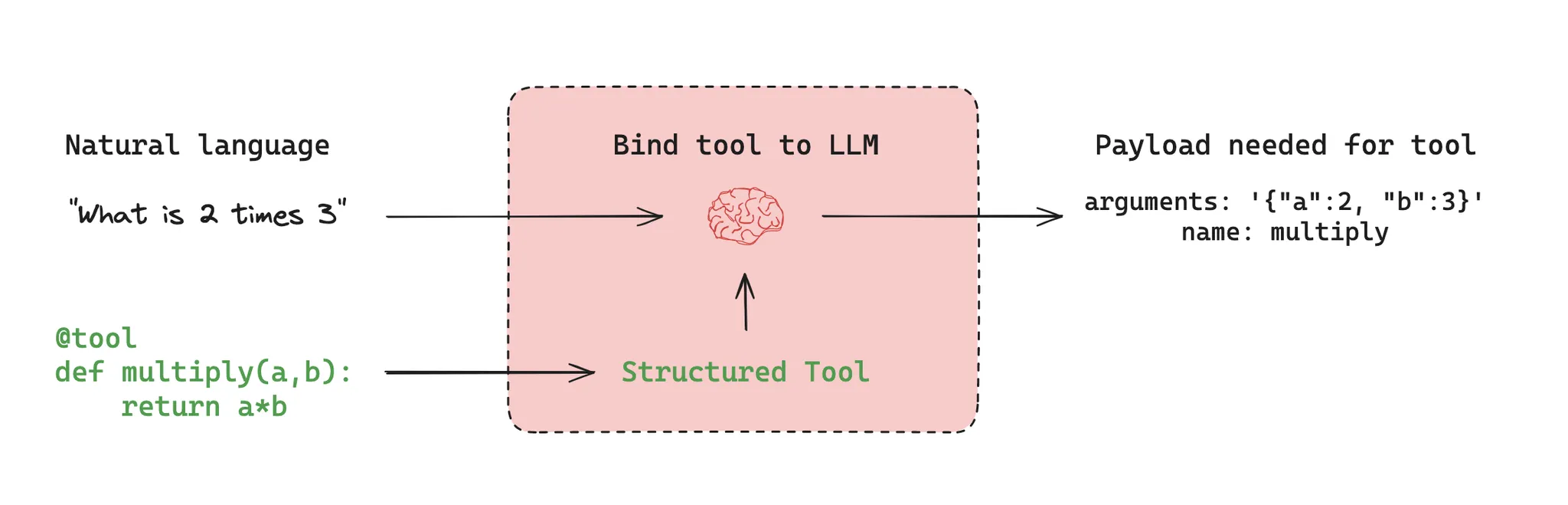
LLM은 사용자의 query가 들어왔을 때 결합된 도구의 Desciption을 바탕으로 해당 도구를 사용할 것 인지 판단하고 필요하다면 호출하여 부족한 정보나 특수한 기능을 수행하게 된다
예제 코드는 맛집 추천 AI 프로젝트를 참고하여 진행합니다
Tavily와 LLM의 연동 과정
1. 도구 선언
먼저 @tool 어노테이션과 함께 LLM이 사용할 도구를 지정합니다.
@tool
def search_web(query: str) -> str:
		# (1)
    """
    Searches the internet for information that does not exist
    in the database or for the latest information.
    """

    tavily_search = TavilySearchResults(max_results=5,
																		    # (2)
                                        include_domains=[
                                            "https://www.tistory.com/",
                                            "https://blog.naver.com/",
                                            "https://www.daum.net/",
                                            "https://brunch.co.kr/"])
    docs = tavily_search.invoke(query)

    if not docs:
        return "관련 정보를 찾을 수 없습니다."

    formatted_docs = "\n---\n".join(
        [
            f'<Document href="{doc["url"]}"/>\n{doc["content"]}\n</Document>'
            for doc in docs
        ]
    )

return formatted_docs(1) function을 구현할 때 Description을 통해 LLM이 어떤 도구인지 이해할 수 있게 작성합니다
(2) (Optional) 검색엔진에게 참고할 도메인을 지정해줄 수 있습니다
반대로 exclude_domains로 제외할 도메인을 지정할 수도 있습니다
(3) (Optional) 응답 포맷을 지정해줍니다
2. LLM 선언 및 Chain 결합
모델 초기화를 진행하고
def initialize_llm() -> ChatOpenAI:
    """
    LLM을 호출하는 함수
    """
    return ChatOpenAI(model="gpt-4o-mini")
프롬프트 템플릿을 정의한다.
def create_prompt_template(feature: str) -> ChatPromptTemplate:
    """
    ChatPromptTemplate을 생성하는 함수
    """
    prompt_template = ChatPromptTemplate([ # (1)
        ("system", f"""
          당신은 사용자의 나이, 성별, 희망 카테고리을 기반으로 맞춤형 식당을 추천하는 어시스턴트입니다.

          아래 사용자의 특성을 반영해서 맞춤형 맛집을 추천해주세요
          {feature}

        """),
        ("user", "#Format: {format_instructions}\n\n#user_input: {user_input}"),
        ("placeholder", "{messages}")
    ])
    output_parser = JsonOutputParser(pydantic_object=Recommendation) # (2)
    prompt = prompt_template.partial(
	    format_instructions=output_parser.get_format_instructions()
	  ) # (3)

    return prompt
(1) 요청 파라미터로 부터 프롬포트의 feature를 받아서 추천합니다
(2) API로 돌려줄 것 이기 때문에 응답 형식은 JSON으로 합니다
(3) OutputParser를 프롬포트에 입력해줍니다
LLM과 Tool을 결합하여 실행할 수 있는 체인을 생성한다.
def execute_web_search_chain(prompt: ChatPromptTemplate) -> Any:
    """
    LLM과 웹 검색 툴을 연결한 체인을 생성하여 반환
    """
    llm = initialize_llm()
    llm_with_tools = llm.bind_tools(tools=[search_web])
    llm_chain = prompt | llm_with_tools # (1)

return llm_chain(1) LCEL(Langchain Expression Language) 체인 결합
3. 최종 실행 및 결과 확인
이제 완성된 함수들을 호출하여 결과를 확인할 수 있다.
def recommend_restaurant(req: RecommendationRequest) -> dict:
    """
    추천 요청을 받아서 맛집을 추천하는 함수
    """
    feature = f"나이: {req.user.age}, 성별: {req.user.gender}, 카테고리: {req.category}"
    prompt = create_prompt_template(feature)

    # 체인 생성
    llm_with_chain = execute_web_search_chain(prompt)

    # invoke 실행 (1차 호출 -> Tool 호출)
    ai_msg = llm_with_chain.invoke({"user_input": req.region}, config=RunnableConfig())
    print("Tool Calling:", ai_msg)

    # search_web 호출하여 추가 데이터 가져오기
    tool_msgs = search_web.batch(ai_msg.tool_calls, config=RunnableConfig())

    # LLM에게 검색 결과를 다시 전달하여 최종 응답 생성 (2차 호출)
    final_response = llm_with_chain.invoke({"user_input": req.region, "messages": [ai_msg, *tool_msgs]}, config=RunnableConfig())
    print("Final AI Response:", final_response)

    # JSON 파싱
    json_str = final_response.content.replace("```json\n", "").replace("\n```", "")
    return json.loads(json_str, strict=False)
실행 결과
하단의 Request 쿼리를 날렸을 떄 invoke 실행 1차 호출 결과를 보면
{
  "user": {
    "age": 20,
    "gender": "남성"
  },
  "region": "대치동",
  "category": "국밥"
}
Tool Calling: content='' additional_kwargs={'tool_calls': [{'id': 'call_AByM0FBGcxsC6esoudKl47mv', 'function': {'arguments': '{"query":"대치동 국밥 맛집 추천"}', 'name': 'se}, 'type': 'function'}], 'refusal': None} response_metadata={'token_usage': {'completion_tokens': 23, 'prompt_tokens': 450, 'total_tokens': 473, 'completion_tokens_details': {'accepted_prediction_tokens': 0, 'audio_tokens': 0, 'reasoning_tokens': 0, 'rejected_prediction_tokens': 0}, 'prompt_tokens_details': {'audio_tokens': 0, 'cached_tokens': 0}}, 'model_name': 'gpt-4o-mini-2024-07-18', 'system_fingerprint': 'fp_72ed7ab54c', 'finish_reason': 'tool_calls', 'logprobs': None} id='run-b1c81b02-0c1d-4da7-a2f5-25411de669fd-0' tool_calls=[{'name': 'search_web', 'args': {'query': '대치동 국밥 맛집 추천'}, 'id': 'call_AByM0FBGcxsC6esoudKl47mv', 'type': 'tool_call'}] usage_metadata={'input_to0, 'output_tokens': 23, 'total_tokens': 473}물론 Tool이 하나 밖에 없어서 그렇지만 맛집 추천 search_web 도구를 호출하기로 LLM이 판단
Final Answer에서 호출한 도구의 Document를 바탕으로 content 즉 생성된 응답을 확인 할 수 있다.
Final AI Response: content='```json\n{\n "msg": "대치동에서 추천하는 국밥 맛집입니다.",\n "restaurants": [\n {\n "name": "부산 돼지국밥",\n "description": "부산의 진한 국밥을 맛볼 수 있는 곳으로, 신선한 재한 맛을 경험할 수 있는 인기 있는 맛집입니다.",\n "url": "https://map.naver.com/p/search/부산+돼지국밥+맛집/place/1522848840?c=15.00,0,0,0,dh&placePath=/menu"\n },\n {\n "name": "대치동 국밥집",\n "de료와 깊은 맛이 일품입니다.",\n "reason": "국밥의 진정한 맛을 경험할 수 있는 인기 있는 맛집입니다.",\n "url": "https://map.naver.com/p/search/부산+돼지국밥+맛집/place/1522848840?c=15.00,0,0,0,dh&placePath=/menu"n "description": "푸짐하고 따뜻한 국밥을 제공하는 전통적인 식당입니다.",\n "reason": "국밥의 풍미가 가득한 메뉴로 많은 단골 고객을 보유하고 있습니다.",\n "url": "https://map.naver.com/p/entry/place/1203854"국밥 전문점",\n "description": "신선한 재료로 만든 다양한 국밥 메뉴를 자랑하는 곳입니다.",\n "reason": "국밥의 종류가 다양하여 선택의 폭이 넓습니다.",\n "url": "https://map.naver.com/p/entry/place/1775269 "description": "정통 국밥의 맛을 느낄 수 있는 곳으로, 맛있는 밑반찬도 함께 제공합니다.",\n "reason": "국8"\n }\n ]\n}\n```' additional_kwargs={'refusal': None} response_metadata={'token_usage': {'completion_tokens': 437, 'prompt_tokens': 755, 'total_tokens': 1192, 'completion_tokens_details': {'accepted_prediction_tokens': 0, 'audio_tokens': 0, 'reasoning_tokens': 0, 'rejected_prediction_tokens': 0}, 'prompt_tokens_details': {'audio_tokens': 0, 'cached_tokens': 0}}, 'model_name': 'gpt-4o-mini-2024-07-18', 'system_fingerprint': 'fp_bd83329f63', 'finish_reason': 'stop', 'logprobs': None} id='run-82390e5d-28c8-4137-9f99-0b98dc522c28-0' usage_metadata={'input_tokens': 755, 'output_tokens': 437, 'total_tokens': 1192}참고