📚 오늘은….
유니티 숙련강의를 마무리하고
디자인 패턴에 대한 강의를 듣고 따로 정리하는 시간을 가졌다.
그리고 개인 프로젝트를 시작하였다.
💡오늘의 학습 인사이트
💡오늘의 프로젝트 진행
금일 프로젝트는 진행은 다음과 같다.
- 기본 환경 설정
- git과 연동
- 플레이어 이동, 점프, 카메라 줌 인/아웃
기본 이동 및 점프
Input System, `Rigidbody ForceMode` 를 활용하고
기존 강의에서는 Invoke Unity Event 방식으로 behavior를 설정하였지만,
여기서 나는 Invoke C# Event방식으로 구현해보았다.
우선 PlayerInputAction 에셋을 만들어서
Move, Jump, Look, 그리고 이후에 구현할 Inventory, Interact까지 설정하였다.
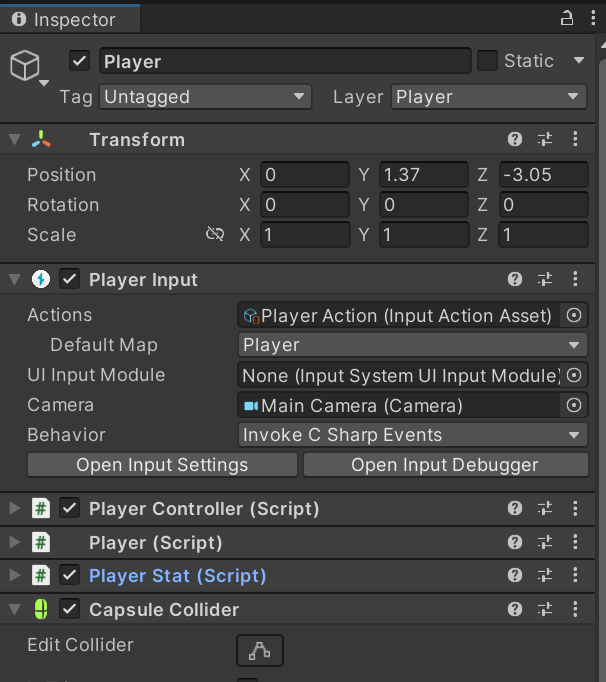
이제 PlayerController.cs를 작성한다.
using System;
using UnityEngine;
using UnityEngine.InputSystem;
using static UnityEditor.Timeline.TimelinePlaybackControls;

public class PlayerController : MonoBehaviour
{
    [Header("이동")]
    public float movSpeed;
    public float JumpPower;
    private Vector2 curMovementInput;
    private Rigidbody rb;
    public LayerMask groundLayerMask;

    [Header("방향")]
    public Transform cameraContainer;
    [SerializeField] private Camera playerCamera;
    public float minXLook;
    public float maxXLook;
    public float minFOV = 30f;
    public float maxFOV = 90f;
    private float camCurXRot;
    public float lookSensitivity;
    public float zoomSensitivity;
    private Vector2 mouseDelta;
    private bool canLook = true;

    public event Action onInventoryToggle;

    // PlayerInput 컴포넌트 참조
    private PlayerInput playerInput;

    private void Awake()
    {
        rb = GetComponent<Rigidbody>();
        playerInput = GetComponent<PlayerInput>();
    }

    private void Start()
    {
        Cursor.lockState = CursorLockMode.Locked;
    }

    private void OnEnable()
    {
        // Move 액션
        playerInput.actions["Move"].performed += OnMove;
        playerInput.actions["Move"].canceled += OnMove;
        // Look 액션
        playerInput.actions["Look"].performed += OnLook;
        // Jump 액션
        playerInput.actions["Jump"].started += OnJump;
        // Inventory 액션
        playerInput.actions["Inventory"].started += OnInventory;
        playerInput.actions["Zoom"].performed += OnZoom;
    }

    private void OnDisable()
    {
        playerInput.actions["Move"].performed -= OnMove;
        playerInput.actions["Move"].canceled -= OnMove;
        playerInput.actions["Look"].performed -= OnLook;
        playerInput.actions["Jump"].started -= OnJump;
        playerInput.actions["Inventory"].started -= OnInventory;
        playerInput.actions["Zoom"].performed -= OnZoom;
    }

    private void FixedUpdate()
    {
        Move();
    }

    private void LateUpdate()
    {
        if (canLook)
            CameraLook();


    }

    // Move 입력 처리
    private void OnMove(InputAction.CallbackContext ctx)
    {
        if (ctx.phase == InputActionPhase.Performed)
            curMovementInput = ctx.ReadValue<Vector2>();
        else if (ctx.phase == InputActionPhase.Canceled)
            curMovementInput = Vector2.zero;
    }

    // Look 입력 처리
    private void OnLook(InputAction.CallbackContext ctx)
    {
        mouseDelta = ctx.ReadValue<Vector2>();
    }

    // Jump 입력 처리
    private void OnJump(InputAction.CallbackContext ctx)
    {
        if (IsGrounded())
        {
            rb.AddForce(Vector2.up * JumpPower, ForceMode.Impulse);
        }
    }

    // Inventory 입력 처리 : 어작 미구현
    private void OnInventory(InputAction.CallbackContext ctx)
    {
        onInventoryToggle?.Invoke();
        ToggleCursor();
    }
    private void OnZoom(InputAction.CallbackContext ctx)
    {
        // Vector2일 때
        float scrollY = ctx.ReadValue<Vector2>().y;

        float newFOV = playerCamera.fieldOfView - scrollY * zoomSensitivity;
        playerCamera.fieldOfView = Mathf.Clamp(newFOV, minFOV, maxFOV);
    }

    private void Move()
    {
        Vector3 dir = (transform.forward * curMovementInput.y + transform.right * curMovementInput.x) * movSpeed;
        dir.y = rb.velocity.y;
        rb.velocity = dir;
    }

    private void CameraLook()
    {
        camCurXRot += mouseDelta.y * lookSensitivity;
        camCurXRot = Mathf.Clamp(camCurXRot, minXLook, maxXLook);
        cameraContainer.localEulerAngles = new Vector3(-camCurXRot, 0, 0);
        transform.eulerAngles += Vector3.up * (mouseDelta.x * lookSensitivity);
        mouseDelta = Vector2.zero;
    }

    private bool IsGrounded()
    {
        Ray[] rays = new Ray[4]
        {
            new Ray(transform.position + transform.forward * 0.2f + transform.up * 0.01f, Vector3.down),
            new Ray(transform.position - transform.forward * 0.2f + transform.up * 0.01f, Vector3.down),
            new Ray(transform.position + transform.right   * 0.2f + transform.up * 0.01f, Vector3.down),
            new Ray(transform.position - transform.right   * 0.2f + transform.up * 0.01f, Vector3.down)
        };

        foreach (var ray in rays)
            if (Physics.Raycast(ray, 2f, groundLayerMask))
                return true;

        return false;
    }

    private void ToggleCursor()
    {
        bool unlocked = (Cursor.lockState == CursorLockMode.None);
        Cursor.lockState = unlocked ? CursorLockMode.Locked : CursorLockMode.None;
        canLook = unlocked;
    }
}
그리고 인스펙터 창에서 알맞은 값을 넣어주자
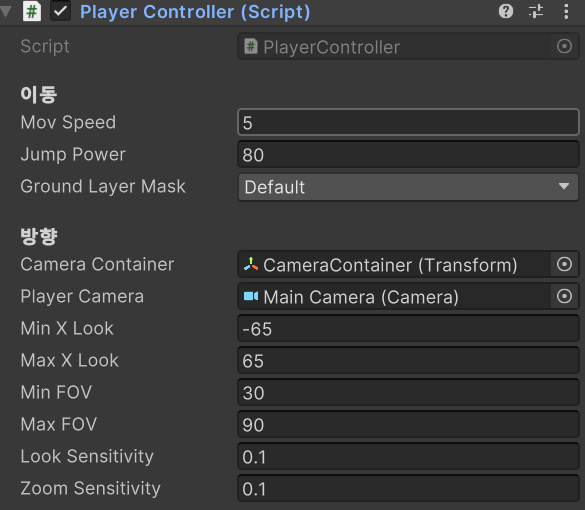
잘 된다.
💭오늘의 회고
- 너무 많은 지식이 눈앞에서 범람하고 있어서 하루하루 버티는 느낌이다.
천천히, 꾸준하게, 끝까지