
EasyOCR
- 딥러닝 기반의 광학 문자 인식(OCR) 라이브러리
- 여러 언어를 지원하며 이미지에서 텍스트를 빠르고 정확하게 추출할 수 있다.
- PyTorch를 기반으로 하여 동작하며, 사전 학습된 모델을 활용해 다양한 글꼴과 크기의 문자를 인식할 수 있다.
- 특히 번호판, 문서 스캔, 표지판 등의 텍스트를 감지하는 데 유용하며, OpenCV와 함께 사용하여 전처리 과정을 최적화하면 인식 정확도를 더욱 향상시킬 수 있다.
- EasyOCR의 핵심 기능은
readtext()함수를 사용하여 이미지에서 텍스트를 감지하고, 바운딩 박스와 신뢰도를 함께 제공하는 것이다.
25_easyocr.py
import cv2
import easyocr

# EasyOCR 리더 초기화
ocr_reader = easyocr.Reader(['ko']) #'ko'인 경우, 한글 영어 숫자 모두 감지함.

# 이미지 경로 리스트
image_file_paths = ['./images/test1.jpg', './images/test2.jpg', './images/test3.jpg', './images/test4.jpg', './images/test5.jpg']

for image_path in image_file_paths:
    print(f"Processing {image_path}")

    # 이미지 읽기
    input_image = cv2.imread(image_path)
    if input_image is None:
        print(f"이미지를 불러올 수 없습니다: {image_path}")
        continue # 다음 반복문으로 넘어감.

    # 그레이스케일 변환
    gray_image = cv2.cvtColor(input_image, cv2.COLOR_BGR2GRAY)

    # Bilateral 필터 적용 (노이즈 감소 + 가장자리 보존)
    # bilateralFilter(영상, 필터 크기, 색상 및 공간 필터 파라미터(값이 클수록 노이즈 제거의 강도가 높아짐. -> 얇은 선도 사라질 수 있음.))
    denoised_image = cv2.bilateralFilter(gray_image, 9, 75, 75)

    # Otsu 이진화 적용 (자동 임계값 설정)
    _, binary_image = cv2.threshold(denoised_image, 0, 255, cv2.THRESH_BINARY + cv2.THRESH_OTSU)

    # 번호판 ROI(관심 영역) 감지를 위한 Canny 엣지 검출
    edges = cv2.Canny(binary_image, 50, 150)

    # OCR을 원본 및 전처리된 이미지에서 수행
    ocr_images = [input_image, binary_image, edges]
    detected_license_plates = {}

    for ocr_img in ocr_images:
        # readtext 반환값
        # bbox(텍스트 영역 바운딩 박스), text(감지된 문자), prob(신뢰도. 0~1)
        # tl:좌상단, tr:우상단, br:우하단, bl:좌하단
        detected_texts = ocr_reader.readtext(ocr_img)

        # 번호판은 일반적으로 7자 이상이고 숫자가 포함되어 있으므로, 이를 만족하는 경우만 필터링
        for (bbox, text, prob) in detected_texts:
            if len(text) >= 7 and any(char.isdigit() for char in text):  # 번호판 형식 필터링

                # 바운딩 박스 좌표 변환
                (tl, tr, br, bl) = bbox
                tl, tr, br, bl = tuple(map(tuple, [tl, tr, br, bl]))
                # 4개의 리스트 튜플로 변환
                width = br[0] - tl[0]
                height = br[1] - tl[1]
                aspect_ratio = width / height if height > 0 else 0

                # 번호판 가로/세로 비율이 너무 작거나 크면 제외 (일반적으로 2~5 범위)
                if 2.0 <= aspect_ratio <= 5.0:
                    # OCR 결과 중 가장 높은 신뢰도(prob)를 가진 텍스트만 저장
                    if text not in detected_license_plates or detected_license_plates[text][1] < prob:
                        detected_license_plates[text] = (bbox, prob)

    # 최종 감지된 번호판 중 신뢰도 높은 것 하나만 시각화
    if detected_license_plates:
        best_text = max(detected_license_plates, key=lambda x: detected_license_plates[x][1])
        best_bbox, best_prob = detected_license_plates[best_text]

        (tl, tr, br, bl) = best_bbox
        tl = tuple(map(int, tl))
        br = tuple(map(int, br))

        # 텍스트 영역에 사각형 그리기
        cv2.rectangle(input_image, tl, br, (0, 255, 0), 2)

        # 텍스트 출력
        cv2.putText(input_image, best_text, (tl[0], tl[1] - 10), cv2.FONT_HERSHEY_SIMPLEX, 0.8, (0, 255, 0), 2)

        print(f"감지된 번호판: {best_text} (신뢰도: {best_prob:.2f})")
    else:
        print("감지된 번호판이 없습니다.")

    # 결과 이미지 표시
    cv2.imshow('Detected License Plates', input_image)
    cv2.waitKey()
    print()
easyocr 설치 : cmd창에서 pip install easyocr 입력
Processing ./images/test1.jpg
감지된 번호판: 99845006 (신뢰도: 0.99)

Processing ./images/test2.jpg
감지된 번호판: 154러 7070 (신뢰도: 0.90)

Processing ./images/test3.jpg
감지된 번호판: 157고4895 (신뢰도: 0.75)

Processing ./images/test4.jpg
감지된 번호판이 없습니다.

Processing ./images/test5.jpg
감지된 번호판: 403수 7975' (신뢰도: 0.29)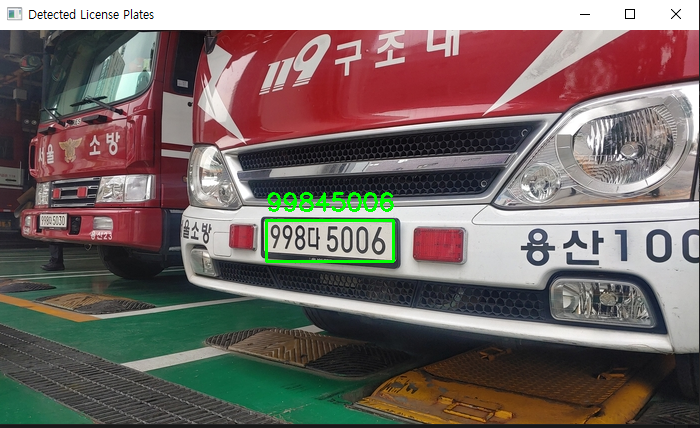
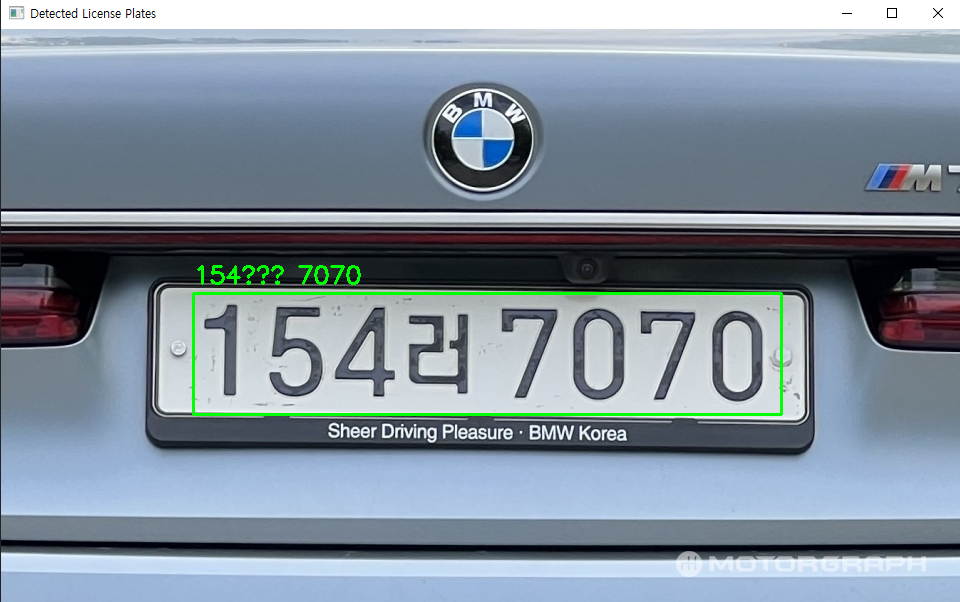
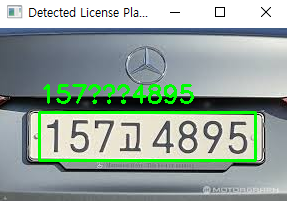
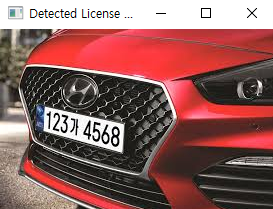
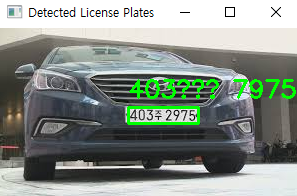
4번째 빨간 차 번호는 아예 읽어내지를 못했다.
다른 차들은 한글을 잘 읽어내지 못했다.
※ 만약, EasyOCR 예제에서
imshow()가 작동하지 않을 때pip uninstall opencv-python-headless pip install opencv-python위 opencv가 설치되지 않는 경우,
pip install --upgrade --force-reinstall opencv-python

The light shines in the darkness.