UI바인딩을 하는 이유
UI에는 이미지, 버튼, 텍스트 등 많은 컴포넌트가 있는데 구조가 커지면서 이러한 정보가 많아질 때 일일히 유니티 툴에서 수동으로 연결해주는게 실수가 일어날 수 있다.
그리고 씬 또는 프리펩 등 메타 데이터가 변경 또는 손실 되면 연결된 정보가 초기화가 될 수도 있다.
UI 구조
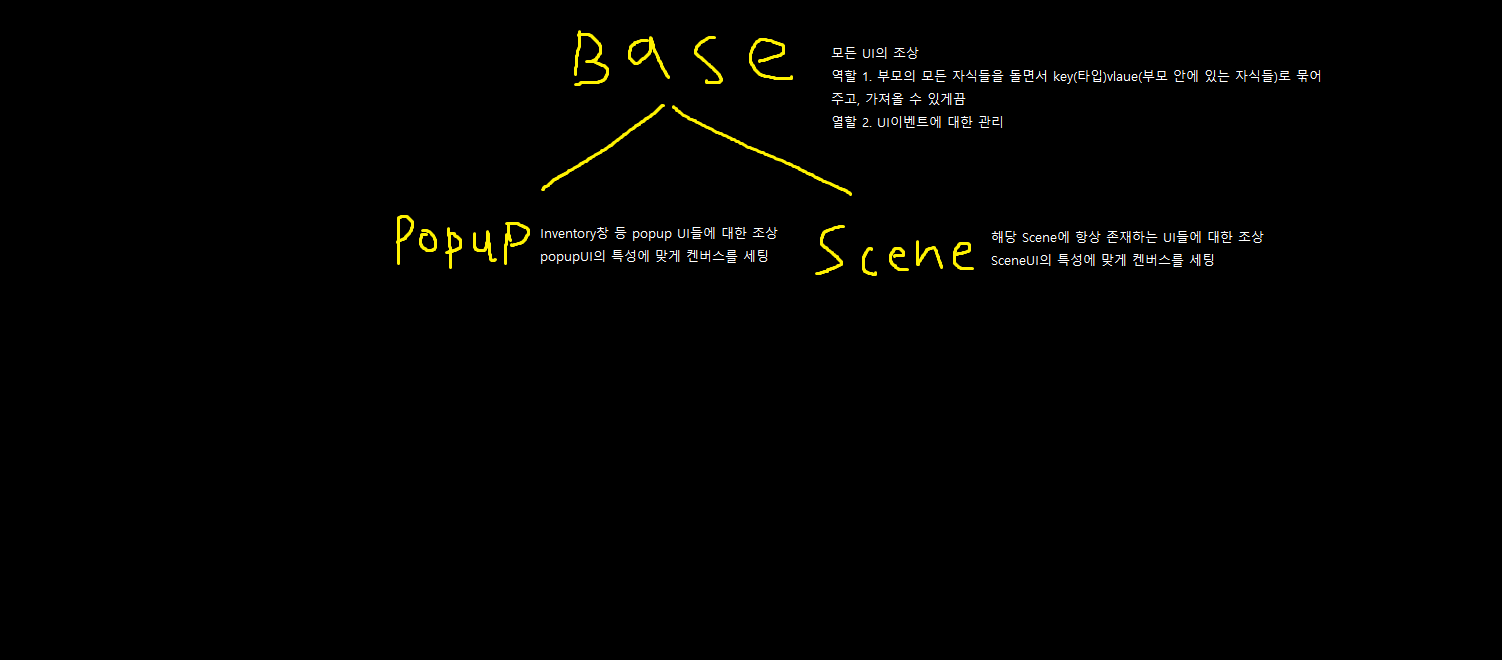
UIBase
자식들을 저장할 자료구조
- 컴포넌트 타입을 Key, 해당 타입을 갖는 컴포넌트 배열을 Value로 설정
private Dictionary<Type, UnityEngine.Object[]> _componentDictionary = new Dictionary<Type, UnityEngine.Object[]>();Bind
protected void Bind<T>() where T : UnityEngine.Object
{
    //필터 해줄 타입 추가
    if (typeof(T) != typeof(Button) && typeof(T) != typeof(TextMeshProUGUI) && typeof(T) != typeof(Image) && typeof(T) != typeof(GameObject)) return;


    if (typeof(T) == typeof(GameObject))
    {
        Transform[] transforms = Util.FindChilds<Transform>(transform, true);
        GameObject[] gameObjects = new GameObject[transforms.Length];
        for (int i = 0; i < transforms.Length; i++)
        {
            gameObjects[i] = transforms[i].gameObject;
        }

        _componentDictionary.Add(typeof(GameObject), gameObjects);
        return;
    }

    T[] objects = Util.FindChilds<T>(transform, true);

    _componentDictionary.Add(typeof(T), objects);
}
Get
protected T Get<T>(string name) where T : UnityEngine.Object
{
    UnityEngine.Object[] objects = null;
    if (_componentDictionary.TryGetValue(typeof(T), out objects) == false) return null;

    foreach (UnityEngine.Object obj in objects)
    {
        if (obj.name == name) return obj as T;
    }

    return null;
}
Event관리
protected void AddUIEvent(GameObject go, Action<PointerEventData> action, Define.UIEvent uIEvent)
{
    UIEventHandler uiEventHandler = Util.GetOrAddComponent<UIEventHandler>(go);


    switch (uIEvent)
    {
        case Define.UIEvent.Click:
            uiEventHandler.ClickAction -= action;
            uiEventHandler.ClickAction += action;
            break;
        case Define.UIEvent.Drag:
            uiEventHandler.DragAction -= action;
            uiEventHandler.DragAction += action;
            break;
    }
}
사용법
- 해당 캔버스에서 사용할 UI컴포넌트들을 Bind -> Dictionary에 데이터 추가됨
- Get -> Dictionary에 저장된 정보를 타입별로 가져와서 수정
- 텍스트 수정
GetText("stage").text = $"stage : {_stage}";- 이벤트 추가
AddUIEvent(GetButton("stageBtn").gameObject, OnClick, Define.UIEvent.Click);private AsyncOperationHandle _operationHandle;
private GameObject _itemIconGameObject;
private int _stage = 0;
private void Start()
{
Bind<Image>();
Bind<Button>();
Bind<TextMeshProUGUI>();
_itemIconGameObject = GetImage("itemIcon").gameObject;
AddUIEvent(_itemIconGameObject, OnDrag, Define.UIEvent.Drag);
AddUIEvent(GetButton("stageBtn").gameObject, OnClick, Define.UIEvent.Click);
AddUIEvent(GetButton("unloadBtn").gameObject, UnloadSprite, Define.UIEvent.Click);
}
private void OnDrag(PointerEventData eventData)
{
_itemIconGameObject.transform.position = eventData.position;
}
private void OnClick(PointerEventData eventData)
{
_stage++;
GetText("stage").text = $"stage : {_stage}";
}