💾 Main Memory (Volatile Memory)
- Type: RAM
- Purpose: Stores data and instructions that the CPU is currently executing
- Note: Data is lost when the power is off(volatile)
🧠 Why is RAM important?
As RAM size increases, more programs and data can be loaded at once, reducing the need to frequently access slower secondary storage.
📘 Types of RAM
| Type | Description |
|---|---|
| DRAM (Dynamic RAM) | Data fades over time and must be refreshed regularly. Denser and cheaper than SRAM. |
| SRAM (Static RAM) | Holds data as long as power is on, no need to refresh, faster than DRAM but more expensive. Used in CPU registers and cache. |
| SDRAM (Synchronous DRAM) | Synchronized with the system clock; transfers one piece of data per clock cycle. |
| DDR SDRAM (Double Data Rate SDRAM) | Transfers data on both the rising and falling edges of the clock — effectively 2× bandwidth compared to SDRAM. |
💽 Secondary Storage (Non-Volatile)
- Examples: SSD, CD-ROM, Hard Disk, USB
- Purpose: Long-term storage of programs, files, and OS
- Note: Data is retained when the power is off
🧭 Physical vs Logical Address
🧠 Logical Address – Used by the CPU and Running Programs
- Every program has their own logical address starting from 0
- CPU accesses memory using logical addresses - not phycial ones directly
🛠 How are Logical Addresses Translated to Physical Addresses?
: The MMU(Memory Management Unit) handles this translation.
It sits between the CPU and the address bus and uses two key registers:
- base register: Added to the logical address to generate physical address
- limit register: Ensure the logical address doesn't exceed the allowed range
🧠 ✅ Valid Address Check
base ≤ logical address + base ≤ base + limit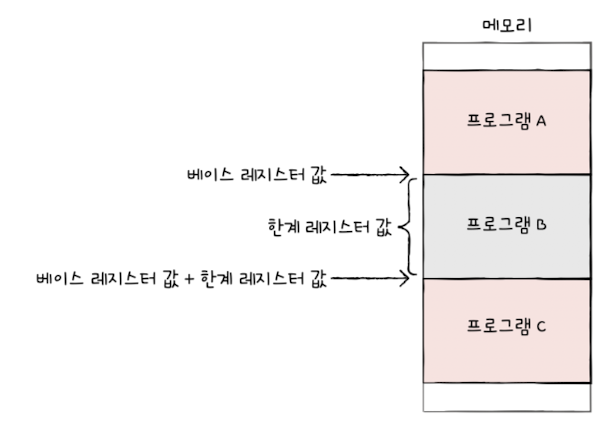
logical register > limit register value➡️ A trap (interrupt) occurs to prevent invalid memory access.
➡️ The address in an instruction is virtual address
📦 Physical Address – Actual Address in RAM
- The real location in physical memory(RAM) where data and instructions reside.
⚡ Cache Memory
🏛️ Memory Hierarchy
- The closer to the CPU, the faster the memory.
- The faster the memory, the smaller and more expensive it tends to be.
💾 What is Cache Memory(SRAM)?
Cache is a small, high-speed SRAM memory located closer to the CPU than main memory (RAM)
Its main job is to temporarily store frequently used data or instructions to reduce the time that the CPU takes to access memory.
📌 Why do we need cache?
- Cache bridges the speed gap between the CPU and RAM.
- Accessing RAM is slower than accessing registers.
- Even with high-performance CPUs(multicore, superscalar, etc.), memory access remains a bottleneck
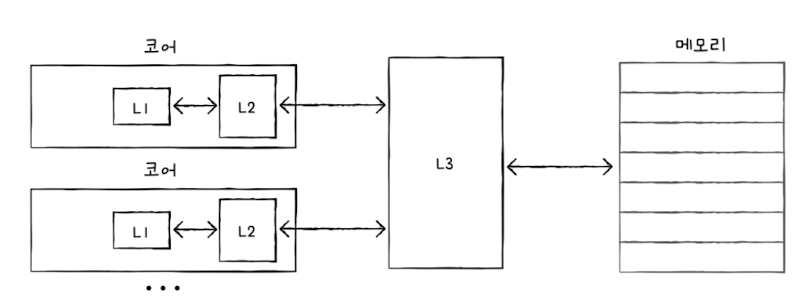
speed: L1 > L2 > L3
L1 and L2 is inside the CPU and L3 is outside
Multi-core contains each cache memory(L1, L2) and share L3
🎯 Cache Performance
- Cache Hit: Data/instruction is found in the cache → ✅ Fast access
- Cache Miss: Not found in cache → ❌ Access main memory (slower)
🧠 How does the cache predict what data to store?
Locality of Reference (two types):
- temporal locality: Recently accessed memory is likely to be accessed again soon
- spatial locality: Nearby memory locations are likely to be accessed soon