💽 Hard Disk Drive (HDD)
🧩 Components of a Hard Disk
- Platter: A disk that stores data. A hard disk can have multiple platters
- track: A circular path on a platter where the data is writen- cylinder: a group of tracks that align across all platters vertically
- sector: The smallest unit of data storage on track
- Spindle: Rotate platters (measured in RPM)
- Head: Reads/writes data from/to the platters
- Disk arm: Moves the read/write head to the correct track. Each side of a platter has a head
How HDD Accesses Data
- Seek time: Time it takes for the disk arm to move the head to the correct track
- Rotational latency: Time waiting for the correct sector to rotate under the head
- Transfer time: Time to actually move data between the disk and computer
⚡ Flash Memory (SSD, USB, SD Card)
Flash memory stores using cells - the smallest unit of flash storage.
🧬 Types of Flash Memory

🧱 Flash Memory Structure
Only Read and Write, no override, remove data in a page unit
- Page: a group of cells
Read and write are based on page unit
- Block: a group of pages
Delete is done by block unit
- Plain: a group of blocks
- Die: a group of plains
⚠️ Key Properties of Flash Memory
"Data cannot be overwritten directly"
"Delete operation works at block level"
"Garbage collection moves valid pages to a new block and erase the old block to free up space"
How to Store Tons of Data Efficiently: RAID vs Distributed File System
🛠 RAID (Redundant Array of Independent Disks)
RAID is a techinique to store a large amount of data efficiently and securely by spliting data and storing them across multiple disks within a single computer
⚙️ Common RAID Levels
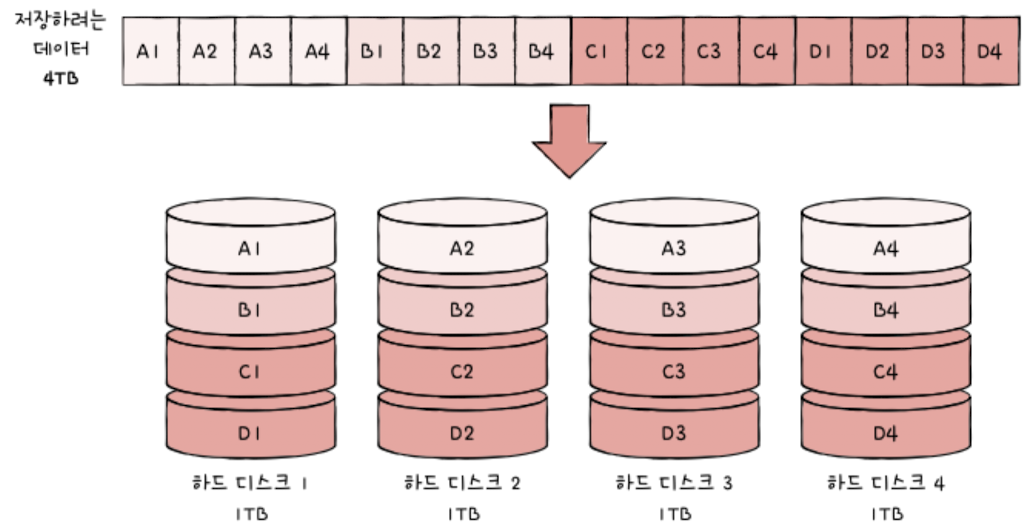
🔹 RAID 0 – Striping
Splits(stripe) data across multiple hard disks without redundancy
Pros: High read/write speed due to parallel access
Cons: No fault tolerance => if one hard disk fails, all data is lost
🔹 RAID 1 – Mirroring
Stores exact copies(replicas) of data on two or more disks.
Pros: high fault tolerance
Cons: need double the space
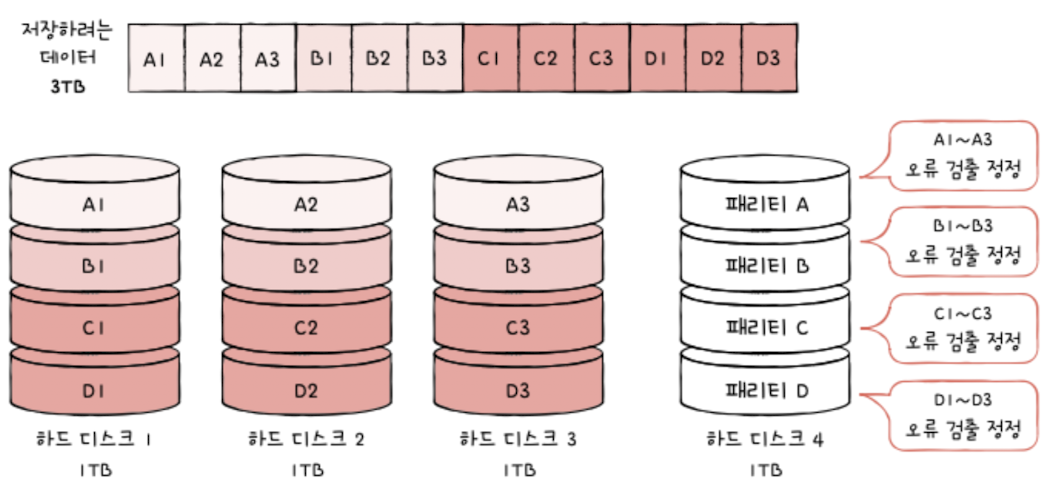
🔹 RAID 4 – Striping with Dedicated Parity
Data is striped across disks, and a separate disk stores parity bits
Pros: Good fault tolerance without full replications
Cons: The parity disk becomes a bottleneck for writes
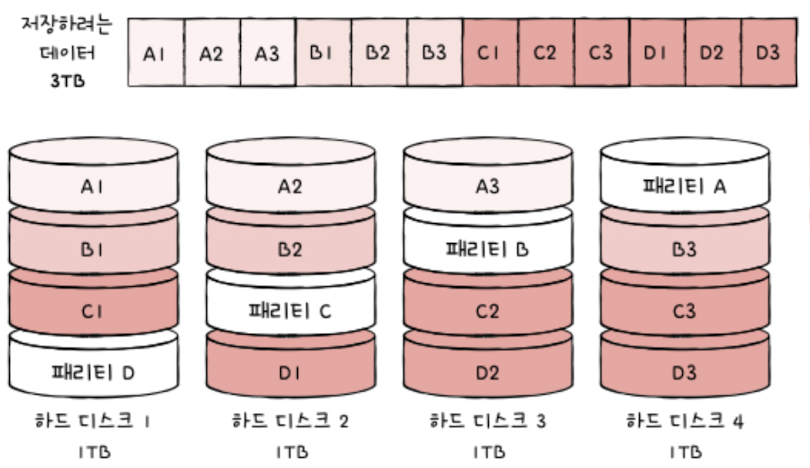
🔹 RAID 5 – Distributed Parity
Distributes both data and parity bits across disks
🔹 RAID 6 – Dual Parity
Like RAID5, but stores two parity blocks for each peice of data
Pros: Can recover from two disk failures
Cons: Slow write speed due to extra parity processing
🌐 Distributed File System (DFS)
DFS is a file system that stores data across multiple machines (nodes, servers, or storage units), not just multiple disks within one computer.
How it works: Splits large files into chunks, store chunks(and replicas) across different nodes, and read/write operations can be performed in parallel
Pros: High scailability, fast read/write through parallelism, high fault tolerance
Cons: hard to maintain data consistency across nodes. Operations like delete and update require synchronizing all replicas
What's the difference between RAID and DFS?
Both are for storing and reading data efficiently by spliting data or using parity bits.
RAID is a storage system in multiple disks in one computer, but DFS is that data spread across multiple computers