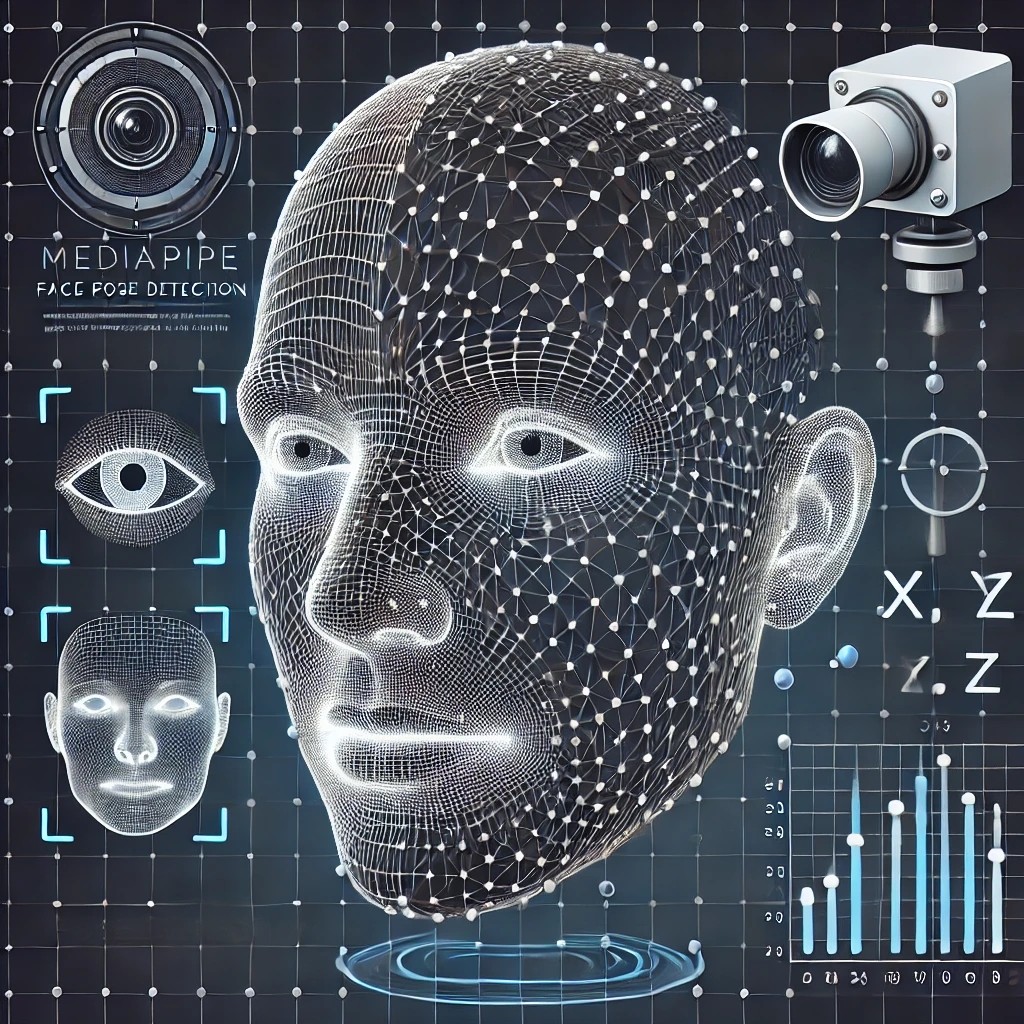
Chapter 2 Face Pose Detection
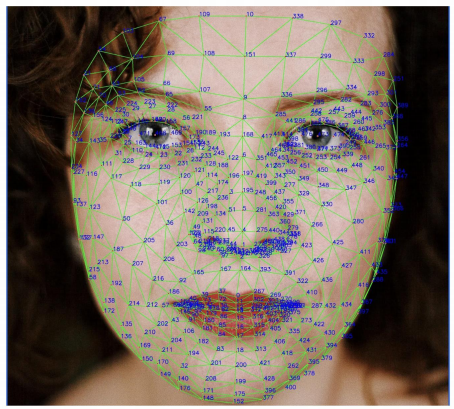
랜드마크를 활용하여 코 위치 찾기
from IPython.display import Image, display
import mediapipe as mp
import cv2
def img_show(image, width=400):
_, buffer = cv2.imencode('.jpg', image)
display(Image(data=buffer, width=width))img = cv2.imread(이미지 경로)
img_show(img, width=200) face_mesh = mp.solutions.face_mesh.FaceMesh(min_detection_confidence=0.5,
min_tracking_confidence=0.5)
drawing_specs = mp.solutions.drawing_utils.DrawingSpec(thickness=1, circle_radius=1)
results = face_mesh.process(img)img_copy = img.copy()
img_h, img_w, img_c = img.shape
for face_landmarks in results.multi_face_landmarks:
mp.solutions.drawing_utils.draw_landmarks(
image=img_copy,
landmark_list=face_landmarks,
landmark_drawing_spec=drawing_specs)
for idx, lm in enumerate(results.multi_face_landmarks[0].landmark):
if idx == 1:
nose_x = lm.x * img_w
nose_y = lm.y * img_h text = "Nose: ({}, {})".format(int(nose_x), int(nose_y))
cv2.putText(img_copy, text, (10, 30),
cv2.FONT_HERSHEY_SIMPLEX, 1, (0, 255, 0), 2,
cv2.LINE_AA)
print('nose position: ', (nose_x, nose_y))def find_nose_position(img):
img_h, img_w = img.shape[:2]
face_mesh = mp.solutions.face_mesh.FaceMesh(min_detection_confidence=0.5,
min_tracking_confidence=0.5)
results = face_mesh.process(img)
for face_landmarks in results.multi_face_landmarks:
for idx, lm in enumerate(face_landmarks.landmark):
if idx == 1:
nose_x = lm.x * img_w
nose_y = lm.y * img_h
return (int(nose_x), int(nose_y))x, y = find_nose_position(img_copy)
x, y cv2.circle(img_copy, (x, y), 10, (0, 255, 0), -1)
img_show(img_copy, width=300) 데이터 특징 추출하기
-
얼굴 각도 찾기
-
이미지 가져오기
img_path_main = r'C:\Users\admin\Desktop\ZB\zerobase class\LSTM\LSTM\Data\archive\AFLW2000\image00002'
img_path = img_path_main + '.jpg'
img = cv2.imread(img_path)
# img = cv2.cvtColor(img, cv2.COLOR_BGR2RGB)
print('image shape:', img.shape)

img_show(img, width=300) 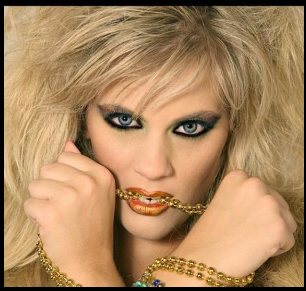
- mat 파일에 기록된 Pose_para 항목이 얼굴의 yaw, picth, roll 각도
import scipy.io

img_path_main = r'C:\Users\admin\Desktop\ZB\zerobase class\LSTM\LSTM\Data\archive\AFLW2000\image00002'
mat_path = img_path_main + '.mat'

mat = scipy.io.loadmat(mat_path)
pitch, yaw, roll = mat['Pose_Para'][0][:3]
pitch, yaw, roll
(-0.39923078, 0.018226579, 0.085676216)
- nose 위치 받기
nose_x, nose_y = find_nose_position(img)
nose_x, nose_y- x,y,z 좌표축을 그리기 위해 기준값 선정
import numpy as np

axes_points = np.array([
        [1, 0, 0, 0],
        [0, 1, 0, 0],
        [0, 0, 1, 0]
], dtype=np.float64)-
axes_points에 yaw, pitch, roll을 적용해서 회전행렬 얻기
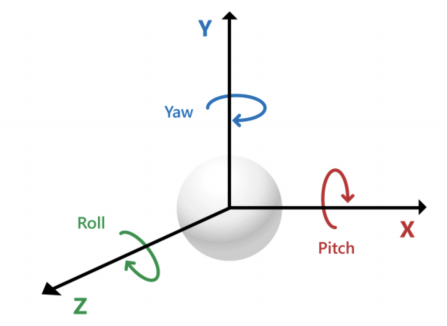
-
Rodrigues 함수
rotation_matrix = cv2.Rodrigues(np.array([pitch, -yaw, roll]))[0].astype(np.float64)
rotation_matrix
- 행렬곱 연산자(@)를 이용해서 행렬곱
axes_points = rotation_matrix @ axes_points
axes_points
- 그림을 그리기 위한 좌표 생성
size = 30

axes_points = (axes_points[:2, :] * size).astype(int)
axes_points- 코 위치에서 그리기 위해 코 좌표 반영
axes_points[0, :] = axes_points[0, :] + nose_x
axes_points[1, :] = axes_points[1, :] + nose_y
axes_points - 이미지에 좌표계 추가
new_img = img.copy()

cv2.line(new_img, tuple(axes_points[:, 3].ravel()),
                        tuple(axes_points[:, 0].ravel()), (255, 0, 0), 3)
cv2.putText(new_img, 'x', tuple(axes_points[:, 0].ravel()),
                        cv2.FONT_HERSHEY_TRIPLEX, 0.5, (255, 0, 0), 1)

cv2.line(new_img, tuple(axes_points[:, 3].ravel()),
                        tuple(axes_points[:, 1].ravel()), (0, 255, 0), 3)
cv2.putText(new_img, 'y', tuple(axes_points[:, 1].ravel()),
                        cv2.FONT_HERSHEY_TRIPLEX, 0.5, (0, 255, 0), 1)

cv2.line(new_img, tuple(axes_points[:, 3].ravel()),
                        tuple(axes_points[:, 2].ravel()), (0, 0, 255), 3)
cv2.putText(new_img, 'z', tuple(axes_points[:, 2].ravel()),
                        cv2.FONT_HERSHEY_TRIPLEX, 0.5, (0, 0, 255), 1)

img_show(new_img, width=400) 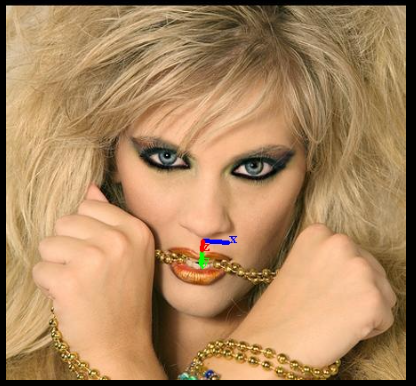
함수로 표현
- x,y,z축 그리기
def draw_axis_lines(img, axes_points, r, g, b):
    cv2.line(img, tuple(axes_points[:, 3].ravel()),
                    tuple(axes_points[:, 0].ravel()), r, 3)
    cv2.putText(img, 'x', tuple(axes_points[:, 0].ravel()),
                    cv2.FONT_HERSHEY_TRIPLEX, 0.5, r, 1)
    cv2.line(img, tuple(axes_points[:, 3].ravel()),
                    tuple(axes_points[:, 1].ravel()), g, 3)
    cv2.putText(img, 'y', tuple(axes_points[:, 1].ravel()),
                    cv2.FONT_HERSHEY_TRIPLEX, 0.5, g, 1)
    cv2.line(img, tuple(axes_points[:, 3].ravel()),
                    tuple(axes_points[:, 2].ravel()), b, 3)
    cv2.putText(img, 'z', tuple(axes_points[:, 2].ravel()),
                    cv2.FONT_HERSHEY_TRIPLEX, 0.5, b, 1)
return img - yaw pitch roll을 입력받아 이미지에 좌표계 추가
def draw_axes(img, pitch, yaw, roll, tx, ty, size=50):
    b = (255, 0, 0); g = (0, 255, 0); r = (0, 0, 255)
    rotation_matrix = cv2.Rodrigues(np.array([pitch, -yaw, roll]))[0].astype(np.float64)
    axes_points = np.array([ [1, 0, 0, 0], [0, 1, 0, 0], [0, 0, 1, 0] ], dtype=np.float64)

    axes_points = rotation_matrix @ axes_points
    axes_points = (axes_points[:2, :] * size).astype(int)
    axes_points[0, :] = axes_points[0, :] + tx
    axes_points[1, :] = axes_points[1, :] + ty

    new_img = img.copy()
    new_img = draw_axis_lines(new_img, axes_points, r, g, b)

return new_img- 적용
img_copy = draw_axes(img, pitch, yaw, roll, nose_x, nose_y)
img_show(img_copy, width=300) 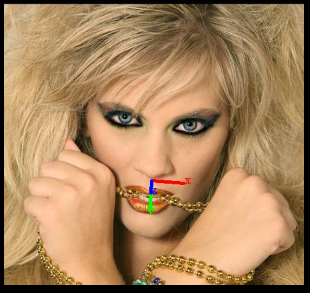
얼굴 각도 예측을 위한 ML모델 만들기
- 주요 특징점 정의
NOSE = 1
FOREHEAD =10
LEFT_EYE = 33
MOUTH_LEFT = 61
CHIN = 199
RIGHT_EYE = 263
MOUTH_RIGHT = 291- 해당 인덱스만 가지고 특징 추출
face_mesh = mp.solutions.face_mesh.FaceMesh(min_detection_confidence=0.5,
                                            min_tracking_confidence=0.5)
result = face_mesh.process(img)
face_features = []

for face_landmarks in result.multi_face_landmarks:
    for idx, lm in enumerate(face_landmarks.landmark):
        if idx in [FOREHEAD, NOSE, MOUTH_LEFT, MOUTH_RIGHT, CHIN, LEFT_EYE, RIGHT_EYE]:
            face_features.append(lm.x)
            face_features.append(lm.y)

face_features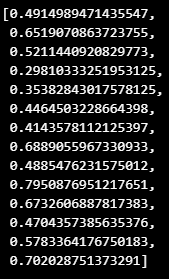
- mat파일에서 yaw pitch roll 가져옴
pose_angles = mat['Pose_Para'][0][:3]
face_features.extend(pose_angles)
face_features - 적용 확인
img_copy = img.copy()
img_h, img_w = img.shape[:2]

for i in range(len(face_features)//2):
    cv2.circle(img_copy,
                center=[int(face_features[i*2]*img_w), int(face_features[i*2+1]*img_h)],
                radius=4, color=(255, 0, 0), thickness=-1)

img_show(img_copy, width=300) 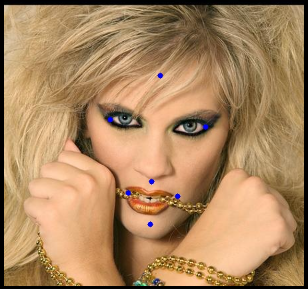
- 특징 추출 함수
def extract_features(img, face_mesh, mat=None):
    result = face_mesh.process(img)
    face_features = []

    if result.multi_face_landmarks != None :
        for face_landmarks in result.multi_face_landmarks:
            for idx, lm in enumerate(face_landmarks.landmark):
                if idx in [FOREHEAD, NOSE, MOUTH_LEFT, MOUTH_RIGHT, CHIN, LEFT_EYE, RIGHT_EYE]:
                    face_features.append(lm.x)
                    face_features.append(lm.y)
    else:
        face_features.extend([None]*14)

    if mat:
        pose_angles = mat['Pose_Para'][0][:3]
        face_features.extend(pose_angles)

    return face_features
face_mesh = mp.solutions.face_mesh.FaceMesh(min_detection_confidence=0.5,
min_tracking_confidence=0.5)
s = extract_features(img, face_mesh)
img_copy = img.copy()
for i in range(len(s)//2):
cv2.circle(img_copy,
center=[int(s[i*2]*img_w), int(s[i*2+1]*img_h)],
radius=4, color=(255, 0, 0), thickness=-1)
img_show(img_copy, width=300) - 컬럼 이름 만들기
cols = []
for pos in ['nose_', 'forehead_', 'left_eye_', 'mouth_left_', 'chin_',
                                                'right_eye_', 'mouth_right_']:
    for dim in ('x', 'y'):
        cols.append(pos+dim)

cols.extend(['pitch', 'yaw', 'roll'])
cols
- 파일 목록 얻어오기
import glob

path = glob.glob(r'경로\*.jpg')
path[0]
import pandas as pd
img_path_pd = pd.DataFrame({'img_id': img_id, 'img_path': img_path, 'mat_path': mat_path})
img_path_pd.head()- 만들어진 pandas에서 이미지 읽고, 특징과 얼굴 각도 정리
face_mesh = mp.solutions.face_mesh.FaceMesh(min_detection_confidence=0.5,
                                            min_tracking_confidence=0.5)
poses = []

for idx, row in img_path_pd.iterrows():
    img = cv2.imread(row['img_path'])
    img = cv2.cvtColor(img, cv2.COLOR_BGR2RGB)
    mat = scipy.io.loadmat(row['mat_path'])
    face_features = extract_features(img, face_mesh, mat)
    poses.append(face_features)

    if idx % 100 == 0:
print('Image Processed :', idx)- 랜덤하게 한장 가져와서 테스트
random_row = img_path_pd.sample(n=1).iloc[0]
img = cv2.imread(random_row['img_path'])

img_w, img_h = img.shape[:2]
s = extract_features(img, face_mesh)

if s[0] is not None:
    img_copy = img.copy()

    for i in range(len(s)//2):
        cv2.circle(img_copy,
                    center=[int(s[i*2]*img_w), int(s[i*2+1]*img_h)],
                    radius=4, color=(255, 0, 0), thickness=-1)

img_show(img_copy, width=300) 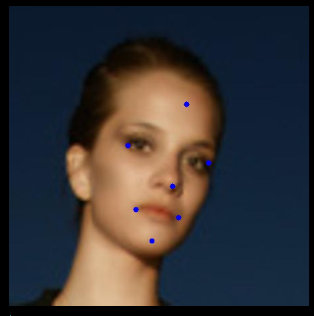
- 특징 추출
poses_df = pd.DataFrame(poses, columns=cols)
poses_df.head()
데이터 평준화를 통한 ML모델 학습하기
- 저장한 특징 파일에서 NaN 제거
import pandas as pd

poses_df = pd.read_csv('경로')
poses_df = poses_df.dropna(axis=0)
print(poses_df.shape)
poses_df.head()- 위치 조정 및 크기 맞추기
def normalize(poses_df):
    normalized_df = poses_df.copy()

    for dim in ['x', 'y']:
        for feature in ['forehead_'+dim, 'nose_'+dim, 'mouth_left_'+dim,
                        'mouth_right_'+dim, 'left_eye_'+dim, 'chin_'+dim, 'right_eye_'+dim]:
            normalized_df[feature] = poses_df[feature] - poses_df['nose_'+dim]

        diff = normalized_df['mouth_right_'+dim] - normalized_df['left_eye_'+dim]

        for feature in ['forehead_'+dim, 'nose_'+dim, 'mouth_left_'+dim,
                        'mouth_right_'+dim, 'left_eye_'+dim, 'chin_'+dim, 'right_eye_'+dim]:
            normalized_df[feature] = normalized_df[feature] / diff

    return normalized_df
poses_df = normalize(poses_df)
poses_df.head()
- train, test 데이터로 분할
from sklearn.model_selection import train_test_split

train_df, val_df = train_test_split(poses_df, test_size=0.2, random_state=13, shuffle=True )

X_train = train_df.drop(['pitch', 'yaw', 'roll'], axis=1)
y_train = train_df[['pitch', 'yaw', 'roll']]

X_val = val_df.drop(['pitch', 'yaw', 'roll'], axis=1)
y_val = val_df[['pitch', 'yaw', 'roll']]

print(X_train.shape, y_train.shape, X_val.shape, y_val.shape)- 간단한 ML 모델 학습 (SVR 사용)
from sklearn.svm import SVR
from sklearn.multioutput import MultiOutputRegressor
from sklearn.metrics import mean_squared_error

svr = SVR(kernel='rbf')
multi_out_svr = MultiOutputRegressor(svr)
multi_out_svr.fit(X_train, y_train)

print('train_rmse: ', np.sqrt(mean_squared_error(y_train, multi_out_svr.predict(X_train))))
print('validation_rmse: ', np.sqrt(mean_squared_error(y_val, multi_out_svr.predict(X_val))))
- 모델 저장
import pickle

pickle.dump(multi_out_svr, open('경로\best_model.pkl', 'wb'))
테스트 진행
import mediapipe as mp
import cv2
import numpy as np
import pandas as pd
import pickle

cols = []
for pos in ['nose_', 'forehead_', 'left_eye_', 'mouth_left_', 'chin_',
            'right_eye_','mouth_right_']:

    for dim in ('x', 'y'):
        cols.append(pos + dim)

NOSE = 1
FOREHEAD = 10
LEFT_EYE = 33
MOUTH_LEFT = 61
CHIN = 199
RIGHT_EYE = 263
MOUTH_RIGHT = 291

def extract_features(img, face_mesh):
    face_mesh = mp.solutions.face_mesh.FaceMesh(min_detection_confidence=0.5,
                                            min_tracking_confidence=0.5)
    result = face_mesh.process(img)
    face_features = []

    if result.multi_face_landmarks != None:
        for face_landmarks in result.multi_face_landmarks:
            for idx, lm in enumerate(face_landmarks.landmark):
                if idx in [FOREHEAD, NOSE, MOUTH_LEFT, MOUTH_RIGHT, CHIN, LEFT_EYE,RIGHT_EYE]:
                    face_features.append(lm.x)
                    face_features.append(lm.y)

    return face_features

def normalize(poses_df):
    normalized_df = poses_df.copy()

    for dim in ['x', 'y']:

        # Centerning around the nose
        for feature in ['forehead_'+dim, 'nose_'+dim, 'mouth_left_'+dim,
                        'mouth_right_'+dim, 'left_eye_'+dim, 'chin_'+dim, 'right_eye_'+dim]:
            normalized_df[feature] = poses_df[feature] - poses_df['nose_'+dim]

        # Scaling
        diff = normalized_df['mouth_right_'+dim] - normalized_df['left_eye_'+dim]
        for feature in ['forehead_'+dim, 'nose_'+dim, 'mouth_left_'+dim,
                        'mouth_right_'+dim, 'left_eye_'+dim, 'chin_'+dim, 'right_eye_'+dim]:
            normalized_df[feature] = normalized_df[feature] / diff

    return normalized_df

axes_points = np.array([
    [1, 0, 0, 0],
    [0, 1, 0, 0],
    [0, 0, 1, 0]
], dtype=np.float64)

def draw_axis_lines(img, axes_points, r, g, b):
    cv2.line(img, tuple(axes_points[:, 3].ravel()),
                    tuple(axes_points[:, 0].ravel()), r, 3)
    cv2.putText(img, 'x', tuple(axes_points[:, 0].ravel()),
                    cv2.FONT_HERSHEY_TRIPLEX, 0.5, r, 1)
    cv2.line(img, tuple(axes_points[:, 3].ravel()),
                    tuple(axes_points[:, 1].ravel()), g, 3)
    cv2.putText(img, 'y', tuple(axes_points[:, 1].ravel()),
                    cv2.FONT_HERSHEY_TRIPLEX, 0.5, g, 1)
    cv2.line(img, tuple(axes_points[:, 3].ravel()),
                    tuple(axes_points[:, 2].ravel()), b, 3)
    cv2.putText(img, 'z', tuple(axes_points[:, 2].ravel()),
                    cv2.FONT_HERSHEY_TRIPLEX, 0.5, b, 1)
    return img

def draw_axes(img, pitch, yaw, roll, tx, ty, size=50):
    b = (255, 0, 0); g = (0, 255, 0); r = (0, 0, 255)
    rotation_matrix = cv2.Rodrigues(np.array([pitch, -yaw, roll]))[0].astype(np.float64)
    axes_points = np.array([ [1, 0, 0, 0], [0, 1, 0, 0], [0, 0, 1, 0] ], dtype=np.float64)

    axes_points = rotation_matrix @ axes_points
    axes_points = (axes_points[:2, :] * size).astype(int)
    axes_points[0, :] = axes_points[0, :] + tx
    axes_points[1, :] = axes_points[1, :] + ty

    new_img = img.copy()
    new_img = draw_axis_lines(new_img, axes_points, r, g, b)

    return new_img

from IPython.display import clear_output
from IPython.display import Image
import time
import math

def display_cv(frame, width=500):
    _, buffer = cv2.imencode('.jpg', frame)
    clear_output(wait=True)
    display(Image(data = buffer, width=width))

model_path = r'경로\best_model.pkl'
model = pickle.load(open(model_path, 'rb'))

def predict_pose(model, features):
    face_features_df = pd.DataFrame([features], columns=cols)
    face_features_normalized = normalize(face_features_df)
    pitch_pred, yaw_pred, roll_pred = model.predict(face_features_normalized).ravel()
    nose_x = face_features_df['nose_x'].values
    nose_y = face_features_df['nose_y'].values

    return pitch_pred, yaw_pred, roll_pred, nose_x, nose_y

def put_text(img, pitch_pred, yaw_pred, roll_pred):
    pitch_pred_deg = pitch_pred * 180/math.pi
    yaw_pred_deg = yaw_pred * 180/math.pi
    roll_pred_deg = roll_pred * 180/math.pi
    text = f"Pitch: {pitch_pred_deg:.2f}, Yaw: {yaw_pred_deg:.2f}, Roll:{roll_pred_deg:.2f}"
    cv2.putText(img, text, (25, 75), cv2.FONT_HERSHEY_SIMPLEX, 1, (255, 0, 0), 2)

    return img

def img_read(cap):
    ret, img = cap.read()
    return cv2.cvtColor(img, cv2.COLOR_BGR2RGB)

def get_features(cap, face_mesh):
    img = img_read(cap)
    img_h, img_w, img_c = img.shape

    face_features = extract_features(img, face_mesh)
    return face_features, img, img_h, img_w

def draw_predict_result(img, model, face_features, img_w, img_h):
    pitch_pred, yaw_pred, roll_pred, nose_x, nose_y = predict_pose(model, face_features)

    nose_x = nose_x * img_w
    nose_y = nose_y * img_h

    img = draw_axes(img, pitch_pred, yaw_pred, roll_pred, nose_x, nose_y)
    img = put_text(img, pitch_pred, yaw_pred, roll_pred)

    return img

def main():
    cap = cv2.VideoCapture(0)
    fps = cap.get(cv2.CAP_PROP_FPS)

    start_time = time.time()
    face_mesh = mp.solutions.face_mesh.FaceMesh(min_detection_confidence=0.5,
                                                min_tracking_confidence=0.5)

    while time.time() - start_time < 20:
        face_features, img, img_h, img_w = get_features(cap, face_mesh)
        if len(face_features)==0:
            continue

        img = draw_predict_result(img, model, face_features, img_w, img_h)
        time.sleep(1/fps)

        img = cv2.cvtColor(img, cv2.COLOR_RGB2BGR)
        display_cv(img, width=800)

    return cap

cap = main()

cv2.destroyAllWindows()
cap.release()
이 글은 제로베이스 데이터 취업 스쿨의 강의 자료 일부를 발췌하여 작성되었습니다
