목적
- 한국 영화 리뷰 데이터로 감성 분석
- Bow 벡터화 + 로지스틱 회귀 => classification
BoW(Bag-of-Words) 개념
-
한 문장을 벡터로 변환하는 가장 기초적인 방법임.
-
단어의 순서는 무시하고, 존재 여부나 등장 횟수만 세서 벡터에 기록.
-
특징
- 매우 간단함.
- 대규모 연산 전에 빠르게 피처를 만들 수 있음.
-
단점
- 순서 정보 없음 → 문맥 잃음.
- 희소 벡터 문제 → 대부분 0으로 채워짐.
실무에서는 TF-IDF, Word2Vec, BERT 등 발전된 방법이 많이 쓰임.
벡터화(vectorization) 개념
-
벡터화란 텍스트 데이터를 수치 벡터로 바꾸는 작업임.
-
머신러닝 모델은 문자(텍스트)를 이해하지 못함 → 반드시 숫자 형태로 변환해야 함.
-
벡터화는 이 과정을 자동으로 해주는 핵심 절차.
BoW(Bag-of-Words) 방식 벡터화
-
가장 기초적인 벡터화 기법.
-
문서에서 단어의 순서 무시
-
단어가 몇 번 등장했는지 빈도(count)만 기록함.
-
각 단어는 벡터의 하나의 차원에 매핑됨.
-
예: 단어 사전이 ['밥', '학교', '영화']라면, 문장 "밥 먹고 학교 감"은 [1,1,0] 로 표시함.
실습
0. 라이브러리 불러오기
import numpy as np
import pandas as pd
import re
import json
from konlpy.tag import Okt
import seaborn as sns
import matplotlib.pyplot as plt
from sklearn.model_selection import train_test_split
from sklearn.linear_model import LogisticRegression
from sklearn.metrics import accuracy_score, classification_report, confusion_matrix, precision_recall_curve, roc_curve, auc
from collections import CounterOkt: 형태소 분석기from collections import Counter: 단어 카운트
okt = Okt()

DATA_PATH = "C:/Users/user/LG/텍스트분석/0318/" #current path
print(os.listdir(DATA_PATH))
out:
['0318.ipynb', 'ratings_test.txt', 'ratings_train.txt']okt = Okt(): 형태소 분석기 인스턴스 생성함. 한국어 문장에서 단어 분리 및 어간 추출에 사용함.DATA_PATH: 데이터 경로 변수 선언. 추후 파일 불러올 때 사용.print(os.listdir(DATA_PATH)): 경로 안에 어떤 파일 있는지 확인함. 준비 상태 점검 목적.
1. 데이터 불러오고 전처리 하기
데이터 불러오기 + 전처리 함수 정의
- 데이터 불로오기 -> 결측치 제거 후 정제 및 토큰화 -> 학습할 수 있는 형태
def load_data(file_path):
    data = pd.read_csv(file_path, sep='\t')  # TSV 파일 불러오기
    data = data.dropna()  # 결측치 제거

    def preprocess(text):
        text = str(text).lower()  # 대소문자 혼용 방지 위해 소문자로 변환
        text = re.sub(r'[^가-힣a-zA-Z0-9\s]', '', text)  # 특수문자 제거 (한글, 영문, 숫자, 공백만 남김)
        text = re.sub(r'\d+', '', text)  # 숫자 제거 (감성 분석에는 의미 없음)
        text = re.sub(r'\s+', ' ', text).strip()  # 여러 공백 → 하나의 공백 처리 후 양 끝 공백 제거

        tokens = okt.morphs(text, stem=True)  # 형태소 분석 및 어간 추출

        stopwords = [
            '은', '는', '이', '가', '을', '를', '과', '도', '에', '의',
            '한', '하다', '되다', '것', '있다', '없다', '그', '수', '이다', '그것'
        ]  # 학습에 방해되는 불용어 리스트 정의

        tokens = [word for word in tokens if word not in stopwords and len(word) > 1]  # 불용어와 한 글자 제거
        return tokens

    data['tokens'] = data['document'].apply(preprocess)  # 각 리뷰에 대해 전처리 적용
    return data
train_data = load_data(DATA_PATH+'ratings_train.txt')
test_data = load_data(DATA_PATH+'ratings_test.txt')- 데이터 불러오기
데이터 분포 확인하기
train_data['doc_length'] = train_data['tokens'].apply(len)
plt.figure(figsize=(8,5))
sns.histplot(train_data['doc_length'], bins=50 ,kde=True)
plt.xlabel('length of review (the number of words)')
plt.ylabel('the number of review')
plt.title('distribution of length of review')
plt.show()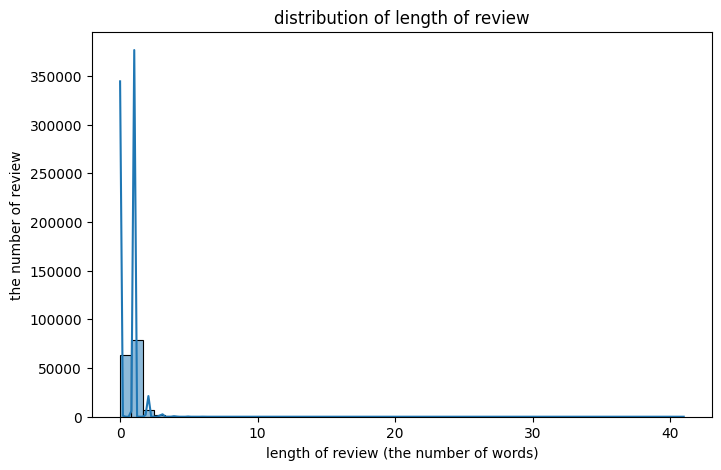
2. 단어 빈도수에 의한 벡터화
전체 단어 수집 및 인덱싱
all_tokens = [token for tokens in train_data['tokens'] for token in tokens]
word_counts = Counter(all_tokens)
word_to_index = {word: i for i, (word, _) in enumerate(word_counts.most_common(20000))}-
train_data['tokens']: 각 리뷰의 토큰 리스트. -
for tokens in train_data['tokens']: 각 리뷰마다 반복. -
for token in tokens: 해당 리뷰의 각 토큰 반복. -
결과: 전체 리뷰에 등장한 모든 토큰(flattened list).
-
Counter(all_tokens): 각 단어의 등장 횟수를 세고, 가장 많이 등장한 순서대로 저장. -
word_counts.most_common(20000): 가장 많이 등장한 20,000개 단어를 반환. -
(word, _): 튜플 형태에서 단어만 가져옴. -
enumerate(): 순서 번호(i) 부여. -
word_to_index: 단어-인덱스 매핑 딕셔너리 생성. -
이렇게 만들어야 벡터화할 때 단어를 해당 인덱스에 카운트 누적 가능.
토큰을 벡터로 만드는 함수
def token_to_vector(tokens):
    vector = np.zeros(len(word_to_index)) # all words initialize zero
    #purpose: save the words frequencies, need to zero to change counting
    for token in tokens: #repeat tokens list and confirm.
        if token in word_to_index: # confirm the token is in word_to index
            vector[word_to_index[token]] +=1 # increase one to find the index

return vector- bow 약점1: 순서를 고려하지 않음( 단어 어떤 순서로 등장했는지 정보가 사라짐 -> 카운트 기반이기 때문)
- bow 약점2: 희소성 문제(단어 사전 크기가 커질수록 대부분의 값이 0이 되어 희소벡터가 됨)
- 0이 많은 희소벡터 -> DB에 악영향 (0은 계산하는데 불필요한 요소 -> 하지만, 필수적)
- 카운트 기바이기 때문에 문제가 발생 -> 근본적으로 해결 불가 -> corpus 키우기
- bow를 배우고 있지만 -> 자연어 처리, 추천시스템을 다른 벡터화 기법을 배움.
학습 및 테스트 데이터 벡터화 — 한 줄씩 해설
X_train = np.array([token_to_vector(tokens) for tokens in train_data['tokens']])
X_test = np.array([token_to_vector(tokens) for tokens in test_data['tokens']])
y_train = train_data['label']
y_test = test_data['label']train_data['tokens']: 학습 데이터셋의 각 리뷰가 토큰 리스트 형태로 저장되어 있음.for tokens in train_data['tokens']: 각 리뷰마다 반복.token_to_vector(tokens): 해당 리뷰의 토큰 리스트를 BoW 벡터로 변환.- 결과: 각 리뷰가 벡터로 변환된 리스트.
np.array(...): 리스트를 넘파이 배열로 변환 (모델 학습 입력으로 사용하기 위함).- 테스트 데이터셋도 동일한 과정으로 벡터화.
- 학습과 동일한
word_to_index사전 사용. - 각 리뷰에 해당하는 정답(라벨)을
y_train,y_test에 저장. - 0은 부정, 1은 긍정 리뷰.
3. Logistic Regression
model = LogisticRegression(max_iter = 1000, C =1.0 )
model.fit(X_train,y_train)
model score
y_pred = model.predict(X_test)
accuracy = accuracy_score(y_test,y_pred)
print('Accuarcy', accuracy)
print(classification_report(y_test,y_pred))
out:
y_pred = model.predict(X_test)
accuracy = accuracy_score(y_test,y_pred)
print('Accuarcy', accuracy)
print(classification_report(y_test,y_pred))
혼동행렬 시각화
conf_matrix = confusion_matrix(y_test, y_pred)
sns.heatmap(conf_matrix, annot=True, fmt = 'd', cmap='Blues', xticklabels=['Negative', 'Positive'], yticklabels=['Negative','Positive'])
plt.xlabel('Predicted')
plt.ylabel('Actual')
plt.title('Confusion matrix')
plt.show()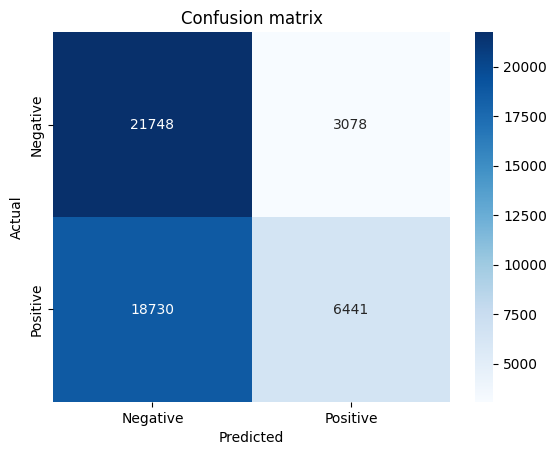
Precision-recall curve 시각화
precision, recall,_ = precision_recall_curve(y_test,model.predict_proba(X_test)[:,1])
plt.figure(figsize=(8,5))
plt.plot(recall, precision, marker='.', label='Precision-Recall Curve')
plt.xlabel("Recall")
plt.ylabel("Precision")
plt.legend()
plt.show()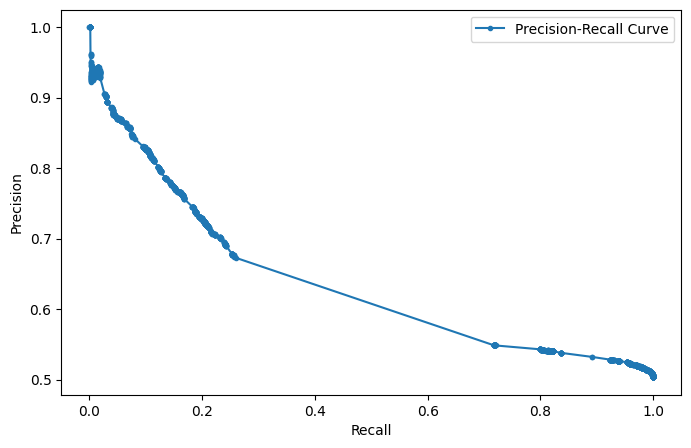
Roc curve 시각화
fpr, tpr,_ = roc_curve(y_test,model.predict_proba(X_test)[:,1])
roc_auc = auc(fpr,tpr)
plt.figure(figsize=(8,5))
plt.plot(fpr, tpr, label=f'Roc Curve(AUC = {roc_auc:.2f})')
plt.xlabel("False Positive Rate")
plt.ylabel("True Positive Rate")
plt.legend()
plt.show()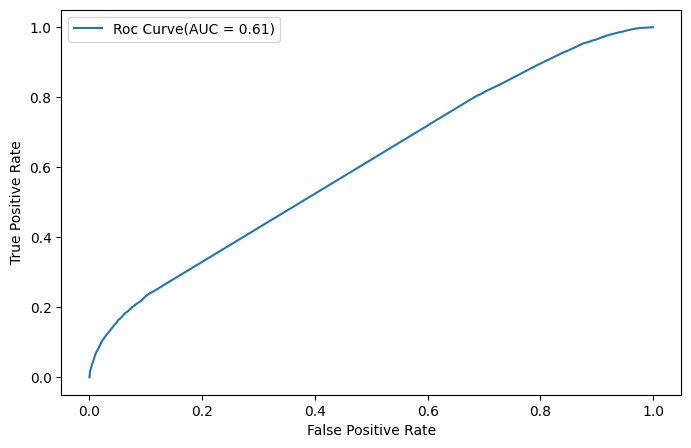
틀린 답 추출하기
missclassified = test_data.iloc[y_test[y_test != y_pred].index]
print('five sample that the model fail to classify')
missclassified
print(missclassified[['document', 'label']].head())
out:
five sample that the model fail to classify
                                             document  label
0                                                 굳 ㅋ      1
5                                  음악이 주가 된, 최고의 음악영화      1
10                                   괜찮네요오랜만포켓몬스터잼밌어요      1
12  청춘은 아름답다 그 아름다움은 이성을 흔들어 놓는다. 찰나의 아름다움을 잘 포착한 ...      1
13                   눈에 보이는 반전이었지만 영화의 흡인력은 사라지지 않았다.      1
중요 단어 확인하기
important_words = [word for word,_ in word_counts.most_common(10)]
print('the most using word 10', important_words)
4. 함수로 만들어서 사용하기
#preprocessing(delete uneccessary things) and analyze
def predict_sentiment(review):
    review = review.lower()
    review = re.sub(r'[가-힣a-zA-Z0-9\s]','',review) #delete all thing except Korean and English
    review = re.sub(r'\d+', '',review) # delete num
    review = re.sub(r'\s+', ' ', review).strip() #delete long blank

    tokens = okt.morphs(review, stem = True) #analyze morpheme and extract stem
    stopwords = ['은', '는', '이', '가', '을', '를', '과', '도', '에', '의', '한', '하다', '되다', '것', '있다', '없다', '그', '수', '이다', '그것']
    tokens = [word for word in tokens if word not in stopwords and len(word)>1] #del bools and length of word is 1

    vector = token_to_vector(tokens)
    pred = model.predict([vector])
    return "Positive" if pred[0] == 1 else"Negative"
예시 넣어보기
print(predict_sentiment('이 영화 너무 재밌어요! 다시 보고 싶어요.'))
print(predict_sentiment('이딴게 영화?'))
out:
Positive
Negative