I can't deal with cartograher anymore..
+) I only need 2D slam
So, change to "Hector SLAM"
Implementing Hector SLAM
Hector SLAM is a popular 2D SLAM system that does not require odometry or IMU data, making it suitable for robots without wheel encoders. However, since you have an IMU, we can configure Hector SLAM to utilize it for improved mapping accuracy.
8.1. Installing Hector SLAM
- Ensure Your ROS Environment Is Sourced:
source /opt/ros/noetic/setup.bash- Create a Workspace for Hector SLAM (If Not Using the Existing Catkin Workspace):
- Since you already have a catkin workspace (~/catkin_ws), we'll use it.
- Navigate to Your Catkin Workspace's Source Directory:
cd ~/catkin_ws/src- Clone the Hector SLAM Repository:
git clone https://github.com/tu-darmstadt-ros-pkg/hector_slam.git- Install Dependencies:
cd ~/catkin_ws
rosdep install --from-paths src -i -r -y- Build the Workspace:
catkin_make- Source the Workspace:
source devel/setup.bash8.2. Configuring Hector SLAM
Hector SLAM primarily uses LIDAR data to perform SLAM. We'll set up Hector SLAM to use your RPLIDAR A1 and integrate the IMU data from the MPU6050 to improve performance.
8.2.1. Modify Hector SLAM Launch Files
- Navigate to the Hector SLAM Launch Directory:
cd ~/catkin_ws/src/hector_slam/hector_slam_launch/launch- Create a Custom Launch File:
We'll create a custom launch file tailored to your robot's configuration.
nano hector_slam_custom.launch- Add the Following Content:
<launch>
  <!-- Use UTM Transform (set to false) -->
  <param name="use_utm" value="false"/>

  <!-- Map Resolution -->
  <param name="map_resolution" value="0.05"/>

  <!-- Map Size -->
  <param name="map_size" value="1024"/>

  <!-- Map Start Position -->
  <param name="map_start_x" value="0.0"/>
  <param name="map_start_y" value="0.0"/>

  <!-- Map Multi-resolution Levels -->
  <param name="map_multi_res_levels" value="3"/>

  <!-- Hector Mapping Node -->
  <node pkg="hector_mapping" type="hector_mapping" name="hector_mapping" output="screen">
    <param name="base_frame" value="base_link"/>
    <param name="odom_frame" value="base_link"/>
    <param name="map_frame" value="map"/>
    <param name="scan_topic" value="/scan"/>
    <param name="pub_map_odom_transform" value="false"/>
    <param name="pub_odometry" value="false"/>
    <param name="pub_odometry_tf" value="false"/>
    <param name="use_tf_scan_transformation" value="true"/>
    <param name="use_scan_matching" value="true"/>
    <param name="update_factor_free" value="0.4"/>
    <param name="update_factor_occupied" value="0.9"/>
    <!-- Enable IMU usage -->
    <param name="use_emergency_stop" value="false"/>
    <param name="map_update_distance_thresh" value="0.4"/>
    <param name="map_update_angle_thresh" value="0.157"/>
  </node>

  <!-- Static Transform from base_link to laser -->
  <node pkg="tf" type="static_transform_publisher" name="base_to_laser_broadcaster" args="0 0 0 0 0 0 base_link laser 100" />

  <!-- Static Transform from base_link to imu_link -->
  <node pkg="tf" type="static_transform_publisher" name="base_to_imu_broadcaster" args="0 0 0 0 0 0 base_link imu_link 100" />

  <!-- IMU Topic Remapping -->
  <remap from="sys_cmd_topic" to="/syscommand"/>
  <remap from="imu_topic" to="/imu/data_raw"/>

  <!-- Map Saver Node -->
  <node pkg="map_server" type="map_saver" name="map_saver" args="--free 25 --occ 65 -f $(env HOME)/hector_map" />

  <!-- RViz Visualization -->
  <node name="rviz" pkg="rviz" type="rviz" args="-d $(find hector_slam_launch)/rviz_cfg/mapping_demo.rviz" />
</launch>
8.3. Running Hector SLAM
- Ensure All Required Nodes Are Running:
- RPLIDAR Node:
roslaunch rplidar_ros rplidar_a1.launch- IMU Node:
roslaunch mpu6050_driver mpu6050.launch- Launch Hector SLAM:
roslaunch hector_slam_launch hector_slam_custom.launch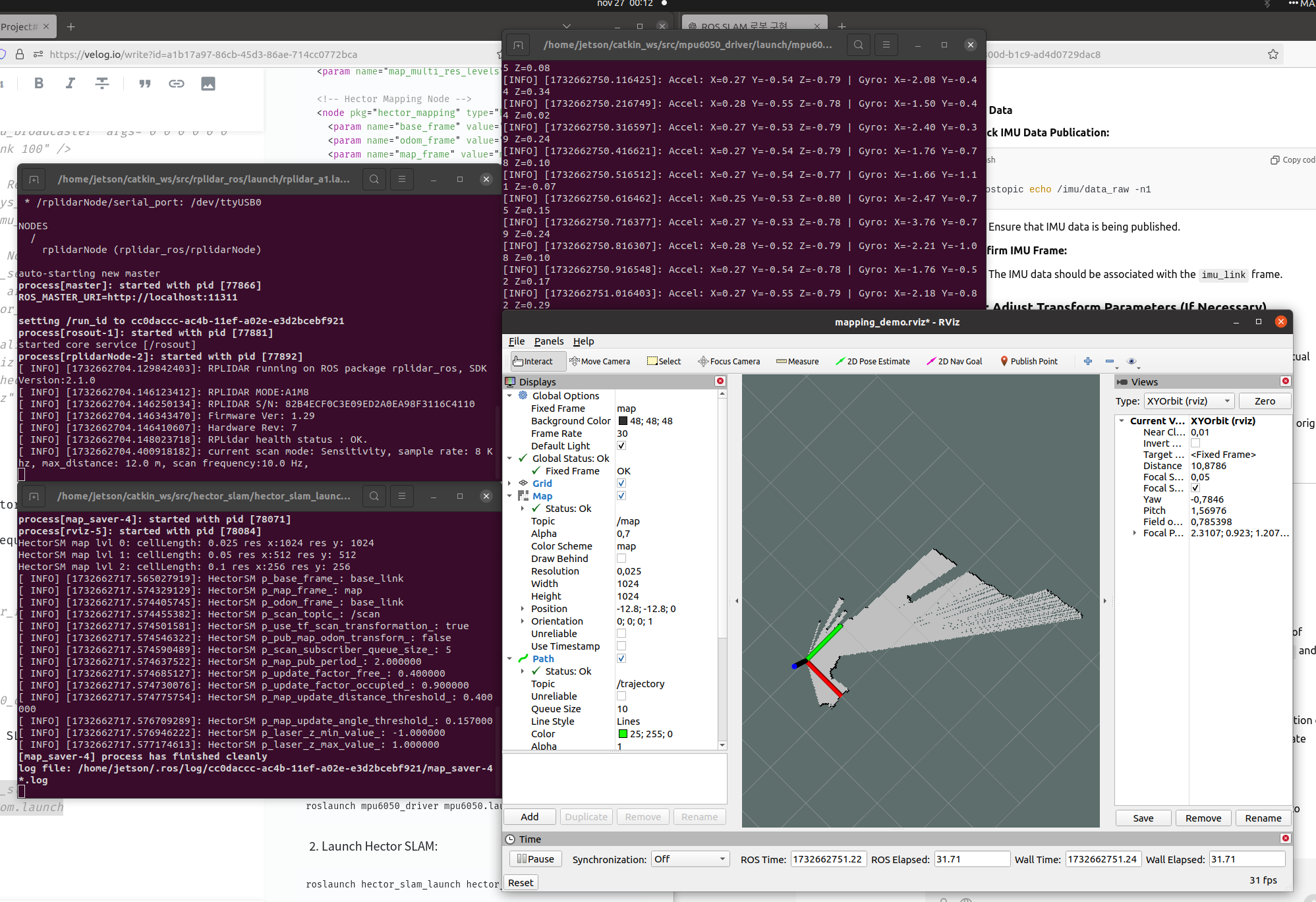

..