이번에도 마찬가지로 핵심 요약만 작성하도록 하겠습니다.
※이번 게시글에는 제 깃허브 링크가 몇 개 밖에 없을 수 있습니다.
따라서, 다음 제 phase 4-2 전체 깃허브 링크를 공유드리고자 합니다.
확인하고 싶은 부분들은 해당 깃허브 링크로 따라가서 확인해주시면 감사하겠습니다.https://github.com/pilmalion114/data_engineer_portfolio/tree/main/phase%204/phase%204-2
1. DBT 개념 이해
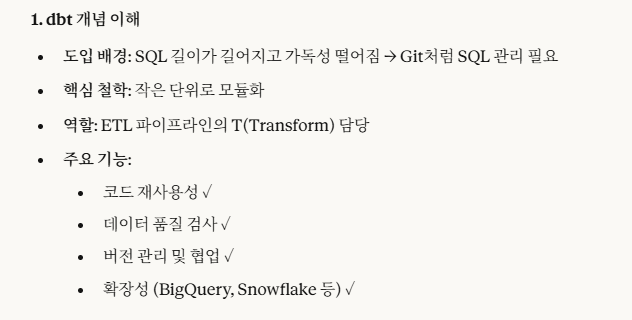
Airflow ETL 파이프라인 -> BigQuery 플랫폼을 활용하면 'ad-hoc(임시적인)'과 같이 규격화가 되어 있는 것이 아닌 즉흥적이고, 임시적으로 SQL 쿼리가 작성되어 가독성이 떨어지는 현상을 보완하기 위해 DBT 개념이 나왔습니다.
위의 '도입 배경', '핵심 철학', '역할', '주요 기능' 모두가 중요한 개념이고, 핵심만을 다 담았습니다.
2. 환경 설정
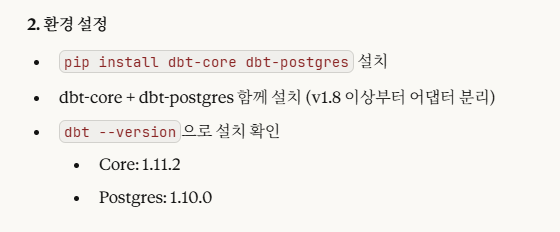
v1.8버전 이상부터 dbt-core와 dbt-postgres가 분리되어 함께 설치해야합니다.
3. 프로젝트 생성
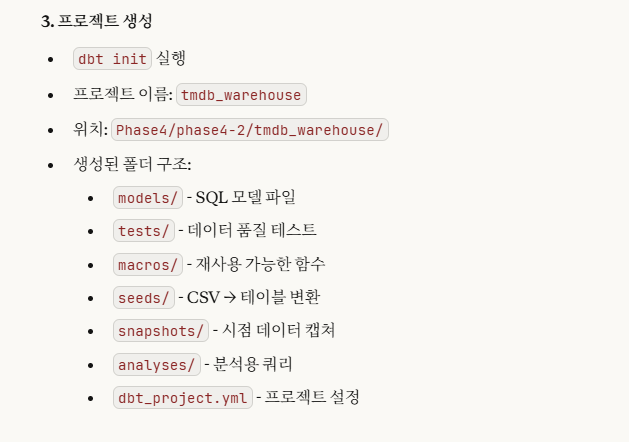
dbt init 명령어는 초기화라고 생각하면 됩니다.
즉, dbt 프로젝트에 필요한 필수적인 것들을 자동으로 설치해주는 것이라고 이해하면 됩니다.
$ dbt init
08:35:14  Running with dbt=1.11.2
08:35:14  Creating dbt configuration folder at C:\Users\dc\.dbt
Enter a name for your project (letters, digits, underscore): tmdb_warehouse
08:35:59
Your new dbt project "tmdb_warehouse" was created!

For more information on how to configure the profiles.yml file,
please consult the dbt documentation here:

  https://docs.getdbt.com/docs/configure-your-profile

One more thing:

Need help? Don't hesitate to reach out to us via GitHub issues or on Slack:

  https://community.getdbt.com/

Happy modeling!

08:35:59  Setting up your profile.
Which database would you like to use?
[1] postgres

(Don't see the one you want? https://docs.getdbt.com/docs/available-adapters)

Enter a number: 1
host (hostname for the instance): localhost
port [5432]: 5432
user (dev username): movie_user
pass (dev password):
dbname (default database that dbt will build objects in): movie_dw
schema (default schema that dbt will build objects in): public
threads (1 or more) [1]: 1
08:37:10  Profile tmdb_warehouse written to C:\Users\dc\.dbt\profiles.yml using target's profile_template.yml and your supplied values. Run 'dbt debug' to validate the connection.
위와 같이 진행됩니다.
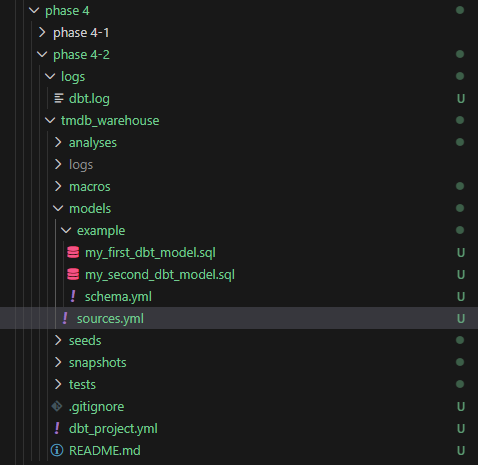
명령어가 잘 실행되면, 위와 같이 폴더들이 생성됩니다.
4. DB 연결 설정
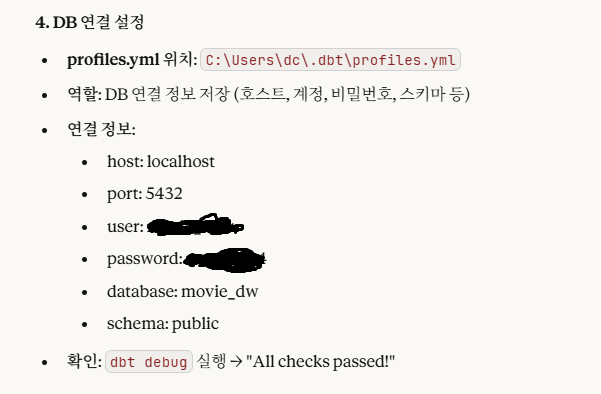
dbt init을 실행하고 나면, 사용자 home 디렉토리에
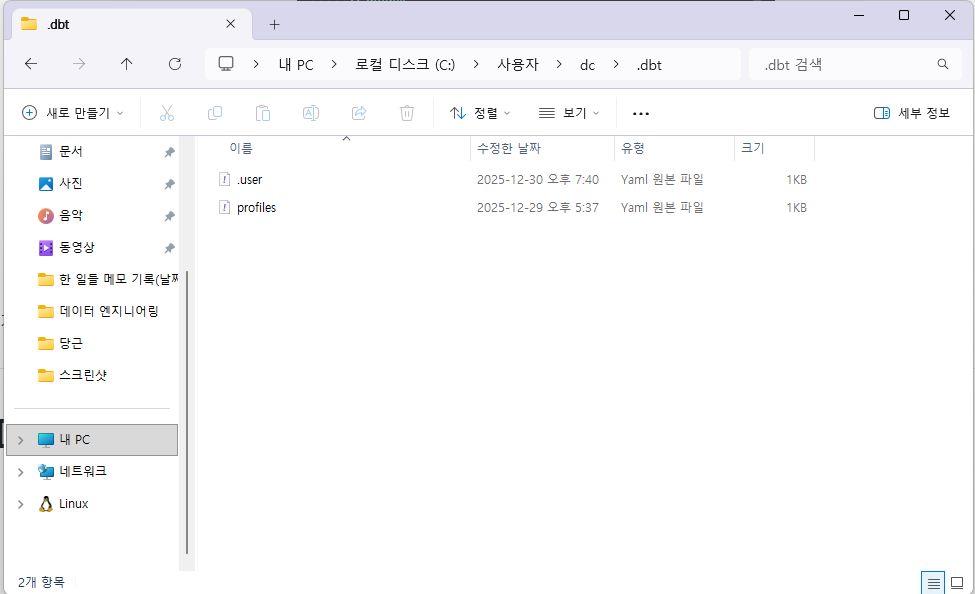
이렇게 profiles.yaml이 저장됩니다.
여기에는 DB 연결 설정에 필요한 값들이 저장되어 있으므로, 외부에 노출되면 안 됩니다.
그래서 따로 사용자 home 디렉토리의 .dbt 폴더에 저장됩니다.
$ dbt debug
10:40:27  Running with dbt=1.11.2
10:40:27  dbt version: 1.11.2
10:40:27  python version: 3.12.4
10:40:27  python path: C:\Users\dc\Desktop\새로운 포트폴리오를 위한 폴더\데이터,AI\포트폴리오용\데이터 엔지니어링\venv\Scripts\python.exe
10:40:27  os info: Windows-11-10.0.26100-SP0
10:40:28  Using profiles dir at C:\Users\dc\.dbt
10:40:28  Using profiles.yml file at C:\Users\dc\.dbt\profiles.yml
10:40:28  Using dbt_project.yml file at C:\Users\dc\Desktop\새로운 포트폴리오를 위한 폴더\데이터,AI\포트폴리오용\데이터 엔지니어링\실습\data_engineer_portfolio\phase 4\phase 4-2\tmdb_warehouse\dbt_project.yml
10:40:28  adapter type: postgres
10:40:28  adapter version: 1.10.0
10:40:28  Configuration:
10:40:28    profiles.yml file [OK found and valid]
10:40:28    dbt_project.yml file [OK found and valid]
10:40:28  Required dependencies:
10:40:28   - git [OK found]

10:40:28  Connection:
10:40:28    host: localhost
10:40:28    port: 5432
10:40:28    user: movie_user
10:40:28    database: movie_dw
10:40:28    schema: public
10:40:28    connect_timeout: 10
10:40:28    role: None
10:40:28    search_path: None
10:40:28    keepalives_idle: 0
10:40:28    sslmode: None
10:40:28    sslcert: None
10:40:28    sslkey: None
10:40:28    sslrootcert: None
10:40:28    application_name: dbt
10:40:28    retries: 1
10:40:28  Registered adapter: postgres=1.10.0
10:40:31    Connection test: [OK connection ok]

10:40:31  All checks passed!
위는 dbt debug를 실행한 결과입니다.
이와 같이 연결 정보들이 나옵니다.
5. 핵심 개념 학습
5-1. dbt model
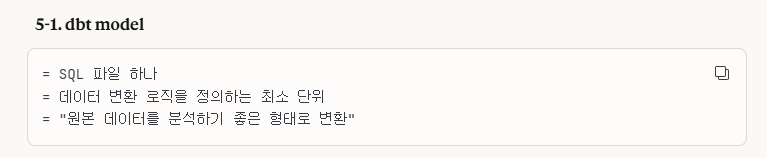
models/ 폴더에 저장되는 모델 파일입니다.
sql 파일로 저장됩니다.
원본 데이터(raw)를 모델링하는 작업이라고 이해하면 됩니다.
5-2. Materialization(저장 방식)
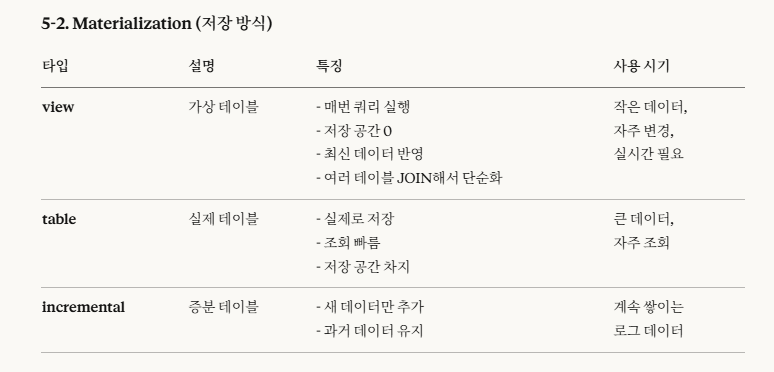
->view에서 '저장 공간 0(숫자 0)'입니다.
view는 가상 테이블로서, '여러 테이블을 조인해서 한 번에 조회할 때 사용' , '자주 변경' , '작은 데이터(저장 x)'라는 특징이 있는데, 그대로 그 특징들이 담긴 거라고 이해하면 됩니다.
table은 '큰 데이터', '자주 조회'로 생각하면 됩니다.
incremental은 '점진적인 증가(증분)'라는 의미인데, '계속 쌓인다.'라고 이해하면 됩니다.
5-3. ref() vs source()
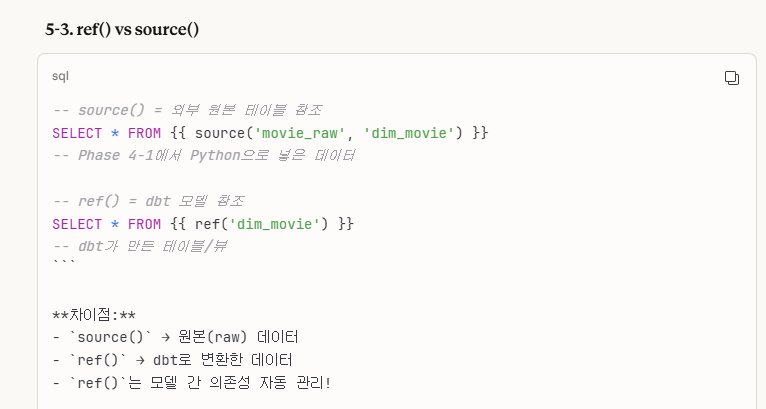
source는 원본(raw) 데이터를, ref()는 dbt로 변환한 데이터를 의미합니다.
또한, ref()는 '모델 간 의존성을 자동으로 관리'합니다.
5-4. seed
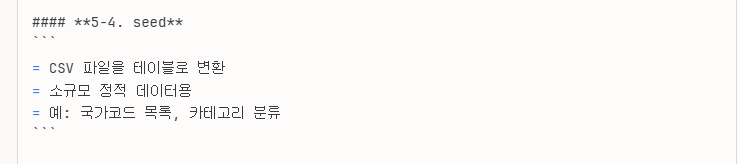
이런 특징이 있습니다.
6. sources.yml 작성
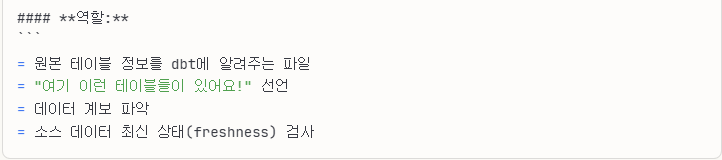
위는 sources.yml의 역할입니다.
위에서 source는 원본(raw) 데이터를 의미했는데, 이와 관련한 설정(정보)들을 작성하는 파일입니다.
sources:           # 소스 정의 시작
  - name: 그룹명   # 소스 그룹 이름 (임의)
    schema: 스키마  # PostgreSQL 스키마
    tables:        # 테이블 목록
      - name: 테이블1
      - name: 테이블2
구조는 다음과 같이 되어있습니다.
제가 작성한 sources.yml 파일은 위의 깃허브에서 참고할 수 있습니다.
⭐7. model 작성하기
7-1. dim_movie.sql
해당 부분 모델링 하는 작업에서 약간의 트러블슈팅이 발생하였습니다.
이 과정을 알아보도록 합시다.

우리가 위 6번에서 sources.yml을 작성하였습니다.
이 정보들을 기반으로 dim_movie.sql을 모델링해볼까 합니다.
7-1-1. 최초 시도(실패)
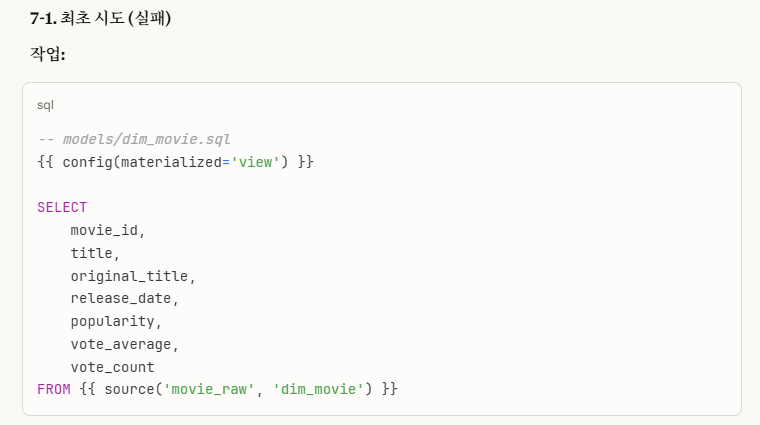
처음에는 위 config 저장 방식 설정 부분을 'view'로 설정하였습니다.
dbt run --select dim_movie실행 명령어를 통해 실행하였고 성공적으로 실행이 완료되었습니다.
$ dbt run --select dim_movie
13:27:53  Running with dbt=1.11.2
13:27:54  Registered adapter: postgres=1.10.0
13:27:55  Found 3 models, 4 data tests, 6 sources, 463 macros
13:27:55
13:27:55  Concurrency: 1 threads (target='dev')
13:27:55
13:27:55  1 of 1 START sql table model public.dim_movie .................................. [RUN]
13:27:55  1 of 1 OK created sql table model public.dim_movie ............................. [SELECT 60 in 0.22s]
13:27:55
13:27:55  Finished running 1 table model in 0 hours 0 minutes and 0.51 seconds (0.51s).
13:27:55
13:27:55  Completed successfully
13:27:55
13:27:55  Done. PASS=1 WARN=0 ERROR=0 SKIP=0 NO-OP=0 TOTAL=1
그리고 결과가 잘 되었는지 직접적으로 확인을 하기 위해 확인 작업을 진행하였습니다.
7-1-2. 확인 시도(문제 발견)
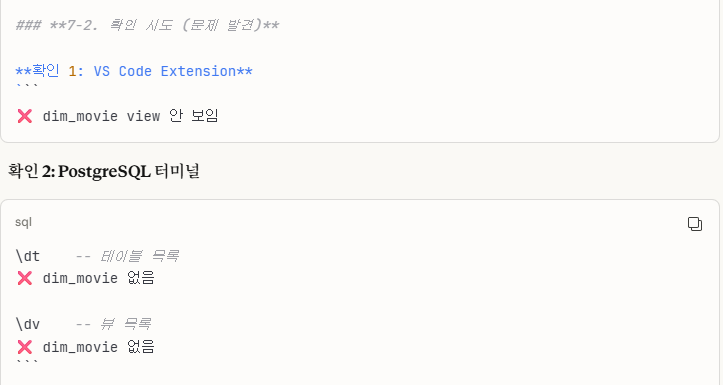
저는 Docker - PostgreSQL 터미널로 직접 확인하는 방법 외에 Vscode PostgreSQL Extension으로도 확인을 진행했는데,
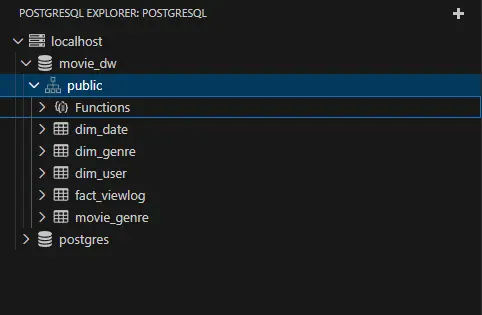
->dim_movie 원본 테이블이 사라졌습니다.
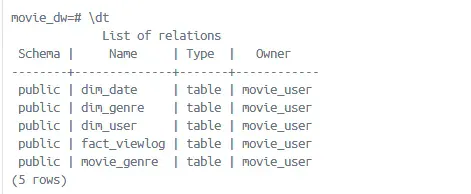
->또한 Docker에서도 원본 테이블이 사라졌습니다.
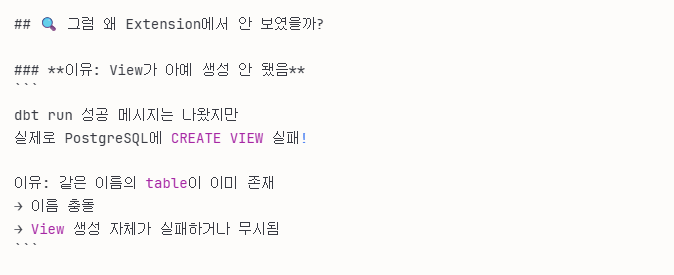
7-1-3. 원인 분석
원인을 분석을 했는데, 이런 결정적인 원인이 있었습니다.
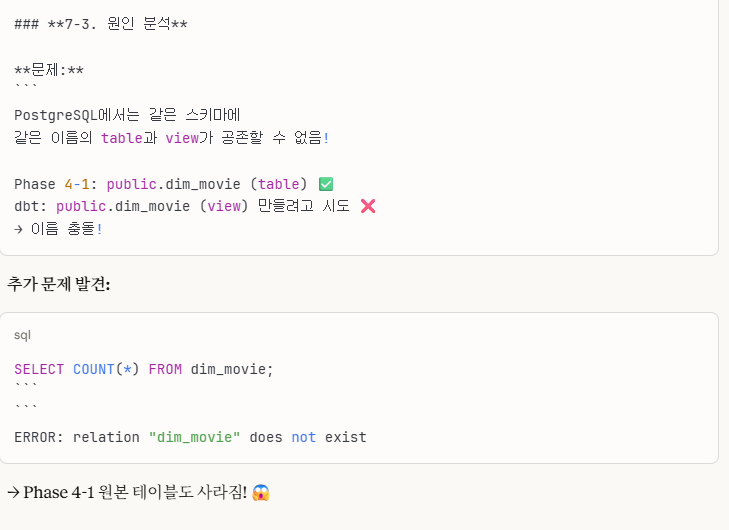
postgreSQL 특성상 테이블 네임과 뷰 네임이 동일하면 안 되고,
이로 인해서 원본 테이블이 사라지는 문제가 발생했습니다.
7-1-4. 복구 작업
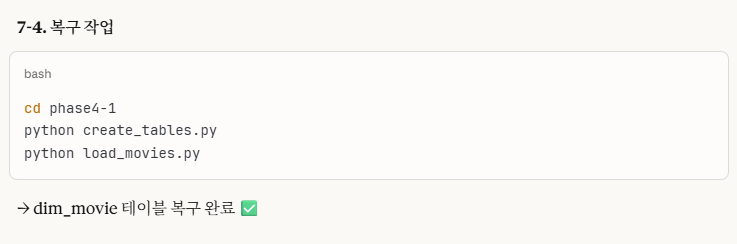
결국 원본 테이블(phase 4-1)을 다시 만들고 데이터를 다시 적재하는 작업을 진행했습니다.
⭐7-1-5. 해결책 2가지
1. view -> table로 변경(원본 덮어쓰기)
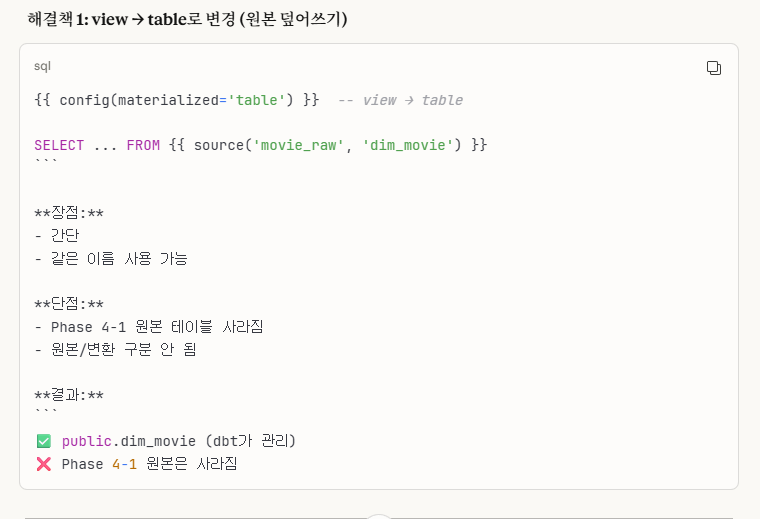
처음에 이렇게 해결을 시도해봤습니다.
하지만, 이렇게 되면 원본 테이블과 새로 만든 dbt 테이블이 겹쳐서,
결국엔 dbt 테이블이 원본 테이블을 덮어쓰는 구조로 변하게 됩니다.
저는 원본 데이터 또한 보존하고 싶어서 다른 방법을 선택하기로 했습니다.
2. 다른 스키마 사용 (채택!) -> 개인적으로 이 방법이 제일 확실한 거 같습니다.
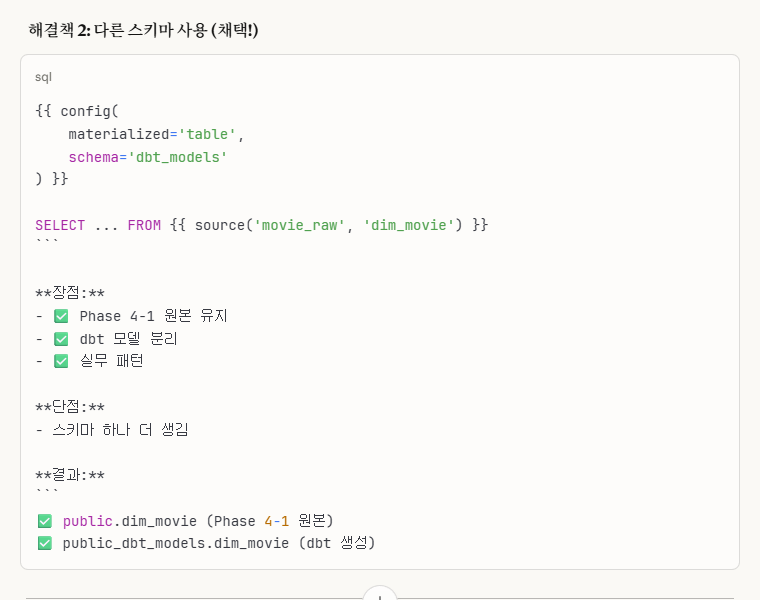
이렇게 config 부분에 schema 이름을 따로 설정하였습니다.
그러면 기존 public과는 다른 public_dbt_models라는 스키마가 새로 생성되고 여기에 저장이 됩니다.
※ sources.yml -> dim_movie.sql 동작 방식
    schema: public # PostgreSQL 스키마(네임스페이스)
    - name: dim_movie # 영화 차원 테이블
위는 sources.yml 파일에 있는 설정들입니다.
해당 파일의 주석에도 기재했듯이,
여기에 있는 schema는 phase 4-1의 원본 데이터의 schema를 나타냅니다.즉, phase 4-1의 원본 데이터의 schema의 table name이 'dim_movie'인 원본 테이블에 있는 데이터를 가져와서 'public_dbt_models' 스키마에 똑같이 저장하는 것입니다.
-- 영화 차원 테이블 (dbt 버전)
SELECT
    movie_id,
    title,
    original_title,
    release_date,
    popularity,
    vote_average,
    vote_count
FROM {{ source('movie_raw', 'dim_movie') }}
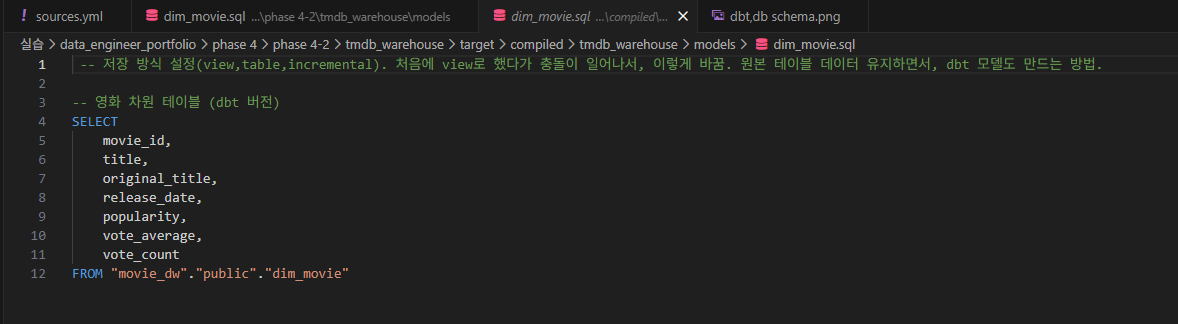
에서 'FROM {{ source('movie_raw', 'dim_movie') }}' 부분은 원본 데이터 경로를 의미하며,
해당 폴더에서
임을 확인할 수 있습니다.
즉, 원본 경로는 'movie_dw.public.dim_movie'임을 나타냅니다.

7-1-6 결과 확인
# psql -U movie_user -d movie_dw
psql (16.11 (Debian 16.11-1.pgdg13+1))
Type "help" for help.

movie_dw=# \dn
            List of schemas
       Name        |       Owner
-------------------+-------------------
 public            | pg_database_owner
 public_dbt_models | movie_user
(2 rows)

movie_dw=# \d
                     List of relations
 Schema |           Name           |   Type   |   Owner
--------+--------------------------+----------+------------
 public | dim_date                 | table    | movie_user
 public | dim_genre                | table    | movie_user
 public | dim_movie                | table    | movie_user
 public | dim_user                 | table    | movie_user
 public | dim_user_user_id_seq     | sequence | movie_user
 public | fact_viewlog             | table    | movie_user
 public | fact_viewlog_view_id_seq | sequence | movie_user
 public | movie_genre              | table    | movie_user
(8 rows)
                             ^
movie_dw=# select count(*) from public_dbt_models.dim_movie;
 count
-------
    60
(1 row)

movie_dw=#
\dn을 통해 public_dbt_models 스키마가 잘 생성됨을 알 수 있고,
sql 쿼리문을 통해서도 count가 60개로 잘 되었음을 알 수 있습니다.
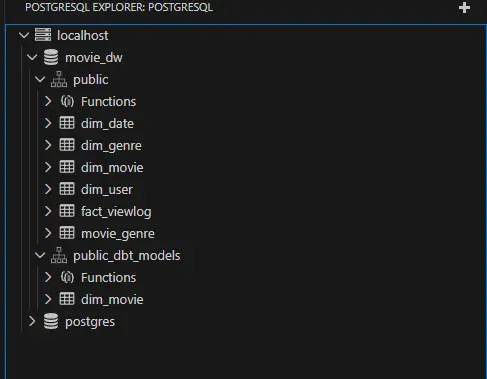
Vscode PostgreSQL Extension에서도 잘 나옴을 알 수 있습니다.
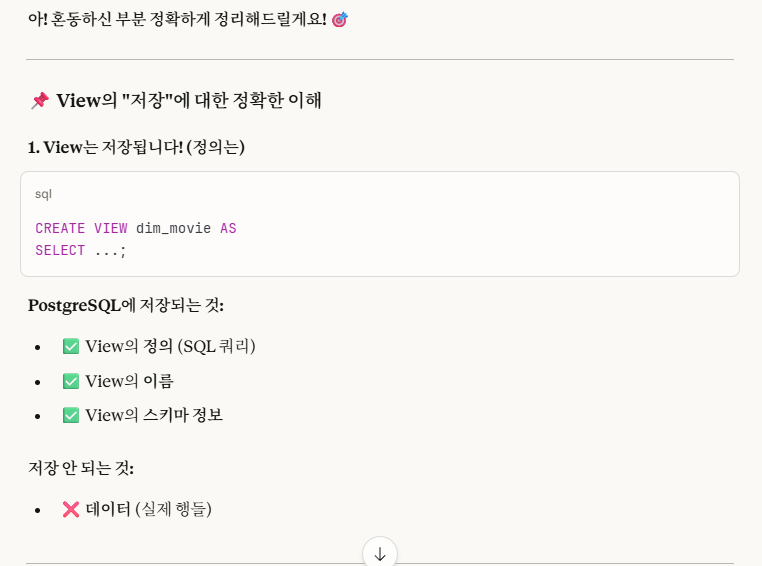
※cf.) View는 저장이 안 된다?
즉, 뷰는 데이터가 저장이 안 되는 것이지, View의 정의,이름,스키마 정보 같은 것들은 저장이 된다.

7-2. 나머지 .sql model 파일들 작성
⭐cf.) 잠깐만!
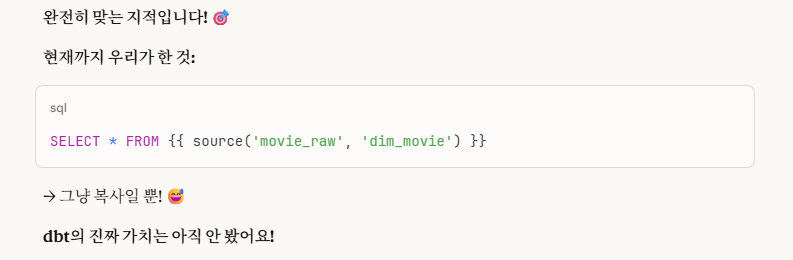
일단 나머지 sql model들을 작성하기에 앞서, 지금까지 한 작업들로는 raw data와 dbt sql과의 데이터가 같으므로 dbt의 장점을 파악하기가 어렵습니다.

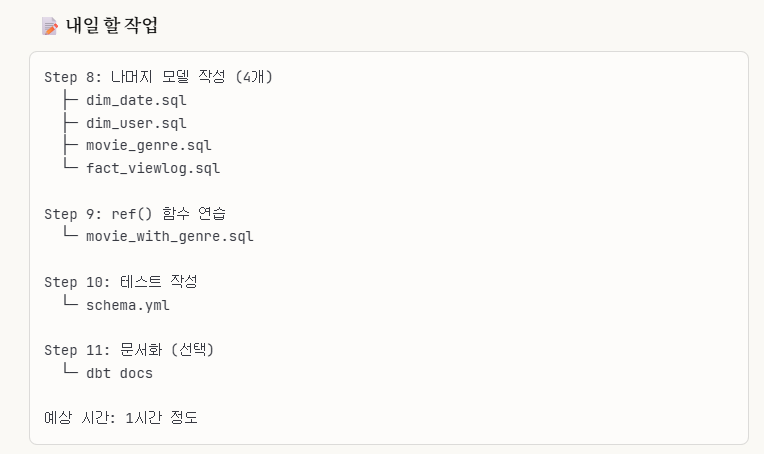
->우리가 앞으로 해야 할 작업이 이렇게 4단계 정도가 남았습니다.
->바로 이 4단계에서 dbt의 진가가 발휘됩니다.
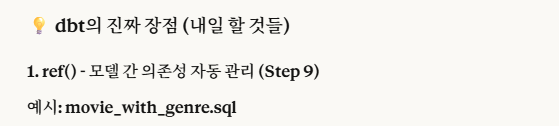
1. step 9: ref() - 모델 간의 의존성 자동 관리
2. step 10: 테스트 - 데이터 품질 자동 검증
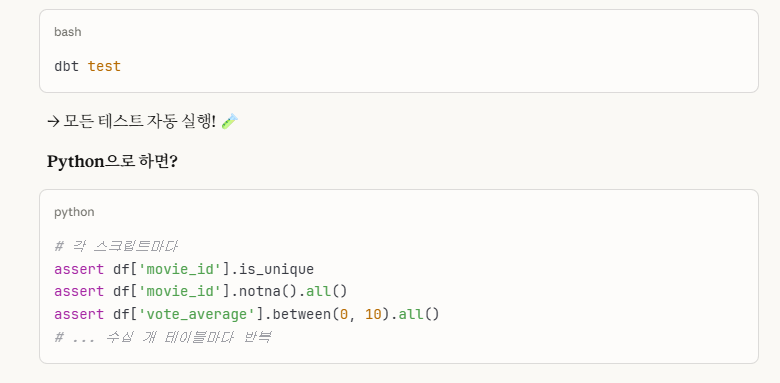
3. step 8: 'fact_viewlog.sql' incremental(증분) 처리 - 효율성
4. step 8~10: 실무 시나리오 비교
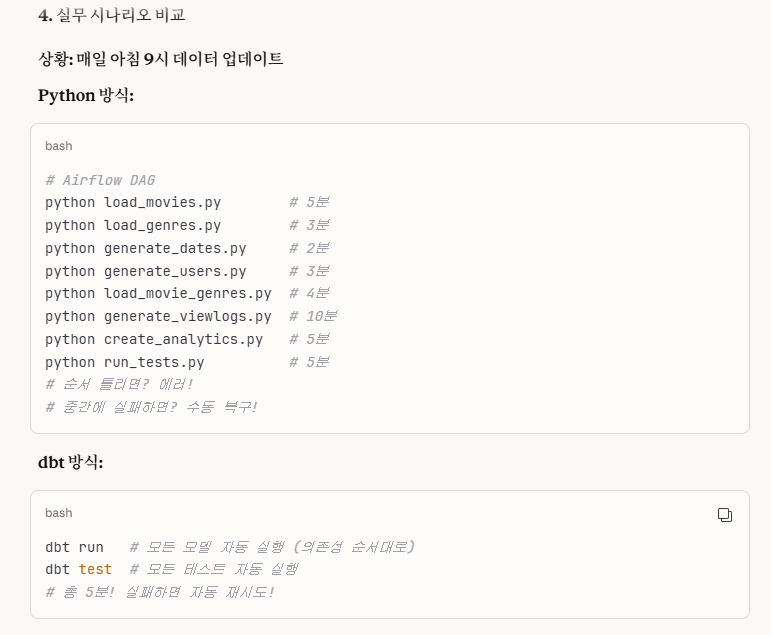
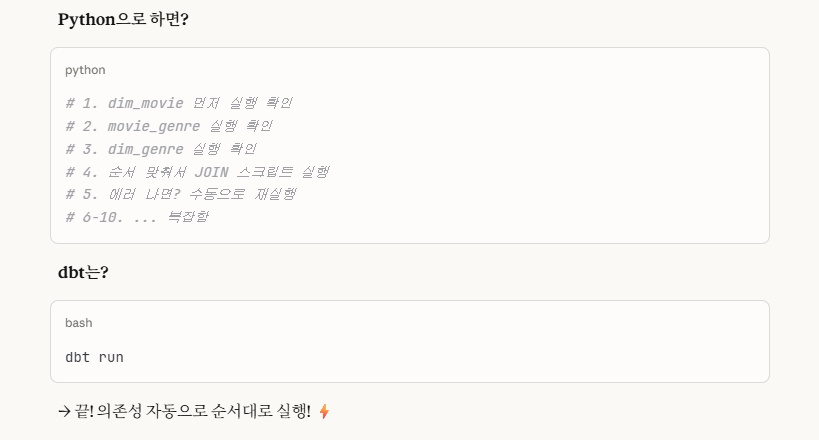
-> 이 부분은 따로 step이 있는 것이 아니라, step 8~10을 통해서 'python' vs 'dbt' 방식을 비교해서 '수동 vs 자동' 실행을 보여줌으로써 그 차이를 보여주는 것입니다.
5. step 11(선택): 문서화
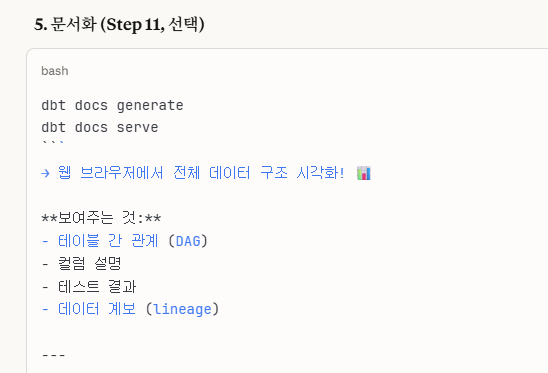
각 step의 자세한 내용들은 뒷 부분에 이어서 작성하도록 하겠습니다.
7-2-1,2,3,4. dim_genre.sql, dim_date.sql, dim_user.sql, movie_genre.sql
dim_movie.sql와 형식이 동일합니다.
7-2-5. fact_viewlog.sql(incremental)
이 sql 모델 부분은 incremental(증분)으로 코드를 작성하고자 합니다.
{{ config(
    materialized='incremental',
    schema='dbt_models',
    unique_key='view_id'
)}}
-- unique_key: 중복 데이터 발생 시, 중복 데이터 처리 기준. unique_key가 중복되는 새 데이터가 들어오면, 덮어쓰는(update) 방식을 택한다.


-- 조회 로그 fact 테이블 (dbt 버전 - incremental)
SELECT
    view_id,
    movie_id,
    user_id,
    view_date,
    rating,
    view_count,
    created_at
FROM {{ source('movie_raw', 'fact_viewlog') }}

{% if is_incremental() %}
    -- 이미 로드된 데이터 이후의 것만 추가(기존의 것은 냅두고, 새로 들어온 데이터만 추가)
    where created_at > (SELECT max(created_at) from {{this}}) -- {{this}}: 현재 이 테이블 자기 자신.
{% endif %} -- 단순한 끝 표시. 그냥 if절이 끝났다라고 이해하면 됨.

-- 첫 실행 --
-- is_incremental() = False
-- → 전체 데이터 로드

--**두 번째 실행부터:**
--
-- is_incremental() = True
-- → 마지막 created_at 이후 데이터만 추가
-- → 효율성 UP! ⚡
해당 sql 모델의 코드 부분입니다.
주석에도 설명이 잘 나와 있으니, 간단하게 과정만 설명하겠습니다.
unique_key로 중복 데이터 발생 시, update 방식으로 처리를 하고,
if문을 통해 incremental 부분을 처리합니다.
incremental 기준은 created_at 날짜 기준으로 전에 있던 데이터는 그대로 남겨두고, 그 이후의 데이터만 새로 받습니다.
is_incremental() = true/false는 dbt가 결정하며,
처음에는 false로 시작하여 if문을 false로 처리해, where절을 무시하고
그 다음부터는 true로 처리해 where절을 실행시킵니다.
⭐7-2-6. movie_with_genre.sql
이 sql 모델 부분은 'ref()' 함수를 사용합니다.
-- ref() 함수를 연습하는 sql 모델링 코드입니다.

-- <목표> --
-- 1. 여러 dbt 모델을 JOIN
-- 2. ref() 함수로 의존성 자동 관리
-- 3. 집계 + 파생 컬럼 추가

{{ config(
    materialized='table',
    schema='dbt_models'
)}}

-- 영화 + 장르 통합 테이블 (ref 연습)
SELECT
    m.movie_id,
    m.title,
    m.release_date,
    m.vote_average,
    STRING_AGG(g.genre_name, ', ') as genres, -- strcat처럼 문자열 이어붙이기. ,로 구분한다.
    count(g.genre_id) as genre_count,
    case
        when m.vote_average >= 8.0 then 'Excellent'
        when m.vote_average >= 7.0 then 'Good'
        when m.vote_average >= 6.0 then 'Average'
        else 'poor'
    end as rating_category -- case-when-end 구조. end는 단순 case문의 끝(종료)를 나타낸다.
from {{ ref('dim_movie') }} m -- 간단히(단순히) 이해하자면, ref는 그냥 단어 의미 그대로, 다른 테이블을 '참조'하는 거라고 생각하면 됨. 다만 차이점은, 'FROM public_dbt_models.dim_movie m(일반 SQL)' 와 'ref'의 차이점은, 1. 테이블 참조(공통 부분) 2. 의존성 파악(ref) 3. 자동 순서 정렬(ref). ex.) 'movie_with_genre.sql'이 'dim_movie.sql'를 참조한다. -> dbt run하면, dim_movie 먼저 실행 -> 그 다음 movie_with_genre 실행.
left join {{ ref('movie_genre') }} mg on m.movie_id = mg.movie_id -- left (outer) join: 왼쪽 테이블은 all, 오른쪽 테이블은 공통(겹치는) 부분만(없으면 Null). right (outer) join은 left join의 반대로. full (outer) join은 left+right(합집합). images/ 폴더에 있는 사진 참고. full outer join 시 공통 부분은 중복을 허용하여 겹치는 속성들이 중복으로 2개 나올 수 있고, 아니면 자연 조인(Natural Join, 겹치는 부분을 2개 다 열로 표현하는 게 아니라 하나만 사용하는 조인)으로 중복 제거해줄 수도 있다.
left join {{ ref('dim_genre') }} g on mg.genre_id = g.genre_id
group by m.movie_id, m.title, m.release_date, m.vote_average
-- GROUP BY는 여러 컬럼 가능
-- 이 4개 컬럼 조합으로 그룹화 (실제로는 movie_id가 PK라 이것만으로 구분됨)
-- 핵심 이유: SQL 규칙 - SELECT의 비집계 컬럼은 전부 GROUP BY에 넣어야 함! -> 즉, String_AGG, count 외에 모든 열은 다 group by해야 함.
-- 안 그러면 에러 발생
해당 sql 모델 코드 부분입니다.
이 역시 코드의 주석에 설명이 자세하게 되어있습니다.
간단하게 요약하자면,
ref()는 단어 의미 그대로 '참조'하는 것을 의미하는데,
단순 일반 sql 테이블 참조에다가 + 의존성 파악, 자동 순서 정렬이 추가됩니다.
7-2-7. 각 테이블 결과들 bash shell 명령어를 통해 .csv 파일로 copy하기
해당 깃허브 링크를 참고하면, 'export_models.sh' 파일 코드를 확인할 수 있습니다.
여기에도 코드 주석 설명이 자세하게 나타나있습니다.
간단히 요약하자면,
각 sql 모델링 테이블 부분들에서 'select * from {table}'을 통해
docker의 tmp/(임시 폴더 생성 후 데이터 복사(저장))에 .csv 파일 형태로 데이터를 복사하고,
이 tmp/ 폴더에서 해당 로컬 폴더(./models_results/)에 .csv 파일을 복사하는 코드입니다.
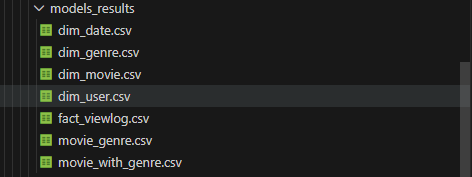
코드를 실행하면,
이렇게 .csv 파일로 테이블 결과들이 저장됩니다.
8. 테스트
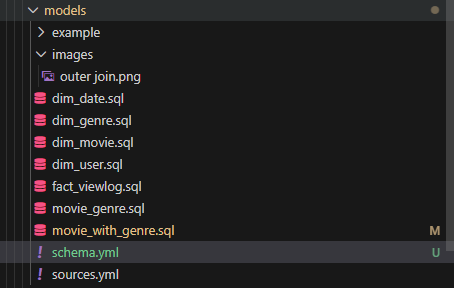
models/ 폴더에 'schema.yml' 파일을 새로 생성합니다.
이 파일에서 테스트를 진행할 것입니다.
# dbt 테스트 설정 파일
# 목적: 데이터 품질 자동 검증(select로 읽기만 함, 데이터 수정 없음)

version: 2

models:
  - name: dim_movie # 테스트할 모델 이름
    description: "영화 차원 테이블"
    columns:
      - name: movie_id
        description: "영화 고유 ID"
        tests:
          - unique # 중복 체크: movie_id가 유일한지 검증
          - not_null # NULL 체크: movie_id에 NULL이 없는지 검증
      - name: title
        description: "영화 제목"
        tests:
          - not_null    # title에 NULL이 없는지
      - name: vote_average
        description: "평균 평점"
        tests:
          - not_null    # vote_average에 NULL이 없는지

  - name: dim_genre
    description: "장르 차원 테이블"
    columns:
      - name: genre_id
        tests:
          - unique      # genre_id 중복 체크
          - not_null    # genre_id NULL 체크
      - name: genre_name
        tests:
          - not_null    # genre_name NULL 체크

  - name: dim_user
    description: "사용자 차원 테이블"
    columns:
      - name: user_id
        tests:
          - unique      # user_id 중복 체크
          - not_null    # user_id NULL 체크
      - name: username
        tests:
          - not_null    # username NULL 체크

  - name: movie_with_genre
    description: "영화 + 장르 통합 테이블"
    columns:
      - name: movie_id
        tests:
          - unique      # movie_id 중복 체크
          - not_null    # movie_id NULL 체크
      - name: genres
        tests:
          - not_null    # genres NULL 체크
      - name: rating_category
        tests:
          - not_null    # rating_category NULL 체크
          - accepted_values:  # 허용된 값만 있는지 체크
              values: ['Excellent', 'Good', 'Average', 'Poor']  # 이 4개 값만 허용
다음은 schema.yml 파일 코드입니다.
상당히 단순한 구조입니다.
테스트하고 싶은 '테이블 선택 -> column 선택 -> test하기' 이런 순서로 진행됩니다.
다 작성했으면
dbt test를 통해 test를 진행하면 됩니다.
(앞에서 따로 기재는 안 했지만, dbt 명령어는 항상 'tmdb_warehouse(dbt init했던 폴더)에서 진행해야 합니다.)
하지만, dbt test를 진행하는데 error가 생겼습니다.
$ dbt test
11:02:34  Running with dbt=1.11.2
11:02:34  Registered adapter: postgres=1.10.0
11:02:35  [WARNING][MissingArgumentsPropertyInGenericTestDeprecation]: Deprecated
functionality
Found top-level arguments to test `accepted_values` defined on
'movie_with_genre' in package 'tmdb_warehouse' (models\schema.yml). Arguments to
generic tests should be nested under the `arguments` property.
11:02:36  Found 9 models, 19 data tests, 6 sources, 463 macros
11:02:36
11:02:36  Concurrency: 1 threads (target='dev')
11:02:36
11:02:36  1 of 19 START test accepted_values_movie_with_genre_rating_category__Excellent__Good__Average__Poor  [RUN]
11:02:36  1 of 19 FAIL 1 accepted_values_movie_with_genre_rating_category__Excellent__Good__Average__Poor  [FAIL 1 in 0.07s]
11:02:36  2 of 19 START test not_null_dim_genre_genre_id ................................. [RUN]
11:02:36  2 of 19 PASS not_null_dim_genre_genre_id ....................................... [PASS in 0.04s]
11:02:36  3 of 19 START test not_null_dim_genre_genre_name ............................... [RUN]
11:02:36  3 of 19 PASS not_null_dim_genre_genre_name ..................................... [PASS in 0.03s]
11:02:36  4 of 19 START test not_null_dim_movie_movie_id ................................. [RUN]
11:02:36  4 of 19 PASS not_null_dim_movie_movie_id ....................................... [PASS in 0.05s]
11:02:36  5 of 19 START test not_null_dim_movie_title .................................... [RUN]
11:02:36  5 of 19 PASS not_null_dim_movie_title .......................................... [PASS in 0.04s]
11:02:36  6 of 19 START test not_null_dim_movie_vote_average ............................. [RUN]
11:02:36  6 of 19 PASS not_null_dim_movie_vote_average ................................... [PASS in 0.05s]
11:02:36  7 of 19 START test not_null_dim_user_user_id ................................... [RUN]
11:02:36  7 of 19 PASS not_null_dim_user_user_id ......................................... [PASS in 0.04s]
11:02:36  8 of 19 START test not_null_dim_user_username .................................. [RUN]
11:02:36  8 of 19 PASS not_null_dim_user_username ........................................ [PASS in 0.04s]
11:02:36  9 of 19 START test not_null_movie_with_genre_genres ............................ [RUN]
11:02:36  9 of 19 PASS not_null_movie_with_genre_genres .................................. [PASS in 0.05s]
11:02:36  10 of 19 START test not_null_movie_with_genre_movie_id ......................... [RUN]
11:02:36  10 of 19 PASS not_null_movie_with_genre_movie_id ............................... [PASS in 0.04s]
11:02:36  11 of 19 START test not_null_movie_with_genre_rating_category .................. [RUN]
11:02:36  11 of 19 PASS not_null_movie_with_genre_rating_category ........................ [PASS in 0.04s]
11:02:36  12 of 19 START test not_null_my_first_dbt_model_id ............................. [RUN]
11:02:36  12 of 19 ERROR not_null_my_first_dbt_model_id .................................. [ERROR in 0.05s]
11:02:36  13 of 19 START test not_null_my_second_dbt_model_id ............................ [RUN]
11:02:36  13 of 19 ERROR not_null_my_second_dbt_model_id ................................. [ERROR in 0.04s]
11:02:36  14 of 19 START test unique_dim_genre_genre_id .................................. [RUN]
11:02:37  14 of 19 PASS unique_dim_genre_genre_id ........................................ [PASS in 0.06s]
11:02:37  15 of 19 START test unique_dim_movie_movie_id .................................. [RUN]
11:02:37  15 of 19 PASS unique_dim_movie_movie_id ........................................ [PASS in 0.04s]
11:02:37  16 of 19 START test unique_dim_user_user_id .................................... [RUN]
11:02:37  16 of 19 PASS unique_dim_user_user_id .......................................... [PASS in 0.03s]
11:02:37  17 of 19 START test unique_movie_with_genre_movie_id ........................... [RUN]
11:02:37  17 of 19 PASS unique_movie_with_genre_movie_id ................................. [PASS in 0.05s]
11:02:37  18 of 19 START test unique_my_first_dbt_model_id ............................... [RUN]
11:02:37  18 of 19 ERROR unique_my_first_dbt_model_id .................................... [ERROR in 0.04s]
11:02:37  19 of 19 START test unique_my_second_dbt_model_id .............................. [RUN]
11:02:37  19 of 19 ERROR unique_my_second_dbt_model_id ................................... [ERROR in 0.04s]
11:02:37
11:02:37  Finished running 19 data tests in 0 hours 0 minutes and 1.18 seconds (1.18s).
11:02:37
11:02:37  Completed with 5 errors, 0 partial successes, and 0 warnings:
11:02:37
11:02:37  Failure in test accepted_values_movie_with_genre_rating_category__Excellent__Good__Average__Poor (models\schema.yml)
11:02:37    Got 1 result, configured to fail if != 0
11:02:37
11:02:37    compiled code at target\compiled\tmdb_warehouse\models\schema.yml\accepted_values_movie_with_gen_c866ae0bc813b46c78618d858cded473.sql
11:02:37
11:02:37  Failure in test not_null_my_first_dbt_model_id (models\example\schema.yml)
11:02:37    Database Error in test not_null_my_first_dbt_model_id (models\example\schema.yml)
  relation "public.my_first_dbt_model" does not exist
  LINE 17: from "movie_dw"."public"."my_first_dbt_model"
                ^
  compiled code at target\run\tmdb_warehouse\models\example\schema.yml\not_null_my_first_dbt_model_id.sql
11:02:37
11:02:37    compiled code at target\compiled\tmdb_warehouse\models\example\schema.yml\not_null_my_first_dbt_model_id.sql
11:02:37
11:02:37  Failure in test not_null_my_second_dbt_model_id (models\example\schema.yml)
11:02:37    Database Error in test not_null_my_second_dbt_model_id (models\example\schema.yml)
  relation "public.my_second_dbt_model" does not exist
  LINE 17: from "movie_dw"."public"."my_second_dbt_model"
                ^
  compiled code at target\run\tmdb_warehouse\models\example\schema.yml\not_null_my_second_dbt_model_id.sql
11:02:37
11:02:37    compiled code at target\compiled\tmdb_warehouse\models\example\schema.yml\not_null_my_second_dbt_model_id.sql
11:02:37
11:02:37  Failure in test unique_my_first_dbt_model_id (models\example\schema.yml)
11:02:37    Database Error in test unique_my_first_dbt_model_id (models\example\schema.yml)
  relation "public.my_first_dbt_model" does not exist
  LINE 18: from "movie_dw"."public"."my_first_dbt_model"
                ^
  compiled code at target\run\tmdb_warehouse\models\example\schema.yml\unique_my_first_dbt_model_id.sql
11:02:37
11:02:37    compiled code at target\compiled\tmdb_warehouse\models\example\schema.yml\unique_my_first_dbt_model_id.sql
11:02:37
11:02:37  Failure in test unique_my_second_dbt_model_id (models\example\schema.yml)
11:02:37    Database Error in test unique_my_second_dbt_model_id (models\example\schema.yml)
  relation "public.my_second_dbt_model" does not exist
  LINE 18: from "movie_dw"."public"."my_second_dbt_model"
                ^
  compiled code at target\run\tmdb_warehouse\models\example\schema.yml\unique_my_second_dbt_model_id.sql
11:02:37
11:02:37    compiled code at target\compiled\tmdb_warehouse\models\example\schema.yml\unique_my_second_dbt_model_id.sql
11:02:37
11:02:37  Done. PASS=14 WARN=0 ERROR=5 SKIP=0 NO-OP=0 TOTAL=19
11:02:37  [WARNING][DeprecationsSummary]: Deprecated functionality
Summary of encountered deprecations:
- MissingArgumentsPropertyInGenericTestDeprecation: 1 occurrence
To see all deprecation instances instead of just the first occurrence of each,
run command again with the `--show-all-deprecations` flag. You may also need to
run with `--no-partial-parse` as some deprecations are only encountered during
parsing.
해당 error를 간단히 요약하자면,
1.models/ 안에 있는 example/(dbt init시에 자동으로 생성되는 default 폴더) 폴더까지 전부 다 테스트를 해버린다.
->단순 dbt test 명령어는 모든 .sql 모델링을 다 포함해서 테스트를 진행한다.
->하지만, 우리는 example/ 부분은 테스트를 안할 것이기 때문에 다음과 같은 2가지 방법을 선택해야한다.1.example/ 삭제
2.dbt test --select dim_movie dim_genre dim_user movie_with_genre
->테스트하고 싶은 모델만 선택본인은 2번 방식으로 진행하였다.
하지만 그럼에도,
$ dbt test --select dim_movie dim_genre dim_user movie_with_genre
11:03:30  Running with dbt=1.11.2
11:03:30  Registered adapter: postgres=1.10.0
11:03:31  Found 9 models, 19 data tests, 6 sources, 463 macros
11:03:31
11:03:31  Concurrency: 1 threads (target='dev')
11:03:31
11:03:31  1 of 15 START test accepted_values_movie_with_genre_rating_category__Excellent__Good__Average__Poor  [RUN]
11:03:31  1 of 15 FAIL 1 accepted_values_movie_with_genre_rating_category__Excellent__Good__Average__Poor  [FAIL 1 in 0.08s]
11:03:31  2 of 15 START test not_null_dim_genre_genre_id ................................. [RUN]
11:03:31  2 of 15 PASS not_null_dim_genre_genre_id ....................................... [PASS in 0.04s]
11:03:31  3 of 15 START test not_null_dim_genre_genre_name ............................... [RUN]
11:03:31  3 of 15 PASS not_null_dim_genre_genre_name ..................................... [PASS in 0.06s]
11:03:31  4 of 15 START test not_null_dim_movie_movie_id ................................. [RUN]
11:03:31  4 of 15 PASS not_null_dim_movie_movie_id ....................................... [PASS in 0.05s]
11:03:31  5 of 15 START test not_null_dim_movie_title .................................... [RUN]
11:03:31  5 of 15 PASS not_null_dim_movie_title .......................................... [PASS in 0.03s]
11:03:31  6 of 15 START test not_null_dim_movie_vote_average ............................. [RUN]
11:03:31  6 of 15 PASS not_null_dim_movie_vote_average ................................... [PASS in 0.05s]
11:03:31  7 of 15 START test not_null_dim_user_user_id ................................... [RUN]
11:03:31  7 of 15 PASS not_null_dim_user_user_id ......................................... [PASS in 0.04s]
11:03:31  8 of 15 START test not_null_dim_user_username .................................. [RUN]
11:03:31  8 of 15 PASS not_null_dim_user_username ........................................ [PASS in 0.04s]
11:03:31  9 of 15 START test not_null_movie_with_genre_genres ............................ [RUN]
11:03:31  9 of 15 PASS not_null_movie_with_genre_genres .................................. [PASS in 0.12s]
11:03:31  10 of 15 START test not_null_movie_with_genre_movie_id ......................... [RUN]
11:03:32  10 of 15 PASS not_null_movie_with_genre_movie_id ............................... [PASS in 0.04s]
11:03:32  11 of 15 START test not_null_movie_with_genre_rating_category .................. [RUN]
11:03:32  11 of 15 PASS not_null_movie_with_genre_rating_category ........................ [PASS in 0.05s]
11:03:32  12 of 15 START test unique_dim_genre_genre_id .................................. [RUN]
11:03:32  12 of 15 PASS unique_dim_genre_genre_id ........................................ [PASS in 0.04s]
11:03:32  13 of 15 START test unique_dim_movie_movie_id .................................. [RUN]
11:03:32  13 of 15 PASS unique_dim_movie_movie_id ........................................ [PASS in 0.05s]
11:03:32  14 of 15 START test unique_dim_user_user_id .................................... [RUN]
11:03:32  14 of 15 PASS unique_dim_user_user_id .......................................... [PASS in 0.05s]
11:03:32  15 of 15 START test unique_movie_with_genre_movie_id ........................... [RUN]
11:03:32  15 of 15 PASS unique_movie_with_genre_movie_id ................................. [PASS in 0.03s]
11:03:32
11:03:32  Finished running 15 data tests in 0 hours 0 minutes and 1.09 seconds (1.09s).
11:03:32
11:03:32  Completed with 1 error, 0 partial successes, and 0 warnings:
11:03:32
11:03:32  Failure in test accepted_values_movie_with_genre_rating_category__Excellent__Good__Average__Poor (models\schema.yml)
11:03:32    Got 1 result, configured to fail if != 0
11:03:32
11:03:32    compiled code at target\compiled\tmdb_warehouse\models\schema.yml\accepted_values_movie_with_gen_c866ae0bc813b46c78618d858cded473.sql
11:03:32
11:03:32  Done. PASS=14 WARN=0 ERROR=1 SKIP=0 NO-OP=0 TOTAL=15
1개의 에러가 발생하였다.
그 이유는 본인이 movie_with_genre.sql을 작성할 때,
case
        when m.vote_average >= 8.0 then 'Excellent'
        when m.vote_average >= 7.0 then 'Good'
        when m.vote_average >= 6.0 then 'Average'
        else 'Poor'
해당 case-when 부분에서 'Poor'의 P를 대문자로 안 하고 소문자로 해서 그렇다.
movie_with_genre.sql을 수정하고,
dbt run --select movie_with_genre까지 해야 최종적으로 적용이 완성된다.
그 다음, 다시 dbt test 명령어를 실행하면,
$ dbt test --select dim_movie dim_genre dim_user movie_with_genre
11:06:00  Running with dbt=1.11.2
11:06:00  Registered adapter: postgres=1.10.0
11:06:01  Found 9 models, 19 data tests, 6 sources, 463 macros
11:06:01
11:06:01  Concurrency: 1 threads (target='dev')
11:06:01
11:06:01  1 of 15 START test accepted_values_movie_with_genre_rating_category__Excellent__Good__Average__Poor  [RUN]
11:06:01  1 of 15 PASS accepted_values_movie_with_genre_rating_category__Excellent__Good__Average__Poor  [PASS in 0.07s]
......... [PASS in 0.12s]
11:06:02  10 of 15 START test not_null_movie_with_genre_movie_id ......................... [RUN]
11:06:02  10 of 15 PASS not_null_movie_with_genre_movie_id ............................... [PASS in 0.04s]
11:06:02  11 of 15 START test not_null_movie_with_genre_rating_category .................. [RUN]
11:06:02  11 of 15 PASS not_null_movie_with_genre_rating_category ........................ [PASS in 0.04s]
11:06:02  12 of 15 START test unique_dim_genre_genre_id .................................. [RUN]
11:06:02  12 of 15 PASS unique_dim_genre_genre_id ........................................ [PASS in 0.04s]
11:06:02  13 of 15 START test unique_dim_movie_movie_id .................................. [RUN]
11:06:02  13 of 15 PASS unique_dim_movie_movie_id ........................................ [PASS in 0.04s]
11:06:02  14 of 15 START test unique_dim_user_user_id .................................... [RUN]
11:06:02  14 of 15 PASS unique_dim_user_user_id .......................................... [PASS in 0.04s]
11:06:02  15 of 15 START test unique_movie_with_genre_movie_id ........................... [RUN]
11:06:02  15 of 15 PASS unique_movie_with_genre_movie_id ................................. [PASS in 0.05s]
11:06:02
11:06:02  Finished running 15 data tests in 0 hours 0 minutes and 1.09 seconds (1.09s).
11:06:02
11:06:02  Completed successfully
11:06:02
11:06:02  Done. PASS=15 WARN=0 ERROR=0 SKIP=0 NO-OP=0 TOTAL=15
이렇게 에러없이 잘 완성된다.
9. 문서화(선택)
문서화는 2가지 과정을 거칩니다.
9-1. dbt docs generate
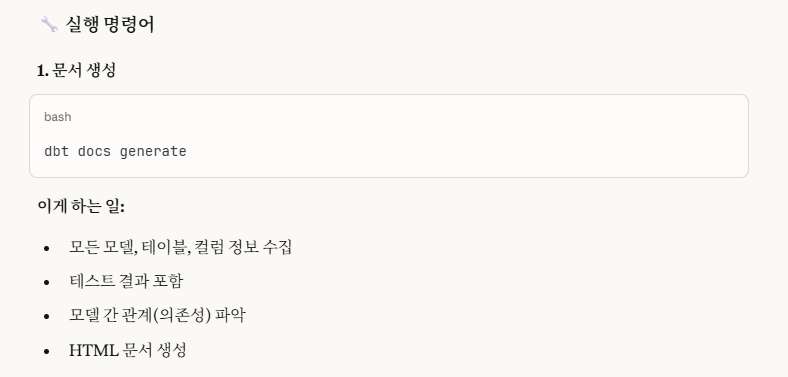
위 사진에 설명 나와있는대로,
우리의 모든 모델,테이블,칼럼 정보들을 수집해서 이를 HTML 문서화시킵니다.
$ dbt docs generate
11:17:33  Running with dbt=1.11.2
11:17:33  Registered adapter: postgres=1.10.0
11:17:34  Found 9 models, 19 data tests, 6 sources, 463 macros
11:17:34
11:17:34  Concurrency: 1 threads (target='dev')
11:17:34
11:17:35  Building catalog
11:17:35  Catalog written to C:\Users\dc\Desktop\새로운 포트폴리오를 위한 폴더\데이터,AI\포트폴리오용\데이터 엔지니어링\실습\data_engineer_portfolio\phase 4\phase 4-2\tmdb_warehouse\target\catalog.json
9-2. dbt docs serve
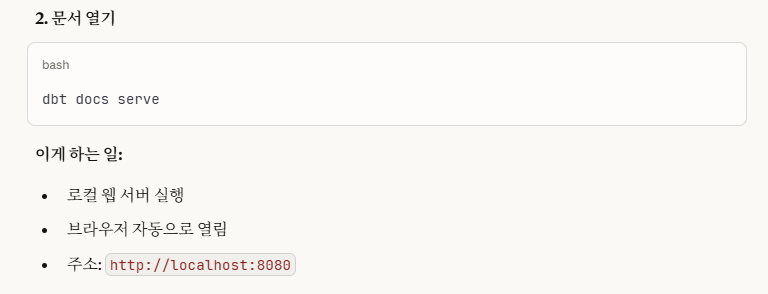
로컬(localhost)에서 웹 서버를 실행하여 docs(문서)를 볼 수 있게 해줍니다.
$ dbt docs serve
11:40:11  Running with dbt=1.11.2
Serving docs at 8080
To access from your browser, navigate to: http://localhost:8080


Press Ctrl+C to exit.
127.0.0.1 - - [31/Dec/2025 20:40:13] "GET / HTTP/1.1" 200 -
127.0.0.1 - - [31/Dec/2025 20:40:13] "GET /manifest.json?cb=1767181213226 HTTP/1.1" 200 -
127.0.0.1 - - [31/Dec/2025 20:40:13] "GET /catalog.json?cb=1767181213226 HTTP/1.1" 200 -
127.0.0.1 - - [31/Dec/2025 20:40:13] code 404, message File not found
127.0.0.1 - - [31/Dec/2025 20:40:13] "GET /%7B%7B%20getIcon(item.type,%20'on')%20%7D%7D HTTP/1.1" 404 -
127.0.0.1 - - [31/Dec/2025 20:40:13] code 404, message File not found
127.0.0.1 - - [31/Dec/2025 20:40:13] "GET /%7B%7B%20getIcon(item.type,%20'off')%20%7D%7D HTTP/1.1" 404 -
웹 서버 연결을 종료하고 싶으면, 'ctrl+c'를 눌러서 종료시키면 됩니다.
웹 개발에서 연결을 종료할 때 입력하는 단축키와 같습니다.
또한, 이미 dbt docs generate를 했으면,
그 이후부터는 dbt docs derve로 웹 서버만 실행시키면 됩니다.(또 다시 docs 생성 안 해도 됨.)
->.sql 모델을 수정하거나 schema.yml 파일을 수정하는 등의 수정 작업이 있을 경우에만 문서를 다시 생성(dbt docs generate)합니다.
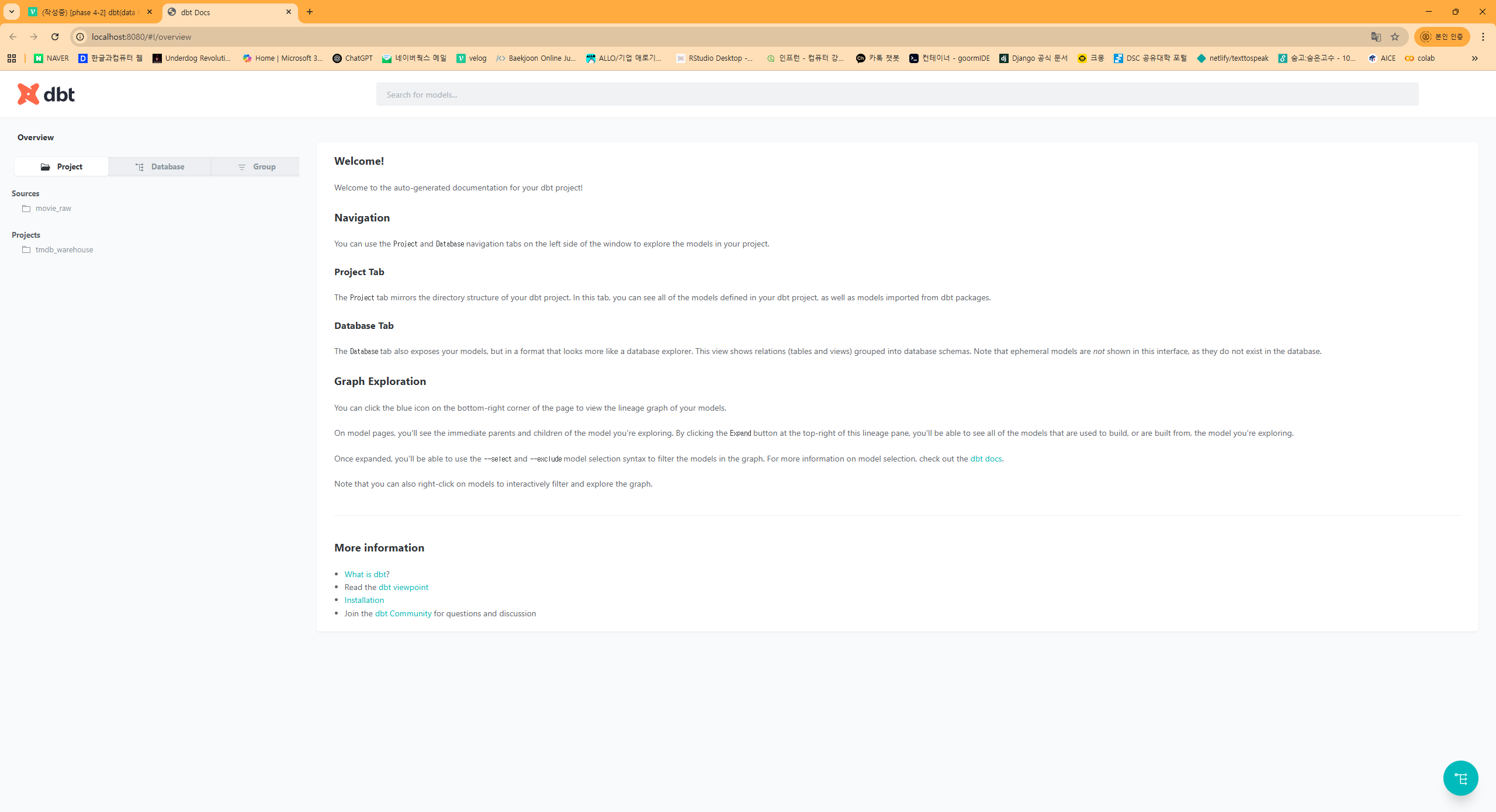
그러면 이렇게 자동으로 docs 로컬 웹페이지가 나타나고,
여기서 우리가 만든 모델링에 대한 정보들을 확인할 수 있습니다.
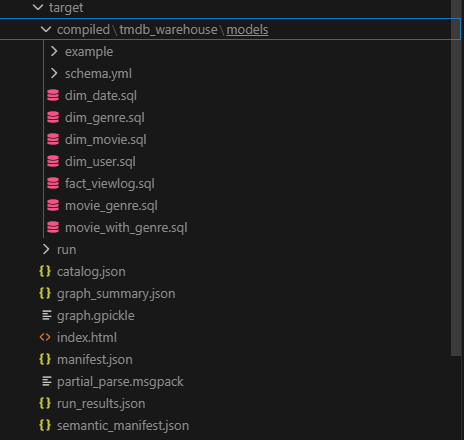
docs는 target/ 폴더를 참고하여 생성합니다.
10. 마무리 및 결론
이렇게 해서 우리는 phase 4-2(dbt) 작업을 마무리해봤습니다.
이번에도 새롭게 배운 내용들이 많아서 뜻 깊은 시간이 된 거 같습니다.
그럼 다음에는 phase 5로 돌아오도록 하겠습니다.
오늘도 제 긴 글을 읽어주셔서 감사합니다 :) bb