출처: 골드 메탈 님의 유튜브 콘텐츠 클론 코딩
00. Spawn Point 추가
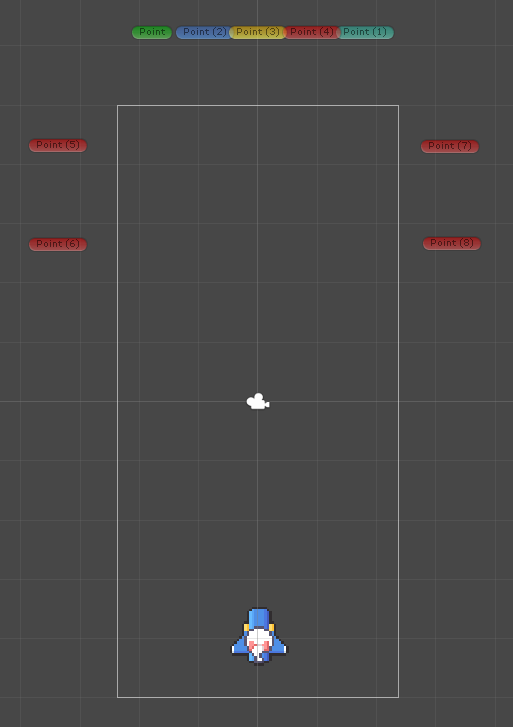
-
좌우로 각각 2개의 Spawn Point를 추가하여 다양한 움직임을 표현한다.
-
기존의 아래로 내려오는 움직임에서 대각선 아래로 내려오는 움직임이 필요하다.
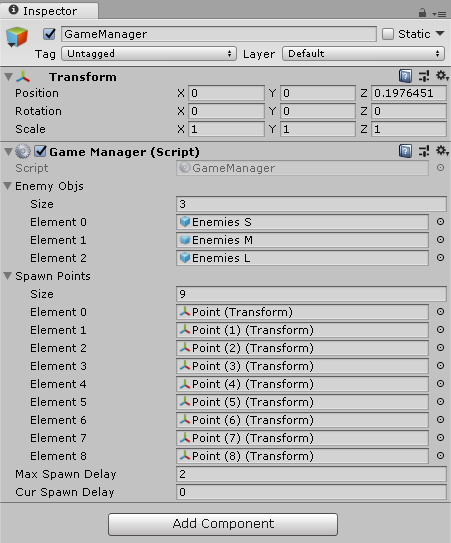
-
4개가 늘었으므로 Size를 9로 늘리고 각 위치를 매핑한다.
Enemy Script
123456789101112131415161718192021222324252627282930313233using System.Collections;using System.Collections.Generic;using UnityEngine;public class Enemy : MonoBehaviour {public float speed;public int health;public Sprite[] sprites;SpriteRenderer spriteRenderer;void Awake(){spriteRenderer = GetComponent<SpriteRenderer>();}void OnHit(int dmg){code}void ReturnSprite(){code}void OnTriggerEnter2D(Collider2D collision){code}}cs -
기존에는 Enemy가 각각 속도를 가지고 있었지만 이를 제거하고 Game Manager에 의해 생성될 때 속도를 부여하도록 한다.
Game Manager Script
12345678910111213141516171819202122232425262728293031323334353637383940414243444546474849using System.Collections;using System.Collections.Generic;using UnityEngine;public class GameManager : MonoBehaviour {public GameObject[] enemyObjs;public Transform[] spawnPoints;public float maxSpawnDelay;public float curSpawnDelay;void Update(){curSpawnDelay += Time.deltaTime;if(curSpawnDelay > maxSpawnDelay){SpawnEnemy();maxSpawnDelay = Random.Range(0.5f, 3f);curSpawnDelay = 0;}}void SpawnEnemy(){int ranEnemy = Random.Range(0, 3);int ranPoint = Random.Range(0, 9);GameObject enemy = Instantiate(enemyObjs[ranEnemy], spawnPoints[ranPoint].position, spawnPoints[ranPoint].rotation);Rigidbody2D rigid = enemy.GetComponent<Rigidbody2D>();Enemy enemyLogic = enemy.GetComponent<Enemy>();if (ranPoint == 5 || ranPoint == 6){rigid.velocity = new Vector2(enemyLogic.speed, -1);}else if(ranPoint == 7 || ranPoint == 8){rigid.velocity = new Vector2(enemyLogic.speed * (-1), -1);}else{rigid.velocity = new Vector2(0, enemyLogic.speed * (-1));}}}cs -
Line 30~33: 오브젝트를 각 위치에 생성하고 rigidbody와 Enemy 스크립트를 가져온다.
-
Line 35~38: 왼쪽에서 생성된 오브젝트에 우하로 향하는 속도를 설정한다.
-
Line 39~42: 오른쪽에서 생성된 오브젝트에 좌하로 향하는 속도를 설정한다.
-
Line 43~45: 아래로 향하는 속도를 설정한다.
01. 적 공격
프리펩 준비
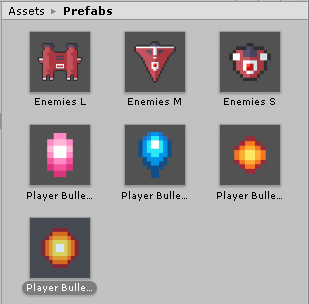
-
적 탄환 2개를 프리펩을 복사하여 sprite만 변경하여 만든다.
-
적 탄환이기 때문에 Tag를 Enemy Bullet으로 수정한다.
Enemy Script
12345678910111213141516171819202122232425262728293031323334353637383940414243444546474849505152535455565758596061626364656667686970717273747576777879808182838485868788using System.Collections;using System.Collections.Generic;using UnityEngine;public class Enemy : MonoBehaviour {public float speed;public int health;public Sprite[] sprites;public string type;public GameObject player;public float maxShotDelay;public float curShotDelay;public GameObject EnemyBulletA;public GameObject EnemyBulletB;SpriteRenderer spriteRenderer;void Awake(){spriteRenderer = GetComponent<SpriteRenderer>();}void Update(){Fire();Reload();}void Fire(){if (curShotDelay < maxShotDelay)return;switch (type){case "L":GameObject ba = Instantiate(EnemyBulletB, transform.position + Vector3.left * 0.3f, transform.rotation);GameObject bb = Instantiate(EnemyBulletB, transform.position + Vector3.right * 0.3f, transform.rotation);Rigidbody2D rigidL = ba.GetComponent<Rigidbody2D>();Rigidbody2D rigidR = bb.GetComponent<Rigidbody2D>();Vector3 dirVecL = player.transform.position - (transform.position + Vector3.left * 0.3f);Vector3 dirVecR = player.transform.position - (transform.position + Vector3.right * 0.3f);rigidL.AddForce(dirVecL.normalized * 5, ForceMode2D.Impulse);rigidR.AddForce(dirVecR.normalized * 5, ForceMode2D.Impulse);break;case "S":GameObject b = Instantiate(EnemyBulletA, transform.position, transform.rotation);Rigidbody2D rigid = b.GetComponent<Rigidbody2D>();Vector3 dirVec = player.transform.position - (transform.position);rigid.AddForce(dirVec.normalized * 5, ForceMode2D.Impulse);break;}curShotDelay = 0;}void Reload(){curShotDelay += Time.deltaTime;}void OnHit(int dmg){code}void ReturnSprite(){spriteRenderer.sprite = sprites[0];}void OnTriggerEnter2D(Collider2D collision){code}}cs -
player의 슈팅 로직을 그대로 가져온다.
-
딜레이를 주기 위해 maxShotDelay, curShotDelay를 추가
-
적의 타입에 따라 bullet이 바뀌기 때문에 public 변수 type을 추가하고 Fire메소드에 타입에 따라 다른 로직을 적용한다.
-
크기가 작은 S타입일 경우 작은 탄환 하나를 발사한다. 이 때 player의 위치로 탄환을 발사해야하기 때문에 player의 위치를 알 필요가 있다.
-
** Enemy는 prefab이기 때문에 이미 scene에 올라가 있는 player를 매핑할 수 없다. 따라서 Enemy가 생성되었을 때 player를 할당할 수 있도록 Game Manager에서 이러한 역할을 하도록 한다.
-
이렇게 벡터를 구하면 이 벡터는 좌표 값이기 때문에 속도가 너무 빠른 문제가 있다. 따라서 normalized 변수를 이용해 단위 벡터로 바꾸고 방향을 그대로 유지하도록 한다.
-
L타입의 경우 탄환 두 개를 발사하기 때문에 같은 위치에서 발사하지 않도록 적절하게 자리를 수정하도록 한다.

02. 피격 이벤트
-
Player script의 OnTriggerEnter2D 수정
Player Script
123456789101112131415161718192021222324252627private void OnTriggerEnter2D(Collider2D collision)if(collision.gameObject.tag == "Border"){switch (collision.gameObject.name){case "Top":isTouchTop = true;break;case "Bottom":isTouchBottom = true;break;case "Left":isTouchLeft = true;break;case "Right":isTouchRight = true;break;}}else if(collision.gameObject.tag == "EnemyBullet" || collision.gameObject.tag == "Enemy"){gameObject.SetActive(false);GameManager manager = gameManager.GetComponent<GameManager>();manager.PlayerActiveOff();}}cs -
적 탄환 또는 적과 부딪칠 경우 player를 비활성화한다.
-
비활성화된 상태에서는 Invoke함수를 사용할 수 없다. 따라서 Game Manager에서 Respawn을 관리한다.
-
public 변수 manager를 추가하고 GameManager script의 PlayerActiveOff 메소드를 호출한다.
GameManager Script
1234567891011121314151617public void PlayerActiveOff(){Invoke("PlayerActiveOffExe", 2f);}void PlayerActiveOffExe(){Player pTmp = player.GetComponent<Player>();pTmp.isTouchBottom = false;pTmp.isTouchTop = false;pTmp.isTouchLeft = false;pTmp.isTouchRight = false;player.transform.position = Vector3.down * 3.5f;player.SetActive(true);}cs -
player는 PlayerActiveOff를 호출하고 이 메소드는 Invoke를 통해 2초 뒤 PlayerActiveOffExe를 호출하여 respawn한다.
-
만약 player가 경계면에 부딪친 상태로 비활성화되면 OnTriggerExit2D가 동작하지 않은 채로 respawn되기 때문에 방향키가 제대로 작동하지 않는다. 따라서 Player script의 bool값들을 불리와 모두 false로 초기화한 상태로 respawn되도록 한다.
03. 결과