출처: 골드 메탈 님의 유튜브 콘텐츠 클론 코딩
00. Prefab
-
오브젝트 설정을 저장하여 이 오브젝트를 재사용할 수 있게 하는 것이 프리펩이다.
-
제공된 sprite를 scene위에 생성한다.
-
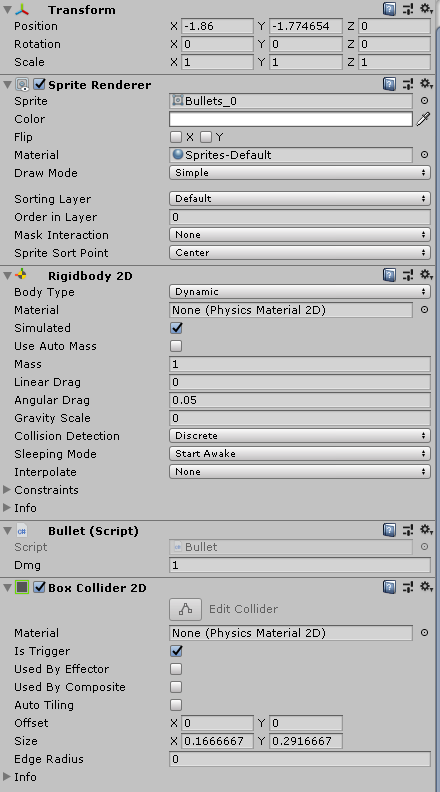
bullet sprite의 inspector를 위와 같이 수정한다.
-
탄환이 쌓이지 않게 제거하기 위해 특정 경계에 도달하면 제거할 수 있도록 box collider를 추가한다.
-
탄환을 발사하기 위해 rigidbody의 addforce를 사용하기 때문에 rigidbody를 추가한다. 중력의 영향을 받지 않기 때문에 Gravity Scale을 0으로 수정한다.
-
만들어 둔 bullet script 또한 추가한다.
-
설정이 완료되면 미리 만들어둔 Prefabs폴더에 오브젝트를 드래그 앤 드랍하면 Prefab이 자동으로 생성된다.
-
01. 탄환 제거
-
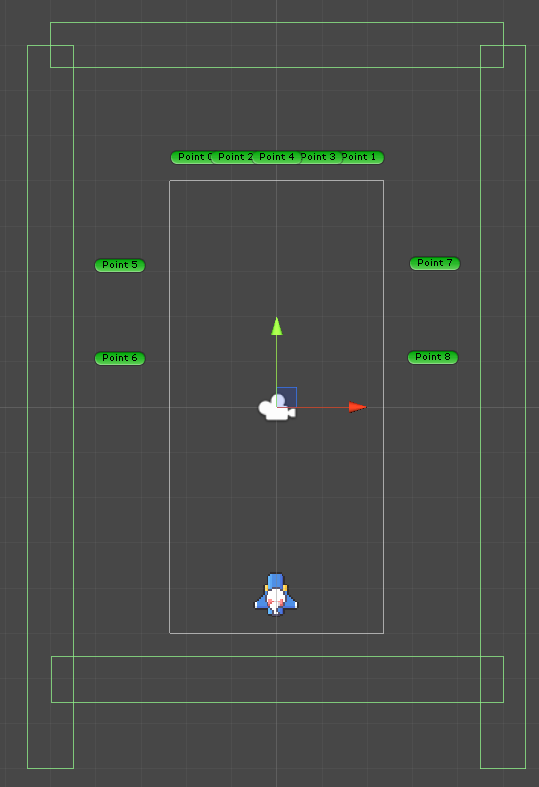
새로운 경계를 추가하여 발사된 탄환이 경계에 도달하면 제거하도록 한다.
-
새로운 태그 BorderBullet을 생성하여 상하좌우 border를 BorderBullet으로 수정한다.
Bullet 스크립트
12345678910111213141516using System.Collections;using System.Collections.Generic;using UnityEngine;public class Bullet : MonoBehaviour {public int dmg;void OnTriggerEnter2D(Collider2D collision){if(collision.gameObject.tag == "BulletBorder"){Destroy(gameObject);}}}cs -
02. 탄환 생성
-
Player가 탄환을 생성하여 발사하기 때문에 Player스크립트에 관련 내용을 추가한다.
123456789101112131415161718192021222324252627282930313233343536373839404142434445464748495051525354555657585960616263646566676869707172737475767778798081828384858687888990919293949596979899100101using System.Collections;using System.Collections.Generic;using UnityEngine;public class Player : MonoBehaviour {public bool isTouchTop;public bool isTouchBottom;public bool isTouchLeft;public bool isTouchRight;public float speed;public float maxShotDelay;public float curShotDelay;public GameObject bulletObjA;public GameObject bulletObjB;public GameManager manager;public int power;Animator anim;void Awake(){anim = GetComponent<Animator>();}void Update(){Move();Fire();Reload();}void Fire(){if (!Input.GetButton("Fire1"))return;if (curShotDelay < maxShotDelay)return;switch (power){case 1:GameObject bullet = Instantiate(bulletObjA, transform.position, transform.rotation);Rigidbody2D rigid = bullet.GetComponent<Rigidbody2D>();rigid.AddForce(Vector2.up * 10, ForceMode2D.Impulse);break;case 2:GameObject bullet1 = Instantiate(bulletObjA, transform.position + Vector3.right * 0.1f, transform.rotation);GameObject bullet2 = Instantiate(bulletObjA, transform.position + Vector3.left * 0.1f, transform.rotation);Rigidbody2D rigid1 = bullet1.GetComponent<Rigidbody2D>();Rigidbody2D rigid2 = bullet2.GetComponent<Rigidbody2D>();rigid1.AddForce(Vector2.up * 10, ForceMode2D.Impulse);rigid2.AddForce(Vector2.up * 10, ForceMode2D.Impulse);break;case 3:GameObject bullet11 = Instantiate(bulletObjA, transform.position + Vector3.right * 0.3f, transform.rotation);GameObject bullet22 = Instantiate(bulletObjA, transform.position + Vector3.left * 0.3f, transform.rotation);GameObject bullet33 = Instantiate(bulletObjB, transform.position, transform.rotation);Rigidbody2D rigid11 = bullet11.GetComponent<Rigidbody2D>();Rigidbody2D rigid22 = bullet22.GetComponent<Rigidbody2D>();Rigidbody2D rigid33 = bullet33.GetComponent<Rigidbody2D>();rigid11.AddForce(Vector2.up * 10, ForceMode2D.Impulse);rigid22.AddForce(Vector2.up * 10, ForceMode2D.Impulse);rigid33.AddForce(Vector2.up * 10, ForceMode2D.Impulse);break;}curShotDelay = 0;}void Reload(){curShotDelay += Time.deltaTime;}void Move(){code}void OnTriggerEnter2D(Collider2D collision){code}void OnTriggerExit2D(Collider2D collision){code}}cs -
Line 12~17: public 변수 추가
-
Line 33~34: Fire, Reload 메소드 추가
-
Line 37~79: Fire 메소드, 버튼이 눌렸을 경우만 탄환 발사, 발사 간격을 조절하기 위해 curShotDelay가 maxShotDelay보다 큰 경우만 발사, power에 따라 다른 탄환 발사
-
Line 81~83: curShotDelay의 값을 시간에 따라 증가시키기 위해 deltaTime을 더함.
-
Line 48~50: Instantiate로 플레이어의 위치에 탄환 생성, RigidBody2D의 AddForce로 탄환을 발사. ForceMode는 Impulse를 사용. 파워에 따라 탄환 생성.
-
03. 결과