개요
Dialog 시스템을 통해서 발생해야 하는 여러가지 이벤트들을 만들어 보겠습니다.
만들어야 할 것들을 정리해보겠습니다.
- 대사 끝나고 선택지 띄우기 / 움직이기 / 선택
- 선택 시 이벤트 함수 호출 ( Dictionary<int, Action> )
- 이벤트 종료 시 진행 상황 정리 ( 카드 회수, 몬스터 회수 등... )
선택지 띄우는 것 부터 차근차근 만들어보겠습니다.
구현
InputManager.cs
public class InputManager
{
    public Action dialogAction = null;
    public Action cardAction = null;
    public Action escAction = null;

    private bool dialogBlock = false;
    private bool escBlock = false;

    public bool DialogBlock { get => dialogBlock; set => dialogBlock = value; }
    public bool EscBlock { get => escBlock; set => escBlock = value; }

    public void OnUpdate()
    {
        if (Input.anyKey == false) return;

        if (cardAction != null && !escBlock && !dialogBlock) cardAction.Invoke();
        if (dialogAction != null && !escBlock) dialogAction.Invoke();
        if (escAction != null && !dialogBlock) escAction.Invoke();
    }

}
모든 Input을 InputManager에서 Action으로만 관리합니다.
Input의 타입을 나눠서 모아두기 때문에 block을 통해 입력을 제어하기 편해집니다.
다음은 DialogManager입니다. 코드가 길어 핵심적인 함수만 보겠습니다.
저번에 EventData를 만들 때 eventSelectCnt를 저장해 두었기 때문에 선택지의 개수를 알 수 있습니다.
DialogManager.cs
    private void OnKeyboard()
    {

        if (Input.GetKeyDown(KeyCode.Space) && dialogInProgress)
        {
            if (isTyping)
            {

                StopAllCoroutines();
                dialogText.text = prevDialogue;
                isTyping = false;
            }
            else
            {
                if (curLineIndex < dialogKeys.Count)
                {
                    prevDialogue = LocalizationSettings.StringDatabase.GetLocalizedString("DialogInfo", dialogKeys[curLineIndex]);

                    ShowNextLine();
                }
                else
                {
                    if (!selectinProgress)
                    {
                        MakeSelection();
                        // 여기 이벤트 선택지 생성하면됨
                    }
                }
            }
        }

        if (Input.GetKeyDown(KeyCode.W) && selectinProgress)
        {
            SoundManager.Instance.PlayWriteSound(Define.DialogSoundType.SelectChange);
            OnUpArrow();
        }
        else if (Input.GetKeyDown(KeyCode.S) && selectinProgress)
        {
            SoundManager.Instance.PlayWriteSound(Define.DialogSoundType.SelectChange);
            OnDownArrow();
        }
        else if (Input.GetKeyDown(KeyCode.F) && selectinProgress)
        {
            OnChooseSelect();
        }
    }


    private void MakeSelection()
    {

        selectinProgress = true;
        selectorImage.SetActive(true);
        selectorImage.GetComponent<RectTransform>().anchoredPosition = new Vector2(-10f, 0);

        selects = new List<GameObject>();

        for (int i = 0; i < eventInfo.eventSelectCnt; i++)
        {
            selects.Add(Instantiate(selectTextPrefab, selectsParent.transform));
            selects[i].GetComponent<RectTransform>().anchoredPosition = new Vector3(0, SELECTEHEIGHT * (eventInfo.eventSelectCnt - i - 1), 0);
            selects[i].GetComponent<TextMeshProUGUI>().text = LocalizationSettings.StringDatabase.GetLocalizedString("DialogInfo",
                 (EVENTKEYOFFSET + 100 * eventInfo.eventID + 20 + i).ToString());
        }

        curSelectedIndex = 0;
        SelectIndex(0);
        // 자동으로 첫번째 선택

    }

    private void SelectIndex(int ind)
    {
        selects[curSelectedIndex].GetComponent<RectTransform>().DOAnchorPosX(0, 0.5f);

        selectorImage.GetComponent<RectTransform>().anchoredPosition = selects[ind].GetComponent<RectTransform>().anchoredPosition - new Vector2(0, 5f);
        selects[ind].GetComponent<RectTransform>().DOAnchorPosX(-SELECTEDOFFSET, 0.5f);

        curSelectedIndex = ind;
    }

    private void OnChooseSelect()
    {
        SoundManager.Instance.PlayWriteSound(Define.DialogSoundType.SelectChoose);
        UnsetEvent();

        EventManager.Instance.EventSelectTrigger(eventInfo.eventID, curSelectedIndex);

        return;
    }
OnKeyboard
InputManager의 Action에 추가할 함수입니다.
만약 선택지가 아닌데 전부 끝났다면 MakeSelection()으로 선택지를 생성합니다.
그 밑의 W, S, F는 선택지를 컨트롤하는 부분이라 생략하겠습니다.
MakeSelection
선택지를 생성하는 부분입니다. 어떤게 선택되었는지 알려주는 selectorImage 를 키고 시작합니다.
선택지 리스트를 만들어서 인스턴스화 해주고 번역된 문자열을 집어넣어줍니다.
SelectIndex
선택지를 교체하는 함수입니다.
선택한 선택지를 알 수 있도록 selectorImage 를 옮겨주고 선택지를 왼쪽으로 살짝 나오게 해줍니다.
OnChooseSelect
선택지를 선택했을 때의 함수입니다.
UnsetEvent 로 이벤트를 초기화해주고 EventManager에서 선택지에 해당하는 함수를 호출합니다.
EventManager.cs
public class EventManager : MonoBehaviour
{
	//
	// Singleton...
    //

    private Dictionary<(int eventId, int choice), Action> eventActions;

    void Start()
    {
        // 이벤트 함수 매핑 초기화
        eventActions = new Dictionary<(int, int), Action>
        {
            { (0, 0), GG_S0 },
            { (0, 1), GG_S1 },
            { (1, 0), WT_S0 },
            { (1, 1), WT_S1 },
            { (1, 2), WT_S2 }
        };
    }

    public void EventSelectTrigger(int id, int select)
    {
        eventActions[(id, select)].Invoke();
    }

    private void GG_S0()
    {
        Debug.Log("GG_S0");
        StartCoroutine(EnemyAppearEvent(3));
    }

	//
	// Other Select Functions...
	//

    private IEnumerator EnemyAppearEvent(int cnt)
    {

        SoundManager.Instance.ChangeBGM(Define.BgmType.Game);
        List<EnemyBT> enemyBTs = new List<EnemyBT>();

        for (int i = 0; i < cnt; i++)
        {
            enemyBTs.Add(MapGenerator.Instance.SummonEnemy());
            yield return new WaitForSeconds(0.3f);
        }

        bool once;
        while (true)
        {
            once = false;
            for (int i = 0; i < cnt; i++)
            {
                if (enemyBTs[i] != null) once = true;
            }

            yield return new WaitForSeconds(1.0f);

            if (!once) break;
        }


        Managers.Game.OnEventEnd();
        enemyBTs.Clear();
    }
}
간단하게 GG_S0 를 선택하면 3명의 적을 소환하는 이벤트 입니다.
1초마다 맵에 적이 다 죽었는지 확인해서 Event가 끝났는지 확인합니다.
전부 끝났으면 GameManager의 OnEventEnd 함수를 호출해서 이벤트동안 발생한 일들을 정리합니다.
GameManagerEx.cs
public class GameManagerEx
{
    public delegate void EventDelegate<T1>(T1 a);

    private bool isInEvent = false;
    private Action onEventStart = null;
    private Action onEventEnd = null;
    private EventDelegate<int> dialogDelegate;

    private List<BTree> goblins = new List<BTree>();

	//
    // Properties...
    //


    public void Init()
    {
        Managers.Input.dialogAction -= OnKeyboard;
        Managers.Input.dialogAction += OnKeyboard;
    }

    public void NextEvent()
    {
        if (isInEvent) return;
        isInEvent = true;


        int eventIdx = 1;

        // TODO : 이벤트 선택지 선택하는 로직 필요
        onEventStart.Invoke();

        DialogDelegate(eventIdx);
    }

    // Event끝나면 호출
    public void OnEventEnd()
    {
        onEventEnd.Invoke();
        isInEvent = false;
        SoundManager.Instance.ChangeBGM(Define.BgmType.Main);
        RemoveAllGoblin();
    }

    private void OnKeyboard()
    {
        if (Input.GetKeyDown(KeyCode.E))
        {
            NextEvent();
        }

        return;
    }

    public void AddGoblin(BTree bt)
    {
        goblins.Add(bt);
    }

    private void RemoveAllGoblin()
    {
        for (int i = 0; i < goblins.Count; i++)
        {
            if (goblins[i] != null)
                GameObject.Destroy(goblins[i].gameObject);
        }

        goblins.Clear();
    }

}
여기서 고블린들과 이벤트가 시작/끝났을 때 실행해야 하는 모든 함수를 Action으로 관리합니다.
예를 들면, 카드가 전부 사라져야 할 때는 InvenManager 에서 가지고 있는 카드를 없애고 CardDecks 에서 실제 카드 게임오브젝트를 삭제해주어야 합니다.
그 외에도 버튼을 block한다던지 등의 여러 함수들을 전부 추가해줍니다.
아래는 실행화면 입니다.
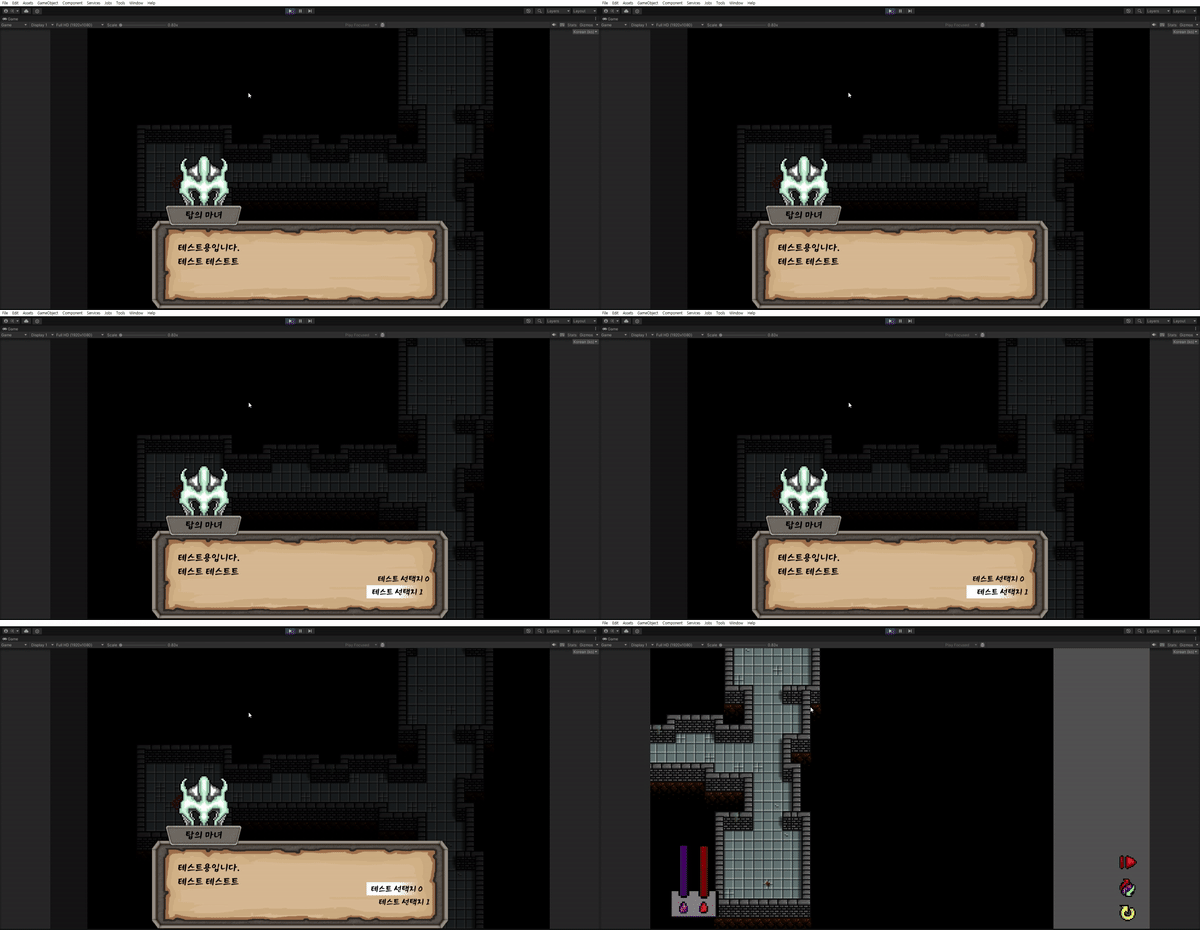
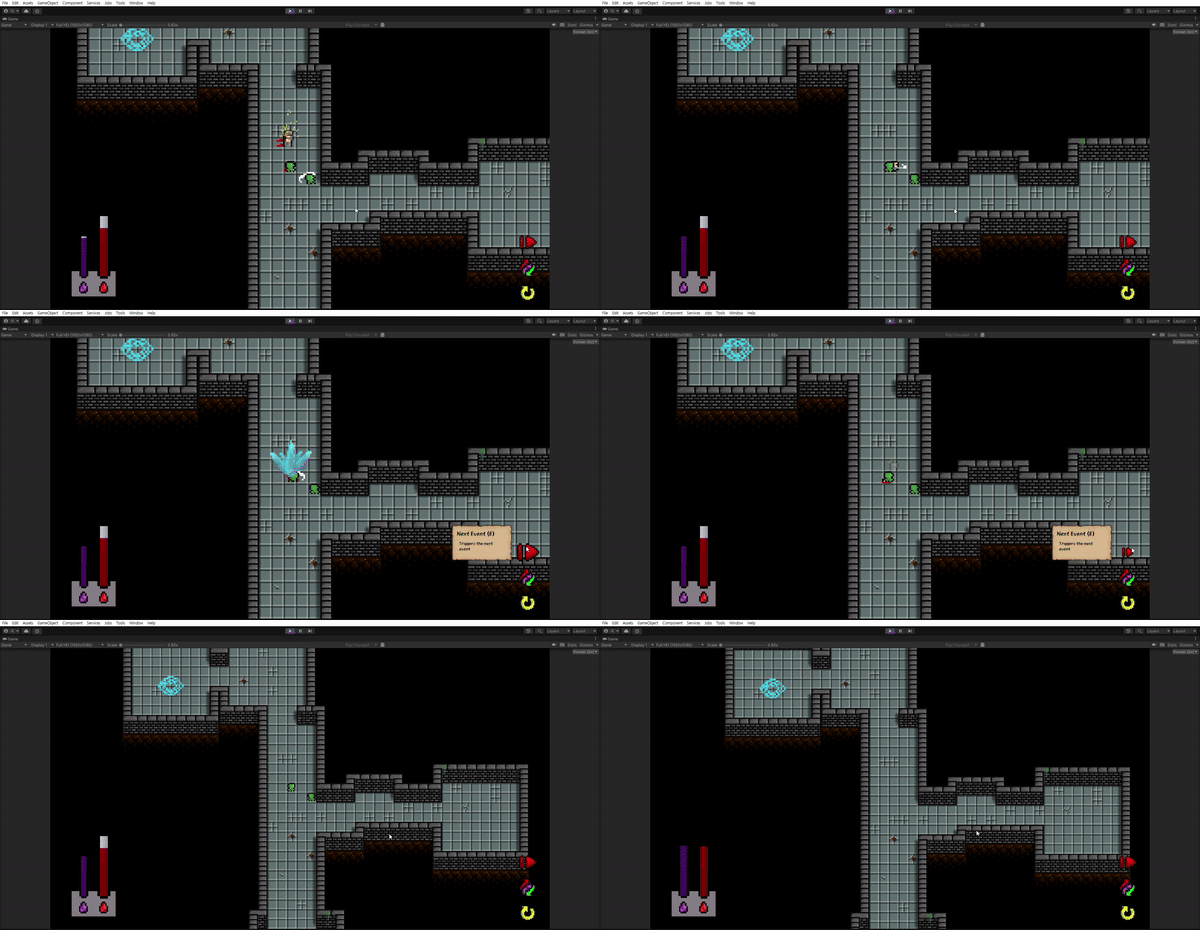
마무리
선택해서 Enemy를 생성하고 전부 죽이면 OnEventEnd 함수가 호출되어서 슬라이더가 원상복구되고 고블린도 다시 사라지는 것을 볼 수 있습니다.
지금까지는 Event, Goblin, Enemy 전부 추가하기 쉽도록 틀을 만드는데 집중했습니다.
이제는 컨텐츠나 꾸미는 부분에 더 신경을 써야할 것 같습니다.
예를 들면, 타일맵의 경우 벽 부분이 전부 Enemy, Goblin 보다 Order가 높아서 가끔씩 코너를 돌 때 벽 뒤로 스프라이트가 가려지는 경우가 생깁니다.
앞으로는 이런 부분들에 신경써서 완성도 있게 만들어보겠습니다.