개요
퍼즐 게임은 선형적으로 진행되는것이 아니라, 각 스테이지를 선택할 수 있어야 합니다.
메뉴와 게임 씬을 분리하고, 맵 정보를 Json파일로 만들어 로드해두도록 하겠습니다.
구현
ResourceManager
[Serializable]
public class MapInfos
{
    public MapInfo[] mapInfo;
}

[Serializable]
public class MapInfo
{
    public int mapId;
    public int width;
    public GridInfoEx[] gridInfo;
}

[Serializable]
public class GridInfoEx
{
    public Vector2Int pos;
    public int height;
    public GridState state;
    public int colorIdx;
}

public class ResourceManager
{

    private string mapInfoPath = "JsonData/MapData";

    private MapInfos mapInfos = new MapInfos();


    public void Init()
    {
        mapInfos = JsonUtility.FromJson<MapInfos>(Resources.Load<TextAsset>(mapInfoPath).text);
    }

    public MapInfo GetMapInfo(int idx)
    {
        return mapInfos.mapInfo[idx];
    }


}
이렇게 하면 Json파일을 통해서 맵 정보를 받아오고 GetMapInfo를 통해 사용할 수 있습니다.
MapGenerator도 수정해보겠습니다.
MapGenerator
    public void GenerateMap(int n)
    {

        List<GridInfo> mapArrs = new List<GridInfo>();

        MapInfo mapResource = Managers.Resource.GetMapInfo(n);

        foreach (GridInfoEx gi in mapResource.gridInfo) {
            mapArrs.Add(new GridInfo(gi.pos, gi.height, gi.colorIdx, gi.state));
        }


        currentMapWidth = mapResource.width;
        mapGrids = new MapGrid[currentMapWidth, currentMapWidth];

        GridInfo grid;

        for (int i = 0; i < mapArrs.Count; i++)
        {
            grid = mapArrs[i];
            mapGrids[grid.Pos.y, grid.Pos.x] = Instantiate(gridPrefab, new Vector3(grid.Pos.x, 0, grid.Pos.y) * Constant.GRID_SIZE + new Vector3(0, camOffY, 0), Quaternion.identity, transform).GetComponent<MapGrid>();
            mapGrids[grid.Pos.y, grid.Pos.x].transform.localScale = Vector3.one * Constant.GRID_SIZE;
            mapGrids[grid.Pos.y, grid.Pos.x].InitMapGrid(grid);

        }

        StartCoroutine(GridAppearEff(fallDuration));
        return;
    }

    // Restart or NextLevel in GameScene
    public void ResetAndInit(int n)
    {
        StartCoroutine(GridDisappearEff(fallDuration, n));
    }

    private IEnumerator GridDisappearEff(float duration, int n)
    {
        if (curBoxController != null)  curBoxController.UnsetBoxController();
        curBoxController = null;

        yield return new WaitForSeconds(0.5f);

        // Disappear Grids
        for (int i = 0; i < mapGrids.GetLength(0); i++)
        {
            for (int j = 0; j < mapGrids.GetLength(1); j++)
            {
                if (mapGrids[i, j] == null) continue;
                mapGrids[i, j].DisappearGrid(duration);
                yield return new WaitForSeconds(timeBetweenFall);
            }
        }

        yield return new WaitForSeconds(duration);

        GenerateMap(n);

    }
GenerateMap 과 GridDisappearEff 로 사라지는 효과 및 생성 시 레벨을 지정할 수 있도록 수정했습니다.
하지만, Scene 전환을 담당하는 스크립트가 하나 더 필요합니다.
GameManagerEx
public class GameManagerEx : MonoBehaviour
{

	//Singleton
    //...

    private int currentLv = -1;

    public void GameStart(int lvId)
    {
        currentLv = lvId;
        StartCoroutine(GameStartCoroutine(lvId));

        return;
    }

    public void GameFail()
    {
        MapGenerator.Instance.ResetAndInit(currentLv);
    }

    public void GameSuccess()
    {
        MapGenerator.Instance.ResetAndInit(++currentLv);
    }


    public IEnumerator GameStartCoroutine(int idx)
    {
        // LoadScene and wait-> MapGenerate
        AsyncOperation async = SceneManager.LoadSceneAsync(Constant.GAME_SCENE);

        yield return async;
        yield return new WaitForSeconds(0.5f);

        MapGenerator.Instance.GenerateMap(idx);

    }

}GameFail, GameSuccess, GameStart 등의 이벤트를 시작 및 씬 전환을 합니다.
Singleton으로 생성하여 씬 전환 후에도 가지고있던 정보를 잃지 않도록 합니다.
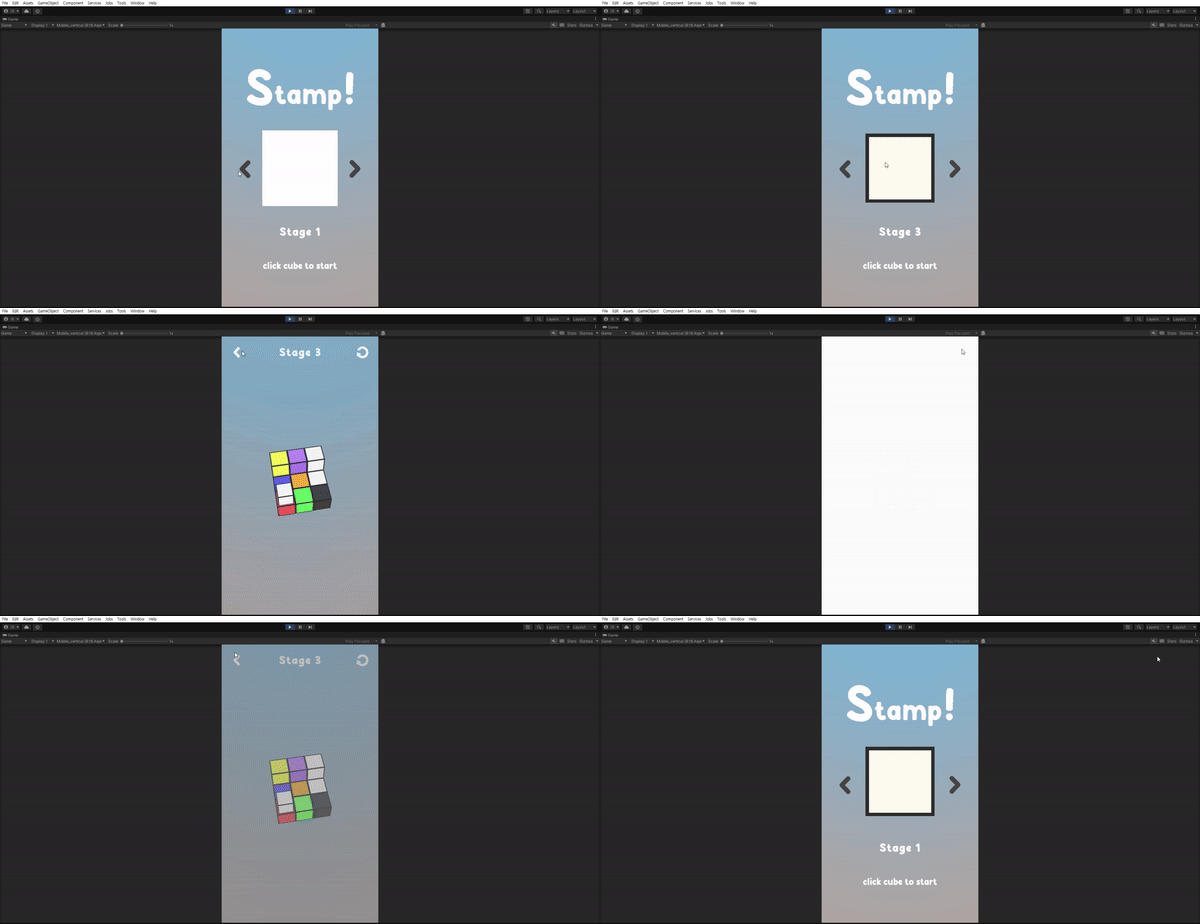
그 후에 씬 전환 효과를 추가하고, 스테이지를 선택할 수 있는 UI를 꾸며주면 다음과 같이 작동합니다.
마무리
기본적인 틀이 전부 만들어졌습니다.
이제 네트워크 환경에서 동작할 수 있도록 코드를 약간씩 수정해 나가겠습니다.