이번 포스트에서는 대량의 데이터에 대해 배치 inference 하는 방법을 object detection을 예시로 구현해 보겠습니다
Scaling with Ray Data
먼저 대량의 데이터로 스케일업하는 방법에 대해 알아보겠습니다. Ray Data를 이용하여 배치 inference를 진행합니다.
Loading the Image Dataset
사용할 예시 데이터 셋은 Pascal VOC 데이터 이며 2434장의 고양이와 개의 이미지를 포함하고 있습니다.
먼저 ray.data.read_images API를 이용하여 준비된 이미지 데이터셋을 S3로부터 다운받습니다. 그 후 schema API를 이용하여 데이터셋의 스키마를 확인하면 "image"라고 명명된 1개의 컬럼을 볼수 있고 값은 np.ndarray 형식으로 표현됩니다.
import ray

ds = ray.data.read_images("s3://anonymous@air-example-data/AnimalDetection/JPEGImages")
display(ds.schema())
[2023-05-19 18:10:29] INFO ray._private.worker::Started a local Ray instance. View the dashboard at 127.0.0.1:8265
[2023-05-19 18:10:35] [Ray Data] WARNING ray.data.dataset::Important: Ray Data requires schemas for all datasets in Ray 2.5. This means that standalone Python objects are no longer supported. In addition, the default batch format is fixed to NumPy. To revert to legacy behavior temporarily, set the environment variable RAY_DATA_STRICT_MODE=0 on all cluster processes.
Learn more here: https://docs.ray.io/en/master/data/faq.html#migrating-to-strict-modeColumn Type
------ ----
image numpy.ndarray(ndim=3, dtype=uint8)Batch inference with Ray Data
model inference는 preprocessing the image, model inference 2개의 스텝으로 구성됩니다.
Preprocessing
첫번째로 preprocessing 코드를 Ray Data로 변환합니다. preprocess_image 함수 내부에 preprocessing 코드를 입력합니다. 이 함수는 오직 numpy array로 표현된 데이터셋 중 한개의 이미지를 포함하는 dictionary 타입의 1개의 변수만을 받습니다.
import numpy as np
import torch
from torchvision import transforms
from torchvision.models.detection import (FasterRCNN_ResNet50_FPN_V2_Weights,
                                          fasterrcnn_resnet50_fpn_v2)
from typing import Dict


def preprocess_image(data: Dict[str, np.ndarray]) -> Dict[str, np.ndarray]:
    weights = FasterRCNN_ResNet50_FPN_V2_Weights.DEFAULT
    preprocessor = transforms.Compose(
        [transforms.ToTensor(), weights.transforms()]
    )
    return {
        "image": data["image"],
        "transformed": preprocessor(data["image"]),
    }
그리고 나면 map API를 사용하여 함수를 전체 데이터셋에 적용합니다. Ray Data의 map을 사용하여 preprocessing을 전체로 스케일업 할 수 있습니다.
ds = ds.map(preprocess_image)Model inference
다음은 model inference part를 변환해 보겠습니다. preprocessing과 비교하여 model inference는 2개의 차이점이 있습니다.
- 모델 로딩과 초기화에 비용이 많이 듭니다
- 데이터를 배치로 처리하면 하드웨어 가속으로 모델 추론을 최적화할 수 있습니다. 더 큰 배치를 사용하면 GPU 활용도와 추론 작업의 전체 런타임이 향상됩니다.
따라서 model inference 코드를 다음dml Object_Detection Model 클래스로 변환합니다. 이 클래스에서 모델 로딩 및 초기화 코드를 init 에 넣고, 한번만 실행하도록 합니다. 그리고 model inference 코드를 call 메서드에 넣고 각 배치에 대해 호출하도록 합니다.
이 call 방법은 배치를 사용합니다. 이 경우 배치는 "image" 키 하나를 갖는 dict이고 값은 np.ndarray 형식으로 표현된 이미지 배열입니다. 또한 API를 사용하여 단일 배치를 가져오고 내부 데이터 구조를 검사할 수 있습니다
single_batch = ds.take_batch(batch_size=3)
display(single_batch)
class ObjectDetectionModel:
def __init__(self):
# Define the model loading and initialization code in `__init__`.
self.weights = FasterRCNN_ResNet50_FPN_V2_Weights.DEFAULT
self.model = fasterrcnn_resnet50_fpn_v2(
weights=self.weights,
box_score_thresh=0.9,
)
if torch.cuda.is_available():
# Move the model to GPU if it's available.
self.model = self.model.cuda()
self.model.eval()
def __call__(self, input_batch: Dict[str, np.ndarray]) -> Dict[str, np.ndarray]:
# Define the per-batch inference code in `__call__`.
batch = [torch.from_numpy(image) for image in input_batch["transformed"]]
if torch.cuda.is_available():
# Move the data to GPU if it's available.
batch = [image.cuda() for image in batch]
predictions = self.model(batch)
return {
"image": input_batch["image"],
"labels": [pred["labels"].detach().cpu().numpy() for pred in predictions],
"boxes": [pred["boxes"].detach().cpu().numpy() for pred in predictions],
}map_batches API 를 사용하여 모델을 전체 데이터셋에 적용합니다.
map및 의 첫 번째 매개변수 map_batches는 사용자 정의 함수(UDF)로, 함수 또는 클래스가 될 수 있습니다. 함수 기반 UDF는 단기 실행 Ray task 으로 실행되고 클래스 기반 UDF는 장기 실행 Ray actor로 실행됩니다. 클래스 기반 UDF의 경우 인수를 사용하여 concurrency 동시 병렬 actor의 수를 지정합니다. batch_size는 각 배치의 이미지 수를 나타냅니다.
num_gpus는 각 Object_Detection Model 인스턴스에 필요한 GPU 수를 지정합니다.Ray 스케줄러는 리소스 활용도를 극대화하기 위해 이기종 리소스 requirement를 처리할 수 있습니다. 이 경우 Object_Detection Model 인스턴스는 GPU에서 실행되고 preprocess_image 인스턴스는 CPU에서 실행됩니다.
ds = ds.map_batches(
    ObjectDetectionModel,
    concurrency=4, # Use 4 GPUs. Change this number based on the number of GPUs in your cluster.
    batch_size=4, # Use the largest batch size that can fit in GPU memory.
    num_gpus=1,  # Specify 1 GPU per model replica. Remove this if you are doing CPU inference.
)
Verify and Save Results
작은 배치의 inference에 대한 결과를 확인할 수 있습니다.
from torchvision.transforms.functional import convert_image_dtype, to_tensor

batch = ds.take_batch(batch_size=2)
for image, labels, boxes in zip(batch["image"], batch["labels"], batch["boxes"]):
    image = convert_image_dtype(to_tensor(image), torch.uint8)
    labels = [weights.meta["categories"][i] for i in labels]
    boxes = torch.from_numpy(boxes)
    img = to_pil_image(draw_bounding_boxes(
        image,
        boxes,
        labels=labels,
        colors="red",
        width=4,
    ))
    display(img)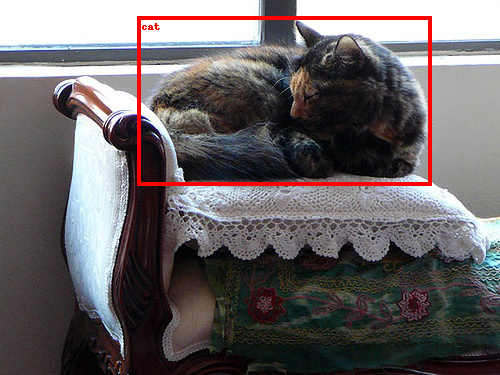
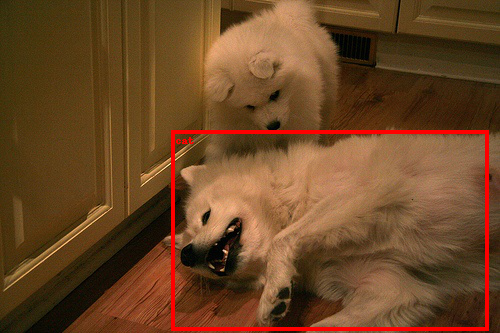
또한 외부 스토리지 또는 로컬 저장소에 상기 결과를 저장할 수도 있습니다.
ds.write_parquet("local://tmp/inference_results")