Unity Code Skill
Attribute
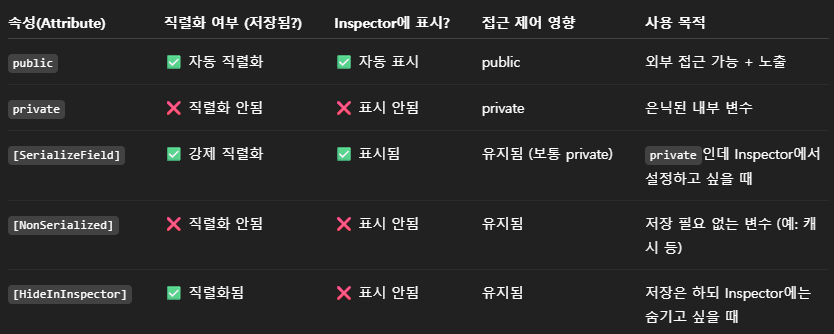
[Serializable]
- 클래스에 적용하는 속성이다.
- 해당 클래스가 직렬화 가능하다는 것을 나타낸다.
- 즉, 해당 클래스의 인스턴스를 파일에 저장하거나 네트워크를 통해 전송할 수 있다.
- 직렬화: 객체를 저장가능한 형태로 변환하는 과정
Coroutine
- Unity에서 비동기적인 작업 수행을 모방한 기능이다.
- 코루틴은 멀티 스레드가 아닌 Unity 단일 메인 스레드에서 실행한다.
- Unity 엔진, 게임 오브젝트, 컴포넌트 등에 안전하게 접근할 수 있다.
- 비동기적으로 작업을 수행하는 것처럼 보이지만 실제로는 아니다.
yield return 사용법
yield return new WaitForSeconds(t);yield return null;yield return new WaitForEndOfFrame();yield return new WaitUntil(() => b);yield return new WaitWhile(() => b);
using System.Collections;

IEnumerator CoLoop(float seconds)
{
	float loop = 0f;
    while (loop < 10f)
    {
    	loop++;
    	yield return new WaitForSeconds(seconds);
    }

    yield return null;
}

Coroutine co = StartCoroutine(CoLoop(1.0f));
StopCoroutine(co);
Lerp & Slerp
- 두 지점 사이에서 GameObject를 움직이게 하거나, 두 색상 사이를 부드럽게 전환하고 싶을 때 사용할 수 있다.
Lerp()
- 두 값 사이를 직선 상의 최단 경로를 따라서 선형 보간하는 함수이다.
- 속도가 일정하지 않다.
Slerp()
- 두 값 사이를 구면 상의 최단 경로를 따라서 구면 선형 보간하는 함수이다.
- 속도가 일정하다.
Vector3 v = Vector3.Lerp(spos, ePos, 0.5f);
Vector3 v2 = Vector3.Slerp(sPos, ePos, 0.5f);

transform.rotation = Quaternion.Lerp(transform.rotation,
	Quaternion.LookRotation(direction), Time.time * speed);
transform.rotation = Quaternion.Slerp(transform.rotation,
	Quaternion.LookRotation(direction), Time.time * speed);
Raycast
Raycast()RaycastAll(), DrawRay()
RayCastHit hit;
RayCastHit[] hits;
LayerMask layerMask = LayerMask.GetMask("TestLayer1") | LayerMask.GetMask("TestLayer2");
Vector3 direction = transform.TransformDirection(Vector3.forward);
Physics.Raycast(start, direction, out hit, maxDistance, layerMask);
Physics.RaycastAll(start, direction, out hits, maxDistance, layerMask);
Vector mousePos = Camera.main.ScreenToWorldPoint(new Vector3(Input.mousePosition.x,
Input.mousePosition.y, Camera.main.nearClipPlane));
Vector3 mouseDir = (mousePos - Camera.main.transform.position).normalized;
Physics.Raycast(Camera.main.transform.position, mouseDir, out hit, maxDistance);
Ray ray = Camera.main.ScreenPointToRay(Input.mousePosition);
Physics.Raycast(ray, out hit, maxDistance);
Debug.DrawRay(startPosition, direction * maxDistance, color, time);
NavMeshAgent
- GameObject가 지능적으로 경로를 찾고 이동하도록 해주는 컴포넌트이다.
- NavMesh 생성
- Window > AI > Navigation > Bake에서 NavMesh를 생성한다.
- NavMeshAgent 컴포넌트 추가
- GameObject에 NavMeshAgent 컴포넌트를 추가한다.
- 목적지 설정
- 스크립트에서 NavMeshAgent의 destination 속성이나
SetDestination()를 사용하여 목적지를 설정한다.
using UnityEngine.AI;
NavMeshAgent agent = gameObject.GetComponent<NavMeshAgent>();
agent.Move(tVec);
agent.CalculatePath(targetPos, path);
UnityEngine.Random
- UnityEnigne에서 제공하는 무작위 추출 라이브러리이다.
using UnityEngine;
int x = Random.Range(minInt, maxInt);
float y = Random.Range(minFloat, maxFloat);
Vector2 tVec = Random.insideUnitCircle;
Vector2 tVec = Random.onUnitCircle;
Vector3 tVec = Random.insideUnitSphere;
Vector3 tVec = Random.onUnitSphere;
좌우반전
transform.localScale = new Vector3(-1.0f, 1.0f, 1.0f);
SpriteRenderer _sprite;
_sprite.flipX = true;