🗂️ 스네이크 게임에 파일 추가
Day20 프로젝트 : 스네이크 게임1
Day21 프로젝트 : 스네이크 게임2
이전 버전에 최고 점수를 기록하는 기능을 추가한 프로그램
🐍 최고 점수 추가하기
🔍 유의 사항
- 📄scoreboard.py 수정
- 최고 점수를 저장하는 속성 추가
game_over()대신 scoreboard를 갱신하는reset_score()메소드 추가
- 유저가 획득한 현재 점수가 최고 점수보다 더 높은지 비교
- 최고 점수 갱신 또는 그대로
- 유저의 점수를 0으로 다시 리셋
- 게임이 오버되면 while문을 False로 바꾸는 대신 scoreboard가 자기 자신을 재설정하도록 변경
(게임 오버가 되도 게임이 꺼지지 않도록)- 📄snake.py 수정
- 뱀을 재설정하는
reset_snake()메소드 추가
- 뱀을 구성하는 객체들을 모두 화면 사이즈 밖의 좌표로 보내서 숨기기
- 객체들을 삭제
(1번 과정 없이 그냥 삭제하면 터틀 객체가 화면에 계속 남아있음)- 뱀 객체 초기화
- ❗️문제점 : 게임을 종료하는 순간 저장했던 최고 점수도 다시 재설정됨 → 다음 단계로
⌨️ scoreboard.py
from turtle import Turtle
ALIGNMENT = "center"
FONT = ("Courier", 24, "normal")


class Scoreboard(Turtle):

    def __init__(self):
        super().__init__()
        self.score = 0
        self.high_score = 0         # 최고 점수를 저장하는 속성
        self.color("white")
        self.penup()
        self.goto(0, 270)
        self.hideturtle()
        self.update_scoreboard()

    def update_scoreboard(self):
        self.clear()                # increase_score() 에서 옮겨옴
        self.write(f"Score: {self.score} "
                   f"High Score: {self.high_score}",align=ALIGNMENT, font=FONT)

    def reset_score(self):          # scoreboard를 갱신
        if self.score > self.high_score:
            self.high_score = self.score
        self.score = 0
        self.update_scoreboard()

    def increase_score(self):
        self.score += 1
        self.update_scoreboard()
⌨️ snake.py
from turtle import Turtle

from main import segment

STARTING_POSITIONS = [(0, 0), (-20, 0), (-40, 0)]
MOVE_DISTANCE = 20
UP = 90
DOWN = 270
LEFT = 180
RIGHT = 0


class Snake:

    def __init__(self):
        self.segments = []
        self.create_snake()
        self.head = self.segments[0]

    def create_snake(self):
        for position in STARTING_POSITIONS:
            self.add_segment(position)

    def add_segment(self, position):
        new_segment = Turtle("square")
        new_segment.color("white")
        new_segment.penup()
        new_segment.goto(position)
        self.segments.append(new_segment)

    def reset_snake(self):          # 뱀을 재설정하는 메소드
        for seg in self.segments:   # 뱀 객체를 화면 밖으로 하나씩 보내기
            seg.goto(1000, 1000)
        self.segments.clear()       # 뱀 객체를 모두 삭제
        self.create_snake()         # 뱀 초기화
        self.head = self.segments[0]

    def extend(self):
        self.add_segment(self.segments[-1].position())

    def move(self):
        for seg_num in range(len(self.segments) - 1, 0, -1):
            new_x = self.segments[seg_num - 1].xcor()
            new_y = self.segments[seg_num - 1].ycor()
            self.segments[seg_num].goto(new_x, new_y)
        self.head.forward(MOVE_DISTANCE)

    def up(self):
        if self.head.heading() != DOWN:
            self.head.setheading(UP)

    def down(self):
        if self.head.heading() != UP:
            self.head.setheading(DOWN)

    def left(self):
        if self.head.heading() != RIGHT:
            self.head.setheading(LEFT)

    def right(self):
        if self.head.heading() != LEFT:
            self.head.setheading(RIGHT)
⌨️ main.py
from turtle import Screen
from snake import Snake
from food import Food
from scoreboard import Scoreboard
import time

screen = Screen()
screen.setup(width=600, height=600)
screen.bgcolor("black")
screen.title("My Snake Game")
screen.tracer(0)

snake = Snake()
food = Food()
scoreboard = Scoreboard()

screen.listen()
screen.onkey(snake.up, "Up")
screen.onkey(snake.down, "Down")
screen.onkey(snake.left, "Left")
screen.onkey(snake.right, "Right")

game_is_on = True
while game_is_on:
    screen.update()
    time.sleep(0.1)
    snake.move()

    #Detect collision with food.
    if snake.head.distance(food) < 15:
        food.refresh()
        snake.extend()
        scoreboard.increase_score()

    #Detect collision with wall.
    if snake.head.xcor() > 280 or snake.head.xcor() < -280 or snake.head.ycor() > 280 or snake.head.ycor() < -280:
        scoreboard.reset_score()        # scoreboard 재설정
        snake.reset_snake()             # snake 재설정
    #Detect collision with tail.
    for segment in snake.segments:
        if segment == snake.head:
            pass
        elif snake.head.distance(segment) < 10:
            scoreboard.reset_score()    # scoreboard 재설정
            snake.reset_snake()         # snake 재설정


screen.exitonclick()
❖ 파일 시스템
프로젝트 파일에 텍스트 파일 첨부
📄 my_file.txt
Hello, World!파이썬에서 파일을 열고 닫는 방법 1
- open( "파일이름.확장자", mode="r" ) : 파일을 여는 메소드
- mode ( 디폴트 값 = r )
- 'r' : 읽기 모드
- 'w' : 쓰기 모드(덮어쓰기)
- 파일 내용을 싹 지우고 쓴 내용으로 덮어씀
- 해당 메소드로 실존하지 않는 파일을 연다면, 자동으로 파일을 생성함
- 'a' : 쓰기 모드(덧붙이기)
- 원래 파일 마지막에 쓴 내용을 추가시킴
- 새 줄에 추가하려면 "\n"으로 줄바꿈해야 한다
- 해당 메소드로 실존하지 않는 파일을 연다면, 자동으로 파일을 생성함
- mode ( 디폴트 값 = r )
- file.close() : 열었던 파일을 닫는 메소드
- 파일을 열면 계속 자원을 차지하고 있기 때문에 필요한 작업 후 닫아야 함
- 닫는 것을 잊어버리기 쉽다는 단점이 있음
⌨️ main.py
# 파일 열기
file = open("my_file.txt")

# 읽기
contents = file.read()
print(contents)

# 파일 닫기
file.close()
Hello, World!
파이썬에서 파일을 열고 닫는 방법 2
- with open( "파일이름.확장자", mode="r" ) as 지정이름: : with, as 키워드로 파일을 여는 메소드
- close() 메소드 필요 없음
(자동으로 파일을 닫기 때문에 편리함)
⌨️ main.py
with open("my_file.txt") as file:
    # 읽기
    contents = file.read()
    print(contents)
📄 my_file.txt
Hello, World!⌨️ main.py
with open("my_file.txt", 'w') as file:
    # 쓰기(덮어쓰기)
    file.write("New text.")
📄 my_file.txt
New text.⌨️ main.py
with open("my_file.txt", 'a') as file:
    # 쓰기(덧붙이기)
    file.write("\nNew text 2.")
📄 my_file.txt
New text.
New text 2.
🐍 파일에 최고 점수 읽고 쓰기
🔍 유의 사항
- 📄scoreboard.txt를 생성
- 최고 점수(숫자 하나)를 저장하는 파일
- 처음에는 0만 작성
- 파일을 읽어서 불러온 값은 string 타입
📄 data.txt
0⌨️ scoreboard.py
from turtle import Turtle
ALIGNMENT = "center"
FONT = ("Courier", 24, "normal")


class Scoreboard(Turtle):

    def __init__(self):
        super().__init__()
        self.score = 0
        with open("data.txt", "r") as data:			# 읽기
            self.high_score = int(data.read())
        self.color("white")
        self.penup()
        self.goto(0, 270)
        self.hideturtle()
        self.update_scoreboard()

    def update_scoreboard(self):
        self.clear()
        self.write(f"Score: {self.score} "
                   f"High Score: {self.high_score}",align=ALIGNMENT, font=FONT)

    def reset_score(self):
        if self.score > self.high_score:
            self.high_score = self.score
            with open("data.txt", "w") as data:		# 덮어쓰기
                data.write(str(self.high_score))
        self.score = 0
        self.update_scoreboard()

    def increase_score(self):
        self.score += 1
        self.update_scoreboard()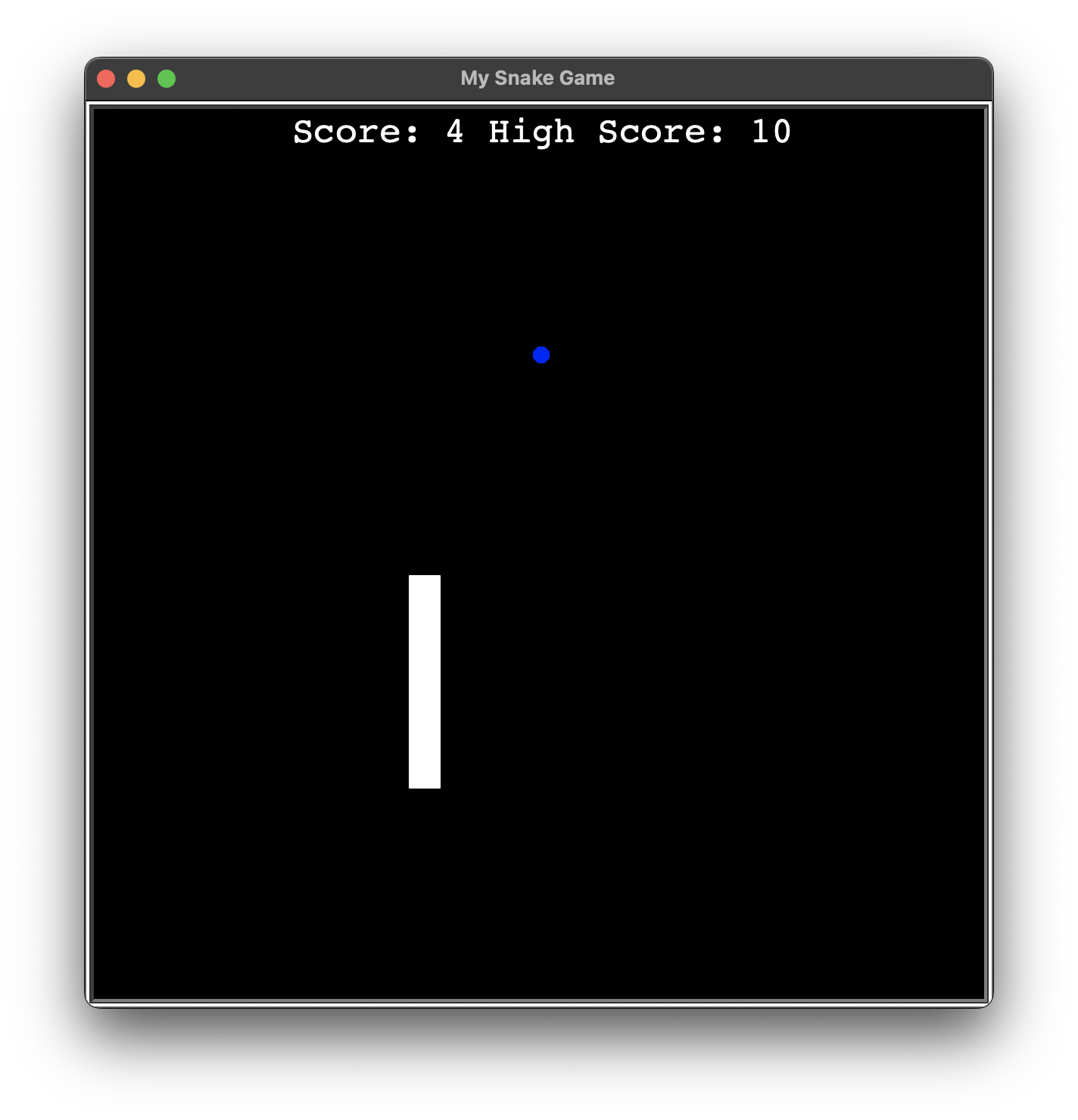
❖ 상대 및 절대 파일 경로
- /
Root(Macintosh HD, C:/ 등)📂 Work📄 report.doc📄 main.py→ 🙋♂️작업 디렉토리 예시2📂 Project→ 🙋♀️작업 디렉토리 예시1📄 talk.ppt
| 파일 이름 | 절대 파일 경로 (Absolute File Path) | 상대 파일 경로 예시1 (Relative File Path) | 상대 파일 경로 예시2 |
|---|---|---|---|
| (시작 기준) | 루트(저장 시스템의 근원) | Working Directory | 즉, 현재 작업하는 디렉토리(폴더) |
Root | / | ||
Work | /Work | ||
report.doc | /Work/report.doc | ../report.doc | ./report.doc |
main.py | /Work/main.py | 🙋♂️ | |
Project | /Work/Project | 🙋♀️ | |
talk.ppt | /Work/Project/talk.ppt | ./talk.ppt |
- 상대 경로 접근 방법
./: 같은 폴더(같은 폴더 안의 같은 계층일 경우 생략 가능)../: 상위 폴더(1번 위로 가기)../../: 상위의 상위 폴더(2번 위로 가기)
...
- 각 폴더를 분리하는 방법
- 맥 : / (슬래시)
- 윈도우즈 : \ (백슬래시)
📄 new_file.txt
Hello, World!new_file.txt 위치 : /Users/유저이름/Desktop (같은 디렉토리 안이 아님)
main.py 위치 : /Users/유저이름/Desktop/folder1/folder2/folder3
⌨️ main.py
# 절대 파일 경로
with open("/Users/유저이름/Desktop/new_file.txt") as file:
    contents = file.read()
    print(contents)


# 상대 파일 경로
with open("../../../new_file.txt") as file:
    contents = file.read()
    print(contents)
Hello, World!
🗂️ Day24 프로젝트 : 메일 머지
준비된 형식에 이름 목록의 이름을 순서대로 하나씩 넣어 이메일을 일괄 작성하는 프로그램
🔍 유의 사항
- 순서
- 📄starting_letter.txt를 이용하여 메일 생성
- [name]에 📄invited_names.txt의 이름 넣기
- 생성된 메일은 📂ReadyToSend에 저장
- 결과물은 example.txt처럼 되어야 함
- 파일 이름은 📄letter_for_[name].txt 로 통일
- 힌트
- file.readlines( hint ) : 각 줄을 원소로 하는 리스트를 반환하는 메소드(링크)
hint: 몇 줄을 읽을 것인지 정하며, 생략 시 모두 읽음 ( 디폴트 값 = -1 )- ❗️끝에 s 주의 : readline() 은 실행할 때마다 한 줄씩 순차적으로 문자열로 반환
- string.replace( oldvalue, newvalue, count ) : 지정한 부분을 변경하는 메소드 (링크)
oldvalue: 바꾸려고 하는 문장newvalue: oldvalue를 대체할 문장count: 파일 전체에서 몇 개의 oldvalue를 바꿀지 정하며, 생략 시 모두 바꿈- string.strip( characters ) : 시작과 끝의 공백을 전부 없애는 메소드(링크)
characters: 제거할 문자 집합을 지정, 생략 시 공백만 제거
파일 경로
📂 Project📂 Input📂 Letters📄 starting_letter.txt
Dear [name],
You are invited to my birthday this Saturday.
Hope you can make it!
Angela
📂 Names📄 invited_names.txt
Aang
Zuko
Appa
Katara
Sokka
Momo
Uncle Iroh
Toph
📂 Output📂 ReadyToSend📄 example.txt
Dear Aang,
You are invited to my birthday this Saturday.
Hope you can make it!
Angela
📄 main.py
⌨️ main.py
PLACEHOLER = "[name]"

with open("./Input/Letters/starting_letter.txt") as letter_file:
    letter_contents = letter_file.read()

with open("./Input/Names/invited_names.txt") as names_file:
    names = names_file.readlines()

for name in names:
    stripped_name = name.strip("\n")
    new_letter = letter_contents.replace(PLACEHOLER, stripped_name)

    with open(f"./Output/ReadyToSend/letter_for_{stripped_name}.txt", "w") as completed_letter:
        completed_letter.write(new_letter)
📄letter_for_Aang.txt
Dear Aang,

You are invited to my birthday this Saturday.

Hope you can make it!

Angela
外 7개의 텍스트 파일 생략
