시작하기 전에 import 하기
import numpy as np
import pandas as pd
import numba
from pandas import DataFrame
dtype변경 (astype)
DataFrame.astype(dtype, copy=True, errors='raise')
개요
astype 메서드는 열의 요소의 dtype을 변경하는함수 입니다.
사용법
기본 사용법
df.astype(dtype, copy=True, errors='raies')
dtype : 변경할 type입니다.
copy : 사본을 생성할지 여부입니다.
errors : {'raies', 'ignore'} : 변경불가시 오류를 발생시킬 여부입니다.
copy는 사본을 생성할지 여부 입니다. False로 할 경우 원본 데이터의 값이 변경 될 경우
원본 데이터를 사용해 생성된 객체의 데이터도 변경되기 때문에 False의 선택은 신중해야합니다.
errors는 변경 불가능한 dtype일 경우 오류를 발생시킬지 여부입니다. False로 하여 오류를
발생시키지 않으면, 변경불가능한 요소는 원래 dtype 그대로 보존됩니다.
예시
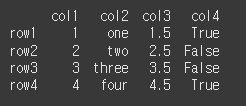
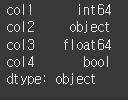
먼저, 아래와 같이 기본적인 4x4 행렬을 만듭니다. col1은 int64, col2는 object, col3은 float64, col4는 bool의 dtype을 가집니다.
(실행 결과1)col1 = [1, 2, 3, 4] col2 = ['one', 'two', 'three', 'four'] col3 = [1.5, 2.5, 3.5, 4.5] col4 = [True, False, False, True] index = ['row1','row2','row3','row4'] df = pd.DataFrame(index=index, data={"col1": col1, "col2": col2, "col3": col3, "col4": col4}) print(df)
(실행 결과2)print(df.dtypes)
한개의 열만 type 변경
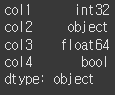
열의 dtype 변경 시 딕셔너리 형태로 {'열이름' : '변경 dtype'}와 같이 입력해줍니다.df1 = df.astype({'col1':'int32'}) print(df1.dtypes)
int64 였던 col1의 dtype이 int32로 변경된 것을 확인할 수 있습니다.
다수의 열의 dtype 변경
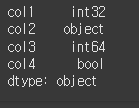
다수의 열의 변경도 딕셔너리 형식을 이용하면 됩니다.df1 = df.astype({'col1':'int32', 'col3':'int64'}) print(df1.dtypes)
int64 였던 col1의 dtype이 int32로 변경되고 float64였던 col3의 dtype의 값이 int64로 변경된 것을 확인할 수 있습니다.
모든 열의 dtype 변경
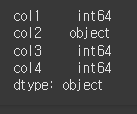
모든열의 변경을 하고자하는 경우 dtype 인수에 원하는 dtype을 입력해주는 것만으로도 가능합니다.df1= df.astype(dtype='int64') print(df1.dtypes)

col2 : object형식은 int64형태로 변경할 수가 없기 때문에 오류가 발생합니다. 변경 가능한 열만 변경하려면, 아래와 같이 errors 인수를 기본값인 'raise' 에서 'ignore'로 변경하면 됩니다.
df1= df.astype(dtype='int64',errors='ignore')
print(df1.dtypes)
열의 dtype통일 (convert_dtypes)
DataFrame.convert_dtypes(infer_objects=True, convert_string=True, convert_integer=True, convert_boolean=True, convert_floating=True)
개요
convert_dtypes 메서드는 열의 요소가 혼합된 dtype일 경우, 열의 요소를 같은 dtype으로 통일할 수 있는 가장 합리적인 형식을 갖는 pd.NA로 변환합니다.
사용법
기본 사용법
df.convert_dtypes(infer_objects=True, convert_string=True, convert_integer=True, convert_boolean=True, convert_floating=True)
infer_object : dtype이 object인 경우 적절한 type으로 변경 할지의 여부입니다. 기본적으로 True이며,
이 경우 열의 요소를 확인해서 가장 적절한 dtype을 가진 pd.NA를 반환합니다.
convert_string, convert_integer, convert_boolean, convert_floating : 해당 유형으로의 pd.NA를 설정할지의 여부입니다.
기본적으로 True이기 때문에, 가능한 모든 dtype에 대해서 적절한 값을 반환합니다.
예시
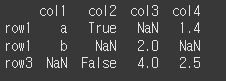
먼저, 아래와 같이 NaN이 포함된 3x4 행렬을 만듭니다.
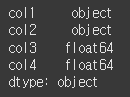
col1은 string, col2는 bool, col3, col4는 dtype을 가지지만, NaN 을 포함하기 때문에
col1과 col2는 object 형식을 갖는것을 볼 수 있습니다.
(실행 결과1)col1 = ['a','b',np.nan] col2 = [True, np.nan, False] col3 = [np.nan, 2, 4] col4 = [1.4, np.nan, 2.5] df = pd.DataFrame(data={'col1':col1,'col2':col2,'col3':col3,'col4':col4},index=['row1','row1','row3']) print(df)
(실행 결과2)print(df.dtypes)
이제 df.convert_dtype를 실행해서 가장 적절한 dtype으로 만들 수 있는
np.NA를 추가해보겠습니다.result = df.convert_dtypes() print(result)
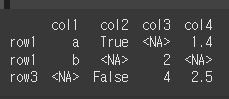
위와 같이 기존 NaN들이 NA 형태로 변경된 것을 확인 할 수 있습니다.
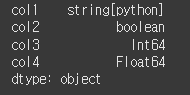
그럼 이어서 dtype또한 변경되었는지 확인해보겠습니다.print(result.dtypes)
각 열의 dtype또한 기돈 object type에서 string, boolean, int64, float64로
각각에 맞게 변경된 것을 확인할 수 있습니다.
object 열의 적절 dtype추론(infer_objects)
DataFrame.infer_objects()
개요
infer_object메서드는 dtype이 object인 열에 대해서 적당한 dtype을 추론합니다.
사용법을 참고 바랍니다.
사용법
기본 사용법
df.infer_object( )
예시
먼저 str과 int가 혼합된 col1을 가진 DataFrame 객체를 만들어 dtype이 object인 열을 만들어 보겠습니다.
(실행 결과1)col1 = ['a','b', 3, 4] df = pd.DataFrame({'col1':col1},index=['row1','row2','row3','row4']) print(df)
(실행 결과2)print(df.dtypes)
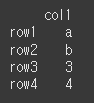

이제 df에서 형식이 int인 행만 남겨서 인덱싱을 한 뒤. dtype을 살펴보면, 여전히 dtype이 object인 것을 확인 할 수 있습니다.
(실행 결과1)df = df.iloc[2:] print(df)
(실행 결과2)print(df.dtypes)


이런 경우에 대해 infer_object는 가장 적당한 dtype을 제안하는 기능을 합니다.
(실행 결과1)print(df.infer_objects())
(실행 결과2)print(df.infer_objects().dtypes)
위와 같이 int형식만 남은 df의 col1 열에 대해 가장 적절한 dtype인 int64로 변환된 것을 확인할 수 있습니다.