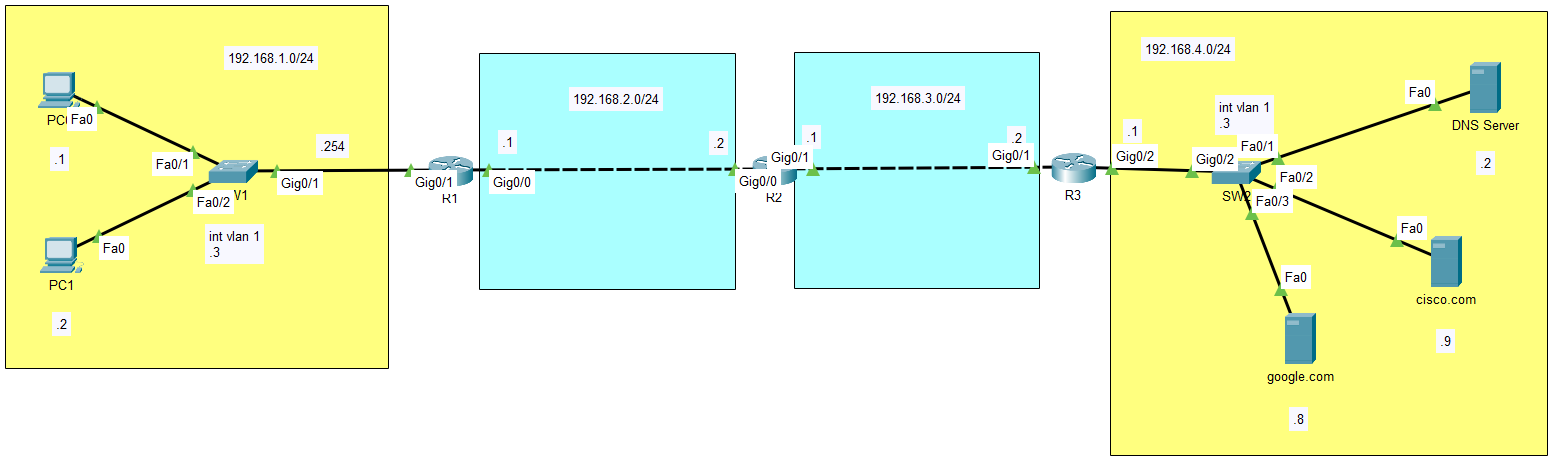
- static route 설정 사용 (Do not use default routes)
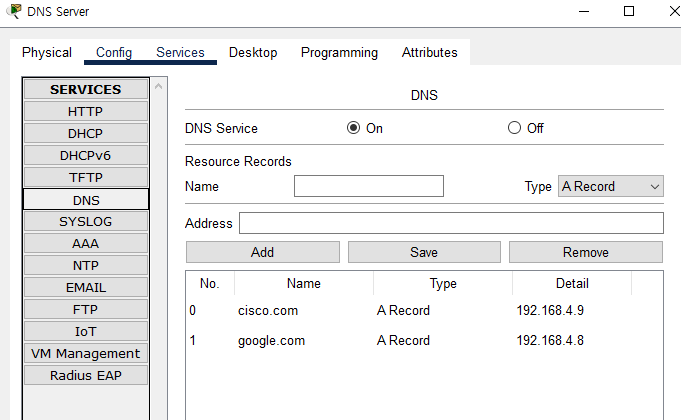
- DNS 설정
- PC1과 PC2가 DNS를 사용하여 cisco.com에 접속할 수 있는지 확인
- ping cisco.com / ping google.com
- tracert cisco.com / tracert google.com
- http, https를 이용한 접속 cisco.com, google.com
- S1과 S2가 DNS 서버 192.168.4.2에 ping을 할 수 있도록 설정
- ping cisco.com / ping google.com
- traceroute cisco.com / traceroute google.com
- R1, R2, R3가 DNS 서버 192.168.4.2에 ping을 할 수 있도록 설정
- ping cisco.com / ping google.com
- traceroute cisco.com / traceroute google.com
PC1
192.168.1.1/24 192.168.1.254
DNS 192.168.4.2
PC2
192.168.1.2/24 192.168.1.254
DNS 192.168.4.2
SW1
conf t
int vlan 1
ip add 192.168.1.3 255.255.255.0
no sh
endip name-server 192.168.4.2
ip default-gateway 192.168.1.254
R1
conf t
int g0/0
ip add 192.168.2.1 255.255.255.0
no sh
endconf t
int g0/1
ip add 192.168.1.254 255.255.255.0
no sh
endconf t
ip route 192.168.3.0 255.255.255.0 192.168.2.2
ip route 192.168.4.0 255.255.255.0 192.168.2.2
R2
conf t
int g0/0
ip add 192.168.2.2 255.255.255.0
no sh
endconf t
int g0/1
ip add 192.168.3.1 255.255.255.0
no sh
endconf t
ip route 192.168.1.0 255.255.255.0 192.168.2.1
ip route 192.168.4.0 255.255.255.0 192.168.3.2
R3
conf t
int g0/1
ip add 192.168.3.2 255.255.255.0
no sh
endconf t
int g0/2
ip add 192.168.4.1 255.255.255.0
no sh
endconf t
ip route 192.168.1.0 255.255.255.0 192.168.3.1
ip route 192.168.2.0 255.255.255.0 192.168.3.1
SW2
conf t
int vlan 1
ip add 192.168.4.3 255.255.255.0
no sh
endconf t
ip name-server 192.168.4.2
ip default-gateway 192.168.4.1
DNS Server
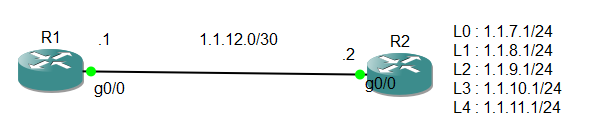
R1
conf t
int g0/0
ip add 1.1.12.1 255.255.255.252
no sh
endconf t
ip route 1.1.7.0 255.255.255.0 1.1.12.2
ip route 1.1.8.0 255.255.255.0 g0/0
ip route 1.1.9.0 255.255.255.0 g0/0 1.1.12.2
R2
conf t
int g0/0
ip add 1.1.12.2 255.255.255.252
no sh
endconf t
int l0
ip add 1.1.7.1 255.255.255.0
int l1
ip add 1.1.8.1 255.255.255.0
int l2
ip add 1.1.9.1 255.255.255.0
int l3
ip add 1.1.10.1 255.255.255.0
int l4
ip add 1.1.11.1 255.255.255.0
루프백 ip를 각각이 아닌 (합=요약=축약)하여 사용 방법
1.1.7.0 ➡ 1.1.0000 0111.1
1.1.8.0 ➡ 1.1.0000 1000.1
1.1.9.0 ➡ 1.1.0000 1001.1
1.1.10.0 ➡ 1.1.0000 1010.1
1.1.11.0 ➡ 1.1.0000 1011.1 ➡ 1.1.0000 0000.0 ➡ 1.1.0.0/20 ➡ 1.1.0.0 255.255.240.0 ➡ (와일드카드마스크) 1.1.0.0 0.0.15.255
R1
conf t
ip route 1.1.0.0 255.255.240.0 1.1.12.2
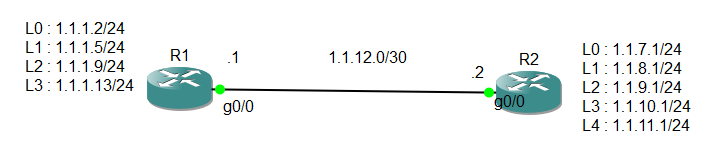
R1의 4개의 주소를 통합경로로 작성하여 R2에서 통신이 가능하도록 설정
1.1.1.0000 0010
1.1.1.0000 0101
1.1.1.0000 1001
1.1.1.0000 1101
➡ 1.1.1.0000 0000
➡ 1.1.1.0/28
➡ 1.1.1.0 255.255.255.240
R1
conf t
int l0
ip add 1.1.1.2 255.255.255.0
int l1
ip add 1.1.1.5 255.255.255.0
int l2
ip add 1.1.1.9 255.255.255.0
int l3
ip add 1.1.1.13 255.255.255.0
R2
conf t
ip route 1.1.1.0 255.255.255.240
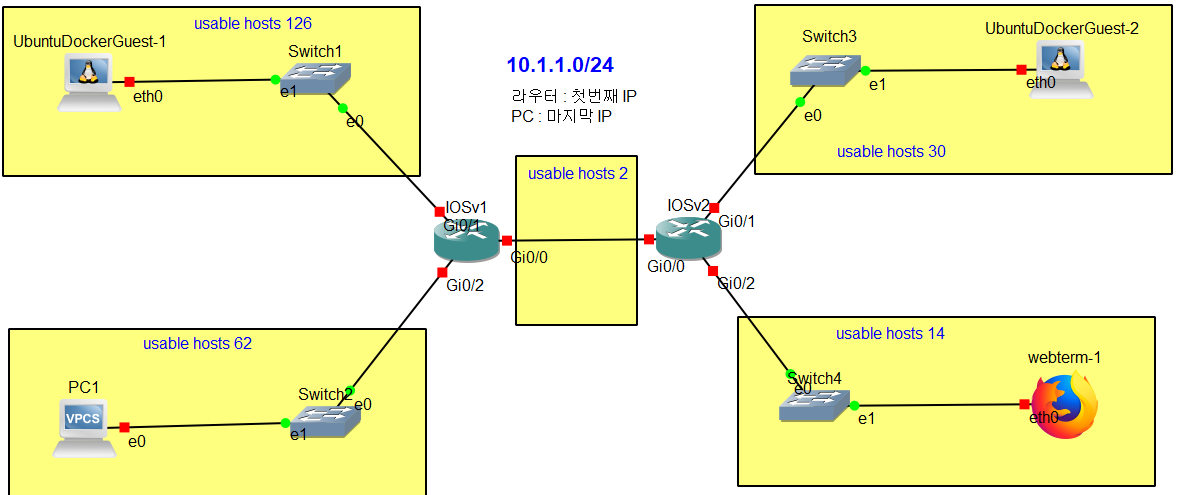
- 10.1.1.0/25 0~127
- 10.1.1.128/26 128~191
- 10.1.1.192/27 192~223
- 10.1.1.224/28 224~239
- 10.1.1.240/30 240~243
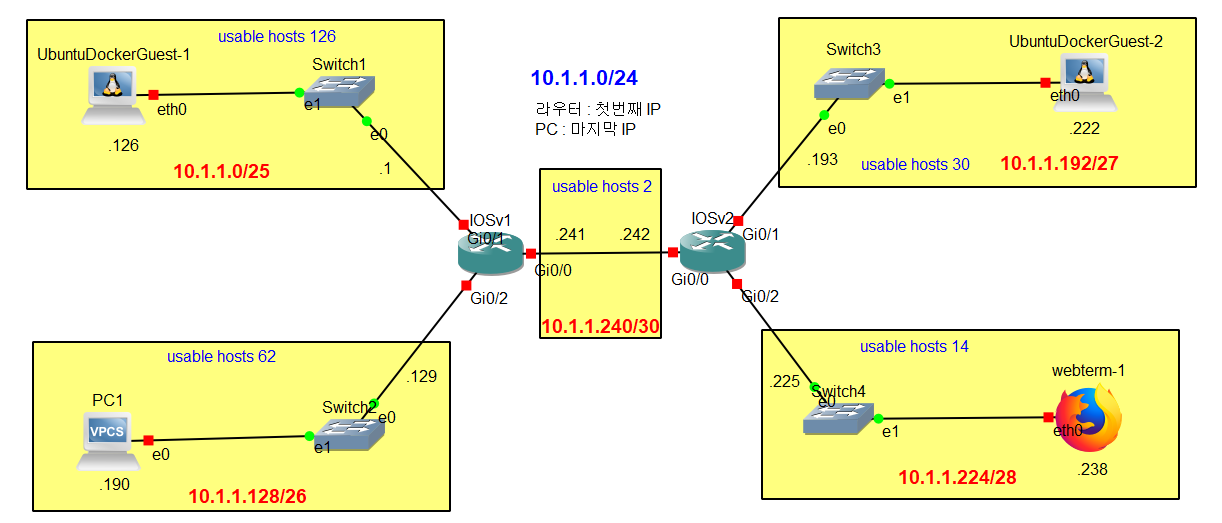
R1
conf t
ip route 10.1.1.0 255.255.255.0 10.1.1.242
R2
conf t
ip route 10.1.1.0 255.255.255.0 10.1.1.241