Adaptor Pattern
어댑터 패턴이란 이름 그대로 클래스를 어댐터로 사용하는 구조 패턴이다.
어댑터는 우리 쉽게 말해 110V 전용 가전제품을 220V 어댑터를 끼워 사용할 수 있다. 즉, 서로 호환되지 않는 단자를 어댑터로 호환시켜 작동시키게끔 하는 것이 어댑터의 역할이다. 이를 객체 지향 프로그래밍에 접목해보면, 호환성이 없는 인터페이스 때문에 함께 동작할 수 없는 클래스들을 함께 작동해주도록 반환 역할을 해주는 행동 패턴이라고 보면 된다.
예를 들어 기존에 있는 시스템에 새로운 써드파티 라이브러리를 추가하고 싶거나, Legacy 인터페이스를 새로운 인터페이스로 교체하는 경우에 어댑터 패턴을 사용하면 코드의 재사용성을 높일 수 있다. 즉, 어댑터란 이미 구축되어 있는 것을 새로운 어떤 것에 사용할 때 양 쪽 간의 호환성을 유지해 주기 위해 사용하는 것으로서, 기존 시스템에서 새로운 업체에서 제공하는 기능을 사용하려고 할 때 서로 간의 인터페이스를 어댑터로 일치시켜줌으로써 호환성 및 신규 기능 확장을 할 수 있다고 보면 된다.
어댑터가 Legacy 인터페이스를 감싸서 새로운 인터페이스로 변환하기 때문에 Wrapper 패턴이라고도 불리운다.
Structure
어댑터 패턴에는 기존 시스템의 클래스를 상속(inheritance)해서 호환 작업을 해주냐, 합성(composition)해서 호환 작업을 해주냐에 따라, 두 가지 패턴 방법으로 나뉘게 된다.
Object Adaptor
- 합성된 멤버에게 위임을 이용한 어댑터 패턴
- 자기가 해야 할 일을 클래스 멤버 객체의 메서드에게 다시 시킴으로써 목적을 달성하는 것을 위임이라고 한다.
- 합성을 활용했기 때문에 런타입 중에 Adaptee가 결정되어 유연하다.
- 그러나 Adaptee 객체를 필드 변수로 저장해야 되기 때문에 공간 차지 비용이 든다.
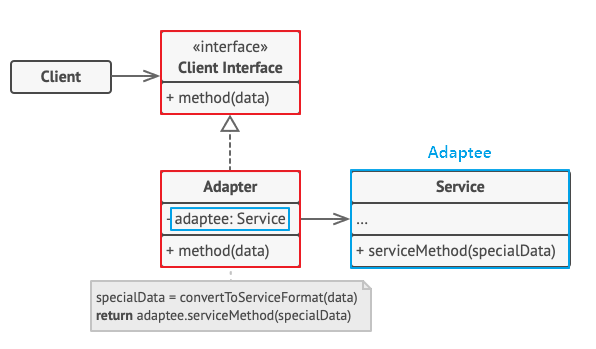
- Adaptee(Service) : 어댑터 대상 객체. 기존 시스템 / 외부 시스템 / 써드파티 라이브러리
- Target(Client Interface) : Adapter 가 구현하는 인터페이스.
- Adapter : Client 와 Adaptee(Service) 중간에서 호환성이 없는 둘을 연결시켜주는 역할을 담당.
- Object Adaptor 방식에선 합성을 이용해 구성한다.
- Adaptee(Service)를 따로 클래스 멤버로 설정하고 위임을 통해 동작을 매치시킨다. - Client : 기존 시스템을 어댑터를 통해 이용하려는 쪽. Client Interface를 통하여 Service를 이용할 수 있게 된다.
// Adaptee : 클라이언트에서 사용하고 싶은 기존의 서비스 (하지만 호환이 안되서 바로 사용 불가능)
class Service {

    void specificMethod(int specialData) {
        System.out.println("기존 서비스 기능 호출 + " + specialData);
    }
}

// Client Interface : 클라이언트가 접근해서 사용할 고수준의 어댑터 모듈
interface Target {
    void method(int data);
}

// Adapter : Adaptee 서비스를 클라이언트에서 사용하게 할 수 있도록 호환 처리 해주는 어댑터
class Adapter implements Target {
    Service adaptee; // composition으로 Service 객체를 클래스 필드로

    // 어댑터가 인스턴스화되면 호환시킬 기존 서비스를 설정
    Adapter(Service adaptee) {
        this.adaptee = adaptee;
    }

    // 어댑터의 메소드가 호출되면, Adaptee의 메소드를 호출하도록
    public void method(int data) {
        adaptee.specificMethod(data); // 위임
    }
}
class Client {
public static void main(String[] args) {
// 1. 어댑터 생성 (기존 서비스를 인자로 받아 호환 작업 처리)
Target adapter = new Adapter(new Service());
// 2. Client Interfac의 스펙에 따라 메소드를 실행하면 기존 서비스의 메소드가 실행된다.
adapter.method(1);
}
}Class Adaptor
- 클래스 상속을 이용한 어댑터 패턴
- Adaptee를 상속했기 때문에 따로 객체 구현없이 바로 코드 재사용이 가능하다.
- 상속은 대표적으로 기존에 구현된 코드를 재사용하는 방식이지만, 제한적인 다중 상속 문제로 전반적으로 권장하지는 않는 방법
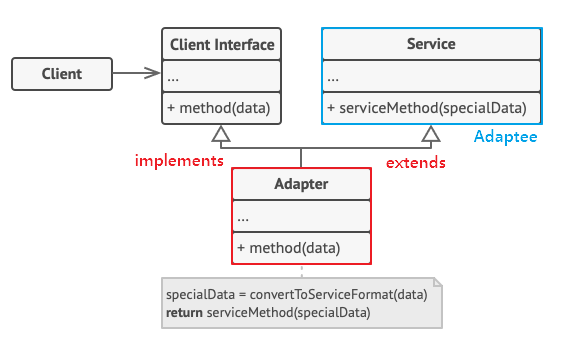
- Adaptee(Service) : 어댑터 대상 객체. 기존 시스템 / 외부 시스템 / 써드파티 라이브러리
- Target(Cient Interface) : Adapter 가 구현하는 인터페이스.
- Adapter : Client 와 Adaptee(Service) 중간에서 호환성이 없는 둘을 연결시켜주는 역할을 담당.
- Class Adaptor 방식에선 상속을 이용해 구성한다.
- Existing Class와 Adaptee(Service) 를 동시에 implements, extends 하여 구현한다. - Client : 기존 시스템을 어댑터를 통해 이용하려는 쪽. Client Interface를 통하여 Service를 이용할 수 있게 된다.
// Adaptee : 클라이언트에서 사용하고 싶은 기존의 서비스 (하지만 호환이 안되서 바로 사용 불가능)
class Service {

    void specificMethod(int specialData) {
        System.out.println("기존 서비스 기능 호출 + " + specialData);
    }
}

// Client Interface : 클라이언트가 접근해서 사용할 고수준의 어댑터 모듈
interface Target {
    void method(int data);
}

// Adapter : Adaptee 서비스를 클라이언트에서 사용하게 할 수 있도록 호환 처리 해주는 어댑터
class Adapter extends Service implements Target {

    // 어댑터의 메소드가 호출되면, 부모 클래스 Adaptee의 메소드를 호출
    public void method(int data) {
        specificMethod(data);
    }
}
class Client {
public static void main(String[] args) {
// 1. 어댑터 생성
Target adapter = new Adapter();
// 2. 인터페이스의 스펙에 따라 메소드를 실행하면 기존 서비스의 메소드가 실행된다.
adapter.method(1);
}
}When
- 레거시 코드를 사용하고 싶지만 새로운 인터페이스가 레거시 코드와 호환되지 않을 때
- 이미 만든 것을 재사용하고자 하나 이 재사용 가능한 라이브러리를 수정할 수 없을 때
- 이미 만들어진 클래스를 새로운 인터페이스(API)에 맞게 개조할때
- 소프트웨어의 구 버전과 신 버전을 공존시키고 싶을때
기존의 클래스를 새로운 인터페이스에 맞게 사용하고 싶으면 기존 클래스를 수정해야했다. 하지만 이런식으로 프로그램을 운용하면 이미 테스트가 끝난 기존의 클래스를 다시 한번 수정하고 테스트를 해야 한다. 만일 클래스의 코드가 몇 천 줄이라면 굉장히 힘들 것이다.
이러한 관점에서 어댑터 패턴은 기존의 클래스를 수정하지 않고 새로운 인터페이스에 맞게 호환작업을 중계하여 해주는 것이다.
이러한 어댑터 패턴을 사용하게 되면..
- 프로그램의 기본 비즈니스 로직에서 인터페이스 또는 데이터 변환 코드를 분리할 수 있기 때문에 단일 책임 원칙을 만족한다.
- 기존 클래스 코드를 건들지 않고 클라이언트 인터페이스를 통해 어댑터와 작동하기 때문에 개방 폐쇄 원칙을 만족한다.
- 만일 추가로 필요한 메소드가 있다면 어댑터에 빠르게 만들 수 있다. 만약 버그가 발생해도 기존의 클래스에는 버그가 없으므로 Adapter 역할의 클래스를 중점적으로 조사하면 되고, 프로그램 검사도 쉬워진다.
But
- 새로운 인터페이스와 어댑터 클래스 세트를 도입해야 하기 때문에 코드의 복잡성이 증가한다.
- 때로는 직접 서비스(Adaptee) 클래스를 변경하는 것이 간단할 수 있는 경우가 있다.
Example
원래 현재 진행중인 프로젝트에서 인벤토리 시스템을 아래와 같이 사용하고 있었다고 해보자.
public class Item
{
    public string name;
    public string description;
}
interface IInventorySystem
{
void AddItem(Item item);
void RmoveItem(Item item);
void ResetInventory();
}
class A_InventorySystem : IInventorySystem
{
public void AddItem(Item item)
{
// 인벤토리 아이템 추가 로직
}
public void RemoveItem(Item item)
{
// 인벤토리 아이템 삭제 로직
}
public void ResetInventory()
{
// 인벤토리 초기화 로직
}
}그러다 게임 개발의 규모가 커져 아이템 데이터를 로컬이 아닌 클라우드에 저장할 필요가 생겨서 클라우드 아이템 기능이 포함된 인벤토리 시스템을 사용하기로 했다. 그런데 다음과 같이 기존의 인벤토리와는 동작 메서드 시그니처가 달랐으며 심지어 지원하지 않는 메서드도 존재했다.
B 인벤토리 시스템은 AddItem과 RemoveItem 기능은 동일하게 지원하지만 기존의 ResetInventory 메서드는 지원하지 않는다.
enum SaveLocation
{
    Local,
    Cloud,
    Both
}
class B_InventorySystem
{
public void AddItemToSaveLocation(Item item, SaveLocation saveLocation) {}
public void RemoveItemToSaveLocation(Item item, SaveLocation saveLocation) {}
public void SyncInventory() {}
}현재 개발중인 게임에서는 인벤토리 시스템에서 인터페이스를 끌어다 사용하기 있었기 때문에 B 인벤토리 시스템에 인터페인스를 implements해도 호환이 되지 않아 수정 작업이 필요하다. 특히, B 인벤토리 시스템의 ResetInventory() 메서드 부재는 치명적이었는데 플레이어가 죽을 때마다 인벤토리를 비워야해서 매우 편리한 기능이었는데, 클라우드를 사용하기 위해 B 인벤토리 시스템으로 어떻게든 교체해야하는 상황이다.
가장 직관적인 방법은 Inventory 클래스를 통짜 수정해서 적응하는 방법이다. 기존 사용하던 인터페이스 내부를 삭제해서 마커 인터페이스 용도로만 이용하고, 인벤토리에서 다운 캐스팅으로 둘이 호환 시켜주었다.
interface IInventorySystem
{
}

class A_InventorySystem : IInventorySystem
{
    public void AddItem(Item item)
    {
        // 인벤토리 아이템 추가 로직
    }

    public void RemoveItem(Item item)
    {
        // 인벤토리 아이템 삭제 로직
    }

    public void ResetInventory()
    {
        // 인벤토리 초기화 로직
    }
}
class B_InventorySystem  : IInventorySystem
{
    public void AddItemToSaveLocation(Item item, SaveLocation saveLocation)
    {
        // saveLocation에 item 추가
    }

    public void RemoveItemToSaveLocation(Item item, SaveLocation saveLocation)
    {
        // saveLocation에 item 삭제
    }

    public void SyncInventory()
    {
        // Local과 Cloud 인벤토리 동기화
    }
}
class Inventory
{
IInventorySystem _inventorySystem;
//public void SetSystem(IInventorySystem inventorySystem) { this._inventorySystem = inventorySystem; }
public void AddItemToInventory(Item item, SaveLocation saveLocation)
{
B_InventorySystem BinventorySystem = _inventorySystem as B_InventorySystem;
BinventorySystem.AddItemToSaveLocation(item, saveLocation);
}
public void RemoveItemFromInventory(Item item, SaveLocation saveLocation)
{
B_InventorySystem BinventorySystem = _inventorySystem as B_InventorySystem;
BinventorySystem.RemoveItemToSaveLocation(item, saveLocation);
}
public void ResetIventory()
{
A_InventorySystem AinventorySystem = _inventorySystem as A_InventorySystem;
B_InventorySystem BinventorySystem = _inventorySystem as B_InventorySystem;
// 인벤토리 초기화 후 Sync로 클라우드와 동기화
AinventorySystem.ResetInventory();
BinventorySystem.SyncInventory();
}
}이 코드를 더 이상 유지 보수 할 것이 아니라면 이대로 사용해도 된다. 하지만 객체 지향 프로그래밍에서 고수준이 아닌 저수준 모듈로 의존해서 로직을 작성하는 것은 지양해야하며, 나중에 다른 인벤토리 시스템으로 또 교체하야할 경우가 온다면 안그래도 억지로 호환시키느라 뜯어고친 코드 전체를 다시 뜯어 고쳐야한다. 당연히 권장하지 않는 방법이다.
Object Adaptor Pattern
어댑터 패턴은 클라이언트가 사용하는 인터페이스는 정해져있는데, 적용할 코드(Adaptee)가 해당 인터페이스를 따르지 않을때 클라이언트와 Adaptee 사이의 간극을 어댑터로 매꿔서 Adaptee를 재사용할 수 있도록 한다.
따라서 현재 사용중인 InventorySystem에서 이용하던 인터페이스를 손대지 않고 별도의 어댑터 InventorySystemAdaptor 클래스를 만들어서 호환 작업을 시켜줄 것이다.
// 기존의 인터페이스는 수정하지 않는다.
interface IInventorySystem
{
    void AddItem(Item item);
    void RemoveItem(Item item);
    void ResetInventory();
}

class A_InventorySystem : IInventorySystem
{
    public void AddItem(Item item)
    {
        // 인벤토리 아이템 추가 로직
    }

    public void RemoveItem(Item item)
    {
        // 인벤토리 아이템 삭제 로직
    }

    public void ResetInventory()
    {
        // 인벤토리 초기화 로직
    }
}
class B_InventorySystem
{
    public void AddItemToSaveLocation(Item item, SaveLocation saveLocation)
    {
        // saveLocation에 item 추가
    }

    public void RemoveItemToSaveLocation(Item item, SaveLocation saveLocation)
    {
        // saveLocation에 item 삭제
    }

    public void SyncInventory()
    {
        // Local과 Cloud 인벤토리 동기화
    }
}
class InventorySystemAdaptor : IInventorySystem
{
A_InventorySystem AinventorySystem;
B_InventorySystem BinventorySystem;
InventorySystemAdaptor(A_InventorySystem AinventorySystem, B_InventorySystem BinventorySystem)
{
this.AinventorySystem = AinventorySystem;
this.BinventorySystem = BinventorySystem;
}
public void AddItem(Item item)
{
BinventorySystem.AddItemToSaveLocation(item, SaveLocation.Local);
BinventorySystem.SyncInventory();
}
public void RemoveItem(Item item)
{
BinventorySystem.RemoveItemToSaveLocation(item, SaveLocation.Local);
BinventorySystem.SyncInventory();
}
public void ResetInventory()
{
AinventorySystem.ResetInventory();
BinventorySystem.SyncInventory();
}
}class Inventory
{
IInventorySystem _inventorySystem;
public void setInventorySystem(IInventorySystem inventorySystem)
{
_inventorySystem = inventorySystem;
}
public void AddItem(Item item)
{
_inventorySystem.AddItem(item);
}
public void RemoveItem(Item item)
{
_inventorySystem.RemoveItem(item);
}
public void ResetInventory()
{
_inventorySystem.ResetInventory();
}
}이렇게 하면 이제 인벤토리 시스템에 원본 시스템 대신 어댑터를 할당해서 사용할 수 있다.
class inventoryManager : MonoBehaviour
{
    void Start()
    {
        IInventorySystem adaptor = new InventorySystemAdaptor(new A_InventorySystem(), new B_InventorySystem());
        Inventory inventory = new Inventory();
        inventory.setInventorySystem(adaptor);
    }
}
이런식으로 구현하면 이제 기존의 Inventory 코드는 건들지 않고서도, 객체 할당만 어댑터 객체로 넣어서 수정없이 B 시스템 이용이 가능해진다. 나중에 C 시스템, D 시스템으로 교체한다고 하더라도 어댑터 클래스만 적절히 수정하면 되기 때문에 유지보수가 용이해진다.
A_InventorySystem AinventorySystem;
B_InventorySystem BinventorySystem;
C_InventorySystem CinventorySystem; // 새롭게 추가할 C 인벤토리 시스템

public InventorySystemAdaptor(A_InventorySystem AinventorySystem, B_InventorySystem BinventorySystem, C_InventorySystem BinventorySystem)
{
    this.AinventorySystem = AinventorySystem;
    this.BinventorySystem = BinventorySystem;
    this.CinventorySystem = CinventorySystem; //이제 C 인벤토리 시스템의 기능도 사용가능
}
Class Adaptor
이번엔 클래스 어댑터 형식으로 구성해보자. 상속 구조를 통해 심플하게 보일 수는 있지만 단일 상속만 가능하기 때문에 여러개의 Adaptee 호환작업을 해줘야 한다는 한계점이 존재한다.
class InventorySystemAdaptor : B_InventorySystem, IInventorySystem
{
    public void AddItem(Item item)
    {
        AddItemToSaveLocation(item, SaveLocation.Local);
        SyncInventory();
    }

    public void RemoveItem(Item item)
    {
        RemoveItemToSaveLocation(item, SaveLocation.Local);
        SyncInventory();
    }

    public void ResetInventory()
    {
        // A InventorySystem의 ResetInventory 로직을 그대로 복붙 및 구현
        SyncInventory();
    }
}
class inventoryManager : MonoBehaviour
{
void Start()
{
IInventorySystem adaptor = new InventorySystemAdaptor();
Inventory inventory = new Inventory();
inventory.setInventorySystem(adaptor);
}
}
Inventory클래스는 그대로 사용 가능