
병렬로 작업을 처리 하고 싶을 때는 코루틴을 사용한다
유니티 - 코루틴
MSDN - yield
MSDN - IEnumerator
코루틴 (Coroutine)
- 작업을 다수의 프레임에 분산하여 처리하는 비동기식 작업. 함수의 실행을 일시중지하고, 다음 업데이트에 이어서 실행함. 일종의 추가 업데이트. 분신술
return이 아닌yield키워드를 사용한다. yield를 만나면 일시 중지되고 다른 코드를 실행하거나, 유니티에게 제어권을 반납한다. 다음 업데이트에서 중단점부터 이어서 실행- 비동기 작업 같지만 라이프 사이클 내에서 직렬적으로 일을 처리하는 동기 작업
- 코루틴은 스레드(작업절차)가 아니며 코루틴의 작업은 메인 스레드에서 실행. 즉,
멀티 스레드가 아닌싱글 스레드
yield
- yield : 일시정지라는 뜻이 있는 것처럼, 실행 될 때마다 지정해둔 반환을 준다
IEnumerator Routine()
{
	Debug.Log(1);
  yield return 1;
  Debug.Log(2);
  yield return 2;
  Debug.Log(3);
  yield return 3;
  Debug.Log(4);
  yield return 4;
  Debug.Log(5);
  yield return 5;
}
코루틴 반복 작업
- IEnumerator : 함수형으로 반환할 수 있다
IEnumerator를 반환형으로 함수를 구성IEnumerator Routine() { Debug.Log(0); yield return new WaitForSeconds(1f); Debug.Log(1); yield return new WaitForSeconds(1f); Debug.Log(2); yield return new WaitForSeconds(1f); Debug.Log(3); yield return new WaitForSeconds(1f); Debug.Log(4); yield return new WaitForSeconds(1f); Debug.Log(5); }
코루틴 예시) 딜레이 걸린 점프
public class coroutineJumper : MonoBehaviour
{
    [SerializeField] Rigidbody rigid;
    [SerializeField] float jumpPower;

    // Update is called once per frame
    void Update()
    {
        if(Input.GetKeyDown(KeyCode.Space))
        {
            StartCoroutine(routine: ());
        }
    }
    IEnumerator Routine()
    {
        Debug.Log("점프 대기 시작!");
        yield return new WaitForSeconds(2f);
        Debug.Log("점프!");
        rigid.AddForce(Vector3.up*jumpPower, ForceMode.Impulse);
    }
}- 입력 후 2초 뒤에 점프하는 방법이다
StartCoroutine함수의 반환형은Coroutine형이다
코루틴 변수
- 코루틴을 관리하는 객체를 참조하는 변수
코루틴 시작
-
StartCoroutine을 통해 실행Coroutine coroutine; private void OnEnable() { coroutine = StartCoroutine(Routine()); }
코루틴 종료
StopCoroutine을 통해 코루틴 종료StopAllCoroutines을 통해 진행중인 모든 코루틴 종료- 반복가능한 작업이 모두 완료되었을 경우 자동 종료
- 코루틴을 진행중인 게임오브젝트가 비활성화된 경우 자동 종료
private void OnDisable()
{
    StopCoroutine(coroutine);
    StopAllCoroutines();
}
코루틴 사용법 예시
public class coroutineTester : MonoBehaviour
{
    private Coroutine countDownCoroutine;
    [SerializeField] int count;

    private void Update()
    {
        if(Input.GetKeyDown(KeyCode.Space))
        {
            countDownCoroutine = StartCoroutine(Routine());
        }

        if(Input.GetKeyDown(KeyCode.Escape))
        {
            StopCoroutine(countDownCoroutine);
        }
    }

    IEnumerator Routine()
    {
        for (int i = 0; i < count; i++)
        {
            Debug.Log(i);
            yield return new WaitForSeconds(1f);
        }
    }
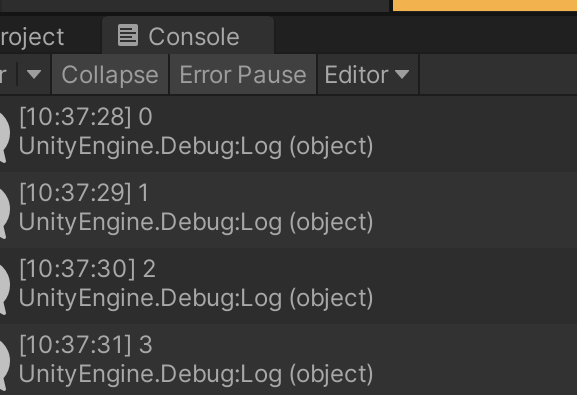
}
주의
- 해당 방법으론는 멈출 수 없다
if(Input.GetKeyDown(KeyCode.Escape))
{
    StopCoroutine(Routine());
}
- 실행중인 함수를 객체로 등록해서 중지 해야 한다
if(Input.GetKeyDown(KeyCode.Escape))
{
	StopCoroutine(countDownCoroutine);
}
코루틴 메모리 누수 방지
- 코루틴은 종료 메서드를 쓰든, 자동 종료 되든 코루틴 된 객체는 사라지지 않는다. 잊지않고 코루틴 객체를
null로 바꿔주는 작업을 해야한다
사용 중지
countDownCoroutine = null;- 이렇게 되면, 자동 종료 시
StopCoroutine()은 터진다.null 체크를 해서 작업하자
public class coroutineTester : MonoBehaviour
{
    private Coroutine countDownCoroutine;
    [SerializeField] int count;

    private void Update()
    {
        if(Input.GetKeyDown(KeyCode.Space))
        {
            countDownCoroutine = StartCoroutine(Routine());
        }
        if(Input.GetKeyDown(KeyCode.Escape))
        {
            if (countDownCoroutine != null)
            {
                StopCoroutine(countDownCoroutine);
            }
        }
    }

    IEnumerator Routine()
    {
        for (int i = 0; i < count; i++)
        {
            Debug.Log(i);
            yield return new WaitForSeconds(1f);
        }
        countDownCoroutine = null;
    }
}- 여기서 또한, 모든 반복마다
new WaitForSeconds()를 쓰는 것도 메모리가 새로 계속 생성된다. 이것또한 객체 생성이기 때문이다. 메모리 사용을 줄이기 위해 아예 객체로 하나 지정하는 것이 좋다 - 다만, 루틴을 자주 사용 하는 경우에 한해서다. 미리 지정하는 것은 그만큼 메모리를 더 크게 초기화 해서 가지기 때문이다
변수에 객체 할당
private WaitForSeconds waitSeconds;
[SerializeField] float seconds;
private void Awake()
{
    waitSeconds = new WaitForSeconds(seconds);
}

IEnumerator Routine()
{
    for (int i = 0; i < count; i++)
    {
        Debug.Log(i);
        yield return waitSeconds;
    }
    countDownCoroutine = null;
}
코루틴 지연
코루틴은 반복작업 중 지연처리를 정의하여 작업의 진행 타이밍을 지정할 수 있음
Update 끝날 때
yield return null;n초간 기다리고, Update 끝날 때
yield return new WaitForSeconds(1f);현실 n초간 시간 지연 (게임에 배속을 거는 경우들 땜에 씀)
yield return new WaitForSecondsRealtime(1f);FixedUpdate 끝날 때
yield return new WaitForFixedUpdate();프레임이 끝날 때(LateUpdate 다음)
yield return new WaitForEndOfFrame();조건이 충족할때까지 지연
yield return new WaitUntil(() => 조건);
 yield return new WaitUntil(() => Input.GetKeyDown(KeyCode.Space));
코루틴 예시1) 주기적으로 포탄 발사
public class coroutineShooter : MonoBehaviour
{
    public GameObject bulletPrefab;
    public Transform muzzlePoint;
    private GameObject bulletOut;
    private Coroutine fireCoroutine;

    [SerializeField] float repeatTime;

    [Range(1, 50)]
    public float speed;
    [SerializeField] float coolTime;

    private float currentShootTime;

    void Update()
    {
        if (Input.GetKeyDown(KeyCode.Space) && fireCoroutine == null)
        {
            fireCoroutine = StartCoroutine(FireRoutine());
        }
        if (Input.GetKeyUp(KeyCode.Space)&&fireCoroutine != null)
        {
            StopCoroutine(fireCoroutine);
            fireCoroutine = null;
        }
    }
    void Fire()
    {

        //currentShootTime = coolTime;
        bulletOut = Instantiate(bulletPrefab, muzzlePoint.position, muzzlePoint.rotation);
        Rigidbody rig = bulletOut.GetComponent<Rigidbody>();
        rig.velocity = muzzlePoint.forward * speed;

    }
    IEnumerator FireRoutine()
    {
        WaitForSeconds delay = new WaitForSeconds(repeatTime);
        while (true)
        {
            Fire();
            yield return delay;
        }
    }
}Space키를 꾹 누르고있으면 포탄이 지정한repeatTime마다 날아간다- 꾹 떼고 있는 것을 떼면 포탄이 더 이상 안나오고,
Coroutine이 끝나고 삭제된다
코루틴 예시2) 차지샷 날리는 방법
private Coroutine chargeCoroutine;
private float bulletSpeed;

void Update()
{
    //차지공격
    if(Input.GetKeyDown(KeyCode.Space))
    {
        if(chargeCoroutine== null)
        {
            chargeCoroutine = StartCoroutine(ChargeRoutine());
        }
    }
}

void Fire(float bulletSpeed)
{
    bulletOut = Instantiate(bulletPrefab, muzzlePoint.position, muzzlePoint.rotation);
    Rigidbody rig = bulletOut.GetComponent<Rigidbody>();
    rig.velocity = muzzlePoint.forward * bulletSpeed;
}

IEnumerator ChargeRoutine()
{
    float timer = 0;
    while (true)
    {
        timer += Time.deltaTime * 50;
        yield return null;

        if (Input.GetKeyUp(KeyCode.Space))
        {
            break;
        }
    }
    // mathf : 수학 함수 기능
    bulletSpeed = Mathf.Clamp(speed+timer, speed, speed * 5);
    Fire(bulletSpeed);
    chargeCoroutine = null;
}mathf클래스의 함수Clamp로 최솟값, 최댓값을 설정할 수 있다- 키를 누르고 있는 동안 비동기로
ChargeRoutine()이 실행된다 - 키를 떼면 차징된 만큼 포탄을 발사
멀티 스레드가 아닌 이유
- 왜 코루틴은 비동기식인데 멀티 스레드가 아닐까?
공유자원의 문제
- 한 프레임 내에서 플레이어에게 힐과 피격이 동시에 일어났다고 가정해보자
int playerHealth = 50;힐
playerHealth +=20;피격
playerHealth -= 10;결과
- 단순하게 보자면 결과 값은
50 + 20 - 10 = 60일것이다.멀티 스레드에서는 얘기가 다르다
- 단순하게 보자면 결과 값은
멀티 스레드 힐
playerHealth = 50 + 20;
= 70;
멀티 스레드 피격
playerHealth = 50 - 10; = 40;- 이렇게 되면 플레이어의 체력으로
40이 저장된다. 한 프레임 안에서 동시에 작업이 수행 되다보니, 각 스레드가 같은 변수 값을 들고 가서 연산하다보니 이런 문제가 생긴다 - 해당 이유 때문에,
코루틴은싱글 스레드에서 작동한다 공유자원 문제를 해결한멀티스레드방식은뮤텍스와세마포어를 이용해 해결한다. 근데 이 방식을 쓰면, 시간 리소스에 차이가 없어진다. 즉 멀티 스레드일 이유가 사라진다...
타이밍의 문제
게임 오브젝트가 각각 멀티 스레드로 계산 된다고 해보자. 그러다 서로 좌표가 겹칠 수도 있다. 양자역학과 같은 현상이 생기는거다- 게임은 프로그램 특성 상
물리 처리,애니메이션,후처리등 순차적으로 진행해야 되는 작업들이 있다. 그렇다보니 멀티 스레드로는 해결하기 난해한 부분들이 생긴다. - 많은 게임들이
CPU를 싱글 코어만 사용하는 이유이기도 하다. 대표적인 것이마인크래프트 자바 에디션.베드락 에디션에서는 멀티코어를 사용하여 청크를 불러온다

개발 박살내자