2024.02.28
오늘 학습한 내용 : 동적 웹페이지 크롤링
동적 웹페이지 크롤링
정적 웹페이지와 동적 웹페이지
정적 웹페이지
- 서버로부터 한 번에 전달되며, 사용자의 요청에 따라 동적으로 생성되거나 변경되지 않음
- HTML,CSS,JavaScript
- 내용이 고정되어 있어 페이지 요청시 항상 동일한 내용 반환
동적 웹페이지
- 사용자의 요청에 따라 서버에서 생성되거나 변경
- 서버측에서 사용자 요청에 따라 내용이 동적으로 생성되는 웹페이지
- Python,PHP,Ruby
- 보통 사용자와의 상호작용이 더 필요한 웹에 사용
python을 사용하여 동적 웹페이지 크롤링
1. 모듈 selenium 설치
- selenium은 웹 브라우저를 자동화하고 웹 애플리케이션을 테스트하기 위한 파이썬 라이브러리
2. 동적 웹페이지 크롤링 해보기
실습1> 커피빈 사이트에서 자동으로 매장정보 페이지에 접속하여 매장정보 데이터 크롤링 하기
# visualstudio
# selenium 모듈을 통해 동적으로 웹브라우저로 접속하고 매장 지역 정보 크롤링 하기

from selenium import webdriver
from bs4 import BeautifulSoup
import pandas as pd
import time

wd = webdriver.Chrome()  # : Chrome WebDriver를 사용하여 웹 브라우저를 연다. 이후에 wd 변수를 통해 브라우저 제어 가능
wd.get("https://www.coffeebeankorea.com/store/store.asp")
# 브라우저가 로딩이 완료될때까지 기다려야한다.
time.sleep(3) # 3초동안 기다림
wd.execute_script("storePop2(29)")
time.sleep(3) # 3초동안 기다림

html = wd.page_source
soup = BeautifulSoup(html,'html.parser')
#print(soup.prettify())
items = soup.select('div.store_txt table tr')
#print(items)
for item in items:
    if item.td.string == None:
        temp = str(items[2].td)
        print(temp[4:temp.find('<!')])
    else:
        print(item.td.string)


Result>
평일 07:00~21:00 | 주말 08:00~21:00 | 공휴일 : 09:00~21:00
승용차-최초 30분 2,400원/15분당 1,200원/1일 주차시 4만 8천원 화물차-승용차 주차 요금의 2배
서울 강남구 테헤란로87길 46 지하 2층
02-3466-8507
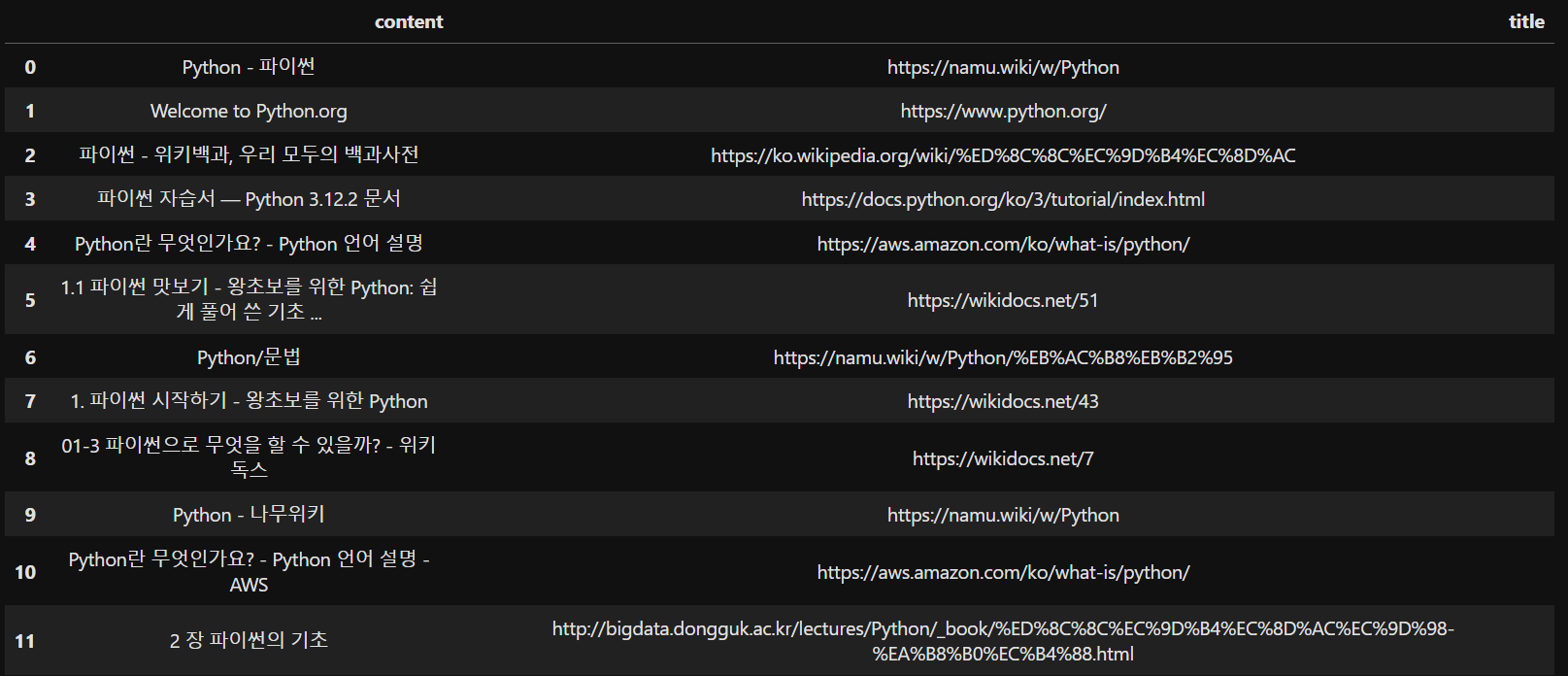
실습2> 동적 웹페이지 크롤링을 통해 검색 - 크롤링 자동화
- 동적 웹 브라우저를 제어하는 selenium 모듈을 통해 구글 홈페이지에서 특정 키워드를 입력하면 검색결과를 pandas의 데이터 프레임으로 반환하는 함수 만들기
import requests
from bs4 import BeautifulSoup
from selenium import webdriver
from selenium.webdriver.common.keys import Keys
from selenium.webdriver.common.by import By
import time
import pandas as pd

def searchWhatdoUwant(keyword):
    # selenium의 webdriver를 통해 크롬창 열기
    wd = webdriver.Chrome()
    wd.get("https://google.com")
    time.sleep(3)

    # find_element를 통해 특정 요소 찾기
    # 찾고자 하는 요소가 있는 부분의 class명과 find_element를 통해 해당 요소 찾기
    search = wd.find_element(By.CLASS_NAME, 'gLFyf')

    # 자동으로 검색창에 '파이썬'을 입력하고 자동으로 enter 누르기
    # send_keys()는 문자열이나 키보드 상수를 받아서 웹 요소에 입력한다
    search.send_keys('파이썬') # 즉, 찾고자하는 요소에 '파이썬'이라는 문자열을 입력
    search.send_keys(Keys.RETURN) # Keys.Return :엔터 키에 해당하는 특수 키 상수
    time.sleep(3)
    # button = wd.find_element(By.XPATH,'/html/body/div[1]/div[3]/form/div[1]/div[1]/div[2]/div[4]/div[6]/center/input[1]')
    # button.click()
    # time.sleep(3)
    html = wd.page_source
    soup = BeautifulSoup(html,'html.parser')
    all_content = soup.select('#rso div.yuRUbf a')
    content_list = []
    for item in all_content:
        link = item.attrs['href']
        title = item.h3.string
        content_list.append([title,link])
    # print(content_list)
    df = pd.DataFrame(content_list, columns=['content','title'])
    def style_center(df):
        return df.style.set_properties(**{'text-align': 'center'})
    centered_df = style_center(df)

    return centered_df

searchWhatdoUwant('손흥민')
- result>

JINSU