light map이란
현실세계의 물체는
뭐 단순하게 한개의 물질로만 이루어져 있을 수도 있지만
대게의 경우, 여러 물질로 구성되어 있음
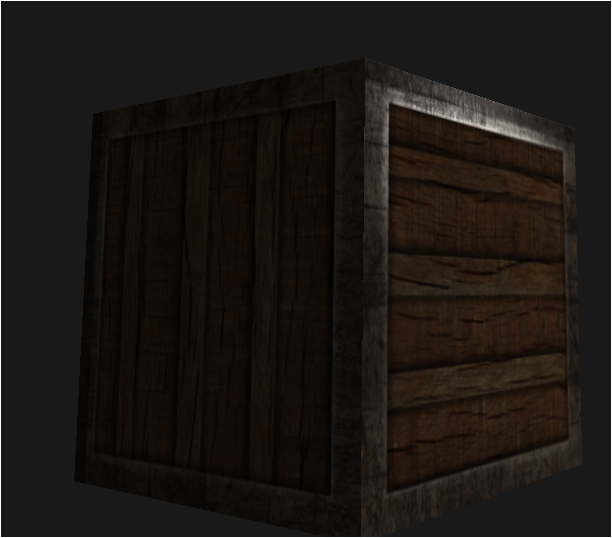
이런 물체는
내부는 밝은 나무
외부는 좀 어두운 강철 재질의 물체임
diffuse map
이런 복합 구성 물체의 재질을 만들기 위해선
텍스쳐와 같은게 필요함
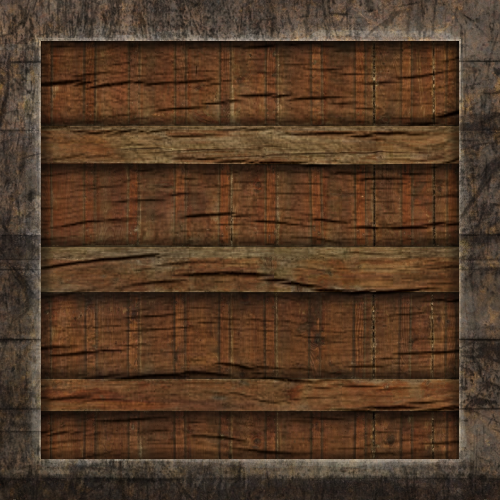
가장 먼저 필요한건 물체의 가장 기본이 되는 색상 결정 조건인
diffuse map임
이는 텍셀 단위로 삼각형을 매핑함
즉, 픽셀 하나하나마다 저 색상을 넣는거임
따라서 ambient도 이 diffuse map의 색상에 따라 빛의 강도만 조절해서 적용되게 되는거지비
이걸 그대로 써보자
Diffuse map사용시 주의점
Diffuse map은 GL에서 sampler2D라는 타입으로 저장을 하게 됨
sampler2D는 말그대로 2D라서 RGBA처럼 translucent성질이 없음
이를 opaque라고 함이렇게 opaque타입을 사용하려면 uniform으로 선언 후 전역으로 사용되어야만 함
struct Mat {sampler2D dif};
Mat mat1; // X
uniform Mat mat1; // O
opaque타입을 가진 모든 구조체, 변수에 대해서
객체로 만드는것을 엄격하게 금지함(e.g 참조없는 함수 파라미터, 객체 만들기 등등)sampler2D는 gpu의 내부에 저장되어 있음
따라서 이를 사용하기 위해 텍스쳐에 대한 참조로 저장되어 있음
참조된 객체를 객체화 한다? 뭔가 이상하지?이런 opaque를 포함한 구조체는 또한 참조로 바뀌게 되어서,
마찬가지로 인스턴스화를 하게되면... 으흠....잘 모르겠으면 CPP공부 ㄱㄱ
fragment shader를 수정해줌
#version 330 core
struct Material
{
    sampler2D diffuse;
    vec3 specular;
    float shininess;
};

struct Light
{
    vec3 position;
    vec3 ambient;
    vec3 diffuse;
    vec3 specular;
};

out vec4 FragColor;

in vec3 FragPos;
in vec3 Normal;
in vec2 TexCoords; //light map용 텍스쳐 좌표

uniform vec3 viewPos;
uniform Material mat;
uniform Light light;


void main()
{
    // ambient
    vec3 ambient = vec3(texture(material.diffuse, TexCoords)) * light.ambient;

    // diffuse
    vec3 norm = normalize(Normal);
    vec3 lightDir = normalize(light.position - FragPos);
    float diff = max(dot(norm, lightDir), 0.0);
    vec3 diffuse = diff * vec3(texture(material.diffuse, TexCoords)) * light.diffuse;

    // specular
    vec3 viewDir = normalize(viewPos - FragPos);
    vec3 reflectDir = reflect(-lightDir, norm);
    float spec = pow(max(dot(viewDir, reflectDir), 0.0), mat.shininess);
    vec3 specular = mat.specular * spec * light.specular;

    vec3 result = (ambient + diffuse + specular);
    FragColor = vec4(result, 1.0);
}
그리고 vertices에 texture coordinates를 추가함
	float vertices[] =
    {
        // 정점좌표            // 법선               // 텍스쳐 좌표
        -0.5f, -0.5f, -0.5f,  0.0f,  0.0f, -1.0f,  0.0f, 0.0f,
         0.5f, -0.5f, -0.5f,  0.0f,  0.0f, -1.0f,  1.0f, 0.0f,
         0.5f,  0.5f, -0.5f,  0.0f,  0.0f, -1.0f,  1.0f, 1.0f,
         0.5f,  0.5f, -0.5f,  0.0f,  0.0f, -1.0f,  1.0f, 1.0f,
        -0.5f,  0.5f, -0.5f,  0.0f,  0.0f, -1.0f,  0.0f, 1.0f,
        -0.5f, -0.5f, -0.5f,  0.0f,  0.0f, -1.0f,  0.0f, 0.0f,

        -0.5f, -0.5f,  0.5f,  0.0f,  0.0f, 1.0f,   0.0f, 0.0f,
         0.5f, -0.5f,  0.5f,  0.0f,  0.0f, 1.0f,   1.0f, 0.0f,
         0.5f,  0.5f,  0.5f,  0.0f,  0.0f, 1.0f,   1.0f, 1.0f,
         0.5f,  0.5f,  0.5f,  0.0f,  0.0f, 1.0f,   1.0f, 1.0f,
        -0.5f,  0.5f,  0.5f,  0.0f,  0.0f, 1.0f,   0.0f, 1.0f,
        -0.5f, -0.5f,  0.5f,  0.0f,  0.0f, 1.0f,   0.0f, 0.0f,

        -0.5f,  0.5f,  0.5f, -1.0f,  0.0f,  0.0f,  1.0f, 0.0f,
        -0.5f,  0.5f, -0.5f, -1.0f,  0.0f,  0.0f,  1.0f, 1.0f,
        -0.5f, -0.5f, -0.5f, -1.0f,  0.0f,  0.0f,  0.0f, 1.0f,
        -0.5f, -0.5f, -0.5f, -1.0f,  0.0f,  0.0f,  0.0f, 1.0f,
        -0.5f, -0.5f,  0.5f, -1.0f,  0.0f,  0.0f,  0.0f, 0.0f,
        -0.5f,  0.5f,  0.5f, -1.0f,  0.0f,  0.0f,  1.0f, 0.0f,

         0.5f,  0.5f,  0.5f,  1.0f,  0.0f,  0.0f,  1.0f, 0.0f,
         0.5f,  0.5f, -0.5f,  1.0f,  0.0f,  0.0f,  1.0f, 1.0f,
         0.5f, -0.5f, -0.5f,  1.0f,  0.0f,  0.0f,  0.0f, 1.0f,
         0.5f, -0.5f, -0.5f,  1.0f,  0.0f,  0.0f,  0.0f, 1.0f,
         0.5f, -0.5f,  0.5f,  1.0f,  0.0f,  0.0f,  0.0f, 0.0f,
         0.5f,  0.5f,  0.5f,  1.0f,  0.0f,  0.0f,  1.0f, 0.0f,

        -0.5f, -0.5f, -0.5f,  0.0f, -1.0f,  0.0f,  0.0f, 1.0f,
         0.5f, -0.5f, -0.5f,  0.0f, -1.0f,  0.0f,  1.0f, 1.0f,
         0.5f, -0.5f,  0.5f,  0.0f, -1.0f,  0.0f,  1.0f, 0.0f,
         0.5f, -0.5f,  0.5f,  0.0f, -1.0f,  0.0f,  1.0f, 0.0f,
        -0.5f, -0.5f,  0.5f,  0.0f, -1.0f,  0.0f,  0.0f, 0.0f,
        -0.5f, -0.5f, -0.5f,  0.0f, -1.0f,  0.0f,  0.0f, 1.0f,

        -0.5f,  0.5f, -0.5f,  0.0f,  1.0f,  0.0f,  0.0f, 1.0f,
         0.5f,  0.5f, -0.5f,  0.0f,  1.0f,  0.0f,  1.0f, 1.0f,
         0.5f,  0.5f,  0.5f,  0.0f,  1.0f,  0.0f,  1.0f, 0.0f,
         0.5f,  0.5f,  0.5f,  0.0f,  1.0f,  0.0f,  1.0f, 0.0f,
        -0.5f,  0.5f,  0.5f,  0.0f,  1.0f,  0.0f,  0.0f, 0.0f,
        -0.5f,  0.5f, -0.5f,  0.0f,  1.0f,  0.0f,  0.0f, 1.0f
    };
자자
fragment shader에서 in vec2 TexCoords; //light map용 텍스쳐 좌표
이렇게 in으로 TexCoords를 받으니
vertex shader에서 out으로 매핑된 coords를 넘겨야겠지~?
vertex shader
#version 330 core
//..
layout (location = 2) in vec2 aTexCoords;

//...
out vec2 TexCoords;

void main()
{
//...
	TexCoords = aTexCoords;
}
이렇게 넘겨줌
이제 main.cpp에서
- texture load해주는 함수
- texture load
- texture 사용
만들어줄거임
texture load해주는 함수
//전방선언
uint32_t loadTexture(const char *path);

//...
//texture load
uint32_t loadTexture(char const * path)
{
    uint32_t textureID;
    glGenTextures(1, &textureID);

    int width, height, nrComponents;
    uint8_t *data = stbi_load(path, &width, &height, &nrComponents, 0);
    if (data)
    {
        GLenum format;
        if (nrComponents == 1)
            format = GL_RED;
        else if (nrComponents == 3)
            format = GL_RGB;
        else if (nrComponents == 4)
            format = GL_RGBA;

        glBindTexture(GL_TEXTURE_2D, textureID);
        glTexImage2D(GL_TEXTURE_2D, 0, format, width, height, 0, format, GL_UNSIGNED_BYTE, data);
        glGenerateMipmap(GL_TEXTURE_2D);

        glTexParameteri(GL_TEXTURE_2D, GL_TEXTURE_WRAP_S, GL_REPEAT);
        glTexParameteri(GL_TEXTURE_2D, GL_TEXTURE_WRAP_T, GL_REPEAT);
        glTexParameteri(GL_TEXTURE_2D, GL_TEXTURE_MIN_FILTER, GL_LINEAR_MIPMAP_LINEAR);
        glTexParameteri(GL_TEXTURE_2D, GL_TEXTURE_MAG_FILTER, GL_LINEAR);

        stbi_image_free(data);
    }
    else
    {
        std::cout << "Texture failed to load at path: " << path << std::endl;
        stbi_image_free(data);
    }

    return textureID;
}
texture load
uint32_t diffuseMap = loadTexture(텍스쳐 절대경로); texture사용
//....

	//color cube VAO 정점 속성 및 인덱스 매핑
   glBindVertexArray(cubeVAO);
   //정점 속성 매핑
   glVertexAttribPointer(0, 3, GL_FLOAT, GL_FALSE, 8 * sizeof(float), (void*)0);
   glEnableVertexAttribArray(0);
   //법선 속성 매핑
   glVertexAttribPointer(1, 3, GL_FLOAT, GL_FALSE, 8 * sizeof(float), (void*)(3 * sizeof(float)));
   glEnableVertexAttribArray(1);
   //텍스쳐 속성 매핑
   glVertexAttribPointer(2, 2, GL_FLOAT, GL_FALSE, 8 * sizeof(float), (void*)(6 * sizeof(float)));
   glEnableVertexAttribArray(2);

//...
	//0번 텍스쳐 유닛에 sampler2D mat.diffuse 연결
   normalCubeShader.use();
   normalCubeShader.setInt("mat.diffuse", 0);

//...

	while()
   {
   	//...
       //cubeVAO에 사용할 쉐이더인 normalCubeShader프로그램을 GL에게 쉐이더 상태 등록
       normalCubeShader.use();
       //light 수정
       normalCubeShader.setVec3("light.position", lightPos);
       normalCubeShader.setVec3("light.ambient", 0.2f, 0.2f, 0.2f);
       normalCubeShader.setVec3("light.diffuse", 0.5f, 0.5f, 0.5f);
       normalCubeShader.setVec3("light.specular", 1.0f, 1.0f, 1.0f);
       normalCubeShader.setVec3("viewPos", camera.Position);
       //material 수정
       normalCubeShader.setVec3("mat.specular", 0.5f, 0.5f, 0.5f);
       normalCubeShader.setFloat("mat.shininess", 64.0f);

       //...

       // local->world로 가는 model변환행렬 만들기
       glm::mat4 model = glm::mat4(1.0f);
       normalCubeShader.setMat4("model", model);

       //0번 텍스쳐 유닛 활성화 후
       //활성화된 유닛에 GL_TEXTURE_2D타입 diffuseMap 할당
       glActiveTexture(GL_TEXTURE0);
       glBindTexture(GL_TEXTURE_2D, diffuseMap);
   }
//...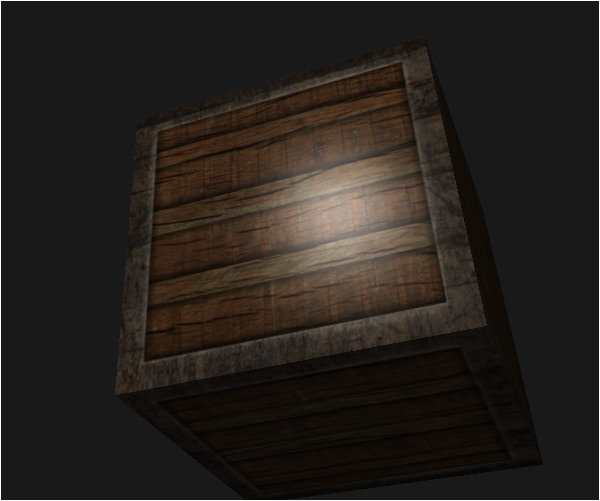
구웃~~
specular map
diffuse map이랑 똑같음
단지 여러 물질로 구성된 물체는
각 픽셀마다 다른 빛 반사를 가지고 있기때문에...
그에 해당되는 specular 텍스쳐를 사용하면 됨
그걸 specular map이라고 부름
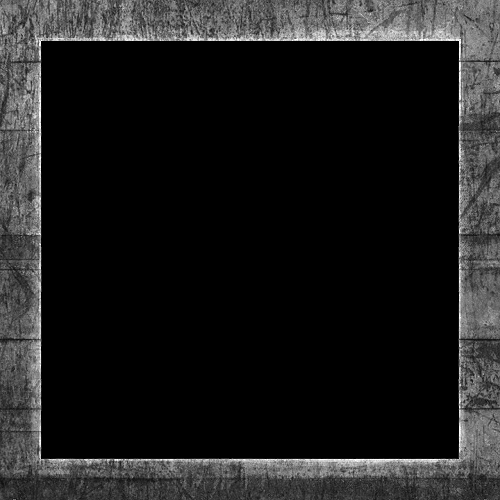
이걸 쓸거임
테두리 강철부분은 반사가 되고, 내부 목재는 반사가 안되도록 할거임
위의 diffuse map은 0번 텍스쳐 유닛에 할당했으니
OpenGL 텍스쳐 유닛
LearnOpenGL(4) - Texture, texture unit
1번 텍스쳐 유닛에 specular map을 할당하고
mix 고고~
main.cpp전체코드
#include <glad/glad.h>
#include <GLFW/glfw3.h>

#include <glm/glm.hpp>
#include <glm/gtc/matrix_transform.hpp>
#include <glm/gtc/type_ptr.hpp>

#include <iostream>
#include "Shader.h"
#include "Camera.h"
#include "stb_image.h"

void framebuffer_size_callback(GLFWwindow* window, int width, int height);
void mouse_callback(GLFWwindow* window, double xpos, double ypos);
void scroll_callback(GLFWwindow* window, double xoffset, double yoffset);
void processInput(GLFWwindow *window);
uint32_t loadTexture(const char *path);

// 윈도우 사이즈
const uint32_t SCR_WIDTH = 1280;
const uint32_t SCR_HEIGHT = 720;

// 카메라
Camera camera(glm::vec3(0.0f, 0.0f, 3.0f));
float lastX = SCR_WIDTH / 2.0f;
float lastY = SCR_HEIGHT / 2.0f;
bool firstMouse = true;

// 프레임 보정
float deltaTime = 0.0f;
float lastFrame = 0.0f;

// 라이팅
glm::vec3 lightPos(1.2f, 1.0f, 2.0f);

int main()
{
    // glfw 초기화, 설정
    // ----------------
    glfwInit();
    glfwWindowHint(GLFW_CONTEXT_VERSION_MAJOR, 3);
    glfwWindowHint(GLFW_CONTEXT_VERSION_MINOR, 3);
    glfwWindowHint(GLFW_OPENGL_PROFILE, GLFW_OPENGL_CORE_PROFILE);

    // glfw 창 생성
    // ------------
    GLFWwindow* window = glfwCreateWindow(SCR_WIDTH, SCR_HEIGHT, "흑45", nullptr, nullptr);
    if (window == nullptr)
    {
        std::cout << "Failed to create GLFW window" << std::endl;
        glfwTerminate();
        return -1;
    }
    glfwMakeContextCurrent(window);
    // glfw 인풋 콜백 처리
    glfwSetFramebufferSizeCallback(window, framebuffer_size_callback);
    glfwSetCursorPosCallback(window, mouse_callback);
    glfwSetScrollCallback(window, scroll_callback);

    // glfw 사용자 마우스 설정
    glfwSetInputMode(window, GLFW_CURSOR, GLFW_CURSOR_DISABLED);

    // glad로 openGL모든 함수 포인터 로딩
    // -------------------------------
    if (!gladLoadGLLoader((GLADloadproc)glfwGetProcAddress))
    {
        std::cout << "Failed to initialize GLAD" << std::endl;
        return -1;
    }

    // openGL 설정
    // -----------
    glEnable(GL_DEPTH_TEST);

    // 쉐이더 프로그램 만들기
    // -------------------
    Shader normalCubeShader("VertexShaders/MaterialShader.vsh", "FragmentShaders/MaterialShader.fsh");
    Shader lightCubeShader("VertexShaders/LightShader.vsh", "FragmentShaders/LightShader.fsh");

    // 정점 데이터
    // ----------
    float vertices[] =
    {
        // 정점좌표            // 법선               // 텍스쳐 좌표
        -0.5f, -0.5f, -0.5f,  0.0f,  0.0f, -1.0f,  0.0f, 0.0f,
         0.5f, -0.5f, -0.5f,  0.0f,  0.0f, -1.0f,  1.0f, 0.0f,
         0.5f,  0.5f, -0.5f,  0.0f,  0.0f, -1.0f,  1.0f, 1.0f,
         0.5f,  0.5f, -0.5f,  0.0f,  0.0f, -1.0f,  1.0f, 1.0f,
        -0.5f,  0.5f, -0.5f,  0.0f,  0.0f, -1.0f,  0.0f, 1.0f,
        -0.5f, -0.5f, -0.5f,  0.0f,  0.0f, -1.0f,  0.0f, 0.0f,

        -0.5f, -0.5f,  0.5f,  0.0f,  0.0f, 1.0f,   0.0f, 0.0f,
         0.5f, -0.5f,  0.5f,  0.0f,  0.0f, 1.0f,   1.0f, 0.0f,
         0.5f,  0.5f,  0.5f,  0.0f,  0.0f, 1.0f,   1.0f, 1.0f,
         0.5f,  0.5f,  0.5f,  0.0f,  0.0f, 1.0f,   1.0f, 1.0f,
        -0.5f,  0.5f,  0.5f,  0.0f,  0.0f, 1.0f,   0.0f, 1.0f,
        -0.5f, -0.5f,  0.5f,  0.0f,  0.0f, 1.0f,   0.0f, 0.0f,

        -0.5f,  0.5f,  0.5f, -1.0f,  0.0f,  0.0f,  1.0f, 0.0f,
        -0.5f,  0.5f, -0.5f, -1.0f,  0.0f,  0.0f,  1.0f, 1.0f,
        -0.5f, -0.5f, -0.5f, -1.0f,  0.0f,  0.0f,  0.0f, 1.0f,
        -0.5f, -0.5f, -0.5f, -1.0f,  0.0f,  0.0f,  0.0f, 1.0f,
        -0.5f, -0.5f,  0.5f, -1.0f,  0.0f,  0.0f,  0.0f, 0.0f,
        -0.5f,  0.5f,  0.5f, -1.0f,  0.0f,  0.0f,  1.0f, 0.0f,

         0.5f,  0.5f,  0.5f,  1.0f,  0.0f,  0.0f,  1.0f, 0.0f,
         0.5f,  0.5f, -0.5f,  1.0f,  0.0f,  0.0f,  1.0f, 1.0f,
         0.5f, -0.5f, -0.5f,  1.0f,  0.0f,  0.0f,  0.0f, 1.0f,
         0.5f, -0.5f, -0.5f,  1.0f,  0.0f,  0.0f,  0.0f, 1.0f,
         0.5f, -0.5f,  0.5f,  1.0f,  0.0f,  0.0f,  0.0f, 0.0f,
         0.5f,  0.5f,  0.5f,  1.0f,  0.0f,  0.0f,  1.0f, 0.0f,

        -0.5f, -0.5f, -0.5f,  0.0f, -1.0f,  0.0f,  0.0f, 1.0f,
         0.5f, -0.5f, -0.5f,  0.0f, -1.0f,  0.0f,  1.0f, 1.0f,
         0.5f, -0.5f,  0.5f,  0.0f, -1.0f,  0.0f,  1.0f, 0.0f,
         0.5f, -0.5f,  0.5f,  0.0f, -1.0f,  0.0f,  1.0f, 0.0f,
        -0.5f, -0.5f,  0.5f,  0.0f, -1.0f,  0.0f,  0.0f, 0.0f,
        -0.5f, -0.5f, -0.5f,  0.0f, -1.0f,  0.0f,  0.0f, 1.0f,

        -0.5f,  0.5f, -0.5f,  0.0f,  1.0f,  0.0f,  0.0f, 1.0f,
         0.5f,  0.5f, -0.5f,  0.0f,  1.0f,  0.0f,  1.0f, 1.0f,
         0.5f,  0.5f,  0.5f,  0.0f,  1.0f,  0.0f,  1.0f, 0.0f,
         0.5f,  0.5f,  0.5f,  0.0f,  1.0f,  0.0f,  1.0f, 0.0f,
        -0.5f,  0.5f,  0.5f,  0.0f,  1.0f,  0.0f,  0.0f, 0.0f,
        -0.5f,  0.5f, -0.5f,  0.0f,  1.0f,  0.0f,  0.0f, 1.0f
    };

    // VBO, cubeVAO를 만들고 생성
    uint32_t VBO, cubeVAO;
    glGenVertexArrays(1, &cubeVAO);
    glGenBuffers(1, &VBO);

    //VBO에 vertices 데이터 넘기기
    glBindBuffer(GL_ARRAY_BUFFER, VBO);
    glBufferData(GL_ARRAY_BUFFER, sizeof(vertices), vertices, GL_STATIC_DRAW);

    //color cube VAO 정점 속성 및 인덱스 매핑
    glBindVertexArray(cubeVAO);
    //정점 속성 매핑
    glVertexAttribPointer(0, 3, GL_FLOAT, GL_FALSE, 8 * sizeof(float), (void*)0);
    glEnableVertexAttribArray(0);
    //법선 속성 매핑
    glVertexAttribPointer(1, 3, GL_FLOAT, GL_FALSE, 8 * sizeof(float), (void*)(3 * sizeof(float)));
    glEnableVertexAttribArray(1);
    //텍스쳐 속성 매핑
    glVertexAttribPointer(2, 2, GL_FLOAT, GL_FALSE, 8 * sizeof(float), (void*)(6 * sizeof(float)));
    glEnableVertexAttribArray(2);


    //light cube VAO 만들기
    uint32_t lightCubeVAO;
    glGenVertexArrays(1, &lightCubeVAO);
    glBindVertexArray(lightCubeVAO);

    glBindBuffer(GL_ARRAY_BUFFER, VBO);

    //light cube VAO 정점 속성 및 인덱스 매핑
    glVertexAttribPointer(0, 3, GL_FLOAT, GL_FALSE, 8 * sizeof(float), (void*)0);
    glEnableVertexAttribArray(0);

    //texture load
    uint32_t diffuseMap = loadTexture("D:/01_Develope/CPP/learn_opengl/learn_opengl/Resources/container2_diffuse.png");
    uint32_t specularMap = loadTexture("D:/01_Develope/CPP/learn_opengl/learn_opengl/Resources/container2_specular.png");
    normalCubeShader.use();
    //diffuse map
    normalCubeShader.setInt("mat.diffuse", 0);
    //specular map
    normalCubeShader.setInt("mat.specular", 1);

    // 렌더링 루프(매 프레임 실행)
    // -----------
    while (!glfwWindowShouldClose(window))
    {
        // 프레임 보정
        // ----------
        float currentFrame = static_cast<float>(glfwGetTime());
        deltaTime = currentFrame - lastFrame;
        lastFrame = currentFrame;

        // 인풋
        // ----
        processInput(window);

        // 드로우 시작!
        // ----------
        glClearColor(0.1f, 0.1f, 0.1f, 1.0f);
        glClear(GL_COLOR_BUFFER_BIT | GL_DEPTH_BUFFER_BIT);

        //cubeVAO에 사용할 쉐이더인 normalCubeShader프로그램을 GL에게 쉐이더 상태 등록
        normalCubeShader.use();
        //light 수정
        normalCubeShader.setVec3("light.position", lightPos);
        normalCubeShader.setVec3("light.ambient", 0.2f, 0.2f, 0.2f);
        normalCubeShader.setVec3("light.diffuse", 0.5f, 0.5f, 0.5f);
        normalCubeShader.setVec3("light.specular", 1.0f, 1.0f, 1.0f);
        normalCubeShader.setVec3("viewPos", camera.Position);
        //material 수정
        normalCubeShader.setVec3("mat.specular", 0.5f, 0.5f, 0.5f);
        normalCubeShader.setFloat("mat.shininess", 64.0f);

        // world->view로 가는 view변환행렬/view->screen으로 가는 projection 변환 행렬 만들기
        glm::mat4 projection = glm::perspective(glm::radians(camera.Zoom), (float)SCR_WIDTH / (float)SCR_HEIGHT, 0.1f, 100.0f);
        glm::mat4 view = camera.GetViewMatrix();
        normalCubeShader.setMat4("projection", projection);
        normalCubeShader.setMat4("view", view);

        // local->world로 가는 model변환행렬 만들기
        glm::mat4 model = glm::mat4(1.0f);
        normalCubeShader.setMat4("model", model);

        //bind texture
        //diffuse map
        glActiveTexture(GL_TEXTURE0);
        glBindTexture(GL_TEXTURE_2D, diffuseMap);
        //specular map
        glActiveTexture(GL_TEXTURE1);
        glBindTexture(GL_TEXTURE_2D, specularMap);

        //cubeVAO를 GL에게 VertexArray로 바인딩(상태등록)
        //normalCubeShader가 현재 shaderProgram등록되어 있으므로,
        //Draw를 할때,
        //cubeVAO에 저장한 vertex Attribute를
        //enableVertexAttribArray의 0번 등록해놨으니
        //normalCubeShader의 location = 0으로 해당 정점 속성 데이터 전달
        glBindVertexArray(cubeVAO);
        glDrawArrays(GL_TRIANGLES, 0, 36);


        //lightCubeVAO에 사용할 쉐이더인 lightCubeShader프로그램을 GL에게 쉐이더 상태 등록
        lightCubeShader.use();
        //변환행렬들 생성
        lightCubeShader.setMat4("projection", projection);
        lightCubeShader.setMat4("view", view);
        model = glm::mat4(1.0f);
        lightPos.x = 1.0f + sin(glfwGetTime()) * 2.0f;
        model = glm::translate(model, lightPos);
        model = glm::scale(model, glm::vec3(0.2f)); // a smaller cube
        lightCubeShader.setMat4("model", model);

        //lightCubeVAO를 GL에게 VertexArray로 바인딩(상태등록)
        //lightCubeShader가 현재 shaderProgram등록되어 있으므로,
        //Draw를 할때,
        //lightCubeVAO에 저장한 vertex Attribute를
        //enableVertexAttribArray의 0번 등록해놨으니
        //lightCubeShader의 location = 0으로 해당 정점 속성 데이터 전달
        glBindVertexArray(lightCubeVAO);
        glDrawArrays(GL_TRIANGLES, 0, 36);


        // glfw 버퍼 스와핑
        // ---------------
        glfwSwapBuffers(window);
        glfwPollEvents();
    }

    //안해도 되긴하는데, 명시적으로 프로그램 종료될때
    //Buffer, VertexArray를 메모리에서 삭제
    // ---------------------------------------
    glDeleteVertexArrays(1, &cubeVAO);
    glDeleteVertexArrays(1, &lightCubeVAO);
    glDeleteBuffers(1, &VBO);

    //프로그램 종료시 glfw도 끝내기!
    // ----------
    glfwTerminate();
    return 0;
}

// 키 인풋 콜백 이벤트
// -----------------
void processInput(GLFWwindow *window)
{
    if (glfwGetKey(window, GLFW_KEY_ESCAPE) == GLFW_PRESS)
        glfwSetWindowShouldClose(window, true);

    if (glfwGetKey(window, GLFW_KEY_W) == GLFW_PRESS)
        camera.ProcessKeyboard(FORWARD, deltaTime);
    if (glfwGetKey(window, GLFW_KEY_S) == GLFW_PRESS)
        camera.ProcessKeyboard(BACKWARD, deltaTime);
    if (glfwGetKey(window, GLFW_KEY_A) == GLFW_PRESS)
        camera.ProcessKeyboard(LEFT, deltaTime);
    if (glfwGetKey(window, GLFW_KEY_D) == GLFW_PRESS)
        camera.ProcessKeyboard(RIGHT, deltaTime);
    if (glfwGetKey(window, GLFW_KEY_E) == GLFW_PRESS)
        camera.ProcessKeyboard(UP, deltaTime);
    if (glfwGetKey(window, GLFW_KEY_Q) == GLFW_PRESS)
        camera.ProcessKeyboard(DOWN, deltaTime);
}

// glfw를 이용해 gl에게 사용할 창의 viewport크기 지정
// ---------------------------------------------
void framebuffer_size_callback(GLFWwindow* window, int width, int height)
{
    // make sure the viewport matches the new window dimensions; note that width and
    // height will be significantly larger than specified on retina displays.
    glViewport(0, 0, width, height);
}


// 마우스 이동 콜백 이벤트
// --------------------
void mouse_callback(GLFWwindow* window, double xposIn, double yposIn)
{
    float xpos = static_cast<float>(xposIn);
    float ypos = static_cast<float>(yposIn);

    if (firstMouse)
    {
        lastX = xpos;
        lastY = ypos;
        firstMouse = false;
    }

    float xoffset = xpos - lastX;
    float yoffset = lastY - ypos; // reversed since y-coordinates go from bottom to top

    lastX = xpos;
    lastY = ypos;

    camera.ProcessMouseMovement(xoffset, yoffset);
}

// 마우스 스크롤 콜백 이벤트
// ---------------------
void scroll_callback(GLFWwindow* window, double xoffset, double yoffset)
{
    camera.ProcessMouseScroll(static_cast<float>(yoffset));
}

//texture load
uint32_t loadTexture(char const * path)
{
    uint32_t textureID;
    glGenTextures(1, &textureID);

    int width, height, nrComponents;
    uint8_t *data = stbi_load(path, &width, &height, &nrComponents, 0);
    if (data)
    {
        GLenum format;
        if (nrComponents == 1)
            format = GL_RED;
        else if (nrComponents == 3)
            format = GL_RGB;
        else if (nrComponents == 4)
            format = GL_RGBA;

        glBindTexture(GL_TEXTURE_2D, textureID);
        glTexImage2D(GL_TEXTURE_2D, 0, format, width, height, 0, format, GL_UNSIGNED_BYTE, data);
        glGenerateMipmap(GL_TEXTURE_2D);

        glTexParameteri(GL_TEXTURE_2D, GL_TEXTURE_WRAP_S, GL_REPEAT);
        glTexParameteri(GL_TEXTURE_2D, GL_TEXTURE_WRAP_T, GL_REPEAT);
        glTexParameteri(GL_TEXTURE_2D, GL_TEXTURE_MIN_FILTER, GL_LINEAR_MIPMAP_LINEAR);
        glTexParameteri(GL_TEXTURE_2D, GL_TEXTURE_MAG_FILTER, GL_LINEAR);

        stbi_image_free(data);
    }
    else
    {
        std::cout << "Texture failed to load at path: " << path << std::endl;
        stbi_image_free(data);
    }

    return textureID;
}
fragment shader 전체코드
#version 330 core
struct Material
{
    sampler2D diffuse;
    sampler2D specular;
    float shininess;
};

struct Light
{
    vec3 position;
    vec3 ambient;
    vec3 diffuse;
    vec3 specular;
};

out vec4 FragColor;

in vec3 FragPos;
in vec3 Normal;
in vec2 TexCoords; //light map용 텍스쳐 좌표

uniform vec3 viewPos;
uniform Material mat;
uniform Light light;


void main()
{
    // ambient
    vec3 ambient = vec3(texture(mat.diffuse, TexCoords)) * light.ambient;

    // diffuse
    vec3 norm = normalize(Normal);
    vec3 lightDir = normalize(light.position - FragPos);
    float diff = max(dot(norm, lightDir), 0.0);
    vec3 diffuse = diff * vec3(texture(mat.diffuse, TexCoords)) * light.diffuse;

    // specular
    vec3 viewDir = normalize(viewPos - FragPos);
    vec3 reflectDir = reflect(-lightDir, norm);
    float spec = pow(max(dot(viewDir, reflectDir), 0.0), mat.shininess);
    vec3 specular = vec3(texture(mat.specular, TexCoords)) * spec * light.specular;

    vec3 result = (ambient + diffuse + specular);
    FragColor = vec4(result, 1.0);
}
결과는....?
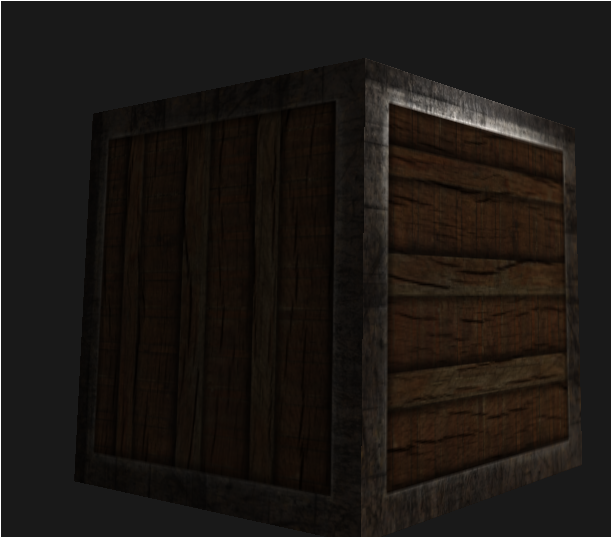
딱 강철부분만 빛 반사되는중~~