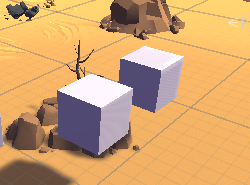
GameObject 위치 확인
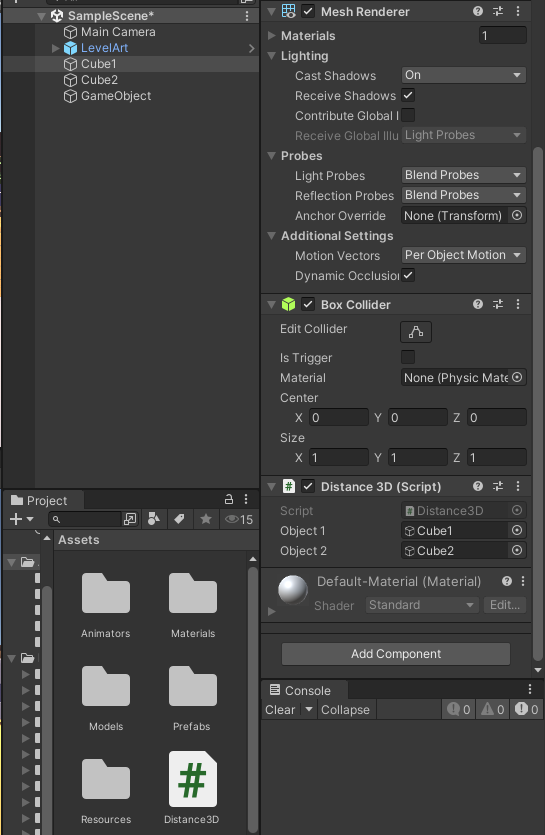
- Distance3D C# 파일 생성 후 Cube1에서 Add
using System.Collections;
using System.Collections.Generic;
using UnityEngine;

public class Distance3D : MonoBehaviour {
    private GameObject object1; //첫번째 게임 오브젝트
    private GameObject object2; //두번째 게임 오브젝트

    void Start() {
        //씬에서 게임오브젝트 이름으로 게임오브젝트 찾기
        object1 = GameObject.Find("Cube1");
        object2 = GameObject.Find("Cube2");
    }

    void Update() {
        if (object1 != null && object2 != null) {
            Debug.Log("게임오브젝트1 위치:" + object1.transform.position); //position : Vector3 타입
            Debug.Log("게임오브젝트2 위치:" + object2.transform.position);
        } else {
            Debug.Log("null 입니다.");
        }
    }
}
- Object1에 Cube1, Object2에 Cube2에 넣기
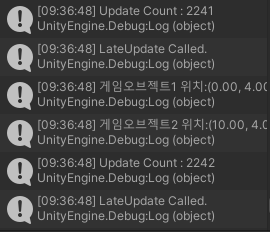
- 결과값
Vector
using System.Collections;
using System.Collections.Generic;
using UnityEngine;

public class Vector3Ex : MonoBehaviour {
    private GameObject object1; //첫번째 게임 오브젝트
    private GameObject object2; //두번째 게임 오브젝트

    void Start() {
        //씬에서 게임오브젝트 이름으로 게임오브젝트 찾기
        object1 = GameObject.Find("Cube1");
        object2 = GameObject.Find("Cube2");

        if (object1 != null && object2 != null) {
            //게임오브젝트1 위치:(0.00, 4.00, 0.00)
            Debug.Log("게임오브젝트1 위치:" + object1.transform.position); //Vector3 타입
            Debug.Log("게임오브젝트2 위치:" + object2.transform.position);
        } else {
            Debug.Log("null 입니다.");
        }

        //게임오브젝트 간의 거리
        Vector3 pos1 = object1.transform.position;
        Vector3 pos2 = object2.transform.position;
        Vector3 delta1 = pos1 - pos2;
        float distance = delta1.magnitude;
        Debug.Log("두 게임오브젝트 간의 거리: " + distance);

        float distance2 = Vector3.Distance(pos1, pos2);
        Debug.Log("두 게임오브젝트 간의 거리: " + distance2);
        //두 벡터사이의 방향과 이동거리 구하기
        Vector3 currentPos = new Vector3(1, 0, 1);
        Vector3 destPos = new Vector3(5, 3, 5);
        //방향벡터
        Vector3 direction = (destPos - currentPos).normalized; //정규벡터(길이1) 방향성
        //목적지를 향해 10만큼 현재 위치에서 이동하기
        Vector3 newPos = currentPos + direction * 10;

    }//Start()
}
- 실행결과
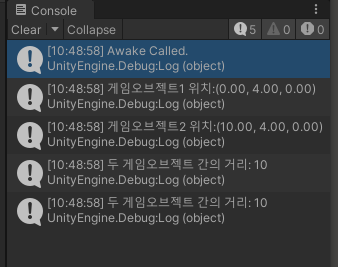
Move
코드를 통해 Cube1 이동시키기
X축의 +만큼 점진적으로 이동
using System.Collections;
using System.Collections.Generic;
using UnityEngine;

public class Move : MonoBehaviour
{
    void Start()
    {
        // transform  : 자신의 transform 컴퍼넌트
        // gameObject : 자신의 GameObject 객체
        Debug.Log("transform : " + transform.position); //(0,4,0)
        transform.position = new Vector3(10, 4, 0);
    }
    void Update()
    {
        // 순차적인 이동
        // Time.deltaTime : FPS에 한 프레임의 시간
        // 일정한 시간만큼 간격 이동
        transform.Translate(new Vector3(1, 0, 0) * Time.deltaTime);
    }
}
- X축 방향으로 축 회전
한번에 한 축에 관해서만 회전 가능
using System.Collections;
using System.Collections.Generic;
using UnityEngine;

public class Move : MonoBehaviour
{
    void Start()
    {
        Debug.Log("transform : " + transform.position); //(0,4,0)
        transform.position = new Vector3(10, 4, 0);
    }
    void Update()
    {
        transform.Rotate(new Vector3(10, 0, 0)*Time.deltaTime);
    }
}