📋 목차
- 모듈형 방어구
- 모듈 적용
- 최종 결과
- 오늘의 배운 점
- 다음 계획
🛡️ 모듈형 방어구
이 게임에서는 단순히 방어구를 입는 것이 아니라, 기존 방어구에서 모듈을 추가하는 형식으로 할겁니다. 슬롯이 3개인 방어구 모듈판이 있고, 각각 방어력, 환경 저항, 스킬로 구성되어 있습니다.
먼저 모듈 타입을 만들까요?
1. 모듈 아이템 생성
아래 코드를 작성하고, Defense, Resistance, Skill이란 Module 데이터를 만든 후, Prefab도 생성해주세요.
// ItemInstance.cs

void IntializeProperties()
{
	// 기존 코드...

    switch (itemdata.itemType)
    {
    	case ItemType.Armor:
        	properties["durability"] = 100f;
    		properties["armorModules"] = new ItemInstance[3];
    		break;
		default:
    		break;
    }
}

// ItemData.cs

[ShowIf("itemType", ItemType.ArmorMoudle)]
public ArmorModuleType armorModuleType;

[ShowIf("armorModuleType", ArmorModuleType.Defense)]
public float defensePower;

[ShowIf("armorModuleType", ArmorModuleType.Resistance)]
public EnvironmentType environmentType;

[ShowIf("armorModuleType", ArmorModuleType.Skill)]
public ArmorSkill armorSkill;

public enum ArmorModuletype
{
	Defense,
    Resistance,
    Skill
}
2. UI생성
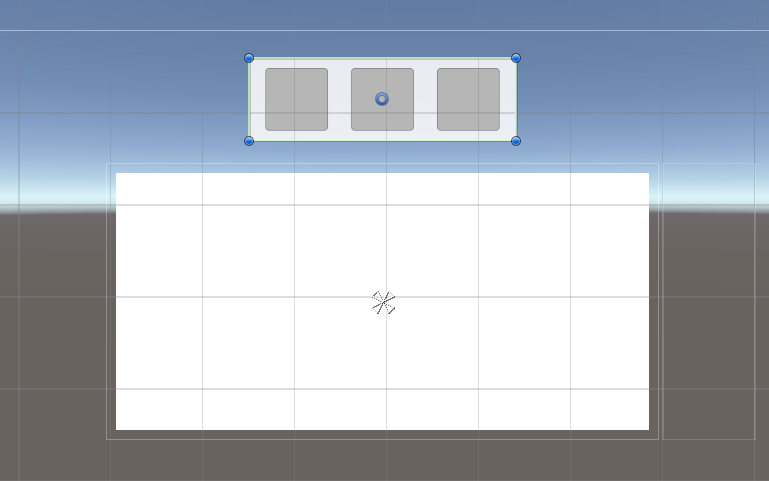
기존에 있던 슬롯 아무거나 하나를 복제해서, 모듈 교체시 나오는 UI를 제작합니다.
3. 슬롯 우클릭
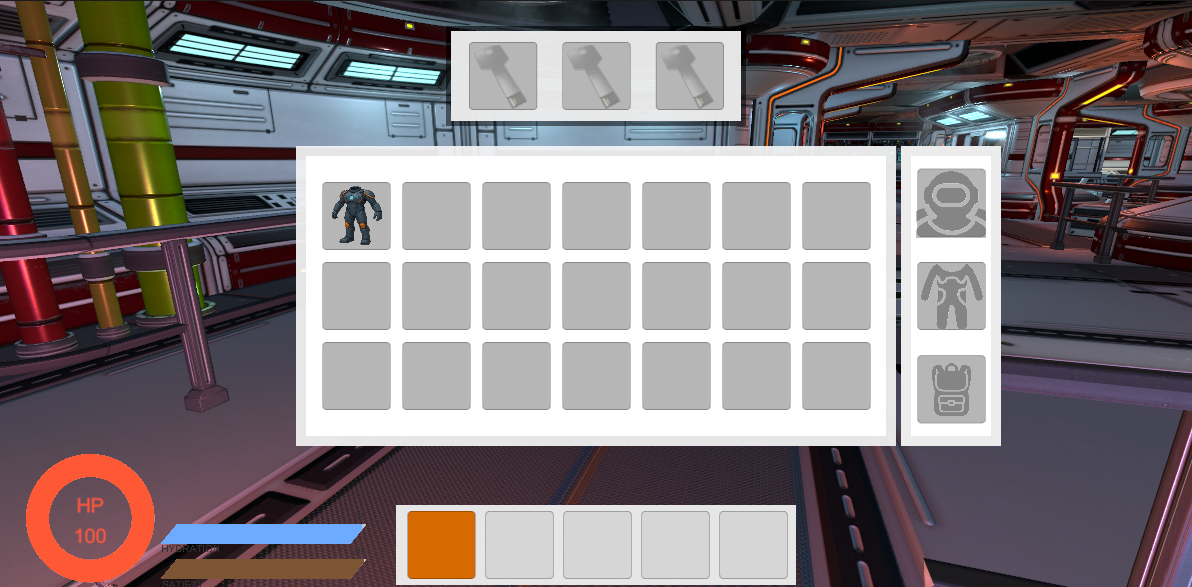
인벤토리 슬롯안에서 갑옷을 우클릭하면 위에 Module UI가 나오게 할겁니다.
// InventorySlot.cs

public void OnPointerClick(PointerEventData eventData)
{
    if (!inventory.items[slotIndex]) return;

    if (eventData.button == PointerEventData.InputButton.Left && eventData.clickCount == 2)
    {
        uiManager.OnInventorySlotDoubleClick(slotIndex);
    }

    if (eventData.button == PointerEventData.InputButton.Right)
    {
        uiManager.OnInventorySlotRightClick(slotIndex);
    }
}

// UIManager.cs

// moduleSlotPanel은 InventoryPanel의 자식에 놓음
public GameObject moduleSlotPanel;
private ItemInstance currentArmor;

public void OnInventorySlotRightClick(int slotIndex)
{
    currentArmor = inventory.items[slotIndex];
    if (!currentArmor) return;

    ItemType type = currentArmor.itemData.itemType;
    if (type != ItemType.Armor) return;

    moduleSlotPanel.SetActive(true);

    ModuleSlot[] moduleSlots = moduleSlotPanel.GetComponentsInChildren<ModuleSlot>();
    ItemInstance[] armorModules = currentArmor.Get<ItemInstance[]>("armorModules");

	if (moduleSlots.Length <= 0 || armorModules.Length <= 0) return;
	for (int i = 0; i < moduleSlots.Length; i++)
	{
	    moduleSlots[i].SetModuleSlots(armorModules[i], currentArmor);
	}
}
🔑 모듈 적용
이제 UI를 생성하는 것까진 됐죠? 그렇다면 ModuleSlot 스크립트를 생성해서 슬롯 프리팹에 적용하고 방어구에 모듈이 들어가게끔 해봅시다.
1. 현재 모듈 세팅
// ModuleSlot.cs

public void SetModuleSlots(ItemInstance module, ItemInstance armor)
{
    int index = -1;
    switch(moduleType)
    {
        case ArmorModuleType.Defense:
            index = 0;
            break;
        case ArmorModuleType.Resistance:
            index = 1;
            break;
        case ArmorModuleType.Skill:
            index = 2;
            break;
        default:
            return;
    }

    if (module)
    {
        itemIcon.sprite = module.itemData.icon;
        itemIcon.color = Color.white;
    }
    else
    {
        itemIcon.sprite = slotImage;
        itemIcon.color = new Color(1, 1, 1, 0.5f);
    }
}
인벤토리를 열어 갑옷을 우클릭하면 상단에 모듈창이 뜨는 모습입니다.
2. 모듈장착하기
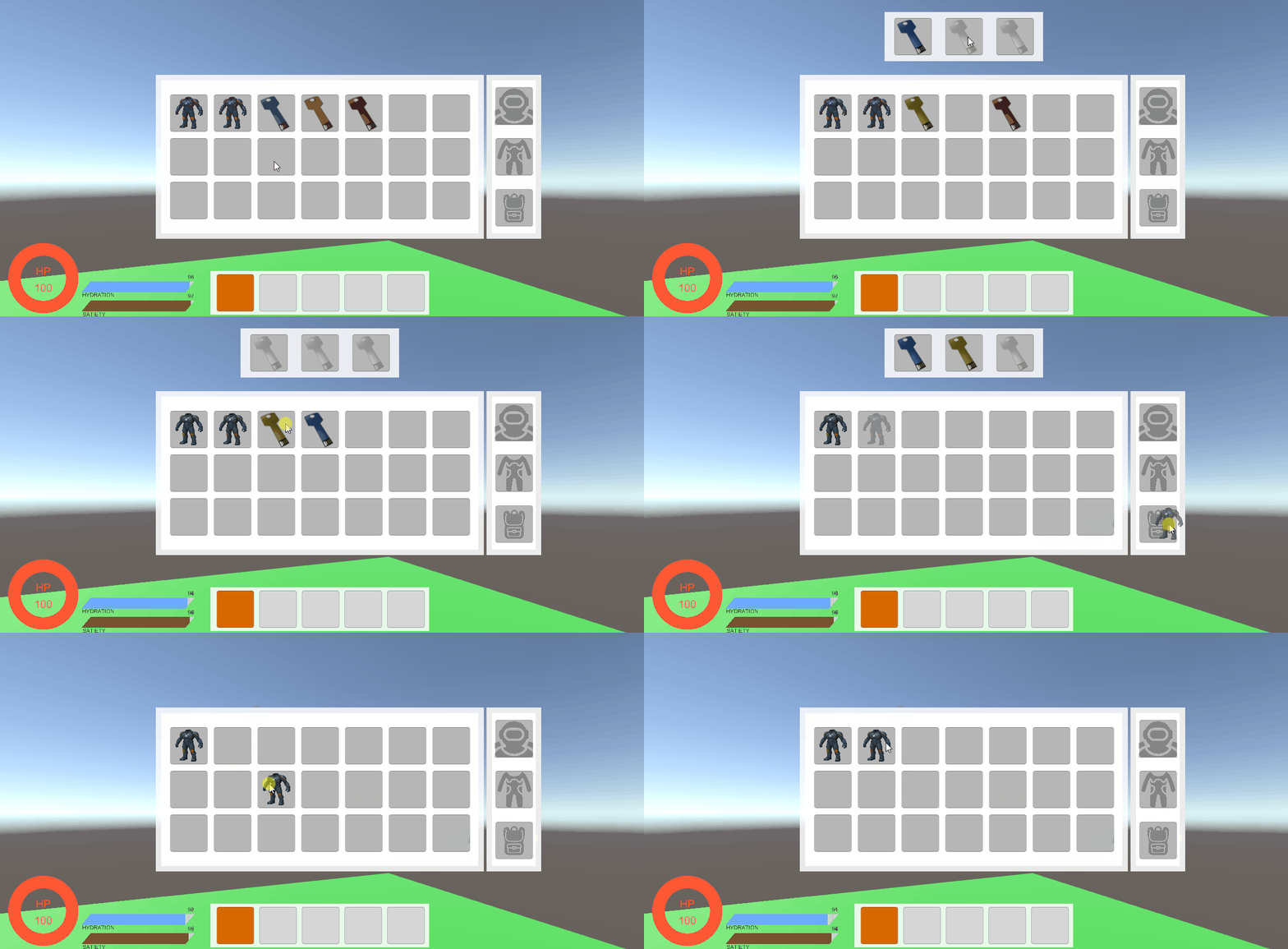
인벤토리창에서 모듈을 더블클릭하면 해당 방어구의 모듈로 들어가고, 모듈창에서 더블클릭 한다면 인벤토리 창으로 해당 모듈이 들어가는 것을 구현하겠습니다.
// ArmorModuleManager.cs

// 현재 모듈이 바뀔때마다 부름
public static event System.Action<int, ItemInstance, ItemInstance> OnModuleChanged;

public void AddModule(Inventory inventory, ItemInstance module, ItemInstance armor)
{
    if (!inventory || !module) return;

    if (module.itemData.itemType != ItemType.ArmorMoudle) return;

    int index = -1;
    switch(module.itemData.armorModuleType)
    {
        case ArmorModuleType.Defense:
            index = 0;
            break;
        case ArmorModuleType.Resistance:
            index = 1;
            break;
        case ArmorModuleType.Skill:
            index = 2;
            break;
        default:
            return;
    }
    AddModuleInIndex(inventory, module, armor, index);
}

private void AddModuleInIndex(Inventory inventory, ItemInstance module, ItemInstance armor, int index)
{
    OnModuleChanged?.Invoke(index, module, armor);
    ItemInstance[] armorModules = armor.Get<ItemInstance[]>("armorModules");
    if (!armorModules[index])
    {
        armorModules[index] = module;
        inventory.RemoveItemFromInstance(module);
    }
    else
    {
        inventory.AddItem(armorModules[index]);
        armorModules[index] = module;
        inventory.RemoveItemFromInstance(module);
    }
}

// ModuleSlot.cs

void OnEnable()
{
    ArmorModuleManager.OnModuleChanged += OnModuleUpdated;
}

void OnDisable()
{
    ArmorModuleManager.OnModuleChanged -= OnModuleUpdated;
}

public void SetModuleSlots(ItemInstance module, ItemInstance armor)
{
    if (module)
    {
        itemIcon.sprite = module.itemData.icon;
        itemIcon.color = Color.white;
    }
    else
    {
        itemIcon.sprite = slotImage;
        itemIcon.color = new Color(1, 1, 1, 0.5f);
    }
}
3. 모듈해제하기
이번엔 모듈창에서 더블클릭하면 모듈이 해제되게 할겁니다. 먼저 currentArmor라는 변수를 생성하고 setModuleSlots함수에서 currentArmor = armor를 작성해주세요.
// ModuleSlot.cs

public void OnPointerClick(PointerEventData eventData)
{
    if (eventData.clickCount == 2)
    {
        RemoveItem(moduleType);
    }
}

private void RemoveItem(ArmorModuleType type)
{

    int index = -1;
    if (type == ArmorModuleType.Defense) index = 0;
    else if (type == ArmorModuleType.Resistance) index = 1;
    else if (type == ArmorModuleType.Skill) index = 2;
    else return;

    ItemInstance[] armorModules = currentArmor.Get<ItemInstance[]>("armorModules");
    if (!armorModules[index]) return;

    inventory.AddItem(armorModules[index]);
    armorModules[index] = null;

    currentArmor.Set("armorModules", armorModules);
    SetModuleSlots(null, currentArmor);

    uiManager.UpdateItemUI();
}
4. 그 외 예외처리
항상 그렇듯... 한 시스템을 만들면 엄청난 예외처리가 필요합니다. 그건 이곳에서 따로 코드를 보여드리진 않겠습니다. 대략적으로 말씀드리자면,
- 인벤토리 창을 닫을 때 모듈 창이 꺼지게 함
- 인벤토리의 다른 슬롯을 건들면 모듈 창이 꺼지게 함
- 다른 방어구를 우클릭했을 경우, 해당 방어구의 모듈을 보여줌
등등이 있겠죠?
🎮 최종 결과
각 모듈이 탈부착 가능하며, 각각 방어구마다 다른 모듈을 보여주는 모습입니다. 인벤토리 슬롯 인덱스가 바껴도 창은 그대로 입니다.
📚 오늘의 배운 점
- 모듈 탈부착 구현
🎯 다음 계획
다음 글에서는:
- 방어구 효과 적용
- 받는 대미지 감소
- 환경에 따른 영향 감소
- 스킬 적용
- 스킬 구현
- 이속 증가
- 공속 증가
- 체력 자동 회복
