
📕 참고: ROS2로 시작하는 로봇 프로그래밍, topic_service_action_rclpy_example
계산기 만들기에 사용된 토픽 퍼블리셔/서브스크라이버 코드를 살펴보려고 한다.
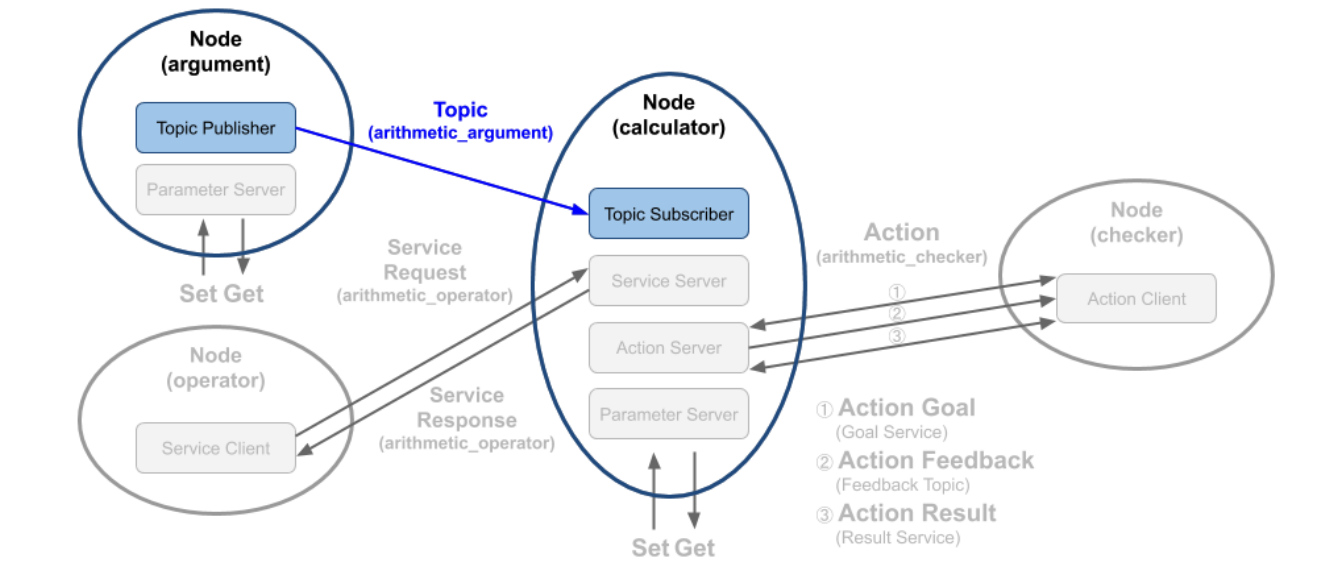
arument
- arithmetic_argument 토픽으로 현재 시간과 변수 a,b 발행
calculator
- arithmetic_argument 토픽에서 발행된 시간과 변수 a,b를 구독
argument/퍼블리셔 코드
Argument 클래스
✔ 초기화 함수 __init__
def __init__(self):
    super().__init__('argument') # 노드 이름
    self.declare_parameter('qos_depth', 10)
    qos_depth = self.get_parameter('qos_depth').value
    self.declare_parameter('min_random_num', 0)
    self.min_random_num = self.get_parameter('min_random_num').value
    self.declare_parameter('max_random_num', 9)
    self.max_random_num = self.get_parameter('max_random_num').value
    self.add_on_set_parameters_callback(self.update_parameter)
- 노드 이름을
argument로 설정 declare_parameter로 기본 값 설정- Qos, 최소값, 최대값add_on_set_parameters_callback: 파라미터가 변경될 때마다 실행되는 콜백 함수
✔ 퍼블리셔 생성
self.arithmetic_argument_publisher = self.create_publisher(
    ArithmeticArgument,
    'arithmetic_argument',
    QOS_RKL10V)
ArithmeticArgument메시지 타입을arithmetic_argument라는 토픽 이름으로 퍼블리시할 퍼블리셔 생성ArithmeticArgument는 인터페이스 패키지에msg로 정의되어 있음
✔ 타이머 설정
self.timer = self.create_timer(1.0, self.publish_random_arithmetic_arguments)
- 1초마다 주기적으로 토픽 발행
메시지 퍼블리싱 함수
def publish_random_arithmetic_arguments(self):
    msg = ArithmeticArgument()
    msg.stamp = self.get_clock().now().to_msg()
    msg.argument_a = float(random.randint(self.min_random_num, self.max_random_num))
    msg.argument_b = float(random.randint(self.min_random_num, self.max_random_num))
    self.arithmetic_argument_publisher.publish(msg)
    self.get_logger().info('Published argument a: {0}'.format(msg.argument_a))
    self.get_logger().info('Published argument b: {0}'.format(msg.argument_b))
msg = ArithmeticArgument():ArithmeticArgument에서 메시지 인스턴스 생성- 현재 시각과 난수를
msg.arument_a, msg.argument_b에 할당 self.get_logger().info(): 생성된 메시지를 로그 값으로 출력
메인 함수
def main(args=None):
    rclpy.init(args=args)
    try:
        argument = Argument()
        try:
            rclpy.spin(argument)
        except KeyboardInterrupt:
            argument.get_logger().info('Keyboard Interrupt (SIGINT)')
        finally:
            argument.destroy_node()
    finally:
        rclpy.shutdown()
rclpy.init(args=args): 노드 초기화argument = Argument():Argument클래스를 인스턴스화하여 노드 생성rclpy.spin(): 노드가 종료될 때까지 무한 실행destroy_node(): 노드를 안전하게 종료rclpy.shutdown(): 노드 및 리소스 모두 종료
destroy_node()역할
rclpy.spin()은 무한 루프로 동작하기 때문에 외부에서 종료 신호가 들어올때까지 계속 실행된다.destroy_node()는 종료 신호를 받을 때 노드를 종료시켜 ROS2 네트워크에서 해당 노드의 등록 및 자원을 해제하여 프로그램이 정상적으로 종료되되록 한다.
전체 코드
# Copyright 2021 OROCA
#
# Licensed under the Apache License, Version 2.0 (the "License");
# you may not use this file except in compliance with the License.
# You may obtain a copy of the License at
#
#     http://www.apache.org/licenses/LICENSE-2.0
#
# Unless required by applicable law or agreed to in writing, software
# distributed under the License is distributed on an "AS IS" BASIS,
# WITHOUT WARRANTIES OR CONDITIONS OF ANY KIND, either express or implied.
# See the License for the specific language governing permissions and
# limitations under the License.

import random

from ros_study_msgs.msg import ArithmeticArgument
from rcl_interfaces.msg import SetParametersResult
import rclpy
from rclpy.node import Node
from rclpy.parameter import Parameter
from rclpy.qos import QoSDurabilityPolicy
from rclpy.qos import QoSHistoryPolicy
from rclpy.qos import QoSProfile
from rclpy.qos import QoSReliabilityPolicy


class Argument(Node):

    def __init__(self):
        super().__init__('argument')
        self.declare_parameter('qos_depth', 10)
        qos_depth = self.get_parameter('qos_depth').value
        self.declare_parameter('min_random_num', 0)
        self.min_random_num = self.get_parameter('min_random_num').value
        self.declare_parameter('max_random_num', 9)
        self.max_random_num = self.get_parameter('max_random_num').value
        self.add_on_set_parameters_callback(self.update_parameter)

        QOS_RKL10V = QoSProfile(
            reliability=QoSReliabilityPolicy.RELIABLE,
            history=QoSHistoryPolicy.KEEP_LAST,
            depth=qos_depth,
            durability=QoSDurabilityPolicy.VOLATILE)

        self.arithmetic_argument_publisher = self.create_publisher(
            ArithmeticArgument,
            'arithmetic_argument',
            QOS_RKL10V)

        self.timer = self.create_timer(1.0, self.publish_random_arithmetic_arguments)

    def publish_random_arithmetic_arguments(self):
        msg = ArithmeticArgument()
        msg.stamp = self.get_clock().now().to_msg()
        msg.argument_a = float(random.randint(self.min_random_num, self.max_random_num))
        msg.argument_b = float(random.randint(self.min_random_num, self.max_random_num))
        self.arithmetic_argument_publisher.publish(msg)
        self.get_logger().info('Published argument a: {0}'.format(msg.argument_a))
        self.get_logger().info('Published argument b: {0}'.format(msg.argument_b))

    def update_parameter(self, params):
        for param in params:
            if param.name == 'min_random_num' and param.type_ == Parameter.Type.INTEGER:
                self.min_random_num = param.value
            elif param.name == 'max_random_num' and param.type_ == Parameter.Type.INTEGER:
                self.max_random_num = param.value
        return SetParametersResult(successful=True)


def main(args=None):
    rclpy.init(args=args)
    try:
        argument = Argument()
        try:
            rclpy.spin(argument)
        except KeyboardInterrupt:
            argument.get_logger().info('Keyboard Interrupt (SIGINT)')
        finally:
            argument.destroy_node()
    finally:
        rclpy.shutdown()


if __name__ == '__main__':
    main()
calculator/서브스크라이버 코드
calculator에는 서브크라이버 뿐만 아니라 서비스, 액션 부분도 포함되어 있다.
오늘은 서브스크라이버 코드만 살펴보자.
서브스크라이버 생성
self.arithmetic_argument_subscriber = self.create_subscription(
            ArithmeticArgument,
            'arithmetic_argument',
            self.get_arithmetic_argument,
            QOS_RKL10V,
            callback_group=self.callback_group)
ArithmeticArgument메시지 타입의arithmetic_argument라는 이름을 가진 토픽 구독
콜백함수
def get_arithmetic_argument(self, msg):
    self.argument_a = msg.argument_a
    self.argument_b = msg.argument_b
    self.get_logger().info('Timestamp of the message: {0}'.format(msg.stamp))
    self.get_logger().info('Subscribed argument a: {0}'.format(self.argument_a))
    self.get_logger().info('Subscribed argument b: {0}'.format(self.argument_b))
- 메시지에서
argument_a와argument_b값을 읽어와 클래스의 멤버 변수에 저장 - 로그값으로 수신받은 메시지 출력
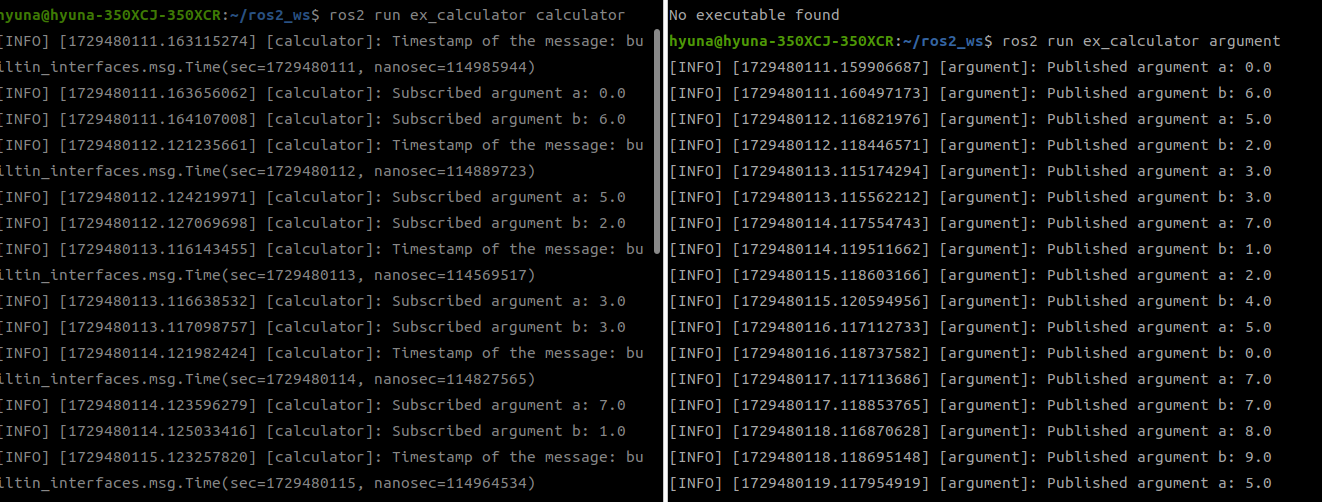
calculator에서 argument에서 발행한 메시지를 수신한걸 확인할 수 있다.