Player UI(스태미나)
이번에는 Player의 스태미나 UI를 출력하고, 스탯에 동기화되도록 해보자
🎮 UBFPlayerAttributeSet.cpp
void UBFPlayerAttributeSet::PostGameplayEffectExecute(const FGameplayEffectModCallbackData& Data)
{
	if (!CachedPawnUIInterface.IsValid())
	{
		CachedPawnUIInterface = TWeakInterfacePtr<IPawnUIInterface>(Data.Target.GetAvatarActor());
	}

	if (Data.EvaluatedData.Attribute == GetCurrentSPAttribute())
	{
		const float NewCurrentSP = FMath::Clamp(GetCurrentSP(), 0.0f, GetMaxSP());
		SetCurrentSP(NewCurrentSP);

		if (UPlayerUIComponent* PlayerUIComponent = CachedPawnUIInterface->GetPlayerUIComponent())
		{
			PlayerUIComponent->OnCurrentSPChanged.Broadcast(GetCurrentSP() / GetMaxSP());
		}
        //중략
}
저번에 구현한 HP_Bar와 동일하게 BFPlayerAttributeSet에서 SP가 변동될때마다 OnCurrentSPChanged를 호출하는 형식으로 구현 하였다.
이후 기존과 동일하게 노드를 배치하여 구현 하였다
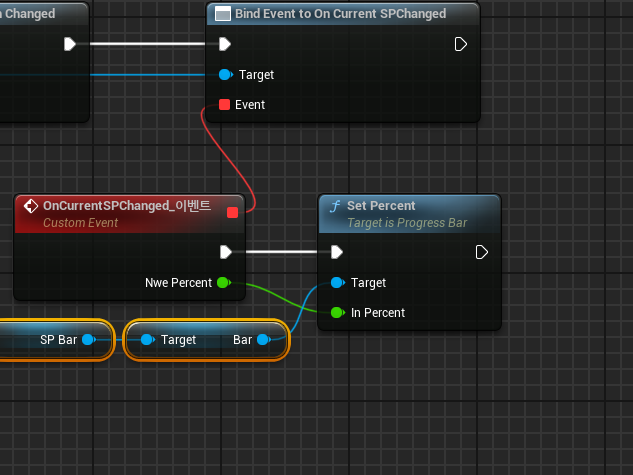
작동 사진
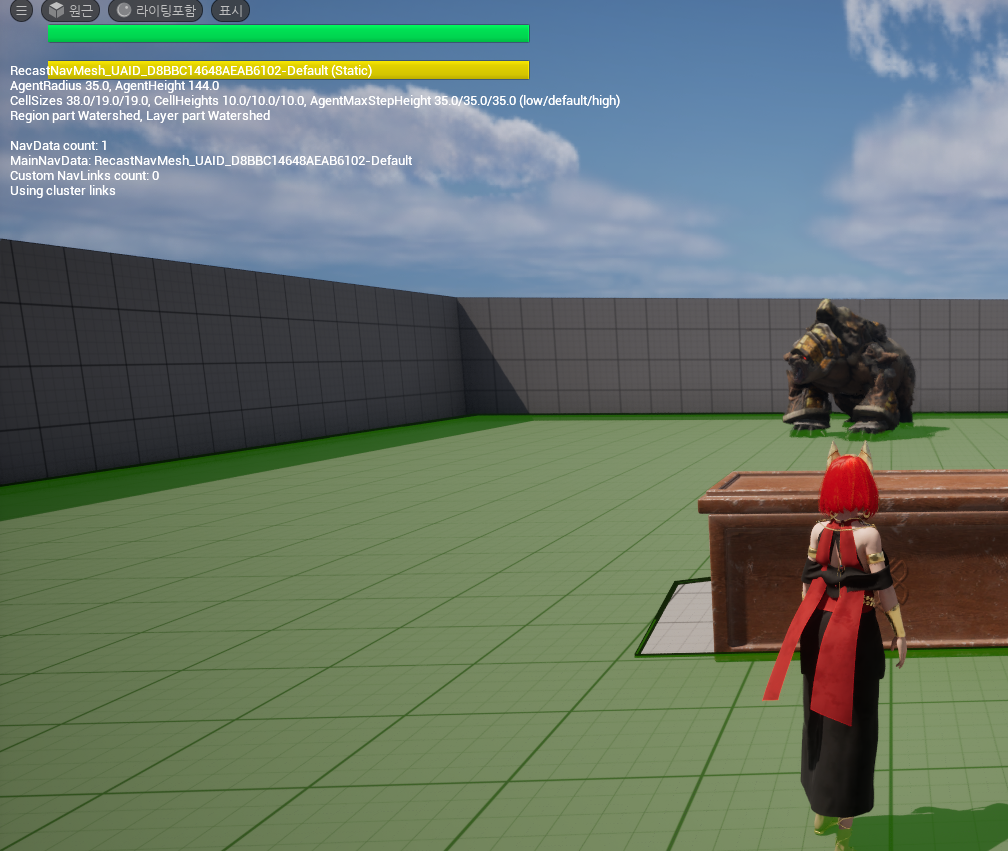
문제없이 HP 및 SP가 초기화 되었다.
달리기 시 SP 감소
다음으로 달리기 시 SP가 지속적으로 감소 하도록 구현 해보겠다. 이를 위해 필요한 기능들을 정리 해보자
< Dash 기능 >
Dash를 사용하면 지속적으로 SP가 감소 된다.
SP가 0이되면, Dash사용이 종료 된다.
Dash 사용중이 아니고, SP가 최대치 보다 작으면, 서서히 SP가 차는 GameplayEffect가 적용 된다.
탈진 상태가 되고 SP가 일정 수치 이상이여만 Dash를 다시 사용 할 수 있다.
이를 순서대로 구현 해보자. 우선 <Dash를 사용하면 지속적으로 SP가 감소 된다.> 부분을 구현 해보자
새로운 GameplayEffect 와 Player.Status.UseDash(Dash사용 중)Tag를 추가하고, GameplayEffect를 아래와 같이 구성하였다.
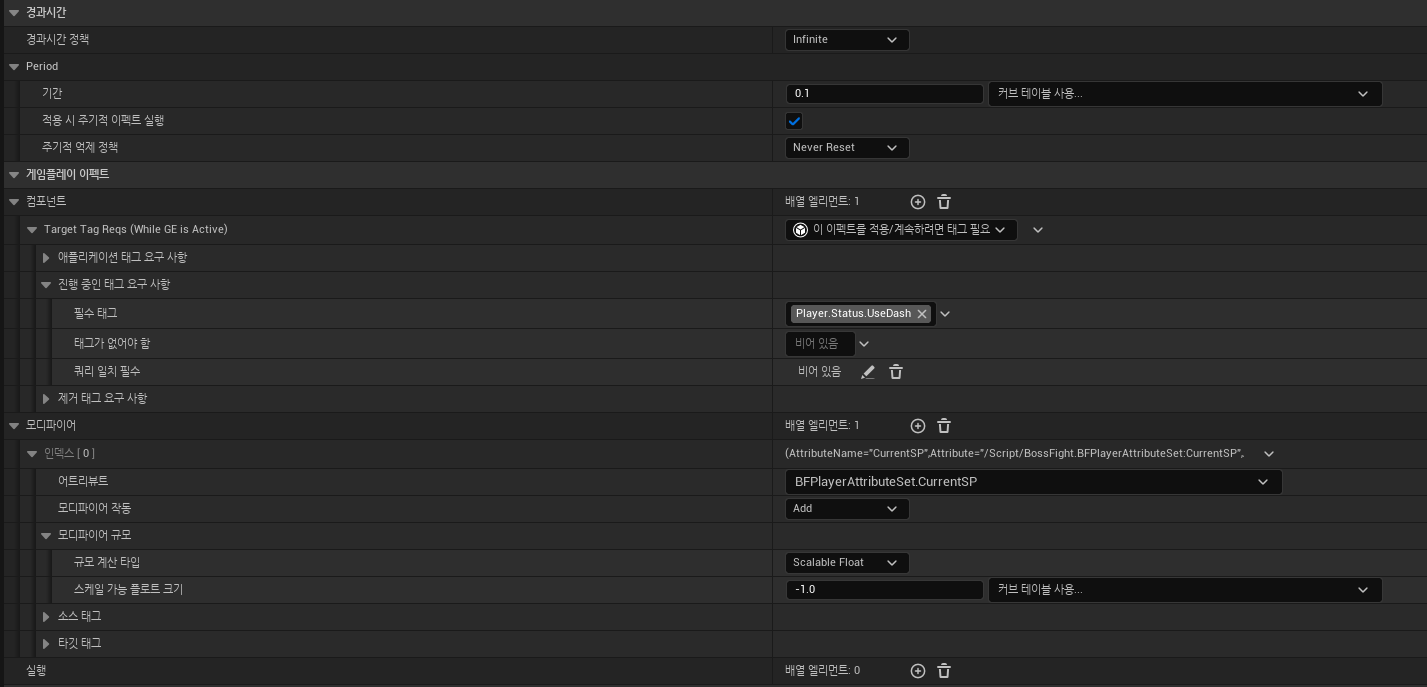
해당 GameplayEffect를 DA_StartUp_Player에 추가하였다.
이를 통해 Player.Status.UseDash Tag가 부착 되면 SP가 0.1초마다 1.0씩 감소 한다.
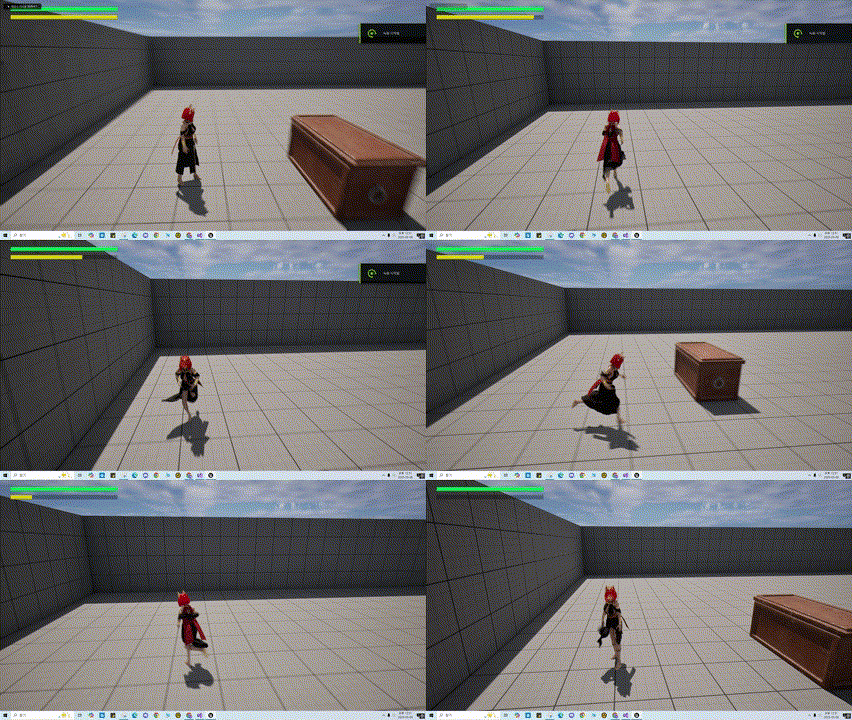
작동 영상
버그 수정
Dash키를 입력하고 실제로 움직이지 않아도, SP가 감소되는 문제점을 발견 하였다.
이를 위해 Dash키를 누르고 실제로 움직일때만 SP가 감소하도록 PlayerCharacter의 코드를 변경 하였다.
void ABFPlayerCharacter::SetupPlayerInputComponent(UInputComponent* PlayerInputComponent)
{
	//중략
	BFInputComponent->BindNativeInputAction(InputConfigDataAsset, BFGameplayTag::InputTag_Move, ETriggerEvent::Triggered, this, &ThisClass::Input_Move);
	BFInputComponent->BindNativeInputAction(InputConfigDataAsset, BFGameplayTag::InputTag_Move, ETriggerEvent::Completed, this, &ThisClass::Input_Move_End);
}

void ABFPlayerCharacter::Input_Move(const FInputActionValue& InputActionValue)
{
	//중략
	if (UBFFunctionLibrary::NativeDoseActorHaveTag(this, BFGameplayTag::Player_Status_UseDash))
	{
		UBFFunctionLibrary::AddGameplayTagToActorIfNone(this, BFGameplayTag::Player_Status_DashSPDawn);
	}
    else
  	{
      	UBFFunctionLibrary::RemoveGameplayTagToActorIfFind(this, BFGameplayTag::Player_Status_DashSPDawn);
  	}
}

void ABFPlayerCharacter::Input_Move_End()
{
	UBFFunctionLibrary::RemoveGameplayTagToActorIfFind(this, BFGameplayTag::Player_Status_DashSPDawn);
}
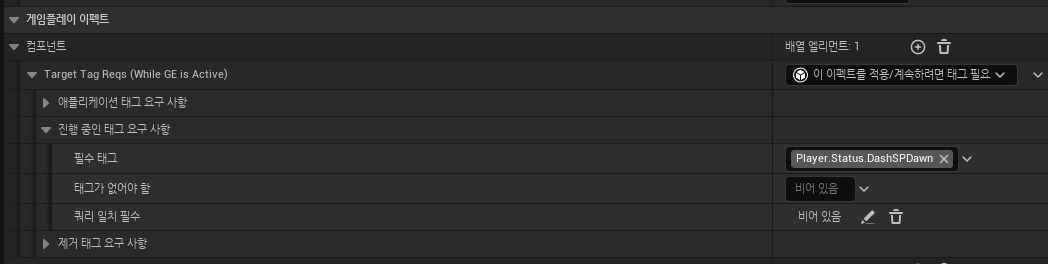
실제로 SP가 감소된다는 것을 알리기위한 Tag Player_Status_DashSPDawn를 추가하였다.
또한 InputTag_Move가 입력될때 Player_Status_UseDash Tag가 부착 되어 있으면 Player_Status_DashSPDawn를 부착하여 SP를 감소 시키는 GameplayEffect를 작동 시키도록 하였다.
InputTag_Move가 입력해제 되면 Player_Status_DashSPDawn를 제거 하도록 코드를 작성 하였다.
또한 기존의 GameplayEffect의 필수 태그 설정을 아래와 같이 수정 해주었다.
다음으로 SP가 0이되면 GA_Dash가 종료 되도록 해보자.
void UBFPlayerAttributeSet::PostGameplayEffectExecute(const FGameplayEffectModCallbackData& Data)
{
	// 중략
	if (Data.EvaluatedData.Attribute == GetCurrentSPAttribute())
	{
		const float NewCurrentSP = FMath::Clamp(GetCurrentSP(), 0.0f, GetMaxSP());
		SetCurrentSP(NewCurrentSP);

		if (UPlayerUIComponent* PlayerUIComponent = CachedPawnUIInterface->GetPlayerUIComponent())
		{
			PlayerUIComponent->OnCurrentSPChanged.Broadcast(GetCurrentSP() / GetMaxSP());
		}

		if (GetCurrentSP() <= 0.0f)
		{
			UBFFunctionLibrary::AddGameplayTagToActorIfNone(Data.Target.GetAvatarActor(), BFGameplayTag::Player_Status_Exhaustion);

			if (UBFFunctionLibrary::NativeDoseActorHaveTag(Data.Target.GetAvatarActor(), BFGameplayTag::Player_Status_UseDash))
			{
				UAbilitySystemBlueprintLibrary::SendGameplayEventToActor(Data.Target.GetAvatarActor(), BFGameplayTag::Player_Event_DashEnd, FGameplayEventData());
			}
		}
	}
	// 중략
}
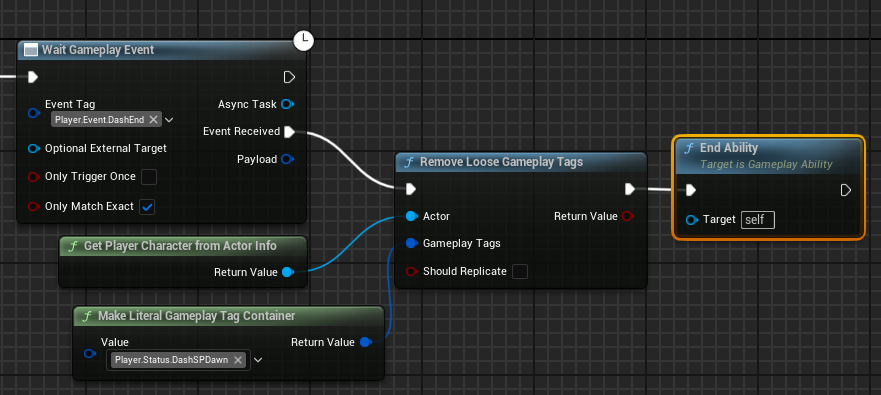
현재 SP가 0보다 작거나 같으면 탈진에 해당하는 Player_Status_Exhaustion Tag를 부착 하고, Dash를 사용 중이면 SendGameplayEventToActor() 함수를 통해 GameplayEvent를 발송 한다.
아래와 같이 GA_Dash의 노드를 수정하였고,
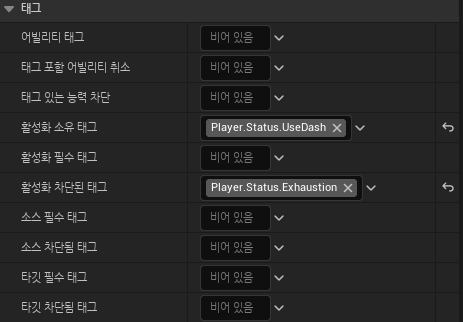
활성화 차단된 태그도 추가하였다.
다음으로 SP가 천천히 차오르는 기능을 구현 해보자.
새로운 GameplayEffect를 생성하고 아래와 같이 설정하고, DA_StartUp_Player에 추가하자.
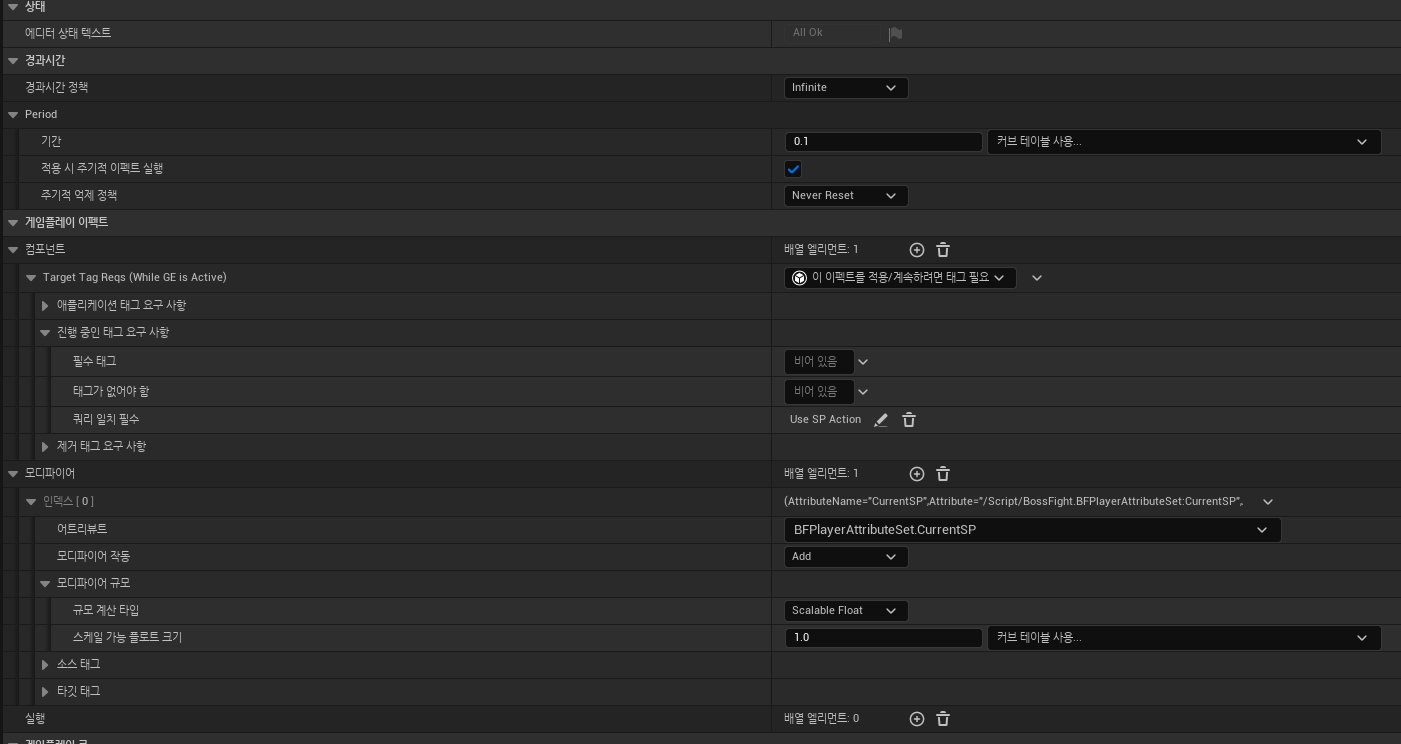
Tag 쿼리는 아래와 같이 설정 하였다. 앞으로 SP를 소모하는 Ability는 Tag를 부착하고, 부착한 Tag를 Tag쿼리에 추가하면 된다.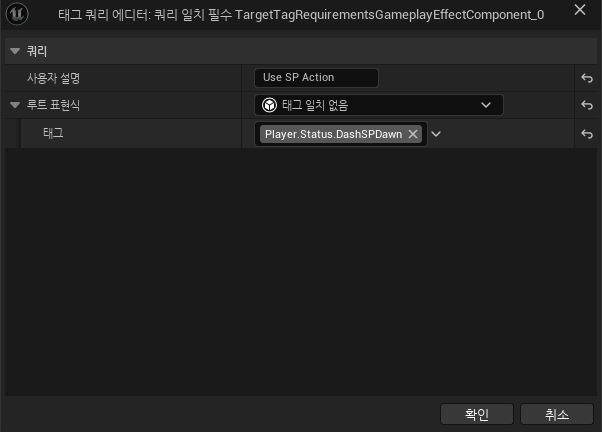
작동 영상
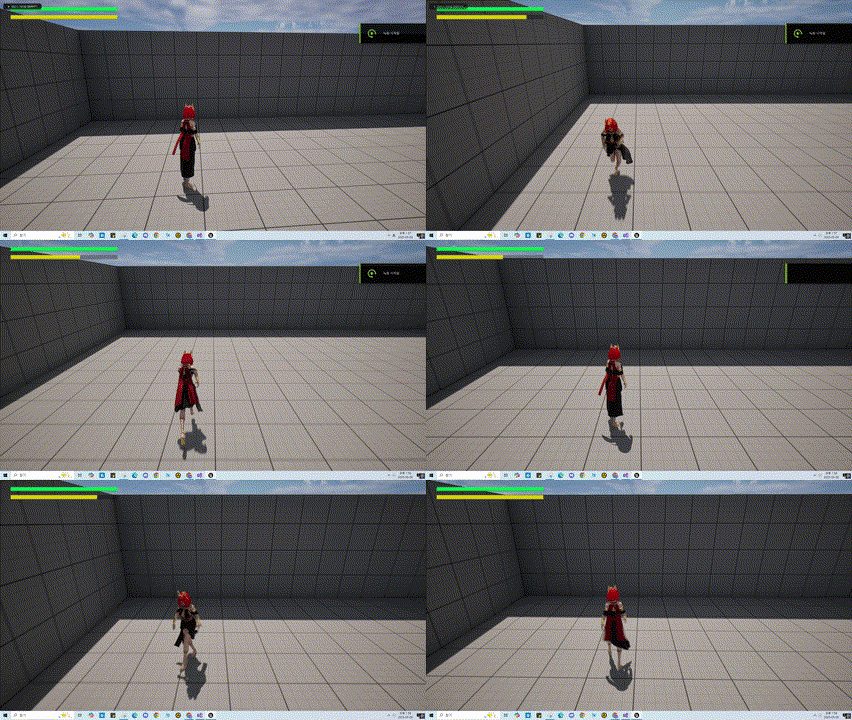
마지막으로 탈진 상태가 되고 SP가 일정 수치 이상이여만 Dash기능이 작동 하도록 구현 해보자
void UBFPlayerAttributeSet::PostGameplayEffectExecute(const FGameplayEffectModCallbackData& Data)
{
	// 중략
	if (Data.EvaluatedData.Attribute == GetCurrentSPAttribute())
	{
    	// 중략
		if (GetCurrentSP() >= 20.0f)
		{
			UBFFunctionLibrary::RemoveGameplayTagToActorIfFind(Data.Target.GetAvatarActor(), BFGameplayTag::Player_Status_Exhaustion);
		}
	}
    // 중략
}
위와 같이 탈진상태에 걸린후 SP가 20.0보다 크면 Player_Status_Exhaustion(탈진 Tag)를 제거하도록 구현 하였다.