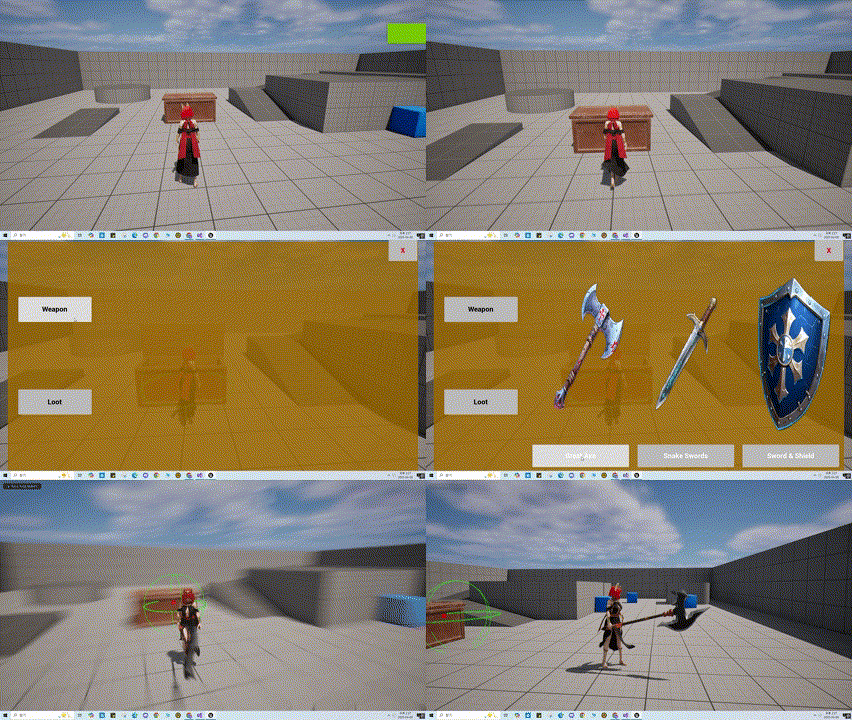
무기 선택 UI 완성
이전에 만들었던 UI의 빈 공간에 각 버튼에 맞는 메뉴가 나오도록 구성 해보자.
우선 Icon과 버튼을 한세트로 묶어 TWBP_Icon_Button Widget을 작성 하였다.
해당 Widget을 기존의 WBP_ItemBox에 추가하여 아래와 같이 구성 하였다.
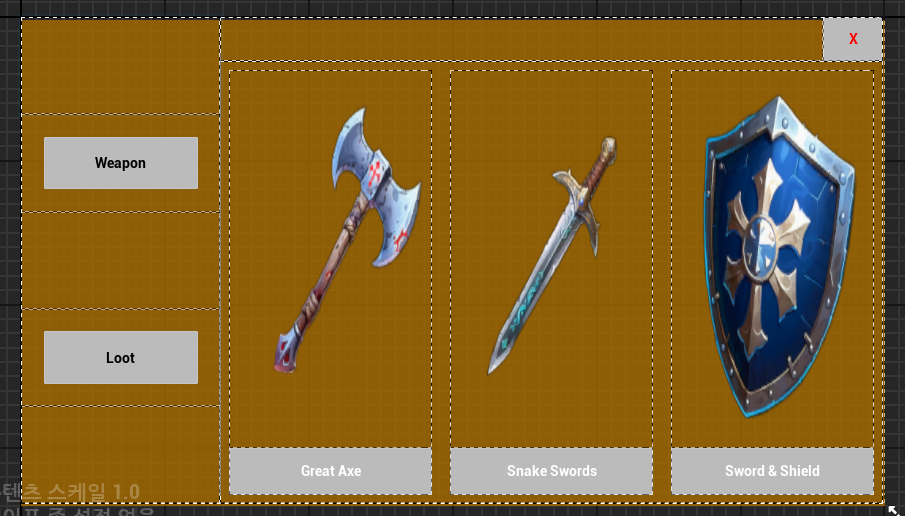
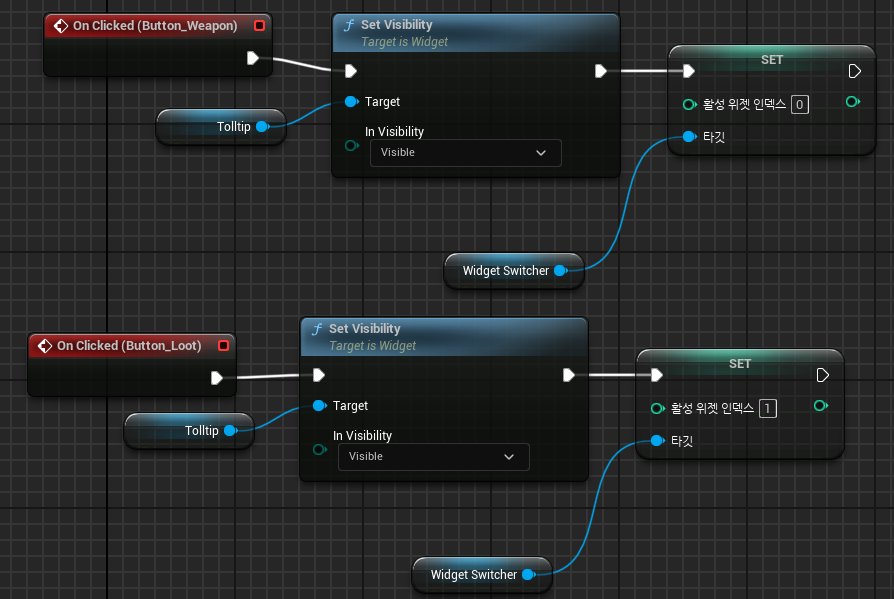
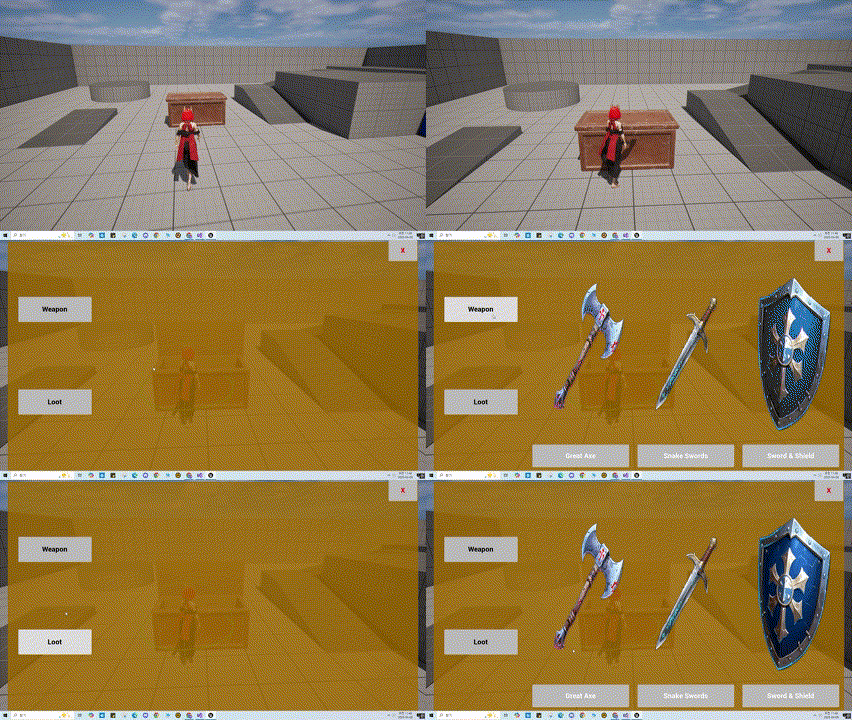
그 다음WidgetSwitcher를 활용 하여 Weapon 버튼을 누르면 0번이 Loot 버튼을 누르면 1번이 활성화 하도록 노드를 작성 하였다.
작동 영상
Ability 부여
다음으로 무기를 선택하면 해당 무기를 스폰 및 장착하는 기능이 필요하다. 이를 Ability로 구현 할 예정이다.
해당 Ability는 부여됨과 동시에 플레이어에게 장비 되고, 중복으로 작동될 필요가 없음으로, Ability Activation Policy를 On Given으로 설정하여, 부여와 동시에 작동하고, 종료시 어빌리티가 제거 되도록 하자.
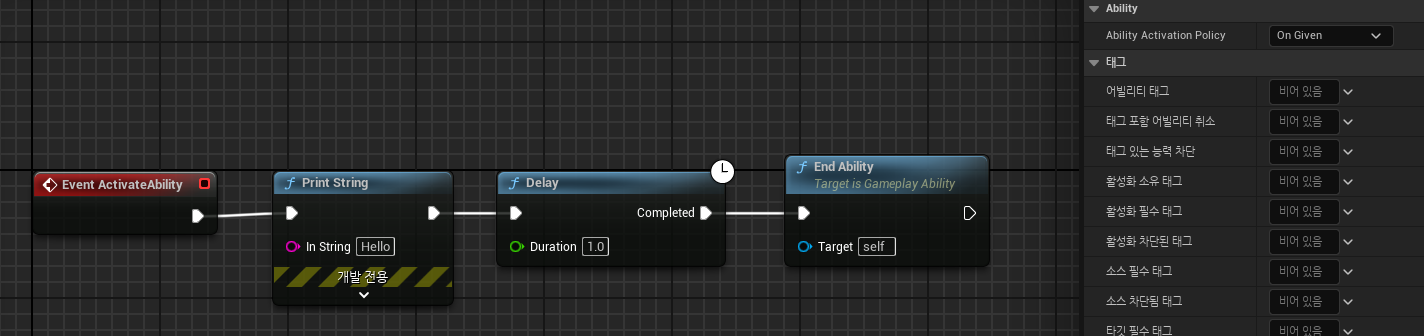
위와 같이 노드를 구성하고, 작동 시켜 보니 Ability가 부여되고 문자가 출력 되는 것을 확인 하였다.
Ability 작동
다음으로 해당 Ability의 기능을 구현 해보자.
< Ability에 필요한 기능 >
1. 무기를 Spawn 및 부착하는 기능 ✔
2. 이미 부착된 무기가 있으면 해당 무기를 제거. ✔
3. 장착한 무기를 캐릭터에게 등록 ✔
4. 부착된 무기에 따라 InputMappingContext 변경
5. 부착된 무기에 따라 애니메이션 변경
위의 기능들을 구현 하기 위해선 무기를 등록 및 관리할 Equipment Component의 구현과 WeaponClass의 구현이 필요 하다.
Equipment Component는 기존의 UIComponent처럼 PawnExtensionComponent를 상속받아서, WeaponClass는 Prop Class를 상속받아서 생성 해주었다.
WeaponClass는 기본적으로 Collision이 필요함으로 BoxComponent를 추가해주자.
🎮 AWeaponBase.h
class UBoxComponent;

UCLASS()
class BOSSFIGHT_API AWeaponBase : public APropBase
{
	GENERATED_BODY()

public:
	AWeaponBase();

	FORCEINLINE EBFWeaponType GetWeaponType() const { return WeaponType; }

protected:
	UPROPERTY(EditDefaultsOnly, BlueprintReadOnly)
	EBFWeaponType WeaponType;

	UPROPERTY(EditDefaultsOnly, BlueprintReadOnly)
	UBoxComponent* WeaponCollision;

	UPROPERTY(EditDefaultsOnly, BlueprintReadOnly)
	FName WeaponSocket;
};
🎮 AWeaponBase.cpp
AWeaponBase::AWeaponBase()
{
	WeaponCollision = CreateDefaultSubobject<UBoxComponent>(TEXT("WeaponCollision"));
	WeaponCollision->SetupAttachment(GetRootComponent());

	WeaponCollision->SetCollisionProfileName(TEXT("Weapon"));
	WeaponCollision->SetCollisionEnabled(ECollisionEnabled::NoCollision);

	Mesh->SetCollisionEnabled(ECollisionEnabled::NoCollision);
}
다음과 같이Collision을 추가하고, 프리셋을 설정 해 주었다.
다음으로 Equipment Component이다 해당 컴포넌트는 기본적으로 무기를 등록하고, 새로운 무기가 장착되면 기존의 무기를 해제해주는 기능이 필요하다.
🎮 UPawnEquipmentComponent.h
class AWeaponBase;

UCLASS()
class BOSSFIGHT_API UPawnEquipmentComponent : public UPawnExtensionComponent
{
	GENERATED_BODY()

public:
	UFUNCTION(BlueprintCallable, Category = "Equipment")
	void RegisterWeapon(AWeaponBase* NewWeapon);

protected:
	TMap<EBFWeaponType, AWeaponBase*> CurrentWeaponMap;
};
🎮 UPawnEquipmentComponent.cpp
void UPawnEquipmentComponent::RegisterWeapon(AWeaponBase* NewWeapon)
{
	if (!CurrentWeaponMap.IsEmpty())
	{
		CurrentWeaponMap.Empty();
	}
	if (NewWeapon)
	{
		CurrentWeaponMap.Add(NewWeapon->GetWeaponType(), NewWeapon);
	}
}
위와같이 간단하게 RegisterWeapon()함수를 통해 무기를 등록 하도록 구현 하였다.
다음으로 WeaponBase를 상속 받아서 Player Weapon을 작성 하였고, PawnEquipmentComponent을 상속 받아서 PlayerEquipmentComponent를 작성하고, PlayerEquipmentComponent를 PlayerCharacter에 추가해주자.
🎮 APlayerWeapon.h
class APlayerWeapon;

UCLASS()
class BOSSFIGHT_API UPlayerEquipmentComponent : public UPawnEquipmentComponent
{
	GENERATED_BODY()

public:
	UFUNCTION(BlueprintPure, Category = "Equipment")
	APlayerWeapon* GetPlayerCurrentWeapon(EBFWeaponType Type) const;
};
🎮 APlayerWeapon.cpp
APlayerWeapon* UPlayerEquipmentComponent::GetPlayerCurrentWeapon(EBFWeaponType Type) const
{
	return Cast<APlayerWeapon>( CurrentWeaponMap.FindRef(Type));
}
간단하게 WeaponType을 통해 현재 무기를 반환 하는 함수를 구현 하였다.
🎮 ABFPlayerCharacter.h
UCLASS()
class BOSSFIGHT_API ABFPlayerCharacter : public ABFBaseCharacter
{
	GENERATED_BODY()
#pragma region Components
	// 중략
	UPROPERTY(VisibleAnywhere, BlueprintReadOnly, Category = "EquipmentComponent", meta = (AllowPrivateAccess = "true"))
	UPlayerEquipmentComponent* PlayerEquipmentComponent;

#pragma endregion
// 중략
};
🎮 ABFPlayerCharacter.cpp
ABFPlayerCharacter::ABFPlayerCharacter()
{
	// 중략
	CreateDefaultSubobject<UPlayerEquipmentComponent>(TEXT("PlayerEquipmentComponent"));
}
컴포넌트를 생성 하였으니 다음으로 Interface를 작성하고 BaseCharacter에 상속 해주자.
🎮 UPawnEquipmentInterface.h
class UPawnEquipmentComponent;
class UPlayerEquipmentComponent;

// This class does not need to be modified.
UINTERFACE(MinimalAPI)
class UPawnEquipmentInterface : public UInterface
{
	GENERATED_BODY()
};

class BOSSFIGHT_API IPawnEquipmentInterface
{
	GENERATED_BODY()

	// Add interface functions to this class. This is the class that will be inherited to implement this interface.
public:
	virtual UPawnEquipmentComponent* GetPawnEquipmentComponent() const = 0;
	virtual UPlayerEquipmentComponent* GetPlayerEquipmentComponent() const;
};
해당 Interface를 BaseCharacter에상속하고 필요한 함수를 Palyer 및 BaseCharacter에 정의 해주었다.
다음으로 PlayerAbility에서 PlayerEquipmentComponent에접근할수 있도록 코드를 작성 해주자.
UPlayerEquipmentComponent* UBFPlayerAbility::GetPlayerEquipmentComponentFromActorInfo()
{
	if (IPawnEquipmentInterface* PawnEquipmentInterface = Cast<IPawnEquipmentInterface>(GetPlayerCharacterFromActorInfo()))
	{
		return PawnEquipmentInterface->GetPlayerEquipmentComponent();
	}
	else { return nullptr; }
}
플레이어의 EquipmentComponent를 반환 하는 함수를 작성 하였다.
다음으로 Ability의 노드를 구성 해보자.
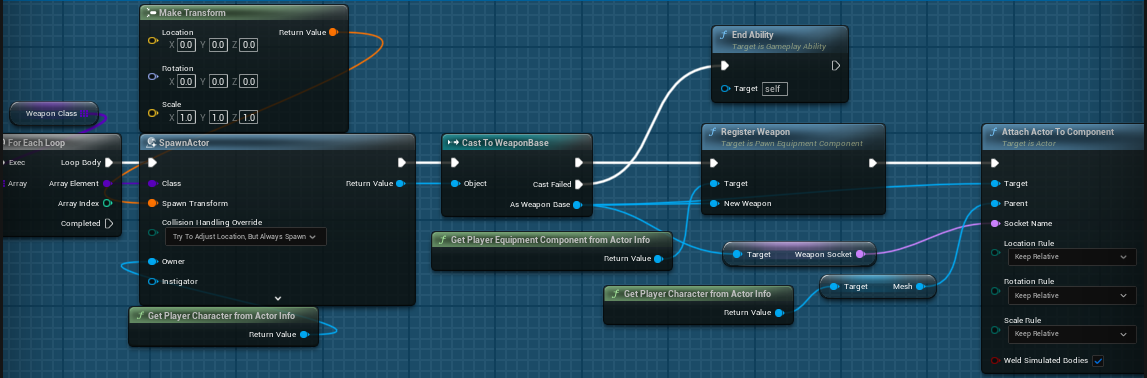
위와같이 SpawnActor를 통해 배열안에 있는 모든 무기를 Spawn하고, Socket에 부착 하도록 구현 하였다.
작동 영상