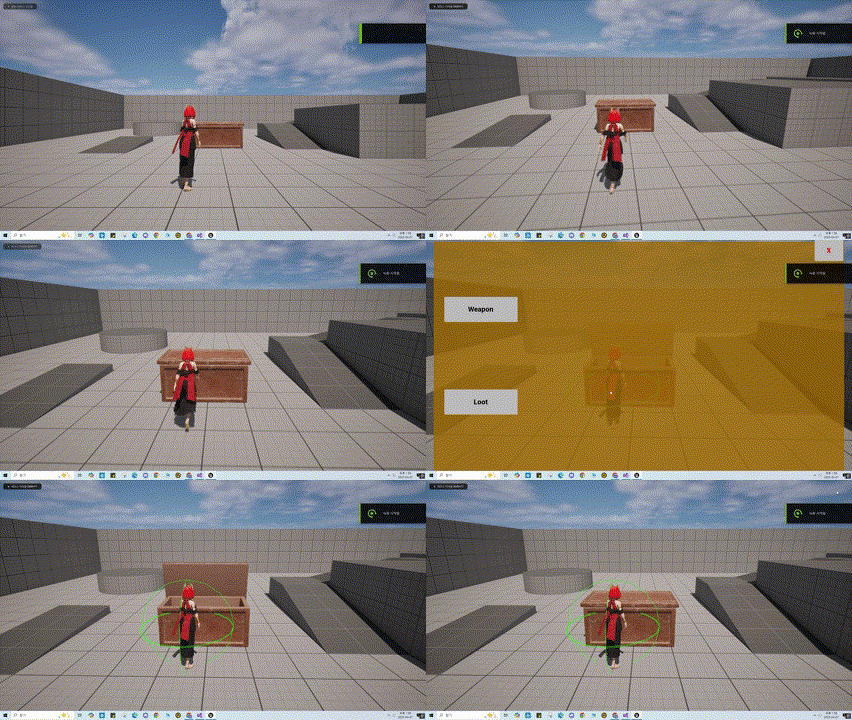
아이템 상자 UI출력
이번에는 상호작용 시 UI가 출력 되도록 구현 해보자
UI와 관련된 기능은 UIComponent를 통해 구현 하기로 하였으니, Input을 제외한 Component의 Base가 될 PawnExtensionComponent부터, Base Class가 될 PawnUIComponent와 해당 Class를 상속받아 만든 PlayerUIComponent를 구현 해보자.
🎮 UPawnExtensionComponent.h
UCLASS(ClassGroup = (Custom), meta = (BlueprintSpawnableComponent))
class BOSSFIGHT_API UPawnExtensionComponent : public UActorComponent
{
	GENERATED_BODY()

protected:
	template<class T>
	T* GetOwningPawn() const
	{
		static_assert(TPointerIsConvertibleFromTo<T, APawn>::Value, "T Template Parmeter get  GetPawn must be derived form APawn");
		return CastChecked<T>(GetOwner());
	}

	APawn* GetOwningPawn() const
	{
		return GetOwningPawn<APawn>();
	}

	template<class T>
	T* GetOwningController() const
	{
		static_assert(TPointerIsConvertibleFromTo<T, AController>::Value, "T Template Parmeter get  GetController must be derived form AController");
		GetOwningPawn<APawn>()->GetController<T>();
	}
};
간단하게 template 함수를 통해 OwningPawn과 OwningControlle를 구하는 함수를 구현 하였다.
해당 Class를 상속 받아 UPawnUIComponent를, UPawnUIComponent를상속받아 PlayerUIComponent를 추가 하였고, 추가적인 기능은 아직 구현 하지 않았다.
다음으로 UIComponent를 위한 Interface를 작성 해주자.
🎮 IPawnUIInterface.h
class UPawnUIComponent;
class UPlayerUIComponent;

// This class does not need to be modified.
UINTERFACE(MinimalAPI)
class UPawnUIInterface : public UInterface
{
	GENERATED_BODY()
};

class BOSSFIGHT_API IPawnUIInterface
{
	GENERATED_BODY()

	// Add interface functions to this class. This is the class that will be inherited to implement this interface.
public:
	virtual UPawnUIComponent* GetPawnUIComponent() const = 0;

	virtual UPlayerUIComponent* GetPlayerUIComponent() const;
};
해당interface를 통해 각 Character에 맞는 UIComponent에 접근 할수 있도록 하였다.
이제 해당 Interface를 상속받고 Component를 구현하자.
🎮 ABFBaseCharacter.h
UCLASS()
//IPawnUIInterface 상속
class BOSSFIGHT_API ABFBaseCharacter : public ACharacter, public IAbilitySystemInterface, public IPawnUIInterface
{
	GENERATED_BODY()

public:
	//중략
};
🎮 ABFPlayerCharacter.h
UCLASS()
class BOSSFIGHT_API ABFPlayerCharacter : public ABFBaseCharacter
{
	GENERATED_BODY()

protected:

	//~ Begin IPawnUIInterface
	virtual UPawnUIComponent* GetPawnUIComponent() const override;
	virtual UPlayerUIComponent* GetPlayerUIComponent() const override;
	//~ End IPawnUIInterface

private:
#pragma region Components

	UPROPERTY(VisibleAnywhere, BlueprintReadOnly, Category = "UIComponent", meta = (AllowPrivateAccess = "true"))
	UPlayerUIComponent* PlayerUIComponent;
};
🎮 ABFPlayerCharacter.cpp
UPawnUIComponent* ABFPlayerCharacter::GetPawnUIComponent() const
{
	return GetPlayerUIComponent();
}

UPlayerUIComponent* ABFPlayerCharacter::GetPlayerUIComponent() const
{
	return PlayerUIComponent;
}
ABFBaseCharacter에서 Interface를 상속 받고, PlayerCharacter에서 PlayerUIComponent와 Interface에 정의된 함수 GetPawnUIComponent() GetPlayerUIComponent()를 정의 하였다.
다음으로 WidgetBase Class를 만들어보자 해당 Class는 프로젝트에서 사용할 Widget의 Base가 될 Class이다.
🎮 UBFWidgetBase.h
class UPlayerUIComponent;

UCLASS()
class BOSSFIGHT_API UBFWidgetBase : public UUserWidget
{
	GENERATED_BODY()

protected:
	// ~Begin UUserWidget Interface
	virtual void NativeOnInitialized() override;
	//~End UUserWidget Interface

	UFUNCTION(BlueprintImplementableEvent, meta = (DisplayName = "On Owning Player UIComponent Initalized"))
	void BP_OnOwningHeroUIComponentInitalized(UPlayerUIComponent* OwingPlayerUIComponent);
};
🎮 UBFWidgetBase.cpp
void UBFWidgetBase::NativeOnInitialized()
{
	Super::NativeOnInitialized();

	if (IPawnUIInterface* PawnUIInterface = Cast<IPawnUIInterface>(GetOwningPlayerPawn()))
	{
		if (UPlayerUIComponent* PlayerUIComponent = PawnUIInterface->GetPlayerUIComponent())
		{
			BP_OnOwningHeroUIComponentInitalized(PlayerUIComponent);
		}
	}
}
해당 Class에서 Interface를 통해 GetPlayerUIComponent()에 접근 할수 있게 되었다. 이후 HP변동과 같이 UI의 변경이 필요하면 UIComponent에서 델리게이트를 선언하고 각 UI에서 처리해주면 될듯 하다.
다음으로, 상호 작용 가능한 객체에서 UI를 생성 및 뷰포트에 추가하는 기능을 구현 해보자.
🎮 AInteractableProp.cpp
void AInteractableProp::ShowPropUI()
{
	if (PropWidgetClass)
	{
		PropWidget = CreateWidget<UBFWidgetBase>(GetWorld(), PropWidgetClass);

		if (IsValid(PropWidget))
		{
			PropWidget->AddToViewport();
		}
	}
}
해당 함수는 BlueprintCallable로 지정 해주었다. 이후 블루프린트 에디터에서 타임라인이 종료되면 해당 함수를 호출 하도록 구현 하였다.
작동 영상
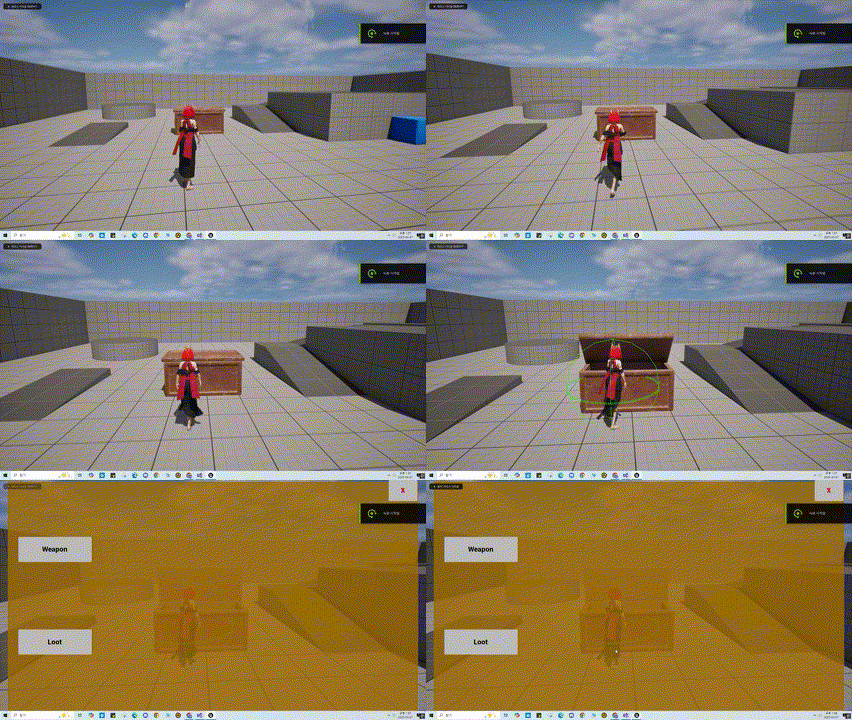
추가로 UI가 출력될때 플레이어의 입력이 UI에만 작동 하도록 하여 함으로, 해당 함수를 함수라이브러리에 정의하고, UI가 출력될때 변경하고, UI가 닫힐때 다시 원래상태로 되돌리도록 하자.
🎮 UBFFunctionLibrary.cpp
void UBFFunctionLibrary::ToggleInputMode(const UObject* WorldContextObject, EBFInputMode InInputMode)
{
	APlayerController* PlayerController = nullptr;
	if (GEngine)
	{
		UWorld* World = GEngine->GetWorldFromContextObject(WorldContextObject, EGetWorldErrorMode::LogAndReturnNull);

		if (World)
		{
			PlayerController = World->GetFirstPlayerController();
		}
	}
	if (!PlayerController) { return; }

	FInputModeGameOnly GameOnlyMode;
	FInputModeUIOnly UIOnly;

	switch (InInputMode)
	{

	case EBFInputMode::GameOnly:
		PlayerController->SetInputMode(GameOnlyMode);
		PlayerController->bShowMouseCursor = false;

		break;
	case EBFInputMode::UIOnly:
		PlayerController->SetInputMode(UIOnly);
		PlayerController->bShowMouseCursor = true;
		break;
	default:
		break;
	}
}
ToggleInputMode()함수를 추가하였다, 이후 작성한 WBP_ItemBox에 아래와 같이 노드를 구현 해주었다.
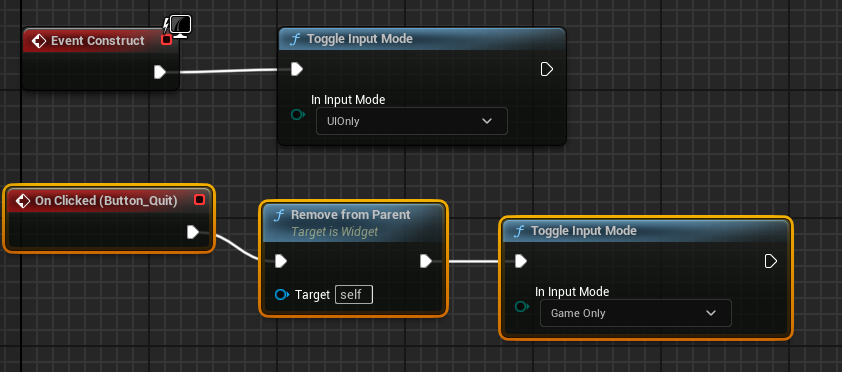
다음으로 종료 버튼을 눌렀을때, 상자를 닫아주고, 다시 상호 작용 가능하게 만드는 기능이 필요하다.
해당기능을 구현 해보자.
🎮 UPlayerUIComponent.h
class IInteractablePropInterface;

UCLASS()
class BOSSFIGHT_API UPlayerUIComponent : public UPawnUIComponent
{
	GENERATED_BODY()

private:
	IInteractablePropInterface* InteractablePropInterface;

public:
	FORCEINLINE void SetInteractableProp(AActor* Prop);

	UFUNCTION(BlueprintCallable)
	void EndInteract();
};
🎮 UPlayerUIComponent.cpp
void UPlayerUIComponent::SetInteractableProp(AActor* Prop)
{
	if (IInteractablePropInterface* InteractableProp = Cast<IInteractablePropInterface>(Prop))
	{
		InteractablePropInterface = InteractableProp;
	}
}

void UPlayerUIComponent::EndInteract()
{
	InteractablePropInterface->InteractEnd();
    InteractablePropInterface = nullptr;
}
UPlayerUIComponent에 상호작용 중인 객체의 IInteractablePropInterface를 변수로 저장 하였고 추가적으로 작동 종료에 해당하는 EndInteract()함수를 정의하여 인터페이스의 InteractEnd()함수를 호출 하도록 구현 하였다.
또한 상호 작용시 UPlayerUIComponent Class의 SetInteractableProp()함수를 통해 현재 상호 작용 중인 객체의 interface를 Setting 하도록 Input_Interection()함수를 수정 하였다.
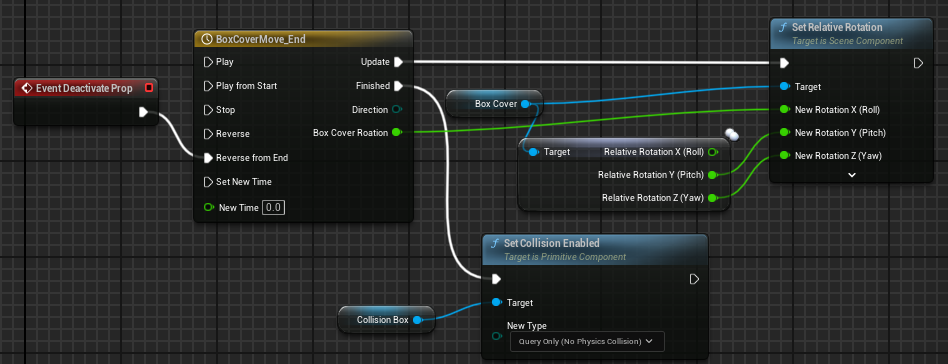
다음으로 PropBase에 BlueprintNativeEvent로 지정한 DeactivateProp()함수를 추가하고, AInteractableProp의 InteractEnd()함수에서 호출 하도록 구현 하였다.
마지막으로 BP_ItemBox에서 DeactivateProp()함수를 아래와같이 구성 해주었다.
작동 영상