프로젝트 생성 및 InputComponent 작성
저번 포스팅에 기획을 완료 하였으니 본격적인 작업에 들어 가도록 하겠다. 우선 UE5.4.4를 실행 시켜, 빈 프로젝트로 프로젝트를 생성 해주었다.
그후 저번 프로젝트처럼 기본적인 셋팅 및 플러그인(GAS, MotionWarping)을 추가 해주었다.
다음으로 3인칭 템플릿을 추가하고 필요없는 파일은 제거 및 폴더 정리를 실시 하였다.
그다음 게임에서 사용할 Character의 Base가 될 BFBaseCharacter Class를 추가하고, 해당 클래스를 상속받아 BFPlayerCharacter를 추가하였다.
또한 EnhancedInputComponent를 상속받아 사용할 BFInputComponent 와 GameplayTag를 선언 및 정의할 BFGameplayTags Class를 추가하였다. 다음으로 InputAction과 GameplayTag를 매핑하기 위해 InputConifg를 작성 해보자.
InputConifg를작성 하기위해 DataAsset Class를 상속 받는 DataAsset_InputConfig를 추가하고 구현 해주었다.
🎮 UDataAsset_InputConfig.h
class UInputAction;
class UInputMappingContext;

/// <summary>
/// Input용 구조체
/// </summary>
USTRUCT(BlueprintType)
struct  FBFInputActionConfig
{
	GENERATED_USTRUCT_BODY()

public:
	UPROPERTY(EditDefaultsOnly, BlueprintReadOnly, meta = (Category = "InputTag"))
	FGameplayTag InputTag;

	UPROPERTY(EditDefaultsOnly, BlueprintReadOnly)
	UInputAction* InputAction = nullptr;

	bool IsVaild() const
	{
		return InputTag.IsValid() && InputAction;
	}
};

UCLASS()
class BOSSFIGHT_API UDataAsset_InputConfig : public UDataAsset
{
	GENERATED_BODY()

public:
	UPROPERTY(EditDefaultsOnly, BlueprintReadOnly)
	UInputMappingContext* DefaultMappingContext;

	UPROPERTY(EditDefaultsOnly, BlueprintReadOnly, meta = (TitleProperty = "InputTag"))
	TArray<FBFInputActionConfig> NativeInputActions;

	UInputAction* FindNativeInputActionByTag(const FGameplayTag& InputTag) const;
};
🎮 UDataAsset_InputConfig.cpp
UInputAction* UDataAsset_InputConfig::FindNativeInputActionByTag(const FGameplayTag& InputTag) const
{
	for (const FBFInputActionConfig& InputActionConfig : NativeInputActions)
	{
		if (InputActionConfig.InputTag == InputTag && InputActionConfig.InputAction)
		{
			return InputActionConfig.InputAction;
		}
	}
	return nullptr;
}
위와 같이 Tag를 매개변수로 받아 해당하는 Tag가 NativeInputActions에 있는 지 확인하고, 유효한 InputAction이 있으면 반환 하도록 하였다.
다음으로 BFInputComponent를 구현 해보자.
🎮 UBFInputComponent.h
class BOSSFIGHT_API UBFInputComponent : public UEnhancedInputComponent
{
	GENERATED_BODY()

public:
	template<class UserObject, typename CallbackFunc>
	inline void BindNativeInputAction(const UDataAsset_InputConfig* InInputConfig, const FGameplayTag& InInputTag, ETriggerEvent TriggerEvent, UserObject* ContextObject, CallbackFunc Func);
};

template<class UserObject, typename CallbackFunc>
inline void UBFInputComponent::BindNativeInputAction(const UDataAsset_InputConfig* InInputConfig, const FGameplayTag& InInputTag, ETriggerEvent TriggerEvent, UserObject* ContextObject, CallbackFunc Func)
{
	checkf(InInputConfig, TEXT("Input Comfig DataAsset is Null"));

	if (UInputAction* FoundAction = InInputConfig->FindNativeInputActionByTag(InInputTag))
	{
		BindAction(FoundAction, TriggerEvent, ContextObject, Func);
	}
}
BindNativeInputAction은 Move나 Look처럼 Ability가 아닌 입력에 대해 Bind를 실행해주고 BindAbilityInputAction은 InputAction을 통해 Ability를 Tag에 맞게 실행 하도록 구현 하였다.
다음으로 해당 컴포넌트를 BFPlayerCharacter에 추가하여 입력을 받아보자.
🎮 ABFPlayerCharacter.h
class USpringArmComponent;
class UCameraComponent;
class UDataAsset_InputConfig;

struct FInputActionValue;

UCLASS()
class BOSSFIGHT_API ABFPlayerCharacter : public ABFBaseCharacter
{
	GENERATED_BODY()

public:
	ABFPlayerCharacter();

protected:
	virtual void BeginPlay() override;
	virtual void SetupPlayerInputComponent(class UInputComponent* PlayerInputComponent) override;

private:
#pragma region Components

	UPROPERTY(VisibleAnywhere, BlueprintReadOnly, Category = "Camera", meta = (AllowPrivateAccess = "true"))
	USpringArmComponent* CameraBoom;

	UPROPERTY(VisibleAnywhere, BlueprintReadOnly, Category = "Camera", meta = (AllowPrivateAccess = "true"))
	UCameraComponent* FollowCamera;
#pragma endregion

#pragma region Inputs

	UPROPERTY(EditDefaultsOnly, BlueprintReadOnly, Category = "Character Data", meta = (AllowPrivateAccess = "true"))
	UDataAsset_InputConfig* InputConfigDataAsset;

	UPROPERTY()
	FVector2D SwitchDirection = FVector2D::ZeroVector;

	void Input_Move(const FInputActionValue& InputActionValue);
	void Input_Look(const FInputActionValue& InputActionValue);

	// Ability System Component 구현 후 구현 할 예정
	void Input_AbilityInputPressed(FGameplayTag InInputTag);
	void Input_AbilityInputReleased(FGameplayTag InInputTag);
#pragma endregion
};
🎮 ABFPlayerCharacter.cpp
ABFPlayerCharacter::ABFPlayerCharacter()
{
	GetCapsuleComponent()->InitCapsuleSize(42.f, 96.f);

	bUseControllerRotationPitch = false;
	bUseControllerRotationRoll = false;
	bUseControllerRotationYaw = false;

	CameraBoom = CreateDefaultSubobject<USpringArmComponent>(TEXT("CameraBoom"));
	CameraBoom->SetupAttachment(GetRootComponent());
	CameraBoom->TargetArmLength = 450.0f;
	CameraBoom->SocketOffset = FVector(0.0f, 55.0f, 65.0f);
	CameraBoom->bUsePawnControlRotation = true;

	FollowCamera = CreateDefaultSubobject<UCameraComponent>(TEXT("FollowCamera"));
	FollowCamera->SetupAttachment(CameraBoom, USpringArmComponent::SocketName);
	FollowCamera->bUsePawnControlRotation = false;

	GetCharacterMovement()->bOrientRotationToMovement = true;
	GetCharacterMovement()->RotationRate = FRotator(0.0f, 500.0f, 0.0f);
	GetCharacterMovement()->MaxWalkSpeed = 250.0f;
	GetCharacterMovement()->BrakingDecelerationWalking = 2000.0f;
}

void ABFPlayerCharacter::BeginPlay()
{
	Super::BeginPlay();
}

void ABFPlayerCharacter::SetupPlayerInputComponent(UInputComponent* PlayerInputComponent)
{
	checkf(InputConfigDataAsset, TEXT("Forget to assgin a vaild data asset as input config"));

	ULocalPlayer* LocalPlayer = GetController<APlayerController>()->GetLocalPlayer();

	UEnhancedInputLocalPlayerSubsystem* SubSystem = ULocalPlayer::GetSubsystem<UEnhancedInputLocalPlayerSubsystem>(LocalPlayer);

	check(SubSystem);

	SubSystem->AddMappingContext(InputConfigDataAsset->DefaultMappingContext, 0);

	UBFInputComponent* BFInputComponent = CastChecked<UBFInputComponent>(PlayerInputComponent);

	BFInputComponent->BindNativeInputAction(InputConfigDataAsset, BFGameplayTag::Input_Move, ETriggerEvent::Triggered, this, &ThisClass::Input_Move);
	BFInputComponent->BindNativeInputAction(InputConfigDataAsset, BFGameplayTag::Input_Look, ETriggerEvent::Triggered, this, &ThisClass::Input_Look);

	//InputComponent->BindAbilityInputAction(InputConfigDataAsset, this, &ThisClass::Input_AbilityInputPressed, &ThisClass::Input_AbilityInputReleased);
}

void ABFPlayerCharacter::Input_Move(const FInputActionValue& InputActionValue)
{
	const FVector2D MovementVector = InputActionValue.Get<FVector2D>();
	const FRotator MovementRotator(0.0f, Controller->GetControlRotation().Yaw, 0.0f);

	if (MovementVector.Y != 0.0f)
	{
		const FVector ForwardDirection = MovementRotator.RotateVector(FVector::ForwardVector);

		AddMovementInput(ForwardDirection, MovementVector.Y);
	}

	if (MovementVector.X != 0.0f)
	{
		const FVector RightDirection = MovementRotator.RotateVector(FVector::RightVector);

		AddMovementInput(RightDirection, MovementVector.X);
	}
}

void ABFPlayerCharacter::Input_Look(const FInputActionValue& InputActionValue)
{
	const FVector2D LookAxisVector = InputActionValue.Get<FVector2D>();

	if (LookAxisVector.X != 0.0f)
	{
		AddControllerYawInput(LookAxisVector.X);
	}
	if (LookAxisVector.Y != 0.0f)
	{
		AddControllerPitchInput(LookAxisVector.Y);
	}
}

void ABFPlayerCharacter::Input_AbilityInputPressed(FGameplayTag InInputTag)
{
	// TODO AbilitySystemComponent 구현 후, Ability 작동 구현
}

void ABFPlayerCharacter::Input_AbilityInputReleased(FGameplayTag InInputTag)
{
	// TODO AbilitySystemComponent 구현 후, Ability 종료 구현
}
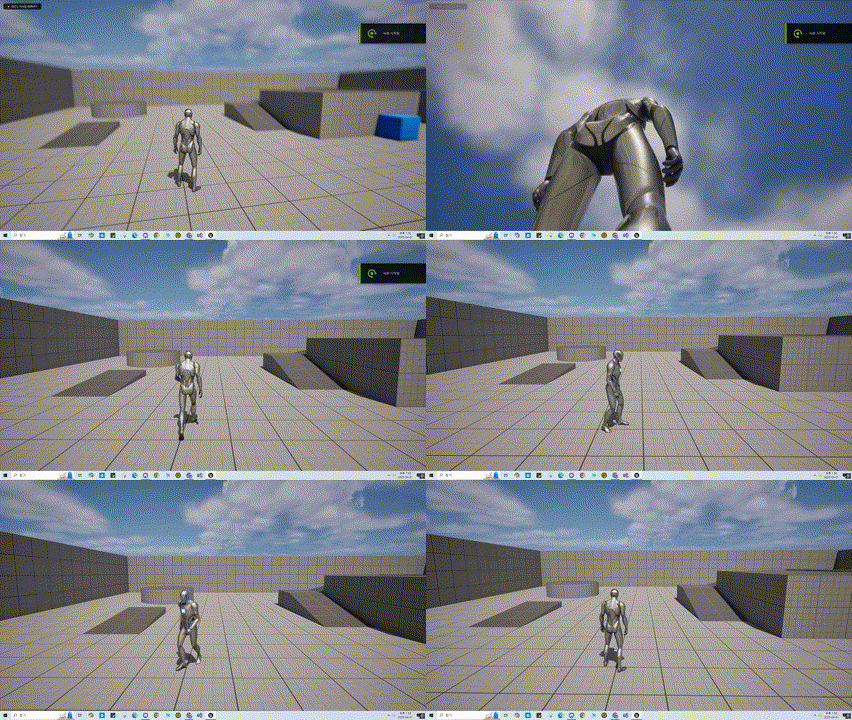
위와같이 코드를 작성하여 Camera와 SpringArm을 달아주고, 입력에 따라 이동 및 시점회전이 가능 하도록 구현 하였다.
또한 현재 AbilitySystemComponent가 구현 되어 있지 않기에 Ability를 작동 시키는 Input은 주석처리를 하였고, 함수또한 선언만 하였다.
이후 AbilitySystemComponent 와 AttributeSet을 구현 할때 추가할 예정이다.
작동 영상