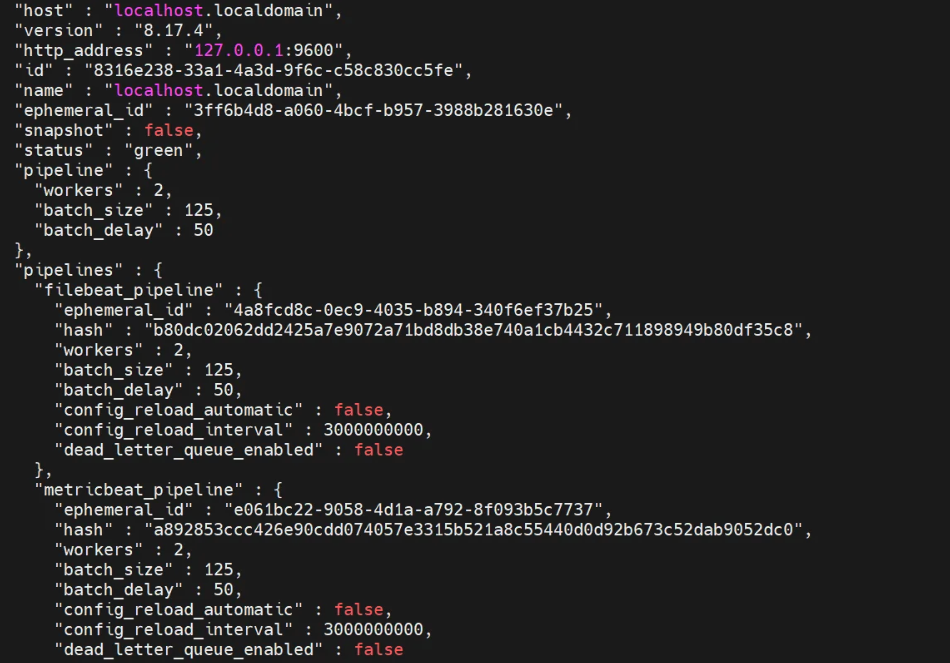
[과제]
Metricbeat와 Filebeat는 실시간 로그/메트릭 수집 에이전트이고, logstash의 pipeline.yml에 각 beat 로 부터 들어오는 데이터를 처리할 파이프라인들을 등록하여 동시 실행한다.
Metricbeat 의 포트번호 = 5045
Filebeat 의 포트번호 = 5044
[버전]
8.17.4 tar
[서버]
192.168.219.159 (master) : Elasticsearch, Kibana, Logstash, CA 인증서
192.168.219.157 (data) : Elasticsearch, Metricbeat
192.168.219.158 (data) : Elasticsearch
1. 방화벽 (port=5045) 추가
firewall-cmd --permanent --add-port=5045/tcp
firewall-cmd --reload
firewall-cmd --list-all
2. metricbeat.yml(157서버)의 포트번호 변경 (동시 실행시 충돌 방지)
[elastic@localhost metricbeat-8.17.4-linux-x86_64]$ sudo vi metricbeat.yml

#  Logstash Output
output.logstash:
  # The Logstash hosts
  hosts: ["192.168.219.159:5045"]
3. metric.conf(159서버) 의 input 수정 (port ⇒ 5045)
[elastic@localhost logstash-8.17.4]$ vi config/metric.conf

input {
  beats {
    port => 5045
  }
}

output {
  elasticsearch {
    hosts => ["https://192.168.219.159:9200"]
    cacert => "/home/elastic/elasticsearch-8.17.4/config/certs/http_ca.crt"
    index => "metricbeat_logs_from_logstash"
    user => "elastic"
    password => "elastic"
  }
stdout {}
}
4. pipeline.yml(157서버) 변경
[elastic@localhost logstash-8.17.4]$ vi config/pipelines.yml

- pipeline.id: metricbeat_pipeline
  path.config: "/home/elastic/logstash-8.17.4/config/metric.conf"

- pipeline.id: filebeat_pipeline
  path.config: "/home/elastic/logstash-8.17.4/config/filebeat.conf"
5. logstash 실행
# 포그라운드
./bin/logstash- 5번 과정 filebeat,metricbeat 가 전송을 시도 햇을 때 logstash가 아직 안 떠있으면 연결 실패(connection refused 에러 발생)
- 포그라운드로 실행 후 잘 실행 되는지 확인 후에 백그라운드로 실행한다.
6. metricbeat.yml, filebeat.yml 실행
sudo ./filebeat -e -c filebeat.yml
sudo ./metricbeat -e -c metricbeat.yml

# 백그라운드 실행
nohup sudo ./filebeat -e -c filebeat.yml &
nohup sudo ./metricbeat -e -c metricbeat.yml &- 시스템 로그 수집 목적. logstash 가 포트 5044 에서 기다리고 있으니까 데이터를 바로 전송 할 수 잇음
- 시계열 기반의 운영 상태 대시보드 구성을 위해 필요(metricbeat)
- 마찬가지로 실행이 잘 되는지 확인 후 백그라운드 실행
7. test config / test output
./metricbeat test config
./metricbeat test output

./filebeat test config
./filebeat test output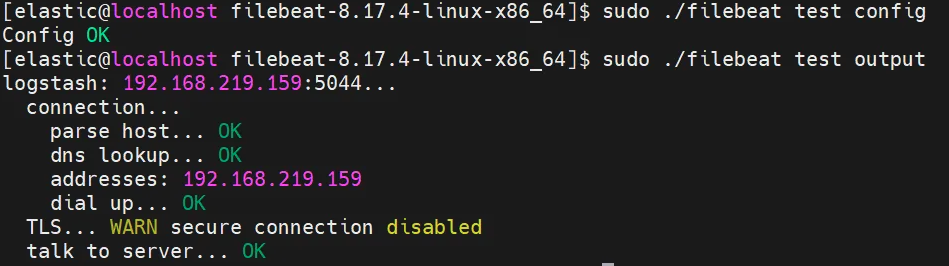
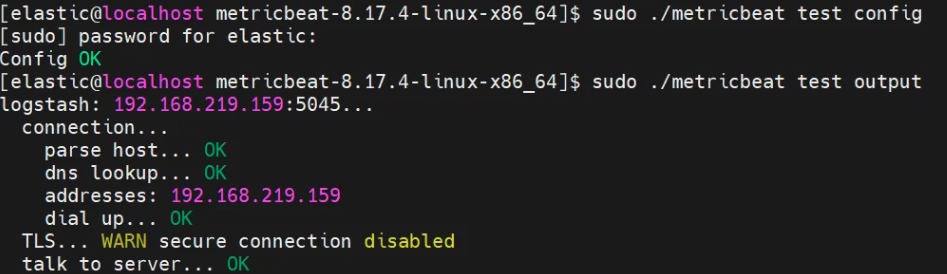
- test config : 설정 yml 구문 체크
- test output : logstash / es 연결 확인
8. 파이프라인 인덱스 확인
curl -XGET "http://localhost:9600/_node/pipelines?pretty"