[과제]
1. 여러 csv, json 동시 적재 진행해보고, metric beat & file beat도 pipeline 사용하여 동시 적재 진행해본다.
[버전]
8.17.4 tar
[서버]
192.168.219.159 (master) : Elasticsearch, Kibana, Logstash, CA 인증서
192.168.219.157 (data) : Elasticsearch, Metricbeat
192.168.219.158 (data) : Elasticsearch
csv, json 파일 동시 적재
1. 드래드 앤 드랍으로 파일 적재
2. .conf 파일 수정
- sanrim.conf & jeju.conf 수정
filter {
        csv {
                columns => ["기관아이디","기관명","정책구분","정책명","신청시
간","시설사용대상기간","지역","위도","경도","연락처","홈페이지주소","상품명","성수기평일가격","성수기주말가격","비수기평일가격","비수기주말가격","추첨대상
확인","비고"]
                separator => ","
        }

        mutate {convert => ["기관아이디","integer"]}
        mutate {convert => ["위도","string"]}
        mutate {convert => ["경도","string"]}
        mutate {convert => ["성수기평일가격","integer"]}
        mutate {convert => ["성수기주말가격","integer"]}
        mutate {convert => ["비수기평일가격","integer"]}
        mutate {convert => ["비수기주말가격","integer"]}
        mutate {strip => ["기관명","정책구분","정책명","지역","상품명","비고","추첨대상확인","연락처"]}

}

output {
  elasticsearch {
    hosts => ["https://192.168.219.159:9200"]
    index => "sanrim_data"
    user => "elastic"
    password => "elastic"
    cacert => "/home/elastic/elasticsearch-8.17.4/config/certs/http_ca.crt"
  }
  stdout{}
input {
file {
path => "/home/elastic/jeju.json"
start_position => "beginning"
codec => "json"
}
}
filter {
mutate {
convert => {
"경도" => "float"
"위도" => "float"
"시도코드" => "integer"
"시군구코드" => "integer"
"행정동코드" => "integer"
"법정동코드" => "integer"
"지번코드" => "integer"
"도로명코드" => "integer"
}
}
}
output {
elasticsearch {
hosts => ["https://192.168.219.159:9200"]
index => "jeju_data"
user => "elastic"
password => "elastic"
cacert => "/home/elastic/elasticsearch-8.17.4/config/certs/http_ca.crt"
}
stdout {}
}3. logstash 실행
nohup ./bin/logstash -f config/sanrim.conf &4. match 쿼리
- 텍스트 필드에 특정 단어나 문장이 포함되어 있는 문서 찾는 쿼리
GET sanrim_data/_search
{
	"query":{
		"match":{
			"정책명" : "산림 복지"
		}
	}
}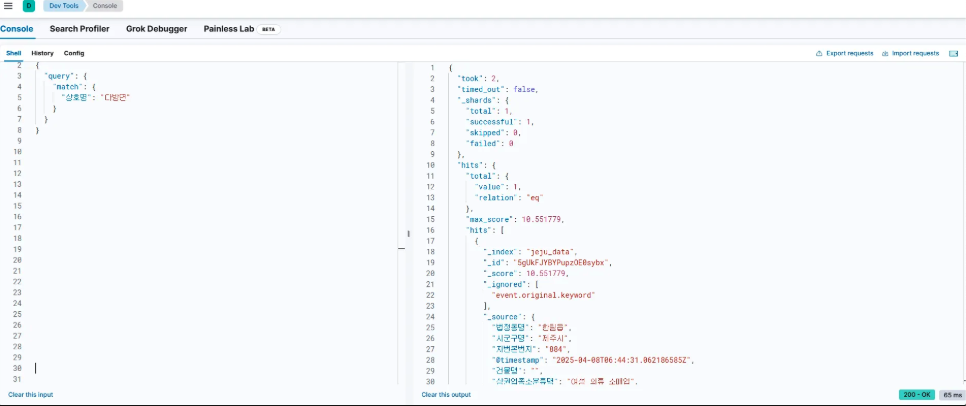
- sanrim_data 인덱스에서 정책명 필드에 "산림복지"라는 단어가 포함된 모든 문서 찾기
5. terms 집계
- 특정 필드에 대해 고유한 값들이 얼마나 나왔는지 집계
GET sanrim_data/_search
{
  "size": 0,
  "aggs": {
    "지역별_정책_개수": {
      "terms": {
        "field": "지역.keyword",
        "size": 10
      }
    }
  }
}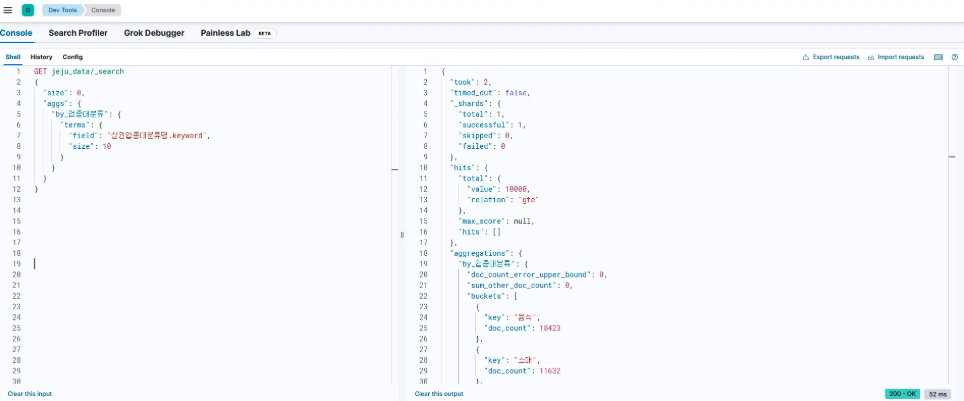
- size : 결과로 모든 문서를 가져오지 않고 집계 결과만 받아옴.
- 지역.keyword : 지역 필드에 대해 정확한 텍스트로 집계
- terms : 지역 값이 무엇이 있는지와 각각의 빈도수를 알려줌
6. jeju.conf 실행
- 이전 sanrim.conf 실행이 되고있는 상황에서 kill하고 jeju 적재를 진행한다.
kill <logstash_pid>
./bin/logstash -f config/jeju.conf- 조건 필터 + 집계 조합(제주시 시군구 내 업종대분류별 상호수)
GET jeju_data/_search
{
  "size": 0,
  "query": {
    "match": {
      "시군구명": "제주시"
    }
  },
  "aggs": {
    "업종대분류_집계": {
      "terms": {
        "field": "상권업종대분류명.keyword"
      }
    }
  }
}
동시 실행(pipeline)
csv 파일에 대해 logstash 실행(sanrim.conf) → 실행 중지 → json 파일에 대해 logstash 실행(jeju.conf)
위의 과정이 복잡하다 싶어 두 개의 conf를 동시에 실행시켜보려 한다.
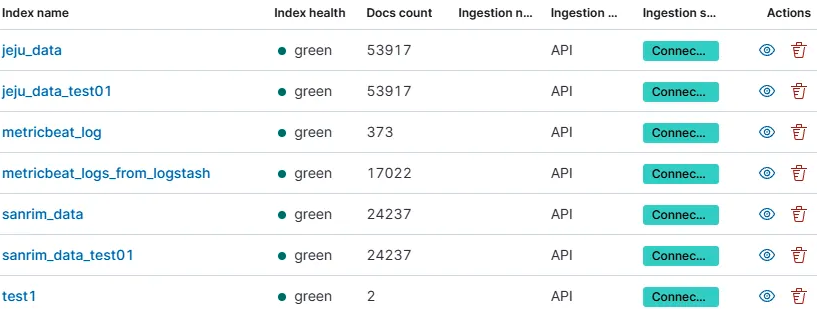
단!! 주의해야할 것이 있다. 테스트를 진행하기 위해, conf 파일에서 index 이름은 모두 sanrim_data_test01 / jeju_data_test01 로 바꾸어 주어 동시 진행했을 때 인덱스가 잘 생성 되엇는지 확인한다.
추가로 주의할 점이 있다. 이미 두 개의 인덱스(sanrim_data / jeju_data) 를 읽어와서 저장햇다. 그러기에 conf 파일에서 /dev/null를 필수로 써주어야 한다.
1. config/pipelines.yml 설정
-pipeline.id: sanrim_pipeline
 path.config: "/home/elastic/logstash-8.17.4/config/sanrim.conf"

-pipeline.id: jeju_pipeline
 path.config: "/home/elastic/logstash-8.17.4/config/jeju.conf"
2. logstash.yml 설정
# Enable multiple pipelines
pipeline.ecs_compatibility: disabled  # → 필요 시
3. .conf에서 index명 변경
- kibana에서 두 개의 인덱스가 동시에 잘 생성 되었는지를 확인하기 위함
- sanrim_data → sanrim_data_test01
- jeju_data → jeju_data_test01
4. /dev/null 추가
# vi config/sanrim.conf
input {
  file {
        path => "/home/elastic/sanrim.csv"
        start_position => "beginning"
        sincedb_path => "/dev/null"
  }
}


# vi config/jeju.conf
input {
  file {
    path => "/home/elastic/jeju.json"
    start_position => "beginning"
    sincedb_path => "/dev/null"
    codec => "json"
  }
}
- 이전에 한번 읽은 것들을 다시 한번 읽기 위해선 새로 읽을 필요가 잇다. 단!! 운영 환경에서는 since_db ⇒ “/dev/null” 절대 쓰면 안됨. 대신에 sincedb_path => "/var/lib/logstash/sincedb_secure" 이렇게 하면 해당 파일을 어디까지 읽었는지 기록해 두고, 재시작하더라도 중간부터 이어서 읽음.
- 개발/테스트 =
/dev/null(처음부터 반복 읽기 OK) - 운영/실서비스 =
sincedb_path지정 (중복 방지, 성능 유지 필수)
5. 실행
./bin/logstash --path.settings ./config/- 백그라운드로 실행 전 포그라운드로 먼저 보고 상태 확인해봄
디렉토리 확인
/home/elastic/logstash-8.17.4/
├── config/
│ ├── pipelines.yml
│ ├── sanrim.conf
│ └── jeju.conf
6. 확인
curl -XGET "http://localhost:9600/_node/pipelines?pretty"- 각각의 pipeline ID = 고유 ephemeral_id 로 정상 분리됨
- config reload 옵션 = false (핫리로드 비활성화)
- dead_letter_queue = 비활성화
- kibana에서 index 가 뜨는 상황을 잘 보기 위해 index 명도 변경