### Annotation
- 객체 탐지 모델을 학습하기 위한 객체의 정보를 담고 있는 파일 입니다
- A text file who contains informations about the name and coordinations of objects


### Pascal VOC
- xmin
    - 대상 객체의 left 의 x 좌표
    - The x-coordinate of the object's left
- ymin
    - 대상 객체의 top 의 y 좌표
    - The y-coordinate of the object's top
- xmax
    - 대상 객체의 right 의 x 좌표
    - The x-coordination of the object's right
- ymax
    - 대상 객체의 bottom 의 y 좌표
    - The y-coordination of the object's bottom
- name
    - 대상 객체의 이름
    - The name of the object

### YOLO
- class index
    - 대상 객체의 이름이 class 정의 파일 내에 해당하는 인덱스 번호
    - The number of index defined in definition file
- xcenter: (xmin + (xmax - xmin)/2) / image_width
- ycenter: (ymin + (ymax - ymin)/2) / image_height
- width: (xmax - xmin) / image_width
- height: (ymax - ymin) / image_height
라벨링 도구를 사용하지 않고 Pascal VOC annotation 만들기
Building Pascal VOC annotation without labelImg tool
- 이미지의 width, height, depth는 OpenCV의 imread를 이용하여 이미지를 읽고 shape을 받아오면 알 수 있습니다
- Width, height, depth is the shape of image read by imread() of OpenCV
- 라벨링 대상 객체의 실측값은 그림판과 같은 도구로 따로 측정하고 이를 아래와 같은 코드를 이용해 Pascal VOC annotation을 만듭니다
- We can get the ground truth coordinates of each objects using like "Paint" program of MS Windows, NOT using labelImg
- 여기서 생성된 xml 파일을 labelImg 와 같은 라벨링 도구로 시각화 하여 라벨링이 잘 되었는지 확인해봅니다
- Just run labelImg to verify and visualize annotation built by our code
- 그러면 이제 우리는 이를 이용하여 가짜 이미지에 대한 실제 annotation을 자동화 할 수 있고 이미지의 대량 생산이 가능합니다
- Now, we can automate labeling so that create massive annotations using this code
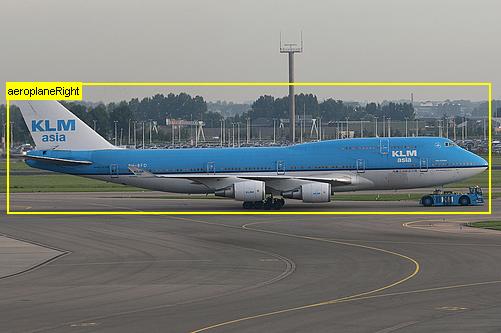
import cv2 as cv
from xml.dom import minidom
import xml.etree.ElementTree as ET

filepath = 'annotation/aeroplane_01.jpg'
h, w, c = cv.imread(filepath).shape

annotation = ET.Element('annotation')

filename = ET.SubElement(annotation, 'filename')
filename.text = 'aeroplane_01.jpg'

size = ET.SubElement(annotation, 'size')
width = ET.SubElement(size, 'width')
height = ET.SubElement(size, 'height')
depth = ET.SubElement(size, 'depth')
width.text = str(w)
height.text = str(h)
depth.text = str(c)

obj = ET.SubElement(annotation, 'object')
name = ET.SubElement(obj, 'name')
bndbox = ET.SubElement(obj, 'bndbox')
xmin = ET.SubElement(bndbox, 'xmin')
ymin = ET.SubElement(bndbox, 'ymin')
xmax = ET.SubElement(bndbox, 'xmax')
ymax = ET.SubElement(bndbox, 'ymax')

name.text = 'engine'
xmin.text = '213'
ymin.text = '180'
xmax.text = '265'
ymax.text = '205'

with open('annotation/aeroplane_01.xml', 'w') as f:
    f.write(minidom.parseString(ET.tostring(annotation)).toprettyxml(indent = "   "))
<?xml version="1.0" ?>
<annotation>
   <filename>aeroplane_01.jpg</filename>
   <size>
      <width>501</width>
      <height>333</height>
      <depth>3</depth>
   </size>
   <object>
      <name>engine</name>
      <bndbox>
         <xmin>213</xmin>
         <ymin>180</ymin>
         <xmax>265</xmax>
         <ymax>205</ymax>
      </bndbox>
   </object>
</annotation>
pascal voc 형태의 annotation
픽셀을 기반으로 찾아내기 때문에 이미지 리사이즈시 annotation이 깨짐
import xml.etree.ElementTree as ET

tree = ET.parse('annotation/aeroplane_01.xml')
root = tree.getroot()
root.tag- root(annotation) 밑에 size tag를 찾습니다
- There is "size" tag under root(annotation)
- size 밑에 width 와 height tag를 읽고 해당 tag의 text를 읽습니다
- Read "width" and "height" under "size" tag
size = root.find('size')
width = int(size.find('width').text)
height = int(size.find('height').text)
(width, height)- root(annotation) 밑에 object tag를 찾습니다
- There are "object" tag under root
- object 태그는 라벨링 된 객체의 수에 따라 2개 이상일 수 있기 때문에 findall을 이용해서 찾습니다
- Use findall() rather than find() to parse "object" tags which can be found 2 or more
- findall은 list를 반환하므로 for 루프를 돌릴 수 있습니다
- findall() returns list which can be iterated in for loop
- 루프를 돌리면서 나오는 object 태그별로
- For each object tag in loop
- name 태그를 찾아 나오는 text를 읽습니다
- Read name tag
- bndbox 태그를 찾습니다
- Finbd bndbox tag under "object" tag
- bndbox 태그 아래 xmin, ymin, xmax, ymax 태그를 찾아 각각의 text를 읽습니다
- Find xmin, ymin, xmax, ymax tag inside it
objects = root.findall('object')
for obj in objects:
    name = obj.find('name').text
    bndbox = obj.find('bndbox')
    xmin = bndbox.find('xmin').text
    ymin = bndbox.find('ymin').text
    xmax = bndbox.find('xmax').text
    ymax = bndbox.find('ymax').text

    display([name, xmin, ymin, xmax, ymax])
Pascal VOC 포맷을 YOLO 포맷으로 바꾸기
Converting Pascal VOC annotation to YOLO annotation
- YOLO 포맷은 객체의 이름이 아니라 객체에 대한 인덱스 번호를 사용합니다
- YOLO annotation doesn't use the name of object but the index number of object
- 따라서 객체의 이름에 대한 리스트 파일이 필요합니다
- So additional file about class index is required
- 그리고 객체의 이름에 대한 인덱스 번호를 알려주는 dict 를 만들어 보겠습니다
- Now, let's build dictionary which has name, index number as key, value respectively
classes = {}

with open ('annotation/classes.txt', 'r') as f:
    lines = f.readlines()
    index = 0
    for line in lines:
        name = line.strip()
        classes[name] = index
        index += 1
display(classes)
========================================================================================
{'aeroplane': 0,
 'people': 1,
 'female': 2,
 'male': 3,
 'car': 4,
 'robot': 5,
 'engine': 6}
Pascal VOC 포맷의 annotation을 읽어서 YOLO annotation 으로 바꾸기
Changing annotation to YOLO format after reading Pascal VOC format
- object 태그를 만날때마다 YOLO annotation을 생성하면 됩니다
- Convert to YOLO annotation for each "object" tag of Pascal VOC annotation
- YOLO annotation 변경식은 맨위에 서술한 것을 그대로 가져와서 활용합니다
- Converting formular is described on the top of this notebook
import xml.etree.ElementTree as ET

f = open('annotation/aeroplain_01.my.txt', 'w')

tree = ET.parse('annotation/aeroplane_01.xml')
root = tree.getroot()

size = root.find('size')
image_width = int(size.find('width').text)
image_height = int(size.find('height').text)

objects = root.findall('object')
for obj in objects:
    name = obj.find('name').text
    bndbox = obj.find('bndbox')
    xmin = int(bndbox.find('xmin').text)
    ymin = int(bndbox.find('ymin').text)
    xmax = int(bndbox.find('xmax').text)
    ymax = int(bndbox.find('ymax').text)

    class_index = classes[name]

    xcenter = round((xmin + (xmax - xmin)/2) / image_width, 6)
    ycenter = round((ymin + (ymax - ymin)/2) / image_height, 6)
    width = round((xmax - xmin) / image_width , 6)
    height = round((ymax - ymin) / image_height, 6)

    annotation = f'{class_index} {xcenter} {ycenter} {width} {height}\n'

    f.write(annotation)

f.close()
with open('annotation/aeroplain_01.my.txt', 'r', encoding='utf-8') as file:
    content = file.read()
    print(content)
YOLO는 annotation을 정규화하여 저장하기 때문에 이미지 학습시에 YOLO가 유리하다.
데이터 처리에는 Pascal VOC
인공지능 학습에는 YOLO

AI가 재밌는 걸