- preview Link : https://velog.io/@suhan0304/Unity-Electricity-6
- gitHub Link : https://github.com/suhan0304/Electricity
End Point
일단 저번에 했던 개발 내용에 이어서 End Point도 전기 흐름을 파악해서 전기가 흐르면 불이 들어오고 GameManager에 Clear 메소드를 호출하도록 작성해주자.
Block.cs
RaycastHit[] hitData = Physics.RaycastAll(ray, rayDistance, blockLayer);
foreach(RaycastHit hit in hitData)
{
    if (hit.collider.CompareTag(GameManager.Instance.startTag))
    {
        ChangeOnState(); // Block State On - Adjacent StartPoint
    }
    if (hit.collider.CompareTag(GameManager.Instance.endTag))
    {
        GameManager.Instance.Clear(); // End Point State Now ON! Finish!
    }
    else {
        Block hitBlock = hit.collider.gameObject.GetComponent<Block>();
        //Debug.Log(hit.collider.name); // For Debug Test

        blocksInRaycast.Add(hitBlock);
    }
}
EndPoint에 전기가 흐르게 되는 거는 동일하게 Tag명으로 EndPoint가 전기가 들어온 블럭의 인접한 위치에 있는지를 확인하도록 했다.
GameManager.cs
/// <summary>
/// endPoint's state is now ON. Ending the stage.
/// </summary>
public void Clear()
{
    if (endPoint == null)
        return;

    StartCoroutine(FinishStage());
}

IEnumerator FinishStage()
{
    yield return new WaitForSeconds(2f);

    Transform bulb = endPoint.transform.Find(BulbName);
    Renderer renderer = bulb.GetComponent<Renderer>();

    renderer.material = OnMaterial;
}
유효성 검사
진행하다보니 게임 매니저의 Material을 초기화해주지 않아서 아래와 같이 오류가 발생했다. 즉시 Material을 초기화 해줬지만 유효성 검사를 따로 해주는게 좋을것 같아서 Validator를 아래와 같이 작성해주었다.
Validator
using UnityEngine;

public class Validator : MonoBehaviour
{
    public bool ValidateInitialization()
    {

        // Validation Initialization GameObject in GameManager
        if (GameManager.Instance.endPoint == null)
        {
            Debug.Log("Error 02 : 01 - InitializationError");
        }

        // Validation Initialization Material in GameManager
        if (GameManager.Instance.OnMaterial == null)
        {
            Debug.Log("Error 02 : 02 - InitializationError");
            return false;
        }
        if (GameManager.Instance.OffMaterial == null)
        {
            Debug.Log("Error 02 : 03 - InitializationError");
            return false;
        }

        return true;
    }
}
GameManager의 변수가 함수가 많아질 수록 Validator의 유효성 검사 항목도 점차 업데이트 될 예정이다.
Start 안에서 유효성 검사를 한 다음에 통과하지 못하면 QuitGame이 실행되도록 했다.
GameManager
void Start()
{
    validator = GetComponent<Validator>();
    buildManager = GetComponent<BuildManager>();

    // Validation
    if (!validator.ValidateInitialization())
        QuitGame();
}

/// <summary>
/// Something has happened and shutting down the game
/// </summary>
public void QuitGame()
{
    Debug.Log("Quitting Game...");
#if UNITY_EDITOR
    UnityEditor.EditorApplication.isPlaying = false;
#else
    Application.Quit();
#endif
}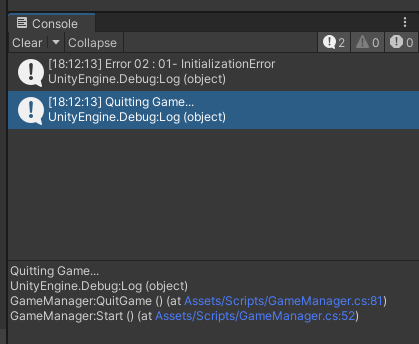
초기화 오류가 발생했다고 Error 코드를 출력하고 게임 실행이 종료된다. 이로써 Material을 초기화하지 않고 실행해서 분홍, 파랑 단색으로 오브젝트가 이상하게 출력되는 문제를 예방할 수 있다.
유니티 에디터라서 상관은 없지만 실제 개발에서 오류 내용 자체를 출력하는 것은 보안에 있어서 치명적일 수 있다. 그래서 위처럼 Error 코드처럼 개발자만 알아볼 수 있도록 작성한 다음에 해당 코드에 해당하는 문제를 고치는 과정으로 진행한다.
이렇게 하고 실행을 해보니 문제가 있었다. start Point는 무조건 ON 상태이기 때문에 block이 startPoint를 인식하기만 하면 ON으로 바꿔줬지만 endPoint는 자체적으로는 OFF이고 block이 ON으로 바뀌었을때 ON이 되면서 Clear 메소드가 호출되는 형식이어서 로직을 바꿔줘야했다. 한 블럭의 상태가 ON이 되면 가지고 있는 이웃 블럭 리스트를 한 바퀴 돌면서 해당 블럭들의 상태도 ON으로 바꿔버리도록 구현해놨는데, end Point는 Block은 아니다 보니 List<Block>에 추가할 수가 없었다.
그래서 endPoint 오브젝트를 따로 생성해서 인접한 오브젝트 중에 endPoint Tag를 가진 오브젝트가 탐지가 되면 endPoint에 저장해둔다. 그러다가 On 상태로 바뀔 때 endPoint가 null인지 아닌지를 확인해서 endPoint가 null이 아니면 endPoint가 인접한 위치에 있다는 것이고 전기가 흘러서 스테이지가 클리어되도록 했다.
if (hit.collider.CompareTag(GameManager.Instance.endTag))
{
endPoint = hit.collider.gameObject; // if end-Poin is adjacent me : initialization endPoint
}
/// <summary>
/// Block State change to ON ( befor : OFF )
/// If the endpoint is adjacent to me, it is necessary to clear the stage
/// Need to notify adjacent blocks that I have changed to the On state.
/// </summary>
public void ChangeOnState() {
float delayTime = 0.75f;
currentState = BlockState.ON;
ChangePillarMaterial(currentState);
// if endPoint is not null = endPoint is adjacent me.
// When I change to the On state, EndPoint also changes to the On state and clears the stage
if (endPoint != null)
{
GameManager.Instance.Clear();
}
StartCoroutine(ChangeAdjacentBlockStateON(delayTime));
}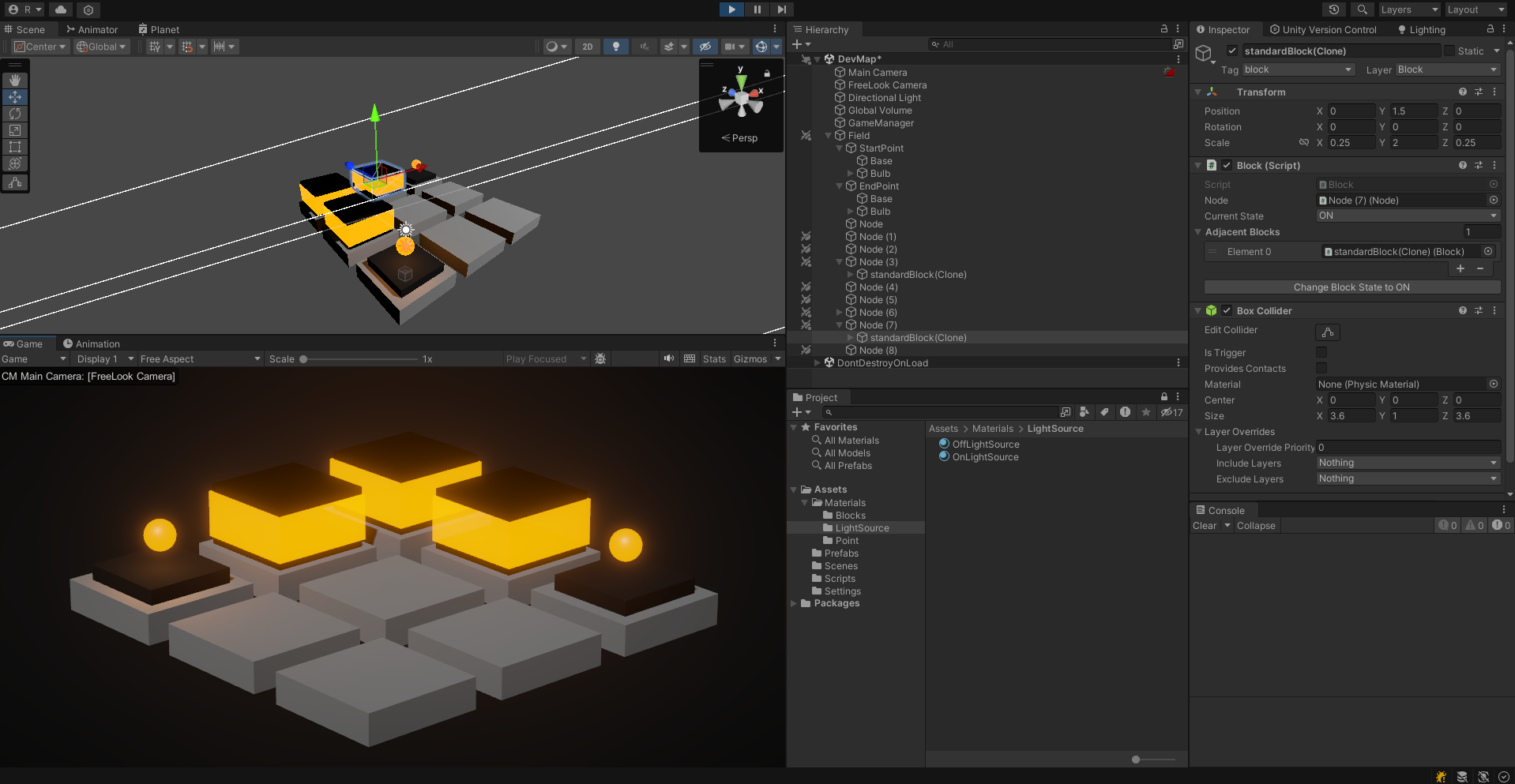
블럭들이 빛나면서 start Point의 전기가 end Point까지 잘 흐른다. 전기 흐름 로직은 이제 완성했다고 볼 수 있지 않을까
추후 계획
블럭의 전기가 좀 자연스럽게 켜지도록 연출하는 부분을 구현해보자. 지금은 마테리얼이 delayTime 이후에 바로 변해버려서 조금 부자연스러운데 있는데 이를 고쳐보자.