시작하며
오늘도 어제에 이어 통계학 공부를 이어갔다. ADsP 공부를 하면서 지겹도록 복습한 귀무가설에 대한 내용들과 아직도 적응이 안되는 여러 분포와 검정들에 대한 내용들을 배웠다.
코드로 확인
정규분포를 따르는 무작위 값 생성
- 평균 175, 표준편차 5인 정규분포를 따르는 가상의 키 데이터 생성(표본 수 = 5000)
heights = stats.norm.rvs(loc=175, scale=5, size=5000)

heights.mean()
# np.float64(175.12138663450918)
heights.std()
# np.float64(4.9588737381446055)- 표본 수 = 500000
heights1 = stats.norm.rvs(loc=175, scale=5, size=500000)

heights1.mean()
# np.float64(175.0016360108597)
heights1.std()
# np.float64(4.9991504073228725)
부트스트래핑 코드
np.random.seed(1234)

avgs = pd.Series()

for i in range(1000):
    smpl = np.random.choice(a=heights, size=100, replace=True)
    avgs.loc[i] = smpl.mean()

avgs.describe().round(2)
# count    1000.00
# mean      175.10
# std         0.49
# min       173.19
# 25%       174.76
# 50%       175.10
# 75%       175.45
# max       176.69
# dtype: float64
정규분포 확률밀도
- 정규분포 확률밀도 함수(PDF)
- : 평균(분포 중심)
- : 표준편차(분포 퍼짐)
- 가능도 : 주어진 데이터가 특정 모수 에서 나올 확률
- 데이터가 평균 분포 중심 근처 → 높은 가능도
- 데이터가 평균 분포 꼬리 쪽 → 낮은 가능도
- 최대가능도 추정(MLE) : 관측 데이터를 가장 잘 설명하는 모수를 찾는 과정
- 가능도 = (각 데이터 확률 곱)
- Log 가능도 = (계산 편의)
- 진수가 0 ~ 1 = 로그값 음수로 출력
- Log 가능도 최대화 = 비용함수 최소화
- 미분 = 0 지점 → 최적 추정
stats.norm.pdf(x=175, loc=175, scale=15)
# np.float64(0.02659615202676218)

stats.norm.pdf(x=175, loc=175, scale=10)
# np.float64(0.03989422804014327)

stats.norm.pdf(x=175, loc=175, scale=5)
# np.float64(0.07978845608028654)stats.norm.pdf(x=[169, 173, 175, 178, 182], loc=175, scale=5)
# array([0.03883721, 0.07365403, 0.07978846, 0.06664492, 0.02994549])
# 각 데이터 확률 곱
stats.norm.pdf(x=[169, 173, 175, 178, 182], loc=175, scale=5).prod()
# np.float64(4.5549448486331744e-07)
# 로그 가능도
np.log(stats.norm.pdf(x=[169, 173, 175, 178, 182], loc=175, scale=5)).sum()
# np.float64(-14.601882228193865)
# 로그 가능도 loc 비교
np.log(stats.norm.pdf(x=[169, 173, 175, 178, 182], loc=185, scale=5)).sum()
# np.float64(-23.80188222819387)- 확률밀도곡선 시각화
x = range(125, 226)
y1 = stats.norm.pdf(x=x, loc=175, scale=15)
y2 = stats.norm.pdf(x=x, loc=175, scale=10)
y3 = stats.norm.pdf(x=x, loc=175, scale=5)

sns.lineplot(x=x, y=y1, label='Scale: 15')
sns.lineplot(x=x, y=y2, label='Scale: 10')
sns.lineplot(x=x, y=y3, label='Scale: 5')

plt.legend()

plt.show()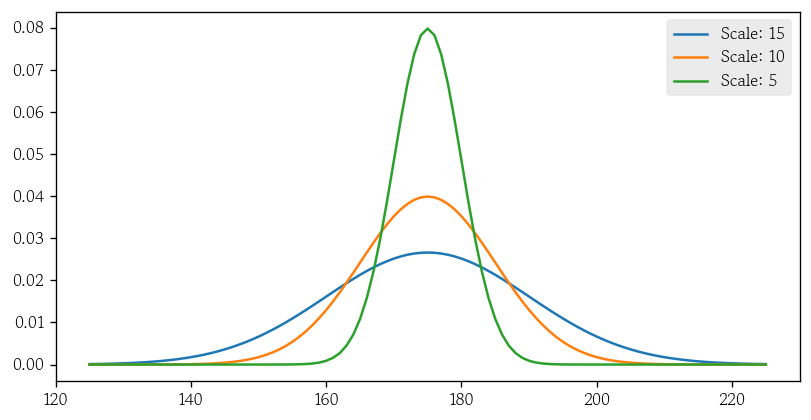
정규분포 누적확률
stats.norm.cdf(x=185, loc=175, scale=15)
# np.float64(0.7475074624530771)

stats.norm.cdf(x=185, loc=175, scale=10)
# np.float64(0.8413447460685429)

stats.norm.cdf(x=185, loc=175, scale=5)
# np.float64(0.9772498680518208)
cdfs = stats.norm.cdf(x=[165, 185], loc=175, scale=5)
np.diff(cdfs)
# array([0.95449974])정규분포 확률변수값
stats.norm.ppf(q=0.748, loc=175, scale=15)
# np.float64(185.02313949588586)

stats.norm.ppf(q=0.841, loc=175, scale=10)
# np.float64(184.9857627061566)

stats.norm.ppf(q=0.977, loc=175, scale=5)
# np.float64(184.9769665508391)
rvs(Random Variates) : 난수 생성
pdf(Probability Density Function) : 확률밀도함수(연속형)
cdf(Cumulative Distribution Function) : 누적분포함수
ppf(Percent Point Functio) : x값 반환
왜도와 첨도
- 왜도 : 확률밀도곡선이 한 쪽으로 치우친 정도
- 정규분포하는 데이터의 왜도는 0
- 표본 왜도가 +-2일 때 정규분포한다고 판단
- 왜도 > 0 : 오른쪽으로 꼬리가 긴 분포
- 왜도 < 0 : 왼쪽으로 꼬리가 긴 분포
stats.skew(heights)
# np.float64(-0.03668062034777025)- 첨도 : 봉우리의 뾰족한 정도
- 정규분포하는 데이터의 첨도는 3
- 표본 첨도가 1 ~ 5일 때 정규분포한다고 판단
stats.kurtosis: 내부적으로 3을 빼서 정규분포하는 데이터의 첨도를 0으로 반환
stats.kurtosis(heights)
# np.float64(-0.07067499523641407)
정규성 검정
- 데이터가 정규분포한다는 가정을 만족하는지 여부를 확인
- 대표적으로 샤피로-윌크 검정과 앤더슨-달링 검정이 있음
- 샤피로-윌크 : 표본 데이터를 오름차순 정렬하고 표준정규분포에서 추출한 순위 통계량과의 상관계수를 통해 정규성 확인
- N : 5000 까지만 가능
- 귀무가설 : 데이터가 정규분포를 따른다
- 대립가설 : 데이터가 정규분포를 따르지 않는다
- 앤더슨-달링 : 표본 데이터가 특정 확률분포에서 추출되었는지를 확인하며 정규성 검정에 사용
statistic= 검정통계량pvalue= 유의확률
stats.shapiro(heights)
# ShapiroResult(statistic=np.float64(0.9995954653825436), pvalue=np.float64(0.40487292793217))np.random.seed(1234)
heights = stats.norm.rvs(loc=175, scale=5, size=10000)
stats.anderson(heights)
# AndersonResult(statistic=np.float64(0.35265258232175256), critical_values=array([0.576, 0.656, 0.787, 0.918, 1.092]), significance_level=array([15. , 10. , 5. , 2.5, 1. ]), fit_result= params: FitParams(loc=np.float64(175.08063230023598), scale=np.float64(4.9761483416071846))
# success: True
# message: '`anderson` successfully fit the distribution to the data.')정규화
- 두 변수의 스케일을 동일하게 맞추는 과정으로 대표적인 방법에는 min-max 정규화와 표준화가 있음
- min-max 정규화 : 모든 값을 0 ~ 1의 값으로 변환(음수X)
- 표준화 : 평균이 0, 표준편차가 1이 되도록 값을 조정(음수O)
- min-max 정규화 : 모든 값을 0 ~ 1의 값으로 변환(음수X)
그림(히스토그램, 커널밀도추정), Q-Q Plot
왜도, 척도 확인
샤피로-윌크 & 앤더슨-달링
표준정규분포
- 정규분포를 따르는 두 확률변수의 표준편차가 다르면 확률변수값의 크기를 비교하기 어렵지만 표준화하면 비교 가능
- 확률변수값을 z-score로 변환하는 것
- z-score =
- z-score는 확률변수값이 평균(0)에서 표준편차 단위로 얼마나 떨어져 있는지를 나타냄
표준화 함수
def scale(x, loc, scale):
return (x - loc) / scalescale(x=185, loc=175, scale=15)
# 0.6666666666666666
scale(x=185, loc=175, scale=10)
# 1.0
scale(x=185, loc=175, scale=5)
# 2.0
scale(x=90, loc=75, scale=15)
# 1.0
scale(x=55, loc=40, scale=10)
# 1.5이상치 탐지
- 표준화 진행
scaled = scale(x=heights, loc=175, scale=5)
scaled
# array([ 0.47143516, -1.19097569,  1.43270697, ..., -1.05246069,
# -0.4976931 , -0.2560062 ], shape=(10000,))- 절대값 기준 표준편차 3보다 큰 값(이상치) 탐색
cond = np.abs(scaled) > 3
cond
# array([False, False, False, ..., False, False, False], shape=(10000,))
outliers = heights[cond]
outliers
# array([157.1824167 , 190.62817574, 190.54817675, 155.59550794,
# 158.61347962, 191.10284213, 158.83247735, 157.82590423,
# 159.91806595, 159.24619206, 190.00573485, 158.67898086,
# 157.0030016 , 158.68108413, 159.25844267, 191.43893949,
# 158.34281695, 155.70665632, 190.18821417, 159.73908333])- 이상치 인덱스 탐색
locs = np.where(cond)
locs
# (array([  81, 1307, 1333, 1670, 2053, 2289, 3136, 3924, 4477, 4599, 4712,
# 5274, 5903, 7040, 7510, 7743, 8578, 8650, 9406, 9888]),)scatterplot으로 시각화
plt.figure(figsize=(12, 4))
sns.scatterplot(
    x=range(10000), y=heights, fc='0.9', s=25
)
sns.scatterplot(
    x=locs[0], y=outliers, fc='red'
)
plt.axhline(
    y=175, linestyle='-', linewidth=1, color='0'
)
plt.axhline(
    y=160, linestyle='--', linewidth=1, color='red'
)
plt.axhline(
    y=190, linestyle='--', linewidth=1, color='red'
)
plt.show()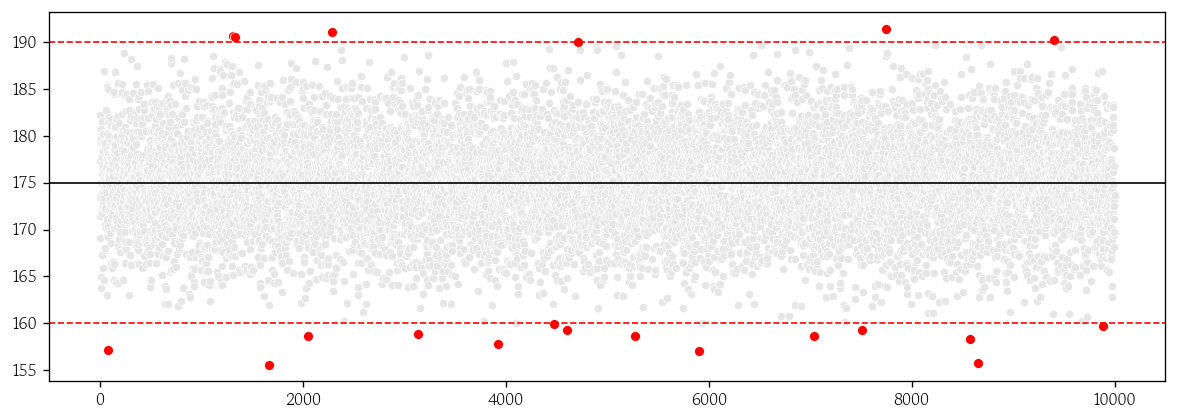
균일분포
- 확률변수의 실현값이 모두 같은 확률을 갖는 분포
- 이산형 균일분포는 확률변수가 가질 수 있는 값의 확률이 모두 같음
- 시각화할 때 막대를 붙이지 않음
- 연속형 균일분포는 확률변수가 가질 수 있는 값의 확률이 구간(a, b)에서 모두 같음
- 확률밀도함수 :
이항분포
- 시행 결과가 이진값인 베르누이 시행을 n번 실행할 때 성공 횟수의 분포
- 확률질량함수 :
- 시행횟수(n)에 따라 분포 모양이 달라짐
- 시행횟수가 커질수록 정규분포에 근사
- 모비율 검정 또는 로지스틱 회귀 분석에서 사용
푸아송 분포
- 단위 시간 또는 공간에서 어떤 사건이 발생하는 횟수를 나타내는 이산확률분포
- 확률질량함수 : 단,
- 시행 횟수는 매우 크지만 발생확률이 아주 작은 이항분포
카이제곱 분포
- 독립적인 z-score의 제곱을 k개 더한 분포
- 모분산을 추정할 때 사용
- 자유도(k)에 따라 분포 모양이 달라지며 자유도가 증가할수록 중심이 오른쪽으로 이동
- 교차분석 및 로지스틱 회귀 모형의 유의성 검정에서 사용
F 분포
- 카이제곱분포를 따르는 두 확률값을 각각의 자유도로 나눈 값의 비의 분포
- 분산분석에서 집단 간 변동과 집단 내 변동의 비가 1(등분산) 여부를 확인
- 선형 회귀 모형의 유의성 검정에서 사용
스튜던트 t분포
- 모분산을 모르고 표본의 크기가 작은 표본평균의 분포
- 중심이 낮고 꼬리가 두꺼움
- 자유도는 n-1
- 표본이 커질수록 표준정규분포에 가까워짐
- 두 집답의 평균 차이가 서로 같은지 여부를 확인
- 선형 회귀계수의 유의성 검정에서 사용
확률분포 정리
- 이산확률분포
- 균일분포
- 베르누이분포
- 이항분포
- 푸아송분포
- 연속확률분포
- 균일분포
- 정규분포
- 표준정규분포
- t분포
- 카이제곱분포
- F분포
통계적 가설검정
통계적 가설검정의 이해
- 모수에 대한 주장을 표본 통계량을 이용해 검정함으로써 어떤 주장이 합당한 것인지를 판단하는 과정
- 귀무가설(null hypothesis)과 대립가설(alternative hypothesis) 설정
- 유의수준을 설정하면 양측검정과 단측검정 여부에 따라 기각역 결정
- 보통 0.05 사용
- 모집단을 대표하는 표본 통계량과 모수의 통계적 거리인 검정통계량을 계산
- 검정통계량으로 유의확률을 계산하고, 유의확률이 유의수준보다 작으면 귀무가설을 기각
가설검정 관련 용어
검정통계량이 기각역에 위치하면 귀무가설을 기각
- 귀무가설 : 기각하기 위해 설정한 가설
- 대립가설 : 분석가가 채택하려는 가설
- 검정통계량 : 대립가설을 뒤받침해주는 모수와 표본 통계량의 통계적 거리
- 유의수준 : 참인 귀무가설을 기각하는 위험을 감내하는 수준
- 양측검정 : 기각역 크기는 양 극단에 0.025씩
- 단측검정 : 기각역 크기는 해당 방향으로 0.05
양측검정이 단측검정보다 임계값이 높음 → 귀무가설 기각 어려움
- 유의확률 : 귀무가설이 참이라는 가정 하에서 현재 관측된 검정통계량보다 극단적인 값이 나올 확률
검정력의 이해
- 제 1종 오류 : 귀무가설이 맞음 → 귀무가설 기각
- 제 2종 오류 : 대립가설이 맞음 → 귀무가설 기각 못함
- 검정력(power) : > 0.8 이면 적절하다고 판단
가설검정의 종류
| 조건 | 가설검정 | ||
|---|---|---|---|
| 일변량 | 연속형 | 대응 없음 | 단일표본 t-검정(모평균 검정) |
| 일변량 | 연속형 | 대응 있음 | 대응표본 t-검정(차이의 모평균 검정) |
| 일변량 | 범주형 | 단일표본 | 모비율 검정 |
| 일변량 | 범주형 | 두 표본 | 모비율 차이 검정 |
| 이변량 | 연속형-연속형 | - | 상관분석(무상관 검정) |
| 이변량 | 연속형-범주형 | 범주 2개 | 독립표본 t-검정(모평균의 차이 검정) |
| 이변량 | 연속형-범주형 | 범주 3개 이상 | 분산분석 |
| 이변량 | 범주형-범주형 | - | 교차분석(독립성 검정) |
피어슨 상관분석
정규성 → 모수적 → 평균(값) 사용
- 두 연속형 변수에 상관관계가 있는지 측정
- 정규분포를 따르는 두 연속형 변수의 공분산을 각 표준편차로 나누어 표준화한 값(모수적 방법)
- -1 ≤ ≤ 1 을 만족
- 절대값이 1에 가까울수록 강한 상관관계를 가짐
- 관련 함수는 상관계수와 유의확률을 반환
스피어만 순위상관분석
비정규성 → 비모수적 → 중위수(순서) 사용
- 이산형/순서형 변수의 의존성을 측정
- 한 변수의 순위가 증가할 때 다른 변수의 순위가 증가하는지 여부를 확인(순위를 고려한 비모수적인 방법)
- 피어슨 상관계수 공식에 두 변수의 순위 데이터로 계산
- 값이 1이면 한 변수의 순위가 증가할 때 다른 변수의 순위도 항상 같은 방향으로 증가한다는 것을 의미
모수적 방법과 비모수적 방법의 선택 기준
- 데이터가 정규성 가정을 만족하면 모수적 방법 사용
- 데이터가 정규성 가정을 만족하지 못하면 비모수적 방법 사용
- 실제 수집한 표본 데이터가 완벽하게 정규분포하는 경우는 거의 없음
- 모집단이 정규분포하는 것으로 알려져 있고 표본의 크기가 충분할 때
- 히스토그램이 좌우대칭의 종모양과 비슷하게 그려질 때
- 왜도와 첨도로 정규분포한다고 판단 가능할 때
- 비모수적 방법 사용
- 표본 크기가 매우 작아서 분포를 모르는 경우
- 정규분포하지 않다는 것을 아는 경우
- 데이터가 명목척도 또는 서열척도인 경우
피어슨 상관분석 코드
stats.pearsonr(x=df['Age'], y=df['Price'])
# PearsonRResult(statistic=np.float64(-0.796544729051927), pvalue=np.float64(5.8796109422549815e-279))pg.corr(x=df['Age'], y=df['Price'])
통계 보는 순서
p-val(CI95%) → r → power
lambda + apply
lambda사용
x = df['Age']corr = lambda x: pg.corr(x=x, y=df['Price'])['p-val']corr(x=df['Age'])
# pearson 5.879611e-279
# Name: p-val, dtype: float64apply사용
df_num = df.select_dtypes(include=[int, float])
df_num.head()
# Price	Age	KM	HP	CC	Doors	Weight
# 0	13500	23	46986	90	2000	3	1165
# 1	13750	23	72937	90	2000	3	1165
# 2	13950	24	41711	90	2000	3	1165
# 3	14950	26	48000	90	2000	3	1165
# 4 13750 30 38500 90 2000 3 1170df_num.apply(func=corr).lt(0.05)
# Price Age KM HP CC Doors Weight
# pearson True True True True False True Truet-검정 종류
| 구분 | 단일표본 t-검정 | 대응표본 t-검정 | 독립표본 t-검정 |
|---|---|---|---|
| 내용 | 표본 통계량과 모평균 비교 | 짝을 이루는 두 집단의 평균 비교 | 서로 독립인 두 집단의 평균 비교 |
| 기본 가정 | 정규성 | 정규성 | 독립성, 정규성, 등분산성 |
| 정규성 가정 만족X | 윌콕슨 부호순위 검정 | 윌콕슨 부호순위 검정 | 윌콕슨 순위합 검정 |
- 독립성 : 수집 과정에서 확인
독립표본 t-검정
- 두 집단의 평균이 같은지 확인할 때 실행
- 두 집단 간의 변화량으로 두 집단의 평균 차이가 통계적으로 유의한지 확인
- 두 집단의 평균 차이가 표준오차에 비해 충분히 크면 두 집단의 평균은 같지 않다고 판단
- 작으면 두 집단의 평균은 같다고 판단
t-검정 자료구조
- 범주별 연속형 목표변수가 정규분포하거나 잔차가 정규분포 해야함
독립표본 t-검정의 가설 및 검정통계량
- 귀무가설 : (두 집단의 모평균이 같음)
- 대립가설 : 두 집단의 모평균이 같지 않음
- 유의수준 : 0.05 → 양측검정
- 검정통계량 :
- : 표본 평균의 차이
- 모평균의 차이는 귀무가설에 의해 0이 됨
- 분모는 두 표본평균의 표준오차이며 모분산의 불편추정량인 합동표본분산임
- 두 표본분산이 같다는 가정
두 집단의 기술통계량 확인
pvt = pd.pivot_table(
    data=df,
    values='Price',
    index='MetColor',
    aggfunc=['count', 'mean', 'std']
)
pvt.columns = pvt.columns.droplevel(1)
pvt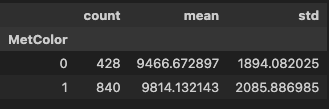
독립표본 t-검정의 가정
- 독립성, 정규성 및 등분산성 가정을 만족해야 함
- 독립성 가정 : 두 집단 간 차이에 영향을 주는 외부 요인이 없어야 함
- 실험 데이터는 무작위화를 통해 외부 요인을 상쇄 가능
- 잔차는 정규분포하고 모분산이 같아야 함
정규성 검정
- t-검정 : 잔차의 정규성 가정을 만족해야 함
dv: dependent variable(종속변수)
pg.normality(data=df, dv='Price', group='MetColor')
#          W	       pval	       normal
# MetColor
# 1	       0.974755	7.062942e-11	False
# 0	       0.988074	1.430807e-03	False
등분산성 검정
- 정규성 가정을 만족하는 두 집단의 등분산성 검정 실행
- 현실에서는 정규성 검정을 만족하는 데이터를 구하기 힘들어 만족한다고 가정하기도 함
pg.homoscedasticity(data=df, dv='Price', group='MetColor')
#              W	    pval	  equal_var
# levene	5.761315	0.016526	False
t-검정
등분산 : t-검정
이분산 : Welch의 t-검정
correction: True 시 이분산, False 시 등분산
pg.ttest(x=y1, y=y2, correction=True)
맨-휘트니 U 검정
- 두 집단 분포 위치가 같은지 여부를 판단하는 비모수적인 검정
pg.mwu(x=y1, y=y2)
마치며
워낙 많은 내용이기도 하고, 어려운 내용들이라 공부를 하는데 체력을 너무 많이 쓴 느낌이 들었다. 자격증 공부를 하면서 조금씩 익숙해진 내용들이긴 해도 자세히 파고드니까 여전히 어려웠다. 내일은 알고리즘 문제 관련 특강이 있어서 한숨 돌리면서 자격증 공부와 복습을 꾸준히 해야겠다.

Hello I'm TaeHyunAn, Currently Studying Data Analysis